Grayscale Image Hover With CSS Filters
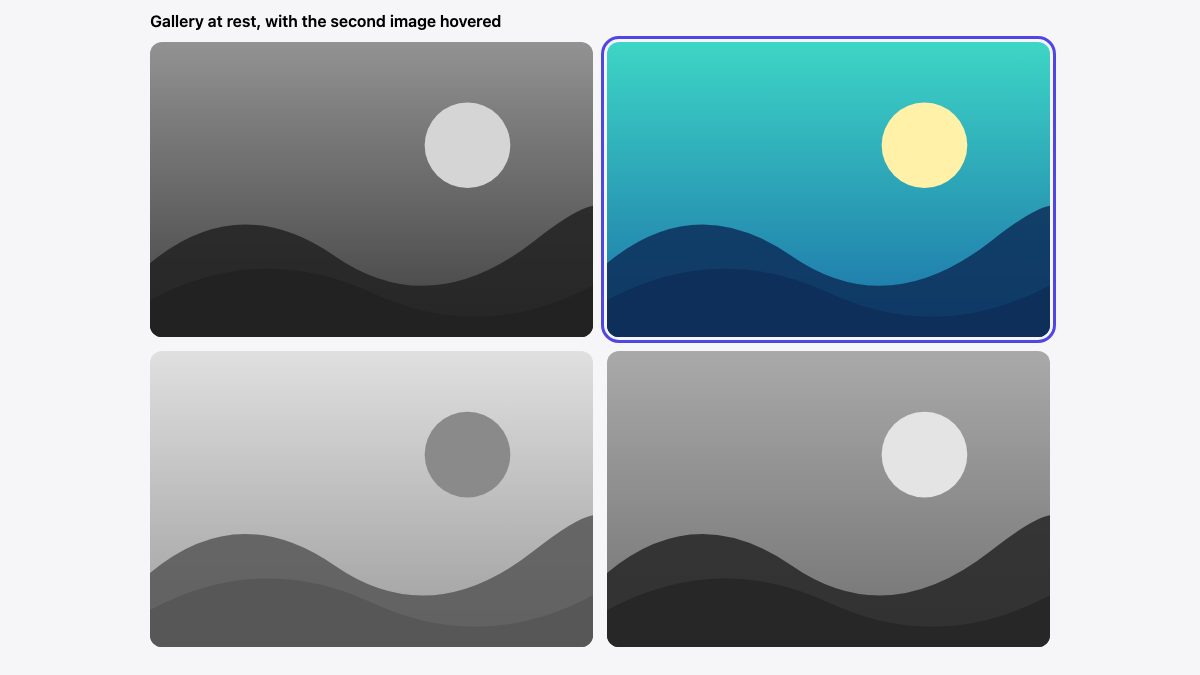
To make a grayscale image fade into colour on hover, you need three lines of CSS: filter: grayscale(1) on the image, transition: filter to animate it, and filter: grayscale(0) on :hover. There is no canvas, no jQuery and no second image file.
This article replaces the 2011 version of the tutorial, which drew each image onto a <canvas>, averaged the RGB values pixel by pixel and cross-faded a cloned copy. That trick was clever for its time. Today the browser does it on the GPU, and it works on any image, including ones from another domain.
The minimal version
Wrap each image in a link (gallery items are almost always links) and put the filter on the image itself:
<ul class="gallery">
  <li><a href="/work/sunset"><img src="sunset.jpg" alt="Sunset over hills" width="600" height="400"></a></li>
  <li><a href="/work/lagoon"><img src="lagoon.jpg" alt="Lagoon at noon" width="600" height="400"></a></li>
</ul>
.gallery img {
display: block;
width: 100%;
height: auto;
filter: grayscale(1);
transition: filter 0.4s ease;
}
.gallery a:hover img {
filter: grayscale(0);
}The grayscale() function takes a number from 0 to 1 or a percentage from 0% to 100%. At 1 the image has no colour at all; at 0 it is untouched. Because the browser can interpolate between those two values, the transition produces a smooth fade with no extra markup.
Why this beats the canvas approach
- No cross-origin errors. The old script read pixels with
getImageData(), which throws a security error for images served from a different origin unless the server sends CORS headers. CSS filters have no such restriction. - No layout work. The original wrapped and absolutely positioned a duplicate image. A filter changes how the same element is painted, so layout, lazy loading and
srcsetkeep working untouched. - No flash of colour. The script waited for
window.loadand then swapped sources, so visitors briefly saw the colour image. The CSS applies from first paint. - Less code to maintain. Plain CSS also degrades safely: if a browser ignored the filter, the visitor would simply see the colour photo.
filter with grayscale() is Baseline Widely available, so you can ship it without a fallback. It is the same family of functions covered in our walkthrough of 9 simple CSS image filters, which is a good next read if you want sepia, blur or hue shifts.
Control the strength
You do not have to go fully gray. A partial value such as grayscale(0.6) keeps a hint of colour, which often looks more refined on brand-heavy imagery. You can also chain functions: a small contrast boost stops flat gray images from looking muddy.
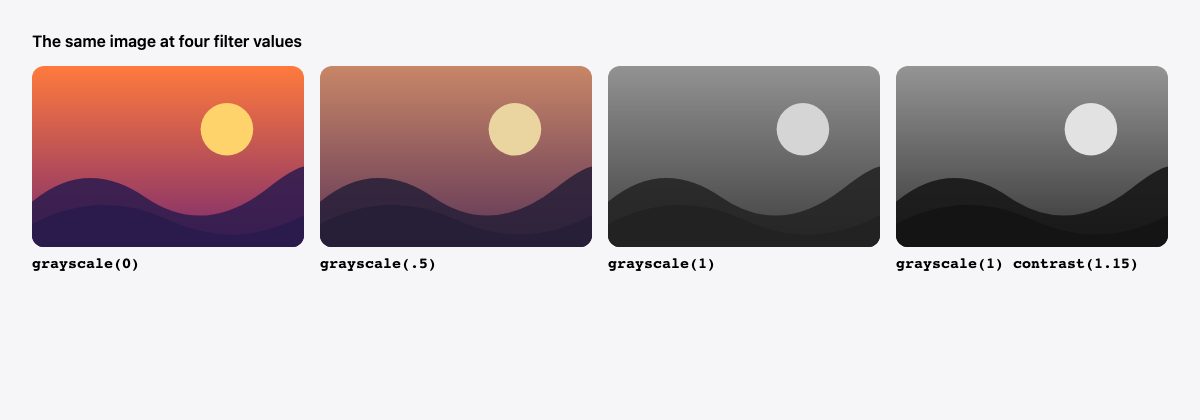
contrast(1.15) to keep the gray tones punchy.For easy tuning, move the value into a custom property:
.gallery {
  --rest: 1;     /* 1 = fully gray at rest */
  --active: 0;   /* 0 = full colour on hover */
}

.gallery img {
  filter: grayscale(var(--rest)) contrast(1.05);
  transition: filter 0.4s ease;
}

.gallery a:hover img,
.gallery a:focus-visible img {
  filter: grayscale(var(--active)) contrast(1);
}
Keep the same functions in the same order in both states. If the lists differ, the browser cannot interpolate them function by function and the change may snap instead of fade.
Make it keyboard and touch friendly
Hover is a mouse-only idea. A good version of this effect handles three more situations.
Keyboard focus
Anyone tabbing through the gallery should see the colour too. Add :focus-visible to the same rule and give the link a clear outline, as in the full demo below. :focus-visible shows the ring for keyboard users without flashing it after a mouse click.
Touch screens
On a phone there is no hover, so a grayscale-only gallery would stay gray forever, or colour would stick after a tap. Wrap the hover rule in @media (hover: hover) so it only applies where hovering is real, and show the colour image by default where it is not, as the demo below does.
Hybrid devices. A touch laptop with a trackpad reports (hover: hover) as its primary input, so (hover: none) is false there even though the screen accepts taps. A tap on such a screen triggers the hover state and the colour can stay until the next tap elsewhere. That is acceptable for a decorative effect, but it is one more reason the link itself must work without it. If you need to react to any hover-capable input, (any-hover: hover) checks every available pointer instead of only the primary one.
Reduced motion
A colour fade is gentle, but it is still motion. Respect prefers-reduced-motion by switching the transition off. The colour change itself still happens, just instantly.
The complete demo
.gallery {
  display: grid;
  grid-template-columns: repeat(auto-fit, minmax(220px, 1fr));
  gap: 16px;
  margin: 0;
  padding: 0;
  list-style: none;
}

.gallery a {
  display: block;
  overflow: hidden;
  border-radius: 12px;
}

.gallery img {
  display: block;
  width: 100%;
  aspect-ratio: 3 / 2;
  object-fit: cover;
  filter: grayscale(1);
  transition: filter 0.4s ease;
}

/* Colour returns on hover, only where hover exists */
@media (hover: hover) {
  .gallery a:hover img {
    filter: grayscale(0);
  }
}

/* Keyboard users get colour on focus, with or without hover support */
.gallery a:focus-visible img {
  filter: grayscale(0);
}
.gallery a:focus-visible {
  outline: 3px solid #4f46e5;
  outline-offset: 3px;
}

/* Touch devices: no hover, so show full colour */
@media (hover: none) {
  .gallery img {
    filter: none;
  }
}

@media (prefers-reduced-motion: reduce) {
  .gallery img {
    transition: none;
  }
}
The result: images start gray, return to colour on pointer hover and on keyboard focus, and appear in colour with no filter on a no-hover device. Because aspect-ratio and object-fit crop every image to the same shape, mixed portrait and landscape uploads still form a tidy grid.
Variations worth knowing
- Dim the siblings instead. Keep every image in colour and fade the others when one is hovered. No
:has()is needed: while the pointer is over the gallery, every link it is not on gets dimmed (snippet below the list). - Add a zoom. Combine the filter with
transform: scale(1.05)on hover and keepoverflow: hiddenon the link. See the product card with hover zoom for a finished card. - Grayscale a background image. A filter on the element would also gray its text. Put the image on a pseudo-element such as
::beforeand filter that instead. - Open a lightbox. Pair the effect with a viewer, as in this lightbox tutorial or the gallery with lightbox snippet.
The sibling-dim snippet, using only :hover and :not(). Resting images stay in colour; while the pointer is inside the gallery, every image except the hovered one fades to gray:
@media (hover: hover) {
  .gallery:hover a:not(:hover) img {
    filter: grayscale(1);
  }
}
Accessibility and design cautions
- Do not hide meaning in colour. If a photo’s colour carries information (a product swatch, a chart, a status), do not leave it gray at rest.
- Keep alt text meaningful. The filter changes only how the picture looks, so the
altattribute still has to describe it. - Check contrast on overlays. If you place captions over gray images, test text contrast against both states, since the colour version can be brighter in places.
- Do not rely on the effect for clicks. The links must look and behave as links on touch devices where the colour reveal never happens.
Frequently asked questions
Do I need JavaScript for a grayscale hover?
No. CSS handles the filter, the transition and the hover state. JavaScript is only useful if you need to trigger the change from something other than hover, such as a scroll position or a click.
Does it work on SVG and background images?
It works on any element, including <img> with SVG sources, <video> and <picture>. For background images, apply the filter to a pseudo-element so the element’s content stays in colour.
Is it slow on big galleries?
Filters are usually composited efficiently, but a long gallery of very large photos can still be heavy. Serve appropriately sized images with srcset, add loading="lazy" below the fold, and animate only the filter, not layout properties.




hello there…awesome tuts. can i re-post on my blog in my language? will credit to you
Doesn’t work on latest Chrome 10.0.634.0/Win7. Images don’t show up until you hover on them.
Works great on my XP / Chrome 8.0.552.237 – and I agree, it’s AWESOME!
Thanks for showing us this – I had never seen this jQuery trick explained before…
Nice article and thanks for sharing!
On mouseover and mouseout events, maybe the animate duration value should be decreased a bit?
This way you won’t have to wait so much (1000ms) to see the effect.
Can’t seem to get this to work. I tried to just run the demo on my site and the images get duplicated, one on top of the other, where the top one only appears when scrolled over. Any ideas?
Expectacular efecto con las imagenes, creo que muy interesantes!!!
“Works great on my XP / Chrome 8.0.552.237”
Great sense of humor!
Wouldn’t it just be easier to do this with CSS?
Nice technique! But for less lines i might still do this with a simple sprite with b&w version / color version and a bit of CSS.
Really great technique. Thanks for sharing!
@Olli – It is possible with less lines but not only would it be more tedious creating the sprites in comparison to a single color image, the accumulated file sizes for the images would be greater than the technique used here. Basically, it would result in a higher file size over line count, impacting — though minimal — page load times.
Or you could use an svg filter without the need to tax the cpu (well if you had heaps of images) looping thru pixels.
The animated effect is possible with this only not with CSS.
Yes, Javascript error in IE8.
Works really nice on my Firefox 3.6 MAC .. lovely demo
Can’t get this to work, pretty sure I did everything correctly was anyone else having issues with this?
That is cool man, really loved it.
thanks a ton for the tut ! ;)
i love this demo….
its really awesome.. :)
Thanks
I love the effect.
&Would definitely love to use it.
How ever, I’m not too familiar with javascript.
I’m using my offline xampp blog, and tried to add the script before the wp_head function…but it still doesn’t work.
the tutorial says use a copy of jquery…
i’m not sure if that means copy and pasty the jquery.js in the same folder or not?
Please help, cause I really really want to use this wonderful script :)
Updates: I copied the jquery.min.js content and pasted it into a new document.
By changing that I realized that the images turn grey but no effect when I rollover them….why might that be?
that’s not exactly true, it’s possible to create a grayscale (or duotone) copy of your image with PHP. ofcourse this means storing another physical image on your server, but there’s no manual action needed.
This is amazing. Great work.
One thing though: I haven’t looked too closely at the code, but it seems like you’re just averaging the RGB values. It would be more accurate to use a weighted average: Y = 0.2126 R + 0.7152 G + 0.0722 B – )
Amazing canvas technique.
But I would recommend to replace jQuery with CSS3 Transition method – so the post title may “Greyscale Image hover using HTML5 and CSS3”. Ofcourse, its not crossbrowser compatible, but yes its an experiment :)
think this could be tweaked to to show a sepia preview on a photographers’ proofing site?
Have tried everything, but still can’t get this to work. Can someone post the actual HTML code used to display the images on the page?
I think I’d use a webworker to generate grayscales. On slower machines and/or larger images, it may delay loading the page too much, and webworkers are non-blocking. They don’t work on all browsers, but the same is true for canvas, so I think it’ll be better in the end.
Especially when you go from the grayscale effect to a blur effect, which is much more cpu-intensive :)
There is a filter for IE that makes grayscale:
function grayscaleImageIE(imgObj)
{
imgObj.style.filter = ‘progid:DXImageTransform.Microsoft.BasicImage(grayScale=1)’;
}
maybe someone knows how to implement it…
Errm, where’s the HTML5? The demo preview is xhtml strict?
It’s cool in theory, but seems far too processor intensive to be feasible. Doing a sprite is going to be faster all around with, of course, the exception of generation time. If you want to automate this process, you could use a server side script to generate and cache a color/bw sprite for you.
HTML is the solution to all browser incompatibility. CSS3 is another great work. All browser should standardize in order to have a better surfing experience.
I think good work! This effect is simple and it easy to do.
I coded kind of a similar effect with the GD library some PHP and jQuery.
The website is coded for WordPress, so there was no ability to use sprites. ‘Cause each team member is displayed by the post_thumbnail function of WordPress.
Maybe your effect is a bit faster than mine.
While very cool, in this day and age of increased efficiency and faster production, I think it might be quicker to do the three clicks in photoshop to save a greyscale version rather than code all this.
I’m not sure what the load-difference would be for the average user. If the code takes less time to process than loading a new image, that might provide some benefit.
Sorry but I don’t get where the HTML 5 link comes in? HTML 5 is not a requirement for this to work – the demo proves that since its using xHTML 4.1.
@Matt Hackmann – maybe you could include some delayed loading so the filters are applied to the images as they need to be, based on the user scrolling, to improve the performance?
Looks nice!
However wouldn’t it be good to make the grayscale images in Photoshop or another graphic programme because it gives you much more control over how the grayscale image looks.
Of course great for simple images! :-)
Check out this site! i find it very useful. Go ahead ahead and put the link bellow that i provided into your address bar.
Websiteideadrop (dot) zzl (dot) org/
Here you can learn webaite ideas that other users have posted, and share your own ideas. No signups, no registrations, no fees! 900% free!
Awful lot of work for a simple thing done in CSS. Looks like another “throw jQuery at every problem” solution.
With IE i get an error for
function grayscale(src){var canvas = document.createElement('canvas');
var ctx = canvas.getContext('2d');
Looks awesome, and nice effect. One thing tho… I think the hover effect is a bit slow
Is there a link to the full HTML code?
This method is very slow… I do not recommend using
Sorry, but how exactly is this HTML5? It’s using an XHTML 1.0 Doctype rather than the HTML5 , nor are the meta or script tags marked up using HTML5 syntax. Likewise you’ve used divs rather than section tags etc. I’ve viewed this under Fx, Chrome, Safari etc. Are you using something server side to push it out as XHTML1.0 syntax? If not then you shouldn’t be pushing this out as an HTML5 tutorial.
the demo is pretty good & also help me..
Thanks for post. keep it up
great effect for photo galleries and even for bloggers.I found it very useful as i was designing a portfolio site so it helps with jquery scripting.
Your can improve the speed and maintenance by using a var and/or jquery chaining.
If your call each time $(‘.item img’), jQuery have to find the selector each time. By putting it into a var you make jQuery select just once.
So…
var $imgToGrayify = $('.item img');

$imgToGrayify.fadeOut(500)

$imgToGrayify.each(function() {... })

$imgToGrayify.mouseover(function() {...});
Or doing this
var $imgToGrayify = $('.item img');

$imgToGrayify.fadeOut(500).each(function() {... }).mouseover(function() {...});
Or finally, this:
$('.item img').fadeOut(500).each(function() {... }).mouseover(function() {...});
Enjoy ;)
Could it be the other way around? from greyscale to color. So you get in color selected ones
This article should be renamed and it’s description amended as it is very misleading. I have looked a number of times at the example page and cannot find one piece of HTML5! wtf?
If I put the script on my website it will affect all images,right? There isnt a way of calling this effect just by an ‘id’? Because i would like to use floating image load, like you click the image, then open a window (inside the site) that shows the image…
I did found a way to express my self better. I wish compatibility with Lightbox JS.
Good tutorial, saves alot of time …not converting images to greyscale
i tried but it does not work on the localhost…
Great tutorial :)
for those who want the opposite effect just change the opacity.
in:
$(..)mouseover() change the opacity to 0
$(..)mouseout() change the opacity to 1
$(..)each change the opacity to 1 (scroll to the right if you can’t see it)
@tejas I just made it work on a localhost template for wordpress. Are you targeting the correct images?
All whitening formulation is applied by dentists with quality features, powerful, secure, and very reasonable prices, as well as the missing handbag is a unique product design, fashion styling you will not ..
Nice and easy! Would it be possible to give the grayscale version of an image a monochromatic overlay?
All whitening formulation is applied by dentists with quality features, powerful
Good sharing !Css splash | Web design inspiration gallery
I’d like to use this but I’m having the ever so popular mootools/jquery conflict… is there a way to load this where it won’t conflict? imagebymac.com – i’m trying to get the top right myProject rollover to work with it. I’d like to use this effect with my portfolio images but can’t get things to play nice. Any advice? Go ahead and contact me/reply. It’s probly a noob effect with getting the two to work, though I’ve done it before using other jquery scripts… but can’t with this one.
Thanks for the handy tutorial – I am not sure it is something I can use that often as I do predominantly logo design work, but the ideas are definitely useful – thanks :)
Free SEO Directory
Free to Add Your Website Our easy to use SEO Directory and tutorials make search engine optimization accessible to everyone.
add2seo.com
where can i get the code for my blog ????????????????
It is now supported by IE9. Not to brag about, I still love firefox and Chrome. However, this measure taken by IE version 9 is going to benefit all designers not to worry about inability of certain feature which was not supported by IE.
This script looks great and exactly what I’m looking for. Sadly I can’t seem to get it working on my wordpress powered site http://www.brentdickens.com.
It doesn’t work on the dynamic thumbnail images and half works on the main image which is static and part of the page. That image does the grey image production but not the rollover. Any ideas? I would love to get it working.
Cheers,
Brent Dickens
dude i was having same problem, if you have multiple images, remove all, and keep only one, plus the image should be in the same domain (not even sub-domain!) and it will work. the restrictions for domains and multiple images are still not known to be why and will update as i find something.
Although HTML5 have lots of new features that are never before, yet I think that Flash has its strong place in web designing that will not be replaced soon by any other language. What do you think?
I’m afraid I don’t understand what this means: “set the target image (eg: .post-img, img, .gallery img, etc.)”
When I load the page in FF 4.0, the image is not visible; when I hover it fades in. I’m not getting a grey-scale image on load (using the default code as is).
Hello,
Not only works on IE7.
I tested on IE7 :(
Did anyone find a way how to do that work on IE?
I’m afraid I don’t understand what this means: “set the target image (eg: .post-img, image, .gallery image, etc.)”
In my case the images apepar in grey scale only. When I hover over the image nothing happens. I tried with exactly the same code as per demo just changed the images. Plz help.
Have you used Internet Explorer? The trick shown works on browsers that are HTML5 complliant. Internet Explorer 8 is not.
i have error sercurity in method getImageDATA
and already resovled
hope it helpful :
// Grayscale w canvas method
function grayscale(src){
$.getImageData({
url:src,
success: function(imagegray){
var canvas = document.createElement(‘canvas’);
var ctx = canvas.getContext(‘2d’);
imgObj.src = src;
canvas.width = imgObj.width;
canvas.height = imgObj.height;
ctx.drawImage(imgObj, 0, 0);
for(var y = 0; y < imagegray.height; y++){
for(var x = 0; x < imagegray.width; x++){
var i = (y * 4) * imagegray.width + x * 4;
var avg = (imagegray.data[i] + imagegray.data[i + 1] + imagegray.data[i + 2]) / 3;
imagegray.data[i] = avg;
imagegray.data[i + 1] = avg;
imagegray.data[i + 2] = avg;
}
}
ctx.putImageData(imagegray, 0, 0, 0, 0, imagegray.width, imagegray.height);
return canvas.toDataURL();
},
error: function(xhr, text_status){
}
});
Bests regards.
Namkazt
awww, u must to use this java script :
https://raw.githubusercontent.com/betamax/getImageData/master/jquery.getimagedata.min.js
Is there any way to trigger this when hovering over a separate div?
For example, if the image is under a div with a z-index of 9999, can the effect be triggered when the cursor moves over that div?
At the moment, as soon as the cursor is over the div, the image fades back to B&W.
Recent surveys, children of depressed mothers’ negative patterns of activity occurring in different brain reveals. This is for children of mothers who take more risks in the future is going to have depression.
Hello.
I am Japanese, and I am roro who cannot talk about English.
Because it writes by using the translation
I’m sorry if there is a shortcoming.
It was not possible to use it well on my site though this script was able to be used well in the demonstration.
Therefore,
Could you teach be good when using it only for the link of full page images to adjust very?
My best regards.
Then,
We will wait for the report though it knows on your precious time.
roro
I was looking for this effect for a long time. Thank you very much for sharing. I wanted to know if anyone can help me insert my WordPress. I’m a newbie. I accept all forms of aid. Many thanks. My email address is [email protected]
__________
Estaba buscando este efecto desde hace mucho tiempo. Muchas gracias por compartirlo. Quería saber si hay alguien que me pueda ayudar a insertarlo a mi WordPress. Soy un novato. Acepto todo tipo de ayuda. Muchisimas gracias. Mi correo electronico es [email protected]
I tried this out, my original image (that is meant to be black and white) doesn’t appear at all, but when you mouse over it, it becomes visible in color.
Any ideas?
Beautiful. But why does it mess up the styles? :-s
When I include this javascript, the images have absolutely no spacing in between them. (I know its a crappy way to explain).
I had this problem as well. I couldn’t find a way to get the CSS to override, even when I put !important on it. It would always devour the css margins, so eventually had to hack it into the JS itself, putting “el.parent().css({“width”:this.width+10,”height”:this.height+8})” directly into the Javascript. After that, it worked ok. I am still having problems with the slow load times and the IE functionality, but I’ve only toyed with it for about 20 minutes so far.
Anyway, hope this helps.
What is friendship?Mont Blanc PenWhy do we call a person our friend? When do we call someone a very good friend?
This is awesome and it works flawlessly for me in chrome, but I can’t figure out why mozilla’s not displaying it. My images load for a sec and then disappear. The demo works in all browsers. Can anyone help?
I know almost nothing of javascript, so any help in the right direction is welcome.
Cool I will have to try this out. I am sure it will be faster than creating two images in Photoshop, one grey the other color.
I Have tried this; However when I try to implement it, I just get a colour image, no greyscale to black and white :(
If anyone can help me, E-Mail me on : [email protected] :)
Thank you so much! This effect works wonders, and so easy to use.
I read a few comments and people were experiencing problems with the grey scale not appearing but when works when hovered and it happened to me at first as well.
What I did to fix it was copy the script from the demo page. Somewhere along the lines, the coding must’ve gotten jumbled up.
Hope that helps!
It took some time but I just got the effect to work on my website . It is so awesome. Thanks :)
Works beautifully on all browser except IE versions 7 8 and 9. Tough, but it would be nice if someone had a solution :)
What DOES work in any IE version? We should just stop supporting it. eventually MS will either comply with W3C or user will eventually see that things look like crap and other browser actually work.
Btw Awesome tutorial, Don’t mean to troll. but effects like these are awesome and that it wont work only in IE… Come on!
You actually can get it to work in IE 6 and up by using a ie’s grayscale filter.
Just replace
this.src = grayscale(this.src);With
if($.browser.msie){this.style.filter = 'progid:DXImageTransform.Microsoft.BasicImage(grayScale=1)';
} else {
this.src = grayscale(this.src);
}
Thanks for the fix. Worked perfectly for me.
I’m sorry but it’s not really HTML5 it’s Javascript and jQuery put together with some HTML tags that were present since HTML 3
It is HTML5 as it generates a canvas grayscale image. How is that not HTML5?
I just wanted to construct a simple word in order to thank you for all of the precious facts you are showing at this site. My rather long internet research has now been honored with reliable information to share with my friends and classmates. I ‘d state that that many of us visitors actually are very much endowed to be in a really good community with very many outstanding professionals with great suggestions. I feel truly lucky to have encountered your website and look forward to really more fabulous times reading here. Thanks a lot again for all the details.
It’s easy to resent punctuation. Its purpose is to clarify sentences, so why are the rules governing it so complicated? There are so many exceptions, so many exceptions to exceptions — it’s enough to make you want forego punctuation altogether. Well, back when it was alive and kicking, the Latin language did just that — and it didn’t stop there. Written Latin also omitted spaces between words or lowercase letters.
How could one reverse this effect = color to grayscale?
Well, it would be easiest to use 2 images, which is what this works around. I see no reason you couldn’t apply this in reverse… to have it switch from color to gray onMouseHover/Click, etc.
For instance, this:
// Fade image
$(‘.item img’).mouseover(function(){
$(this).parent().find(‘img:first’).stop().animate({opacity:1}, 1000);
})
$(‘.img_grayscale’).mouseout(function(){
$(this).stop().animate({opacity:0}, 1000);
});
becomes this:
// Fade image
$(‘.item img’).mouseout(function(){
$(this).parent().find(‘img:first’).stop().animate({opacity:0}, 1000);
})
$(‘.img_grayscale’).mouseover(function(){
$(this).stop().animate({opacity:1}, 1000);
});
It would also have to be in color, rather than grayscale onLoad… I believe.
Alexis Ohanian, co-founder of Reddit.com, talks about the value of college education and the “dire need” for skilled labor in the U.S. Higher education fails to provide students “good value” for the money they and their families spend, more than half of U.S. adults said in a Pew Research Center survey. Ohanian speaks on Bloomberg Television’s “InBusiness With Margaret Brennan.
Is it possible to use this in a fluid layout, when the images have to resize to 100% of their containing element?
I’m also looking for a solution for images set at 100% in a fluid layout. Does anyone have any ideas?
Where’s the HTML5, and why wouldn’t you rather do this server side?
I enjoy you because of each of your effort on this web page. Debby really likes carrying out investigations and it’s obvious why. My spouse and i hear all of the dynamic medium you give functional guidance by means of the blog and as well improve response from some other people on that situation then my child is now learning a lot. Take pleasure in the rest of the year. You’re the one doing a stunning job.
How can I remove the grayscale when the image has been clicked? Still figuring this one out. :(
To set all images monochromatic use this:
$(‘img’).each(function(){
if ($.browser.msie) this.style.filter = ‘progid:DXImageTransform.Microsoft.BasicImage(grayScale=1)’
else {
var canvas = document.createElement(‘canvas’)
canvas.width = this.width
canvas.height = this.height
var ctx = canvas.getContext(‘2d’)
ctx.drawImage(this,0,0)
var thisd = ctx.getImageData(0,0,this.width,this.height)
var pix = thisd.data
for (var i = 0, n = pix.length; i < n; i += 4) pix[i] = pix[i+1] = pix[i+2] = (pix[i] + pix[i+1] + pix[i+2]) / 3
ctx.putImageData(thisd, 0, 0)
this.src = canvas.toDataURL()
}
});
Need urgent help!!
1: On Hover on image it is converting to grayscale and on mouse out it reverts, but how to work around if you want whole div to be active (hover over anything in the div, like text or anything containing in the div) and the image shall animate.??
2: Images hosted in same directory are only working properly, but when images hosted on other site/domain are linked to img, its not working at all!
Hello!
Woww… I love this… and immediatelly I tried to use it for a test design:
It works very nice, indeed!
However, there is a little “gap” at the left and the top of the images, where the cursor detects the other, next element. It does not follow the shape of the image, but uses a square…
How may I do it in a way, the the exact image is detected, and it senses the hover exactly over the appropriate image?
Thanks a lot!
Greetings,
Tamas
hi, sorry but I cant get it to work. i have followed the rules on putting the js in the head tag.
my gallery images are in a and I am putting
but its inside an anchor tag.
im I doing it right? giving the img a class name of “item img?” or where should I put it? I haven’t changed a coded in the JS.please help
its not working in chrome or firefox.. its only working in safari..
very very helpful and much appreciated, fits in well with any div layout, no need to adjust size of divs or images.
Is there a way to reverse it so the color displays at rest and when hovered over it turns gray? thanks awesome plugin
I’m using the same method on my service, I’m getting Uncaught Error: INDEX_SIZE_ERR DOM Exception 1, can any one help?
NB:- The error is only in chrome
I had the same error in chrome and safari.
I was calling the function in document.ready instead of $(window).load as it is in the example.
I changed that and it works fine now!
I removed CSS opacity to “0” then working. But how to change Grayscale to Green colored scale ?
Is there a way to adjust the greyscale? It should be a bit lighter grey.
How can I adjust this??
Thanks for your work. Nice effect.
I’ve been implementing on a site I’m working on but when I was doing some testing for IE8 and 7 this didn’t work. I am using the HTML 5 shiv located here:
…but this unfortunately doesn’t get it working.
Is there any intention of making this compatible with anything but latest gen browsers?
Thanks!
OMG! This is the must awesome image over script I ever seen! I cannot believe the transition of colors is in the code. I will definitely use this for my portfolio. Thanks a lot!
This works really well. Very impressive but has anyone noticed that it shifts the images 30 odd pixels to the right?
Im using it in conjunstion with a standard WP Gallery. I shall play about with the CSS in the JS I think
Awesome tutorial guys! This is the best implementation I’ve seen, along with very tight code. Cheers and thanks!
Could someone tell me why this moves my image over and down? I’m trying to implement this into my custom joomla template to a dynamically generated image tag. I have several images in a row and the first image is is pushed down and to the right. Any help would be appreciated!
If someone interested, I update the script for IE < 9,
replace :
this.src = grayscale(this.src);
by
// Brother version
var ua = $.browser;
// IE < 9 Brother
if ( ua.msie && ua.version.slice(0,3) < 9 ) {
el.css('filter',"progid:DXImageTransform.Microsoft.BasicImage(grayScale=1)");
}
// Canvas Brother
else {
this.src = grayscale(this.src);
}
Brilliant! I’ve been trying for hours to fix it in IE, and the you do it in such a simple fashion. Thanks.
Great! Many thanks for this awesome fix for IE7/IE8!! :-) It’s easy way!
Hello,
Great tutorial indeed. I’ve used this on a project to make all images grayscale when loaded and add color hover effect.
I bumped into a small bug though:
When you apply this script to images and one image fail to load, it breaks the whole code. As I understood it should be a imgObj.onload = function() {
before the ctx.drawImage() function so the page will wait until the images are loaded, but this just draws a transparent image.
Any thoughts?
I had it in IE only – fixed it by adding:
position:relative;
left:0;
to the images.
David, thanks for the IE9 or less change to the script. I was trying myself and decided to look for the original post.
Thank you!
I also had a pixel shift bug in Firefox 9 and IE 7 where the images were shifting right.
If using the exact script at the top of the page, on line 13 I changed:
el.css({“position”:”absolute”})
to
el.css({“position”:”relative”})
and my weird right shift was fixed.
Thanks a bunch for this! Really like using this effect on websites it gives a site a really clean feel without having to use to many colours in thumbnails! Thanks
hi,
with firefox 10 there is a short black between grayscale/color transtion.
Here is a strange fix with background-color :
.clone().addClass(‘img_grayscale’).css({‘z-index’:’500′,’opacity’:’0′,’position’:’absolute’, ‘background-color’ : ‘#FFF’})
How do you tag your images for this to work?
//
Is that how?
why do the pictures fade completely away? for me they don’t go to grayscale. they disappear.
For this I might be able to help out, could you paste your JS code? That could help resolve the problem (if not already resolved).
nvm. i guess it had to do wtih opacity. THX!
Hi Elijah – I’m having an issue where the images start 0ut in Colour and fade away to nothing. Please could you post what you did to correct this issue?
Thanks in Advance !
i still get the color pop. any idea how to change that? i also noticed it happens on yours as well.
Got a fix yet? The initial fade in doesn’t work for me and I get this “pop” issue as well. I’ve even tried making different functions to fade it in but hat didn’t resolve the problem (I’m not that experienced with Javascript…), so I guess the error must be somewhere in the HTML (which is exactly the same as used in the demo) or in the JS (which is copied as well).
I copied the code to test if it works for me as well, because sometimes there is still some code that has to be added in order for it to work properly. After that, I change the code so that it fits my design.
I’ve got my fix. The image doesn’t start off with 0 opacity but at 100 and therefor cannot fade in any further from 100 to 100, meaning that it is already fully loaded from the start. Change the initial opacity to 0 and it should be ok. (I used an external CSS sheet)
[code=”CSS”]
.img_grayscale {
opacity: 0;
position: absolute;
z-index: 998;
}
[/code]
And in the HTML code, give the image the following:
[code=”HTML”]
style=”style=”opacity: 0;”
[/code]
This should turn the pop into a smooth fade.
Can you explain that a little bit more?
change opacity”:”100″
and
// Fade image
$(‘.view-content img’).mouseover(function(){
$(this).parent().find(‘img:first’).stop().animate({opacity:0}, 1000);
})
$(‘.img_grayscale’).mouseout(function(){
$(this).stop().animate({opacity:1}, 1000);
});
});
i did every thing but the thing is not working at all ! Can you explain me what changfes should i do in HTML or CSS . . . . I have just added the JS
could i apply these to a wordpress theme?
I tried this and works dam well. Awesome script.
can you show whole working code with html etc…please :)
i am getting difficulties with implementing it
hi… how i can download the codes ?? any body help me please…
i tried everything and it doesn’t work. nothing’s changing. can you summarize it step by step please?
This is absolutely brilliant! I was killing myself trying to figure out how to grayscale some images across all browsers (had only been able to do it on IE and Firefox before coming across this post). One quick comment though:
– In the javascript function referenced above, the method to fade-in the images to avoid the initial “pop” is different from the function that is now in the source code of the demo. Above it reads:
$(“.item img”).fadeIn(500);
But in the demo you use:
$(“.item img”).animate({opacity:1},500);
I was struggling to avoid the pop, and when I changed my code to use .animate with a target opacity, it worked. I also had to set the initial opacity of my images in my stylsheet to something other that 1 (otherwise, as someone else mentioned here, the image can’t really fade from 1 to 1…) In my case I set the initial opacity in my stylesheet to 0.25 to have them sort of “ghosted” at first, and then the opacity in the javascript function to 0.75.
Anyhow, great resource! THANKS!!
I recently made a change to my template on dreamweaver and updated the template to the page where i was using the grayscale and now it is not working . It is saying that the jquery.min.js is not on the local disk do you have any ideas on what i can do to fix the problem?
can somebody show / past / OR send me whole code INCLUDING images tags
It looks interesting but Im new to webdesigning and have no idea how to use it
:)
thanks!
It looks great but I have two problems.
The site is loading with the images in colour and then turning to greyscale.
The images are now pushing down and covering my descriptive text below.
Any ideas?
The most sexiest website and sexiest tutorials and scripts.
https://github.com/Prydie/jQuery-GreyScale-Plugin
this for me is very simply and easy to use.
however thanks for this interesting post!
grazie
The script works GREAT on FF11 and IE9, really superb!
But it doesn’t fit my needs, cause I need it to work on BACKGROUND-IMAGES, which I use through CSS, like this:
Any idea how to change the script in order to work with bg-images?
I have used HTML5. This is the latest version of HTML. It will help us in our working. Thanks a lot.
Any idea how to make this responsive with bootsrap framework?
hi, I’m having a problem, my image doesn’t go to color it stays in b/w.
GG NOT WORKING IN CHROME, B&W IMAGE ISNT DISPLAYED ;( ;(
Chrome can’t get the image data since it is tainted by cross origin data, and I don’t know what the hell Chrome did that. CSS3 would be a better solution to that. like @romanliutikov down
Hey, nice tutorial! :) I just have a question regarding the jquery.min.js? Do i have to download anything just for that to work? Or can I simply use that?
Thanks anyway! :)
Hello! :) Nice tutorial. I just wanna ask if I need to download anything for this to work, regrading the jquery. Or I’ll just simply copy the …… ?
jQuery is a very popular tool for javascript/web developers and free on jquery.com. Load it there any way you want just make sure it’s on the page.
You can just use CSS Filters for Webkit:
div { -webkit-filter: grayscale(1); }
div:hover { -webkit-filter: grayscale(0); }
These two lines did the same effect for me. USE THIS ONE IN YOUR CSS!
Check out my page here! richeltong.com/rt-gd.php
The feature on your site does not work in Firefox or Internet Explorer. Anyone know a work around?
can it work with magento framework ? if yes how work help me any one ?
This is great but it doesn’t work on chrome locally. I didn’t try it on a web server, but it does work on firefox and other browsers. What could be the problem?
it will work locally check your js path all path and change it as local
If you did a “save page as” it may have saved the generated greyscaled images and messed things up… I know firefox saves canvas stuff done to DOM for some reason.
This script does not work if you want to load images from different servers. A security warning is thrown. Anyone know of a workaround?
great! finally an alternative attempt to adipoli, which doesn’t work for me :/
Useful sharing. Very easy and helping script for grayscale image hover. Thanks for sharing.
wear do we paste the code in the html?
It does not work in internet explorer 8. Is there any way to solve this problem?
Thanks
This script does not work if you want to load images from different servers.
i try it but my images are not getting colored when govered, only greyscaled and keeps that way. any help ? please
I tried this code. but in firefox and chrome the images are not shown at all.
In internet explorer the images appear but no gray effect.
Can anyone please help me.
I copied the code from view source code and tried to run it locally. I changed the path of the images also.
Nice work..
I modify your script to calculate my dualtone images:
function duotone(src, newR, newG, newB){
var canvas = document.createElement(‘canvas’);
var ctx = canvas.getContext(‘2d’);
var imgObj = new Image();
imgObj.src = src;
canvas.width = imgObj.width;
canvas.height = imgObj.height;
ctx.drawImage(imgObj, 0, 0);
var imgPixels = ctx.getImageData(0, 0, canvas.width, canvas.height);
for(var y = 0; y < imgPixels.height; y++){
for(var x = 0; x < imgPixels.width; x++){
var i = (y * 4) * imgPixels.width + x * 4;
var avg = (imgPixels.data[i] + imgPixels.data[i + 1] + imgPixels.data[i + 2]) / 3;
imgPixels.data[i] = ((avg*(255-newR))/255)+newR;
imgPixels.data[i + 1] = ((avg*(255-newG))/255)+newG;
imgPixels.data[i + 2] = ((avg*(255-newB))/255)+newB;
}
}
ctx.putImageData(imgPixels, 0, 0, 0, 0, imgPixels.width, imgPixels.height);
return canvas.toDataURL();
}
where am i suppose to put this? like under what i am so confused :O please help!!
Is it possible to make this work on tumblr?
Hi I’m trying to use this code for my tumblr? I’ve tried to put this code in a lot of areas in custom HTML but none of them seem to work? What should be my target image and where in the HTML do I paste the code??? Help?!?
Fantastic.. Cheers for your insights on the write up HTML5 Grayscale Image Hover,
they are certainly genuinely handy… I enjoyed
checking your content!
How do you this on tumblr when customizing the blog? Like do you jus tpaste into the html codes?
Hi, this is really useful and I want to thank you for doing this. I just havea question, how do i declare multiple instances of the image in the same line of code? for example, in the line $(‘.item img’), what if I also want to declare .logo, .articles, .blog… etc… how do i declare all of them in that single code? Do i have to copy and paste the code again?
Thanks for Your Tip, The demo works like magic. But My problem is that I am using WordPress and Its hard for me to achieve this. Any Help that will point me in the right direction, will be deeply appreciated.
–Thank You.
Skype: alokweb_kiran
It’s really useful.
Is that work for the cross domain images ?
I tested with the local image and it’s ok. But now trying to use from 500px website images, it didn’t work. By inspecting DOM , it say insecure to perform action.
Thanks,
guys, if you don’t know how to applied it to your website i suggest you guys view the demo page and ctrl+u for chrome or just view the source and look out for the HTML tag, it isn’t that bad you know… they already give you the hint now you guys need to find it your self, be productive.. :D
Cheers…
Dude , are you saying to me ?
I just want to know the canvas can get the width and height of cross domain images. I didn’t say i don’t know how to applied to my site. Pls read carefully.
i have a question, i’ve tried to implement it to my portfolio (offline), everythings i put it at the same order, just like you taught here, but what im surprised is i the picture are loaded correctly but the jQuery files wont load, i’ve tried the new version the old version and your version but still nothing is goin on.. can you explain more?
I’ve tried many of jQuery in offline mode but seems like yours is not functional at all or maybe im a nerd in jQuery –
Need help here
Thanx..
Yeah… As soon you apply javascript on the image, it stops being fluid. I’m trying to build a fluid image grid with client logos and it has to scale down the images to fit on lower resolutions. Any idea on how to achieve that?
Why is that it does not work on local and have to host it somewhere?