The Simpler CSS Grid: Layouts With Native CSS Grid

The simplest CSS grid today is CSS Grid itself. You declare columns on a container with display: grid, set the spacing with gap, and let items place themselves. There are no .grid4 classes, no .first or .alpha helpers, no clearfix and no fixed 960px or 978px wrapper.
This is the modern answer to the problem the original version of this article tackled in 2010. Back then we trimmed float-based frameworks down to fewer classes. Today you can drop the framework entirely and write a handful of CSS lines. Below are the patterns that cover most layouts: an explicit 12-column grid, a self-adjusting card grid, aligned cards with subgrid, and named areas for whole-page layouts.
What the old float grids got wrong
Float grids such as 960gs faked a grid with fixed pixel widths, left margins for gutters and helper classes to cancel those margins on the first or last column of each row. Every row needed bookkeeping, and the layout could not adapt below its fixed container width without extra media queries.
The root cause was that columns were only an idea in the stylesheet. CSS Grid makes the grid a real layout object. The container owns the columns and gutters, so children need no knowledge of their neighbours. The margin-on-columns problem disappears because gap only adds space between tracks, never on the outer edges.
Pattern 1: a 12-column grid with one declaration
If you like thinking in twelfths, you can keep that. Define twelve equal tracks and let items span as many as they need. The twelve-track template belongs inside a media query: on small screens the grid stays a single column, so every item takes a full row.
.container {
  max-width: 62rem;
  margin-inline: auto;
  padding-inline: 1rem;
}

.grid {
  display: grid;
  gap: 1.5rem;                       /* one column by default */
}

@media (min-width: 48em) {
  .grid { grid-template-columns: repeat(12, 1fr); }
  .md-span-3  { grid-column: span 3; }
  .md-span-4  { grid-column: span 4; }
  .md-span-6  { grid-column: span 6; }
  .md-span-8  { grid-column: span 8; }
  .md-span-12 { grid-column: 1 / -1; }
}
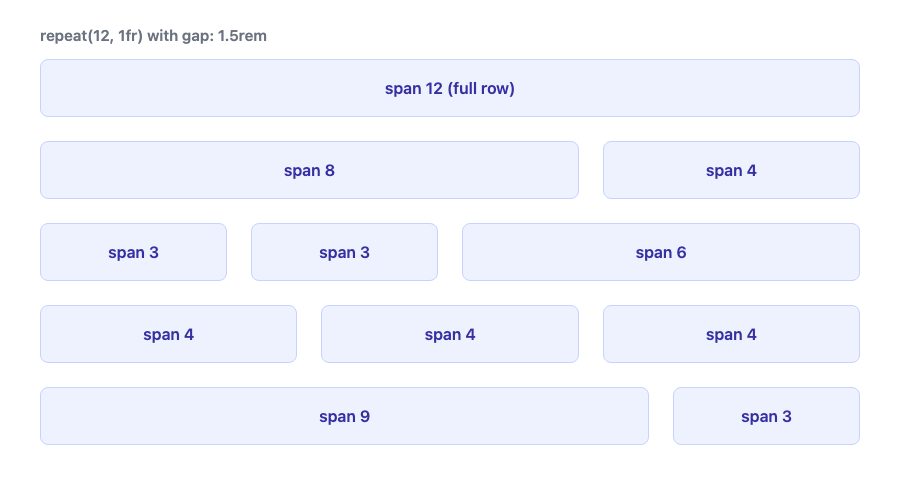
.first class.Three details make this simpler than the old approach:
- Rows wrap by themselves. Grid auto-places items, so a row of 8 + 4 is followed by the next row without any clearing.
- The gutter is one number. Changing
gapfrom1.5remto2remupdates every row. The old grids required recalculating every column width. - The page margin lives on the container. That is the fix the original article argued for: apply side padding to the wrapper, not to the columns.
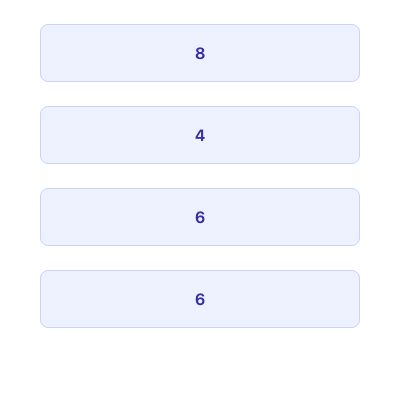
Keep the template and the spans together in the same query. If you declared repeat(12, 1fr) everywhere and only skipped the spans on phones, every unspanned item would sit in one twelfth of the row and become a sliver. With the single-column default, the same markup stacks cleanly below the breakpoint:
Page margins and full-bleed sections
The original argument was about gutters and page margins, so it is worth being precise. padding-inline on the container gives phones a minimum margin, and max-width caps the line length. When a section needs a full-width background but a centred content column, put the margin in the grid itself:
.page {
  display: grid;
  grid-template-columns:
    [full-start] minmax(1rem, 1fr)
    [content-start] min(100% - 2rem, 62rem) [content-end]
    minmax(1rem, 1fr) [full-end];
}
.page > * { grid-column: content; }
.page > .full-bleed { grid-column: full; }
Children sit in the centre column by default, and .full-bleed children run edge to edge. No negative margins and no wrapper per section.
Pattern 2: a grid with no breakpoints
For cards, galleries and product lists you often do not want a fixed number of columns at all. You want as many columns as fit, each at least a sensible width. That is one line:
.cards {
  display: grid;
  grid-template-columns: repeat(auto-fit, minmax(min(100%, 14rem), 1fr));
  gap: 1.5rem;
}
Here is how to read it. minmax(14rem, 1fr) means each column is at least 14rem and shares leftover space equally. auto-fit creates as many columns as fit and collapses empty ones so remaining items stretch. Wrapping the minimum in min(100%, 14rem) stops a column from overflowing a container narrower than 14rem, such as a phone in a narrow embed.
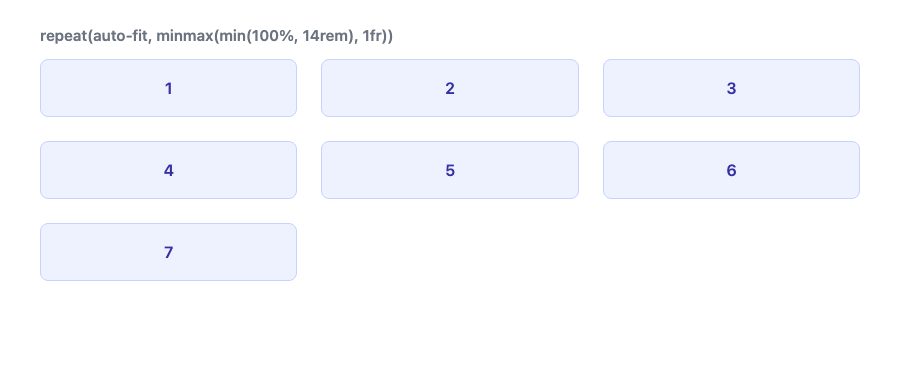
Use auto-fill instead of auto-fit when you want the empty tracks to stay, for example to keep a lone card at the same width as in a full row. For a deeper look at how rows and columns behave in one dimension, see our guide to CSS Flexbox in five steps. Flexbox is still the better tool for a single row of items such as a nav bar.
Pattern 3: align card contents with subgrid
The old web had a stubborn problem. Cards in a row have different amounts of text, so titles, descriptions and buttons end up at different heights. People solved it with JavaScript or fixed heights. Subgrid solves it in CSS.
A card that spans several rows of the parent grid can adopt those row tracks instead of creating its own. Every card then shares the same row sizes, so the tallest title sets the height for all titles.
.cards {
  display: grid;
  grid-template-columns: repeat(auto-fit, minmax(min(100%, 15rem), 1fr));
  gap: 1.5rem;
}

.card {
  display: grid;
  grid-row: span 3;                 /* title, text, button */
  grid-template-rows: subgrid;
  gap: 0.5rem;
}

.card a { align-self: end; }
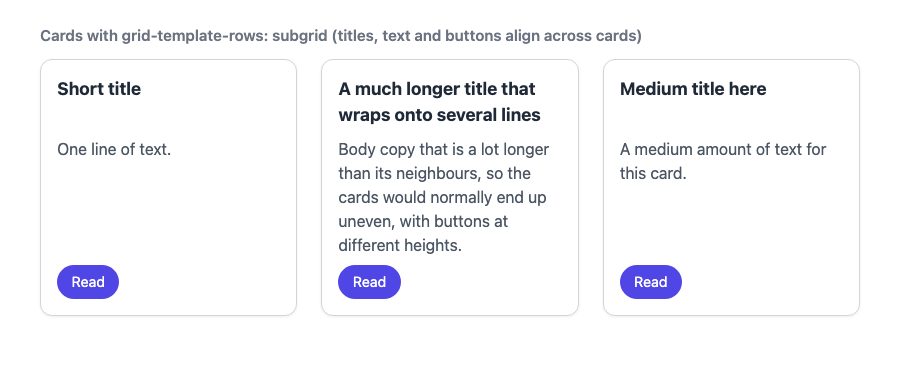
Note the grid-row: span 3. The card must claim three rows of the parent for the subgrid to inherit. The inner gap replaces the parent gap inside the card, which lets you keep tight spacing within a card and wide spacing between cards. Subgrid works on columns too (grid-template-columns: subgrid), which is useful for nesting a form row inside a page grid so its labels follow the page columns.
Simple page layouts with named areas
Many people searching for a simple grid just want header, main, sidebar and footer. grid-template-areas lets you draw that layout as text and redraw it per breakpoint:
.page {
  display: grid;
  gap: 1.5rem;
  grid-template-areas: "head" "main" "side" "foot";
}
@media (min-width: 48em) {
  .page {
    grid-template-columns: 2fr 1fr;
    grid-template-areas: "head head" "main side" "foot foot";
  }
}
.head { grid-area: head; }
.main { grid-area: main; }
.side { grid-area: side; }
.foot { grid-area: foot; }

Make components responsive to their container
Media queries respond to the viewport, but a card in a narrow sidebar and the same card in a wide main column have the same viewport. Container queries let a component respond to the space it is actually given.
.card-wrap { container-type: inline-size; }

.card { display: grid; gap: 1rem; }

@container (min-width: 28rem) {
  .card { grid-template-columns: 10rem 1fr; }
}
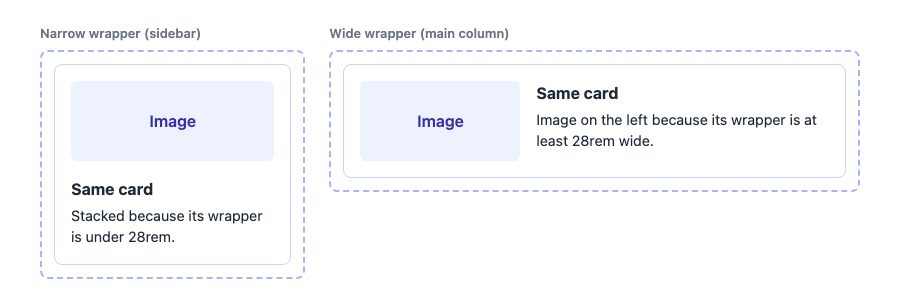
.card, two wrappers. Only the wrapper width differs.When .card-wrap is at least 28rem wide, the card switches from stacked to image-left layout. The same component works in a sidebar, a three-column grid or a full-width row without any page-level breakpoint. Pair this with the auto-fit grid above: the grid decides how many cards fit, and each card adapts to the width it receives.
Browser support and accessibility
- Core Grid,
gap,minmax(),repeat()andauto-fithave been supported in all major browsers for years. - Subgrid and size container queries are both Baseline: they work in current Chrome, Edge, Firefox and Safari. See the MDN pages below for the exact version tables.
- Grid changes visual order only when you ask it to. If you use
orderor explicit placement that differs from the HTML order, keyboard focus and screen readers still follow the source order. Keep the DOM order logical. - Do not rely on a fixed pixel width for the container. Use
max-widthinremso text and layout scale when users change their default font size.
Which pattern should you use?
| Situation | Use |
|---|---|
| Page layout with a sidebar or fixed proportions | 12-column repeat(12, 1fr) with spans |
| Cards, galleries, product lists | repeat(auto-fit, minmax(...)) |
| Cards whose titles, text and buttons should align | Subgrid rows |
| A component that appears in different-width slots | Container queries |
| Header, main, sidebar, footer | grid-template-areas |
| One row of items, such as a nav | Flexbox |
A grid should still be a guideline rather than a restriction, as the original article argued. The difference is that the guideline now lives in one declaration, and the browser handles the arithmetic. If you want ready-made examples to adapt, browse our product card grid and photo gallery layout snippets, and read Responsive Column Layouts and Responsive Design with CSS3 Media Queries for the surrounding responsive thinking.
i like grid design very much.
but the problem is that it’s not well implemented in xhtml/css
you are supposed to change the css to change the design of a site, not the xhtml.
anyone has a grid system layout without this anti semantic problem ?
I like it, will play with this feature. I found the same issues with 960 and never “used” it’s CSS but just it’s form.
Whilst I use a grid as a backdrop to all my designs it very rarely makes it into code like you’ve suggested.
“A clear class is also required to clear the floats after each row of columns.” – this proves that you didn’t look deep enough (or don’t know much about modern CSS, which I highly doubt). You’re supposed to use .clearfix that is a modern, no-excessive-markup solution built in the latest 960GS package.
nice… at 30px between grids it would looks nicer,and have more room to breath. Thanks for sharing.
@Mariusz Very appreciated your comment. To apply a .clearfix, that means you still need to add an additional div tag around the row of columns.
Agreed 100%. Never really understood why 960 bloated their code like that… and didnt understand why they made added that left and right margin to the container.
Any chance on getting a .psd of the grid?
I actually like having an extra div for rows. It allows you to nest stacked columns without the .first class, insert inline content between rows, and provides a common backdrop for each row. It also might be easier to traverse the DOM looking for a group.
I do like your fat gutters. And that’s why I like to apply margins to the content, not the columns.
@Tom Karels – I use this tool to generate the grid: http://www.spry-soft.com/grids or you may download the grid background here:
Nice work. I like the coding logic and it is very similar to my The Golden Grid. Just float: left the unit size and the margin(gutter). I think the main size 960 or 970 or 978 is less important than the gutter size. 90% of the decision making when you build a Grid System is what gutter size you should use. And the that decision depends on what is your content. So there are no miracle Grid System but there are Grid Systems who can hold your content better the others.
I think you are beating a dead horse. The 960 grid works well enough. I think you are going to find that most designers are much more interested in develping sites which also load well on iPad, iPhone, Android and other devices.
The 960 grid is visible and stable on most browsers and screen sizes – good luck winning converts to learn a new system when the old one works fine and requires zero learning curve.
Your time would be much better spent on finding a default grid that fits most mobile devices.
Not sure if you realize or not, but 960.gs has a custom css generator that you can customize the Column width, Number of columns and Gutter width to whatever you want. Here’s the link: http://www.spry-soft.com/grids/
Or you can go to 960.gs and click on the button: “Custom CSS generator”
The margins are necessary. It is a downside to blueprint, as you need to add extra code to keep content away from browser frame.
I really hate sites that jam into browser frames…
Get rid of static grids! For what!? They are so not-dynamic that it hurts. I use fluid grids or even NO grids.
Well if you think the 960 grid limits your creativity, I don’t really see how adding a few pixel will change that.
I do however like the increased gutter space for better readability.
I completely see your point that the 978px grid gives much needed breathing space between columns… my only gripe is that it doesn’t work with the standard 300px wide adverts.
Awesome…..i use the 960gs but have tried not to let it dominate the design….it is more of a reference point for elements inside the design. Great demo as well!
thanks man!
@Andy Marshall
Just use the .grid4 at 306px, and put your ad in a container with 3px side padding?
Interesting article! I wasn’t really considering using the 978px after reading your previous article last week, but this has made me want to give it a shot ;)
The grid depends on the project, i think these grids are unnecessary.
love this simpler css grid.. more balanced than 960gs
but, what’s the best? 12, 16 or 24 columns? layout has to be fluid (grids and typo) or “mobile first”? that’s the dilemma!
Food for thought:
The iPhone 4 screen is 960 pixels at its widest.
This means a site built with 960.gs can have a 1:1 (non distorted) appearance. Not a huge factor, but not possible with a site that’s 978px wide.
Andy:
A fair point I guess, however; I work for a large publishing company as the designer for a digital team. According to the stats from “upstairs” demand for those 300px wide ads has fallen to that of the larger 336px wide bastards! But as adikahorvath said, it really depends on the project in the end.
I may be the odd man out for saying this, but I feel that people depend on pre made grid layouts way too much. I like creating my own layout, knowing the code of the layout, and knowing the feeling of figuring out the right proportions. Maybe this is just me, but I would rather struggle with making my own grid an get to a good result, then use a pre made one any day.
Where is the PSD template? Care to share?
All the .grid_n classes have a left float *and* a left margin – IE6 will shit itself with double margins.
that’s funny, I’m designing a video grid layout and found exactly the same annoyances and was playing around with a 978px grid, then I went for a 940px one. that’s a coincidence.
Just like @adikahorvath said – grids aren’t necessary and each project is too unique to use such as ‘globalized’ thing as 960gs is. Personally I’ve never use it (except reset.css).
Although they save time on prototyping, I’ve always had a slightly uneasy feeling using css frameworks, and I agree about the too-narrow gutters.
Looks like a nice solution.
I really do not see the point in css frameworks. They totally hinder creativity and are not semantic at all. I am surprised you are even talking about them. Hand, custom built code always wins in my book.
Mutha F laying out in grids. Grids suck and are for lazy people or web pushers. Hand coded, custom, is the way to go.
Honestly, I feel that a grid system should be used as a guide and not the rule. Creativity in design will lead us to operate outside the limitations of a grid system, and the golden rule my professors in college were always bringing up, was meant to be broken from time to time.
It’s important to experiment with design, and often I feel like a grid can limit designers more than help. Not to say there will not be projects where a 960 or 978 grid has it’s place—on the contrary there will be many instances where when dealing with large amounts of content that these grids can greatly aid our design making decissions…
My point is the same as many others… be sure to experament in your designs and not limit yourself just because your grid says it should be so. Risking being too cliche, “think outside the grid” and change it up sometimes.
Both, https://gridulator.com/ and https://thesquaregrid.com/ are positive resources to help us experiment with alternative grid systems, but ultimately it might be more effective to throw the grid out at times. My 2 cents.
From a rapid development perspective, I love working with css grids as it allows me to put layouts together quickly.
I’ve tested the 960 grid system but it didn’t work so well for me. I also tested the blueprint grid and I have to say I liked it much better since the columns are actually smaller, 40px columns to be exact (width: 30px; margin:10px;) which gives me a lot of flexibility with columns, gutters and so on. Sure it contains a few more lines of code on the css file, but for the functionality and flexibility is worth it in my opinion.
of course for production we should be compressing all css anyway so the reasoning behind too many lines of code or large files should not be an excuse to throw away good development tools.
I’m making a css framework called css++ because all these css grids do is lock you in to one developers impression of what a layout should look like and i’ve been appalled ever since i realized that centering was standard. boohoo.
For the first time last week i used the 960 Grid framework, it wasn’t easy to grasp. I don’t think i’ll want to stick to it. Will be checking out the new 978 grid.
i must agree with @bcarter et al. grid must be used as a guide rather than a rule. i do use 960 grid as a guide but will surely take a look at 978. thanks for sharing!
I don’t like all these classes. I use simple class names: one-half, one-third and one-forth, More column is not necessary. more complex layouts probably need to be hand coded.
960.gs can be customized to modify the grid width, also there are two classes to bypass left and right margins (alpha and omega)…
and Yes, you’re not a grid scientist!
I totally agree with your conclusion. Designers do restrict themselves too much to the 960gs and I think its time to move on to a wider grid. Even on mobile devices the screen resolutions are becoming higher, allowing for a larger area to design in. It just make sence! Nowadays websites should be more adaptive because the can be accessed by different devices – so a mobile version of the site should be made if a site is accessed by mobile device – rather than tring to make one site fit all.
That’s pretty cool because we no longer need to have to stay put table, or putting several divs and code would be great ….. congratulations for the post, I’m from Brazil and I’m always learning more from you
Really interesting, I’m worked with the 960 grid alot (not too strict), but ran into the issues you mention here. I definitely will give the 978 a try!
10x for the info!
I see the 960.gs website, but where I can find this Simpler 978px Grid ?
Thanx
Hi – I thought this was a really good post, and made up a quick zip with your CSS and a Photoshop template. You can grab it here (Mediafire).
Nice. Although, why use a grid anyway? Coding from scratch gets only what you need and no extra classes, divs or margins that are either not needed or wanted.
I completely understand using a grid system, but when designers use a grid system for website design, despite the opposite, things tend to look blocky and always symmetrical so I would use a grid every-now-and-then but not hamper creativity by always constricting oneself to a grid understructure.
In reading all of these comments… did “we” decide/conclude that 978px was good or bad for mobile, ipad, this that, etc.?
Personally, yeah all the grid stuff is good for framing stuff… but sure by all means experiment and “think outside the grid” when and wherever necessary. I grid and hand code!
Just crunching-ch-ching some numbers and 56px grid x 26px gutter x12 columns works out pretty nice.
Comes real close to 960 pixels (958).
Using all of the above logic and classes, it works out handily.
I just like 56px it factors better, and 26 is easy to remember 56/26 both end in 6 :)
Nice little grid calculator here:
to cr-crunch your own.
Thanks for the CSS logic Nick, not that there’s anything wrong with 978.
OK already flip flopped, the math is easier using 50px columns x 32px gutters = 952 total to come in under 960px.
Can’t wait to work with this and use my other standard base styles.
A personalized framework to taste and per project for the nay-sayers :)~
Hey, great post – I am a web designer and developer, on a day-to-day basis I work in a variety of projects for a broad range of different clients all wanting different styles. Recently I designed a minimalist website for one of my clients which looked great…
How exactly does the 960 grid hinder your creativity any more than a 978 grid… they both have equal amounts of columns… sooo…
While you make some valid points, your aversion to the golden ratio is not too cool. All the best designers (and, for that matter, artists) throughout history have used golden proportions in their work.
I don’ want to post a comment, but you are just an artist. well done
While I am a fan of the golden ratio (as almost every designer should be) I agree that going by set numbers that “fit” into the layout is restricting on the web. Fluidity should be kept in mind, but being flexible is also important!
Do I have to LOVE this grid system & Is it really important to follow this??? I really want to know!! I’m a designer[basically] & also code wordpress themes[my own designs only] from past 2 years I design my websites at 1010px without any grids. One of the example is
http://www.breakupwithsugar.com/
Do You think following grid system can change my life & what are the advantages. =)
Thanks
Hey, I am not sure if you know about the custom grid selector, within the 960.gs – http://www.spry-soft.com/grids/. You can choose whatever gutter width possible, and choose any column size. You can derive anything that you want.
And removing the margins is just one line of code! I might be wrong, but I do not see any convincing argument to move away from 960.gs.
Something funny: You say “Don’t force your design to fit to a grid that hinders your creative genius.” but yet you are proposing a grid. xD
Now, here’s something that you’re misinterpreting: the inclusion of a .clear class.
The fact that the .class is in the 960 CSS file, doesn’t mean you HAVE to add a DIV to clear the floats, so the example graphic above where you have an empty yellow-border DIV, that doesn’t necessarily has to be the exact and only way you would use .clear class. I think your opinion on this point is not objective, but more subjective.
Nevertheless, your 978 grid system looks interesting and will definitely give it a try.
Thanks.
Correction (there’s no way to edit your post here :s):
Third paragraph, I meant: “The fact that the .clear class is in the 960 CSS file…”
Well it’s funny because sometimes I find the 20px gutter *too wide*, but never too narrow.
Grids are great if you’re not a slave to them–I like the 960gs, but I tend to agree that there are way too many classes that are required to make a layout work. From a design perspective, gutters should be as flexible as possible otherwise every design will start to look the same. Let’s not forget about the typographic control that a grid should help with, setting an adjustable vertical rhythm is important.
I have been meaning to look at this for ages now but never get round to it. Thank you!
Bye bye unwanted margins and hello extra space :D
I don’t suppose you have a Photoshop grid template to go along with the CSS code? :)
you guys are so totally right.
I came up with the same conclusion on the 960.gs technique.
but i guess i was too lazy or not bright enough to come up with an alternative myself.
Here we are!
thank you guys, great work!
I use the grid systems as a template for laying out my design. I don’t like or use the CSS of any grid system as I don’t like my classes to describe their layout, only their content. So instead I use the grid size values as guidelines for the widths and spacing of my containers.
This is interface development vs website design though.
We are ever looking for a way to accelerate our work, but sometimes we limit our creativeness with grids and templates, despite they are a good way to start. We need rules to a good design, and we need results. Balancing the creativeness and rules is a hard and funny task.
Great post! Do you have a 16 grid version?
It’s great to have the grid section details which you have provided in the pictures. I like the way you have explained the grid in pixels and giving the whole css code settings. keep going…
Interestesting article. We use the 960 grid and always have to tweak the left and right margins. This is a good alternative.
I really enjoyed the first post on the 978 grid. I had been looking into moving away from the 960 for awhile for exactly the reasons mentioned, and especially the one about the 20 pixels gutter being too narrow. I downloaded myself a 978 grid and intend to use it in future projects.
I still like the 960 grid system for my websites.
Still haven’t decided on “old” or “new”, but your presentation and article were very good. Keep up the good work. Thanks.
Interesting thought, I also never mind to use 960 grid system to my design, I feel that if I use it, the margin in both side is too wide. I prefer to use 980 px width lay out for my design.
Very good ideas. Even though I haves used 960gs quite a lot, I always was bothered by the gutter width and extra classes. Using a grid system is a great help for getting an HTML page to work quickly, but should be cleanned up for the production version. All classes that are not used should be deleted (or better, commented out if you use something like LESS CSS’s desktop compiler which takes the comments out of the production code). In addition to removing some unused classes. We can also see what CSS properties can be condensed to make the code event cleaner… Grid systems are starting points, not final production ready code.
960 is a great tool, but honestly I prefer square grid, as it gives me more space and is more flexible.
imho, both grid systems are good and 960gs didn’t have to die. It’s better coz designer will have many options to choose from :)
I read both articles and I think that first it depends on the project and a designer can use both and adjust them to his needs.
Very interesting concept and it validates in html too because you are using different classes.
I like it and I am using it in a new site, thanks! I like that it uses ‘first’ at the beginning of a row instead of ‘clear’ and the end – it’s more straight-forward.
The grid system is very helpful, nice article !
I’m new to this 960 system with a job on working on now. I’m confused as to whether there is a set standard 960 template to use or I just code place holders to those dimensions…
.container {
width: 978px;
margin: 0 auto;
overflow: auto;
}
And you don’t need any of the clearfix stuff. Much neater HTML markup then.
Totally agree… often had to had an extra left column, padding that made the content even smaller… 960 is good, but I am definitely going to give a try to the 978 grid to see if it saves me the extra tweaking time in 960…
Practice will be the judge.
Thanks for talking about this issue. Now I gotta convince the developper team :))
could you provide a transparent image to use in creating photoshop comps?
Seriously though. Why should we be coding centered layouts with fixed width when we can make responsive designs that look good on everything from a 1900px screen to an iPhone? If you don’t know what I’m talking about google Responsive design and read the top ALA article.
We should be moving things forward instead of trying to fix a method that no longer fits the job.
The grid system is very helpful, nice article !
Every web designer should be using the 960 grid it to create website layouts. Thanks for posting this article!
i like your opinion “Don’t force your design to fit to a grid”…thanks for sharing….
I don’t like how the golden ratio is mentioned, because it isn’t the golden ratio at all! :)
1.618…
I like the idea of “golden ratios” but find it hard these days to apply any sort of template grid to a new website, often i just need to start from scratch, pen and paper and work it all out!
One of the more successful the work of your blog, thanks iked
klima servisi, kombi sevrisi hizmetleri veren web sitesi.
so I have to open a container for every new row? for example
[code]
[/code]
because when I don’t it gets messy..
I’m looking to up my design skills and this grid will definitely help me. I also agreed that you should make padding in the container and not have additional columns.
while I can appreciate the use of grids, you cant beat good old hand cranked code. As a designer you should have the ability to create sites which fit the customers needs and requirements.
Why dont people be creative and use their imagination rather than using grids and making copycat sites.
I’m amazed that everyone still gets so uptight about suggestions regarding the 960px grid. Surely, as designers, we should be pushing the boundaries of what is possible a little bit more??
Yes, it makes life very convenient for designers and it’s possible to produce some gorgeous looking sites using the grid. With the popularity of widescreen monitors now though, anyone still restricting their designs to 960px is really missing a trick.
it will definitely make a good designer better! all useful tools shoud be utilized to make the design more attractive at the same time cope up with the demands of its audience! Good designers have to visit http://www.bidstornado.com, and see how much you can earn :)
I will definitely follow these guidelines for my next websites. :)
I did a minimalistic generator for this type of grid. You have to play with the parameters in url.
940 grid
978 grid
Also, no rounding is done. I don’t know how well browsers handle commas so it’s easy for you to see if things don’t quite measure up if margin is 2 meters long.
ps. there’s nothing interesting on my homepage.
And if you do
You allmost get nice floating grid. Just replace px with %.
There’s something to note about though. When nesting divs with floating grid and without making changes to the current css, you have to think relatively. You’d think that making 2 even columns in grid8 div needs 2 grid4 divs. But no. You have to have ~50% divs which in current example are grid5 classes.
for now I have not used the grid element, but after I saw this tutorial may in the future I will start using
thanks
But I guess you could do this with jQuery:
$(“.first”).before(‘<div class=”clear”></div>’);
Valuable post here. 960 is a little bit to tight. You have the point :)
Cheers!
thats a great post, ive never been a massive fan of the 960gs, it a good tool to help out in the layout, but using the css can be far to much hassle for what its worth.
Excellent & informative post. I think these guidelines are be convenient to perform better & for the best designs. I will follow these tips for my upcoming projects. Thank you so much for your simpler solutions.
Take time to review the above link for more design inspiration & for the CSS templates.
I like a 55px column with a 20px gutter and margin better than the 960.gs for small business clients.
I’ve never used 960 grid system but downloaded it’s one copy from 960.gs… And I think ‘design boundaries’ makes our design look more professional Instead of being a day to day road romeo.
But, Sometimes it’s good to break such boundaries.
Hey,
nice thinking i always have hated the margin space! We’re going to try this out in our next project! Many thanks Fredrik
Enjoy the christmas time and enjoy the hottest white iphone 4. All you need to do is the white iphone 4 conversion kit home.
It’s sorry to hear that Some white iPhone 4 buyers have reported signal reduction when the phone is held in certain ways, especially in the left hand, as the antenna problem is in the bottom left corner of the phone’s side casing. Is that mean i have to wait longer to get the white iphone 4?
I’m having a problem using this grid with a background image. My image is 978px wide, so the text is flush left along the left edge. Any suggestions?
Dolce Gabbana ,dolce and gabb
D&G leisure shoes are famours far and wider for their unque technics,dolce gabbana Sunglasses. Plain mirror,exquisite shape,brihgt color and rich culture.Vibrate the massagr function,can promote the blood circulation,Dolce Gabbana watches,improve Metsbolism,Dolce Gabbana Clothes,ream massage more comfortable valid.Paid no mean amount for the shoes,antibacterial function,dolce and gabbana men sneakers,quality of soft,comfortable and fashion.
hey nick, is the .psd file available for download?
Thanks for this Nick! I have been following your work for years. You are always providing such great content. This article definitely falls in that category. I will most definitely be using this in the near future.
css grid ler oldukça iyi ben şahsen begendim
Excelente sistema de grids, he dejado un proyecto hecho con el 960 gridpor la mitad para probar este de 978 y los resultados en limpieza de codifo han sido fenomenales. Me gustaria que lo pudiesen hacer para 24 columnas.
Today is too precious, should not worry for acid bitter and astringent regrets that dissolve, raise the chin, seize today, it never comes back.
I totally agree with you here, 960grid has been a great help to my projects. But the things you use as arguments where the ones that i kept thinking should i just leave the grid system aside because of the many bigger resolutions these days.
Though when reading your title of the post i hoped you somehow came up with a grid systems that works with a flexible layout, but it is some what that. Only still restricted to some degree of with of the container. Do i defintly start using it.
I suggest you two can make some sketch templates to, because thats where 960 rocks too. You can sit with your client and have a mockup in no time.
So please add the css and sketch tempalte in the download file too.
Keep up the good work.
I really like your simple 978px grid solution!
But I have one question:
How do you handle the SEO problem where main content should be placed before the site menu in html source?
Example:
Lets say we have a very simple layout using two cols: grid2 for menu-column and grid10 for content-column
Optically the menu col should be on left side and the content col on the right. In html source the content-column should be placed before the menu-column. But this breaks the grid system.
Can this be done with the 978px grid?
Thanks,
Martin
Think of a simple html document that will never have a css. Do you think the menu should realy be after the content? I think that, doing so, you are putting more importance to SEO instead of your user.
I think, the placing of you content with seo is importent. But if your website is simpel there isn’t much code and data that will disturb the indexation.
If you have a big community the you should definitly consider that stragegy.
I think I will start using the 960gs and 978gs. I just learned about them today.
Mine didn’t have any organization before.
Hi Nick,
Thanks for the tips! You have inspired me to make my own grid system — 984gs!
@Jessamyn
You may to put your background image on tag
A new and alternative way in the grid system.
I’ld love to see this get adapted, or is it adopted… ? :)
With people making layouts and sharing them.
Esp. moving towards html5 new style layouts.
Seems like a great starting point for anyone to make their own front-end framework, no license required ;)
-crssp
What about the Prefix and Suffix classes of 960.gs, plus a full width sample in the mix of the demo would be nice, just for more examples.
thanks again.
When I looked at this earlier, I missed the “clear:left;” on the .first class. That is so amazingly brilliant! Thanks.
Recent surveys, children of depressed mothers’ negative patterns of activity occurring in different brain reveals. This is for children of mothers who take more risks in the future is going to have depression.
This grid is very usefull for designing website with more invisible design. (Smashing book 2)
Thanks for sharing!
What is friendship?Mont Blanc PenWhy do we call a person our friend? When do we call someone a very good friend?
I like grids because it keeps content clean and streamlined. However, when wanting to use background color within the containing divs, that’s when it can get tricky. Many times adding margin/padding will break the grid layout.
The simpler css grid – Thanks for the info.
I would like to see someone come up with A solution that makes alpha, omega an clear, or even .first, completely unnecessary. Because, with responsive web design, your grid blocks might flow totally different… I now have to use scripts to dynamically correct the classes on those elements, but i do not want to! Or would it be better to not use margins for guter, but padding…
I’m new to all of this (web design), but have already decided to use the fibonacci sequence as a guide. The gist being that the size in px of each element is a fibonacci number.. 1, 2, 3, 5, 8, 13, 21, 34, 55, 89, 144, 233, 377, 610, 987, 1597 being (in practical terms) the first numbers in the sequence.
Elements made from combinations of these numbers just look .. well, aesthetically pleasing really. The golden mean and all that.
Great! I’ve used 960gs for my website and felt that it was pretty messy with all the classes and stuff. I found instead, this system really clean and useful, taking the design to the same result. Simply great work here! Thanks for sharing it! I think I’m going to redesign my website using this system =)
You are right. I think this point is more clear if you compare it to print design. Imagine that a huge amount of print designers use evertime the same grid, no matter which format of paper etc. That would be weird and boring. So thanks for the great article which explains nice how to make a difference!
Thanks , I have recently been looking for information about this subject for ages and yours is the greatest I have discovered till now. But, what about the bottom line? Are you sure about the source?
I wish to show thanks to you just for rescuing me from such a scenario. Because of checking through the world wide web and seeing techniques that were not powerful, I was thinking my life was over. Living minus the approaches to the problems you’ve solved by means of this post is a crucial case, and the ones that would have in a wrong way damaged my entire career if I had not discovered your web site. Your good capability and kindness in handling every part was invaluable. I am not sure what I would have done if I hadn’t come upon such a step like this. It’s possible to at this point look forward to my future. Thank you so much for this reliable and results-oriented help. I will not be reluctant to propose your site to anyone who will need guidelines on this situation.
your simpler css grid is really superb. You are very good in explaining things. good job
Your grid blocks might flow totally different this system really clean and useful. It’s possible to at this point look forward to my future.
Just use 1140px Grid system -> cssgrid.net
Can this be made into a 16 col grid?
Hi,
looks nice. But are there any tutorials how to use the grid. I am not so familiar with grids.
A simple layout would help.
Cheers,
Denis
I’ve been looking for a simplified way of thinking with these css grids and finally found just what I was looking for in this article. Thank you very much.
Most of these comments are meaningless. Good thing that WDW has implemented nofollow. Spammers take note.
I’m sorry but this system is now obsolete! :) Now we need to start using the responsive design…
and what do you suggest to us about this “new method”?
Responsive designs are terrible. Why on earth would you want to render full images to run full code on mobile devices? Granted, it may work on some sites, but anything serious will not want to use a responsive design.
You are far better using m.domain or similar. Hense why any good site will do just that.
I’m sorry but you don’t understand responsive designs.
They don’t render full images, or run full code they scale.
They start with a mobile first design (less code) and add upon that.
Personally I think it is foolish to not make your whole site mobile – it will be increasingly common for your site to be checked by mobile devices.
The images are dynamically scaled – so it loads the right images for the right screen.
@Troy
I disagree with your statement that a special subdomain with a spearate website which is optimized for mobile devices is the best solution.
Nobody wants to maintain an entire website twice, right?
To work on two content-management-sytsems (which most clients want) is just a waste of time. Time nobody has (at least my clients tell me that they have no time).
And Google prefers mobile devices and advices not to have two URLs and two websites with the same content.
https://developers.google.com/search/docs/crawling-indexing/mobile/mobile-sites-mobile-first-indexing
Good sites, as you call them, are responsive.
I’m sorry but all the css frameworks sucks, I better start from zero, every project is different
Hola, muchas gracias por el post, si que esta interesante.
Slds…
I made my own custom css grid, depending on the desired width.. what i did is i pick some of the css coding/technique in 960 grid and innovate it.
I’d like to point out the significance of your conclusion and repeat it over and over. Let’s try to escape the out-of-the-box mentality and design layouts and grids according to the content and the job at hand. Force feeding content into a grid-package may be easy, but in the end, it only hurts the design. And the client. And my heart. And it makes my cats howl strangely at night. :/
hello sir
i really need for simpler CSS grid
thanks for sharing
thanks
your simpler css grid is really superb. You are very good in explaining things. good job