Logo Design Process: From Brief to Brand System
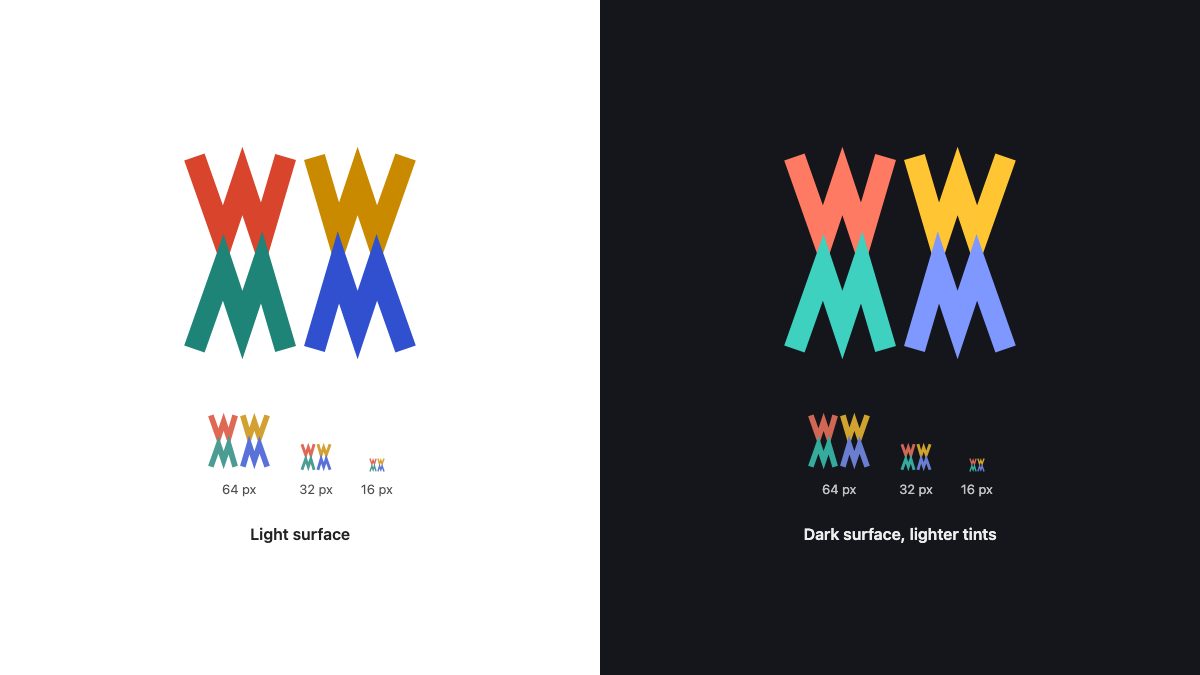
A good logo design process has six stages: write a brief, research and sketch on paper, pick one concept, build it as a vector on a grid, test it small, in one colour and on dark backgrounds, and package it as a small brand system. The tools have changed since this case study was first published, but that order has not.
The example running through this guide is a real project by Swiss logo designer David Pache of Dache. He designed a mark for WebMYnd, a startup whose browser plugin kept a searchable copy of everything you looked at on the web. Pache’s original write-up is the backbone here. The workflow around it is updated with vector tooling and checks you would use today, and the rebuilt example mark below is our own illustration of his W/M idea.
Start with a creative brief, not a sketch
WebMYnd’s brief had one job: communicate “everything you look at, collected in one place” and “an extension of your memory”. It also had a constraint that shaped the whole design. The mark, or part of it, had to work as a button showing when the plugin was active, so colour mattered from day one.
Write your own brief as a one-page document before you open any app. It should answer five questions:
- What does the product do, in one sentence a stranger would understand?
- Who is it for, and what should they feel when they see the mark?
- Where will it live? App icon, browser toolbar, favicon, invoice, shopfront, embroidery. Small and awkward placements decide more than the hero use does.
- What must it avoid? WebMYnd’s team had already tried a brain and disliked how it looked. That is a useful sentence to have in writing.
- What are the colour constraints? Existing brand colours, accessibility needs, one-colour print.
Sketch on paper first, then reject your first idea
Pache’s first concept was a brain abstracted into a “W”. It was clever, but the W was not clear enough and lacked presence, so he dropped it. That is normal. Expect to discard the obvious idea and the clever idea before the useful one appears.
Keep this stage cheap and fast:
- Fill a page with thumbnails, small enough that you cannot fuss over detail. Aim for variety, not polish.
- Circle two or three directions, then redraw those larger.
- Look outside design for colour and rhythm. Pache took his palette cues from a painting by Wassily Kandinsky: broad, varied, bright without being harsh.
- Show the client rough directions early. Pache’s client chose a monogram combining W and M, which narrowed the work to one idea.
Pache noticed an advantage in his chosen sketch: the design was fully symmetrical, with the W mirrored by the M. It had four identical elements, so he only had to perfect one and copy it later. Symmetry like this is one of the cheapest ways to get a mark that looks resolved.
Build it as a vector, one element at a time
Move to a vector editor when you have a direction. Figma, Adobe Illustrator, Affinity and Inkscape can all do this. The principle is the same in each: draw one element carefully on a simple grid, then duplicate and transform it rather than drawing the other copies by hand. Edits then update everywhere.
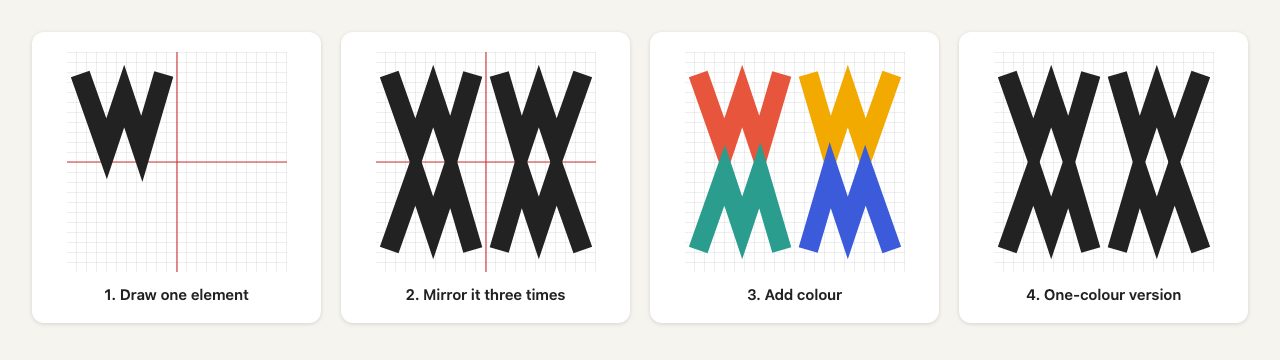
Here is the same idea as hand-written SVG. The shape is defined once in <defs> and instanced four times with <use>, which duplicates the referenced node as a deep clone. Mirroring is a negative scale on each instance:
<svg xmlns="http://www.w3.org/2000/svg" viewBox="-50 -50 100 100"
     role="img" aria-labelledby="t">
  <title id="t">Example monogram</title>
  <defs>
    <path id="leg" fill="none" stroke-width="9"
          d="M-44 -40 L-32 -6 L-24 -30 L-16 -6 L-6 -40"/>
  </defs>
  <use href="#leg" stroke="#e8553d"/>
  <use href="#leg" stroke="#f2a900" transform="scale(-1 1)"/>
  <use href="#leg" stroke="#2a9d8f" transform="scale(1 -1)"/>
  <use href="#leg" stroke="#3b5bdb" transform="scale(-1 -1)"/>
</svg>
Centring the viewBox on 0,0 is what makes the mirroring trivial: flipping a sign reflects the shape across an axis. The paint attributes sit on each <use> and are inherited because the path does not set its own stroke. See MDN’s <use> reference for how referenced attributes override instances.
In a design app the equivalent steps are:
- Draw the element with the pen or shape tools, snapping to a pixel or dot grid.
- Duplicate it, then flip horizontally or vertically (Figma has Flip Horizontal and Flip Vertical in the right-click menu and the Layer menu; Illustrator has Object > Transform > Reflect).
- When shapes must interlock, combine them with boolean operations. Figma offers Union, Subtract, Intersect and Exclude; Illustrator offers the Pathfinder panel and the Shape Builder tool.
- Convert strokes to outlines before delivering final artwork so the shape cannot change when line widths are rescaled.
- Keep the final colour as a fill, not a gradient or effect, unless the mark truly depends on it.
If you want more practice with vector geometry, our vector polishing techniques tutorial and the Illustrator shortcuts list are good companions. For a code-first view of the format, see Playing with SVG design.
Choose colour last, and test it hard
Pache did his colour experiments only after the form was settled, trying combinations in a notebook before choosing a vibrant but not garish set. That order still holds. A shape that works in black will work in colour; the reverse is not true.
Check colour like this:
- Squint test. Blur the mark or shrink it. Does the form survive?
- Greyscale test. Desaturate it. If two colours become the same grey, the separation was only hue.
- Contrast. WCAG 2.2 sets a 3:1 contrast ratio for graphical parts needed to understand content (Success Criterion 1.4.11). Logos are exempt, but the exemption assumes the colours are required by brand guidelines, and a logo that doubles as an interface control needs more care. WebMYnd’s mark was intended as a plugin status button, which is exactly that case.
- Dark mode. Strong colours that look fine on white can be glaring or muddy on near-black. Plan a lighter-tint variant.
That last screenshot is the honest outcome of such a test. The four-part form still reads at 32 pixels, but at 16 pixels the gaps close. A real project would respond with a simplified small-size version, such as fewer strokes or a single quadrant, rather than shrinking the full mark.
Deliver a small brand system, not a single file
A single master logo is rarely enough. Deliver a short set so the client never has to improvise:
| Asset | Format | Why |
|---|---|---|
| Primary mark, full colour | SVG, PDF | Master vector for web and print |
| One-colour and reversed versions | SVG | Stamps, fax-like prints, dark backgrounds |
| Small-size mark | SVG, PNG | Favicon and app icon, simplified if needed |
| Horizontal and stacked lockups | SVG | Header, footer, social avatars |
| Palette and clear-space rules | One-page PDF | Keeps others from distorting the mark |
For the web, an SVG favicon declared with <link rel="icon" href="/icon.svg" type="image/svg+xml"> keeps the mark sharp at any size. Add a PNG or ICO fallback and a 180 by 180 pixel apple-touch-icon. SVG files used as images can include a @media (prefers-color-scheme: dark) block to switch colours; MDN notes this applies to SVGs embedded as images, not SVG inlined in HTML, and you should test favicons in your target browsers.
If you want ideas for building simple marks in code, our retro badge logos in pure CSS and CSS badge logos with ribbon banner snippets are useful references.
Handle the outcome gracefully
Pache is candid about how WebMYnd ended. The client loved the mark and used it for several months, then chose a different design after internal discussion, while retaining the rights to this one. That happens, and the work still earned its place in his portfolio.
Protect yourself with a written agreement covering revisions, what the fee includes, who owns what on payment, and whether you may show the work. A good process also gives you something to point to when a client changes direction: the brief, the rejected sketches, and the reasons each decision was made.
Checklist
- One-page brief with placements and constraints.
- Paper thumbnails, with the obvious idea discarded.
- One concept, built as vector from a single repeated element where possible.
- Colour chosen after form, tested in greyscale, at 16 and 32 pixels, and on dark.
- Outlined, fill-based final artwork with one-colour and reversed versions.
- A favicon and app icon version, plus a short usage sheet.
Credit: the WebMYnd case study and process were written by David Pache of Dache. This updated edition keeps his story and refreshes the technique.
great work! thank you for sharing your know-how
Awesome design. Thanks for sharing the process. I especially love the final result of the color combinations you chose. I can imagine it would be a lot of trial and error. I love the result.
Hi,
David, do you paint or draw? Are you an artist? I wonder if it is possible for someone without natural art/drawing talent to really go into logo and other designing.
It looks like you need to have some more than average art talent to pull such designs off.
:)
Thanks for the tutorial.
Thanks for the tutorial!
>>www.swebstudio.com.br
…but why is the background in the last pic so colourful? Does not look very intentional?!
Web mynd`s new logo sucks. Your design is ten x better.
It’s a shame you didn’t end up continuing with the first idea, as I prefer logos that hint towards what the company or product is about. Thanks for giving us this glimpse into logo design, definatly appreciated!
David, thanks so much for sharing your process here — it’s great to see how yo go about solving challenges from sketch to final art.
As a designer, I appreciate seeing how my colleagues in the field work, which encourages me to do the same.
Great work David, I really love the final solution you came up with!
Great logo and very interesting work flow. Thanks for a great post.
I would have to completely agree with #9 Will. I immediately went to try to find what they decided upon. If the logo on their site is it…they made an awful choice. Their’s is so damn generic it is ridiculous.
I like how he turns to other artist’s for inspiration. That’s something that I’ve gotten more and more into as I start experimenting with mediums more and more. It’s a sweet design, I like it a lot.
Yea and I can’t believe that’s the logo they’re going with now. Way to be an individual.
really great work flow, one more time art background it’s so important for visual work….stunning logo!!!
Thank You! What a great process. I always wondered how people come up with such great organic shapes – i have such a hard time with that. I will definitely have to give this a try.
PS: I agree with “CraigH”, you’re design is 10x better!
I love this logo! It seems to really symbolize the mind; bright colors for creativity, and the mosaic pattern sort of resembles a brain.
Thanks for sharing your design process. It’s always great to see the process other designers go through.
I’ve hired Dache in the past to create a logo for one of my clients. He truly does great work and I’m happy to see he’s continued to raise the bar with each project he does. Good stuff David!
So interesting to see the use of markers. I always start with either pencil or pen sketches and move to the computer for colour. I might give markers a try next time!
Wow, right, where do I begin!? It looks like it’s been done so simply, but that’s a bloody art, the finished work is stunning. Amazing article, can’t wait for the next!
Great article, and awesome logo, but cant help feel the logo is a bit too colorful for all scales and media types.
Call me out of date and old fashioned, but i thought that logos had to work in black and white, but i guess if its only going to appear on screen then it can be in as many colors as you like.
Thank you, its great to see how other people work. thanks for sharing :)
All I can see is a speckled frog. Ug.
I enjoyed seeing the process from early stages to the final result. I am sorry to hear they chose to discontinue the use of your design. I looked at the new logo on WebMYnd sites and was less impressed.
I think this logo would translate well to a single color. Although the rainbow of colors give the logo a certain pop, the structure of the design is very strong and distinct. I’d recognize in B&W just as quickly, a testament to a quality of the work. Plus, it definitely leaves a lot of room for making fun color variations of the logo, a trend I have been seeing everywhere.
Good Job David.
I’m curious where to get knowledge about designing such a impressive and creative logos. How to deal with long / short names in logo projects. What colors, how many, etc. Maybe you could write something more about special technics?
Regards, great job.
Gee, loved the logo. Kinda agree with henry up here, but it’s so different from anything else that it makes it powerful.
Very nice work and a very good color pallete. The bottom typography can be a bit improved in my mind, it feels colder and too techincal to fit the illustrated logo. Still, a very intresting piece.
Thanks for the case study.
p.s. – just checked up on what logo they went with eventualy, what a shame. I think this one is much better.
Hi, nice work.
However, one thing missing -imho- in your design process is the use of a mindmap (step 1) in which all communicative associations to the brand you are creating the logo for are in. From there, you can choose different ways to go in your creative process.
Good luck!
Thank you for the look into your process! I dig the logo, but the part of this post that I’ll take with me is that the clients decided to go a different direction… as a young designer this happens all the time and its reaffirming to know that even the best get turned away some times.
This is a really awesome article and provided great insight for me.
I find experimentation is essential to any piece of design and I like how inspiration was garnished in this logo.
I really enjoyed the process of sketches. This is very valuable and a cool alternative to just cracking open illustrator and going straight through ideas that way.
I needed my boder. Do I want boder
This would be a great resource all those people who think a logos is just typing a word in a “font” and moving a couple of ovals into an ellipse…
Lovely process, great result. Really innovative and inspiring.
Miss Blossom : )
Very interesting article and the final result is tasty to say the least. Colorful and bold, but also unique and way more memorable, than their current very generic and boring looking logo.
I do however agree with Asi Epshtain(#48), that the typography below the “mark” could greatly be improved. Feels rushed and in all honesty a bit lazy to simply use the very generic looking Helvetica (Neue?) after all the excellent work that went into creating the mark.
I shouldn’t be too harsh though since that could have been the choice of the client and I’ also aware of the fact that I, as a designer, hold very little love for Helvetica. A brilliant font that is terribly over-used.
Overall, impressive work.
I think that is one of my favourite logos around right now.
Nice logo design process. You might like this logo or not, but you wouldn’t say it’s not colorfull, would you?
I really enjoy seeing the process that other designers go through. Thank you for sharing. The end result is beautiful. Keep up the good work.
this shows it again: web design and logo design are art! Wonderful, creative work and very interesting description of the process. Thanks!
I really like the simple Brain Logo, I would have like to have seen that developed alongside the Kandinsky’s colour palette. The final solution was good but the brain actually captured the function of the tool much more effectively. What they have now is just cop-out.
I like the logo, I went to go and see what they eventually went for and I must say I think they took a step backwards. It’s too … how do you say … Bland! It has nothing to do with what they stand for? It’s just 4 transparent blocks. I might be wrong, everyone is entitled to their own opinion. Thanks again! Great site!
I agree with the last comment – I like the unique nature of the logo described in this article but I can say – you will never know what corps are really after and what inspired them with their choice. Good Job mate!!!
This is some awesome logo you made here!
Really cool to see you adding some painting in the logo :)
Keep up the good work!
Really interesting post. Thank you for sharing.
I do like the logo a lot and find that it has a uniqueness to it that just sticks in your head.
I’d say you have created a very strong identity here!
As someone mentioned before, it would have been interesting to see how the initial brain-shaped logo could have evolved, as it was probably more meaningful to the project.
This article is great because it details the design process and how the designer took the time to understand their clients solution and how it would help people. Creativity can be subjective and being in this business myself you try and point the client into what appeals not just what ticks their personal box(es). Achieving both of these is design genius!
I AM STARTING IN THIS AREA, I WAS LOOKING FOR SOME TIPS TO DESIGN A LOGO TO A PROJECT TO MY SCHOOL,
THIS ARTICLE SHOW US A PERFECTO WAY TO DESIGN OUR OWNS LOGOS.
I THINK IT’S GREAT & VERY EXPLICIT.
I WISH I WERE TOO CREATIVE TO DO THOSE TOO GREAT AS THIS.
: (
m&m
I really love the logo. It combines with the amiable, attractive, suitable colors. Very interesting and so creative. Keep up the good work!
i saw the current logo and i dont like it…it’s one of the same….
Ouch! WebMynd.com current logo looks too common and can easily done by a grade school student. what a shame to change the logo. I’m now beginning to believe that beauty is in the eye of the beholder is true.
Once the logo is designed, do you have any sort of method to test it for distort-ability? By that I mean some litmus test for a logo that distorts it in ways that the end-user might experience it (skewed, upside-down, etc.).
I wrote a quick bash script on Nerdvana that does something like that, but I would certainly appreciate any feedback you have, or tips to that end. Read the post about strength in branding.
Thanks!
A very inspiring showcase indeed :)! There is an interesting blend of ‘tribal/psychedelic’ feel in the way the icon is made. I love the analogue approach.
Yes, I wholeheartedly agree with many posters in regards to the current (today’s) logo of the website – it looks mundane and repetitive.
Allow me to be a contrarian here–I like the one they ended up choosing better. Yours isn’t ‘techy’ enough–and honestly feels a little unprofessional.
Sorry.
Enjoyed checking out your process tho… keep on keepin’ on.
I checked out their new logo. It is awful.
i don’t like the numer of colors that u use, but if the like.. its mean something like music! :D
Yeah I agree that the colors are probably too much but definitely love this tutorial and overall feel of the logo!
@caroline – yeah I don’t see how their current logo really fitting into what they are doing. awful, simply awful!
Ups! How can anyone call the new thing a “logo”. The isotype shouts “lazy designer here!”. My work is also inspired by Kandinsky, but I’m very far from David in both, style and quality. :P
I think all designers must read deeply ‘Punkt und Linie zu Fläche’. I believe that the title is ‘Point and Line to Plane’ in english, y ‘Punto y Línea soble el Plano’, en español. It’s more easy to understand than apply what he tell us. At least for me.
No offense to the creators of the current WebMynd logo, but they should’ve stuck with yours! It’s much nicer.
great way to create identity, i confess i’m bad for this, i love to create interfaces instead of logos, but this is for sure a great article about logo creation
Great work my friend … Actually the process you choose to go through is the best way and I almost do the same, when you start specially a corporate identity, better to put all your lines and curves on paper and try to test the intersect lines and colors as you did, which give you wide picture of how the logo will look like. My rules in doing a logo is as the following:
Simple, Strong, less and attractive colors, meaningful, pay more time on the idea not the graphics.
Thanks again on this case study :)
You make it look to easy. Great work.
Whilst your design is far more creative, striking and better executed, I believe what they are using now better represents their product. I don’t regard it as better design, but – IMHO – it does the job of conveying ‘technology, simplicity and modernity’.
Thanks for sharing – interesting reading.
Work would be much better if there was no clients. Awesome design btw.
Very interesting design process, thanks for sharing!
I think the current WebMynd logo, altough better serving the purpose and better presenting the WebMynd service, is far inferior to the logo you’ve made! I love your logo, amazing work!
The current WebMynd logo? Bleh! What were they thinking!
Great work on the logo. I enjoyed hearing about your creative process, especially seeing your initial sketches.
Muy buen trabajo, me gustó el uso de colores, saludos!
Hey David,
Great article and insight. I went to their site and was suprised to see such a “blah” logo. Just four transparent boxes overlapping one another..
Yours seems to have much more character and thought put into it.
Great job
If I NEVER see 4 overlapping boxes like their “new” logo again, it’ll be too soon! ugh! Yours has so much more of a story to tell… too bad they had to get swayed to BlazeDesignLand!
Love your design.
Had a look at the logo on their website and was stunned to see overlapping semi-transparent boxes. Your initial concept is great!.. I would have chosen that one too.
Thank youfor this article – pretty interesting.
I think this is a very professional workflow for creating a logo.
The paper drafts are best works, I think :P
Oh my god… clients clients clients… you gotta thrust the designer… you gotta buy into the whole process and at the very least thrust the professional and educated opinion of the designer. The logo above is far more interesting than what you currently have on your website. I say bad move WebMYnd…. and well done on your logo David Pache of Dache
It looks like a quilt my mom has hanging in her room. Very disconnected from an internet branded company. It would work on a youth group camp t-shirt though.
looks better thats for sure. kinda looks like a frog.? ya
Thanks Thanks What’s the problem here? Google could bury the meager profit number from even the biggest media conglomerates.
Thank =)=)=) you http://www.cennet.gen.tr webdesignerwall Thanks
Masterful work on the mirror-image letterforms. I agree that there may be too many colors to make this a truly successful logo, which may have contributed to them abandoning it, but I think what the company has now is a watered-down concept (too many members on the committee?) that has no individuality. Yawn….
GREAT logo. Was curios to see what they changed to…..boring.
Not only is it boring, I do not see the correlation as I did in David’s design.
We can make and explain our suggestions, but cannot force our creativity on clients.
It looks like a quilt my mom has hanging in her room. Very disconnected from an internet branded company.
Dache’s logo looks great but between Dache’s and the current logo of WebMynd, I’d pick the latter. The concept of W and M is great but why the colors? I agree with KJL (fashionow.net); Dache’s logo did look like a quilt.
I really like the colours that you have used together in this logo. There is also a nice shape to the symbol. Great work.
This is my first visit to your site and really think the illustration style is fantastic. Thank you for sharing the logo design process.
Wow. Cool post. Hope I could design a logo for myself (one day, maybe) but I tried designing one for myself but in the end decided to use the professional services of an online logo design site instead after googling for one () and finally got the logo I wanted at an affordable price and fast too. Lesson learned. I’m not going to design a logo without any professional help though it’s somewhat fun. Hahaha…
i just did a logo design project last semester, if my work was something like this logo, i thought i would get a full mark. The logo is just simple but fantastic!
Very well written article indeed, it really helps me with my programming skills, thank you so much for sharing such information with us, i hope we will see more from author in the future.
Thank you very much for posting such valuable information. As i am associated with Web Banner Business, so i am very well aware of usefulness of the info..
Thanks again….
A good logo helps a company to have a professional and polished look. It is very hard to design a logo. When you design a logo, you have to consider the whole company and the product it sells. Logo represents your brand. So it is very important part of your business.
Web Design LA
Just saw WebMynd’s new logo. They should have kept this one, this is so much more interesting!
People die for iphone 4 white is understandable, isn’t it? The reason is quite simple, We all want to be differnt!
People can have no interst in Nokia, Moto or other mobile phone brand, but he wiil surely love the apple offical white iphone 4.
That is to be expected in a long-term, high-risk project like ours. So, we turned to the blogging community for help – and got it! We have published our problems, and the community responded with results!uggs outlet
Hello this is a graphic designer and I can design a logo for you, and to inform you that I am soon to register my business for making logo and graphic designs, so if you are really intrested in making logo than please dop your message on my email and soon I will contact you, and start my work as soon as I get registered for my work.
thank you
from shailez
We are LogoProDesign as a Creative Logo Designer, We checked your artwork collections. Those are amazed us. Thanks for that type of good work collections. We regularly checked your website for good artwork example.
Thanks
David Thomas
I agree with Cil, your logo is so much better and on so many levels, why would they drop that in favour of four coloured and uninspiring boxes.
Want to submit your article to Web Designer Wall?
I can’t believe they opted for red-yellow-green-blue squares instead of yours! I’m shocked. What a missed opportunity.
Hi! This is my first comment here so I just wanted to give a quick shout out and say I really enjoy reading your articles. Can you recommend any other blogs/websites/forums that cover the same subjects? Thanks for your time!
Oh thanks for this helpful peek at that process. I wish they had stuck with your logo! Not a fan of the squares or the type treatment that they currently have.
Student get more training in eu or canada then i in joy my life
I checked your artwork collections. Those are amazed me. Thanks for that type of good work collections. I regularly checked your website for good artwork example.
Thanks
Just working on my new company logo. I have the basic shape but making it into something extra special is proving difficult. Your process has given me some inspiration. I also happened to notice a Dot Grid in there… Fricking love them!, Got some on sale on eBay in the Uk: http://bit.ly/UJlMUZ – Someone may want one :-) Great work mate
I think this is among the most vital info for me.
And i am happy studying your article. But wanna commentary on few normal things, The website taste
is great, the articles is actually excellent : D.
Excellent job, cheers