Build an Interactive SVG World Map with CSS and JavaScript
The fastest way to build an interactive world map today is an inline SVG with one <path> per country, styled with CSS and wired up with about 40 lines of vanilla JavaScript. You get hover states, keyboard focus, tooltips and data-driven colour with no map library, no canvas and no build step.
This is the modern replacement for the old Raphael.js approach this article used to teach. Raphael existed to draw SVG (and VML for IE8) from JavaScript. Browsers now do SVG natively, CSS can style it, and the DOM handles the events, so the library is no longer needed for a map like this.
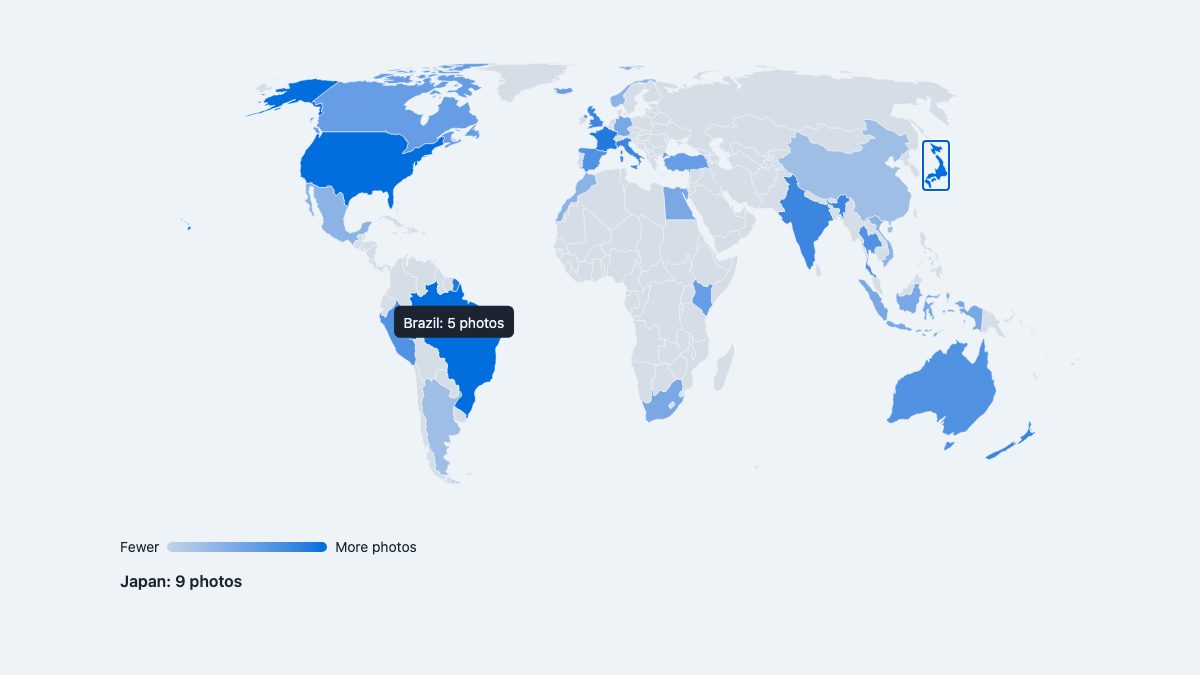
What you will build
- A responsive SVG map that scales with its container, with no resize handler.
- Countries coloured by a value, using
color-mix()and a CSS custom property. - A tooltip on hover and on keyboard focus.
- Click or Enter to select a country, announced to screen readers.
- Automatic dark mode through
prefers-color-scheme.
The data in the demo is a made-up sample (“photos taken per country”), the same travel-photo idea the original tutorial used. Swap in your own numbers.
1. Get map geometry you are allowed to use
The map is only paths, so the shapes matter. Do not scrape them from a random website. Natural Earth data is in the public domain, and the world-atlas package ships it as compact TopoJSON at three resolutions. The 110m file is plenty for a page-wide map.
Convert it to SVG paths once, at build time, with d3-geo and topojson-client. The Equal Earth projection keeps country areas honest, which matters when colour encodes data.
import fs from 'node:fs';
import { feature } from 'topojson-client';
import { geoEqualEarth, geoPath } from 'd3-geo';

const topo = JSON.parse(fs.readFileSync('node_modules/world-atlas/countries-110m.json'));
const countries = feature(topo, topo.objects.countries).features
  .filter((f) => f.properties.name !== 'Antarctica');

const projection = geoEqualEarth()
  .fitSize([960, 500], { type: 'FeatureCollection', features: countries });
const path = geoPath(projection).digits(1); // one decimal keeps the file small

const svg = countries
  .map((f) => `<path data-name="${f.properties.name}" d="${path(f)}"/>`)
  .join('\n');
fs.writeFileSync('paths.svg.txt', svg);
Run it with Node, then paste the output into your page. The 110m set produces about 176 shapes and roughly 115 KB of markup, which compresses well over the wire. Antarctica is dropped because it stretches the layout and rarely carries data.
2. Put the SVG in the page
Inline the SVG rather than loading it through <img> or <object>. Only inline SVG elements are part of your document, so only they can take CSS, events and focus.
<div class="map" id="map">
  <svg viewBox="0 0 960 500" role="group"
       aria-label="World map. Countries with data are focusable.">
    <path data-name="France" d="M…"/>
    <path data-name="Japan" d="M…"/>
    <!-- one path per country -->
  </svg>
  <div class="tip" id="tip" hidden></div>
  <p class="detail" id="detail" aria-live="polite">Select a highlighted country.</p>
</div>
The viewBox is what makes the map responsive. The coordinates stay at 960 by 500 while CSS sets width: 100%; height: auto, and the browser scales everything. The old tutorial computed a scale factor in JavaScript and redrew on resize; you no longer do any of that.
3. Style the map with CSS
Colour, hover and focus all live in the stylesheet. Each country with data gets a --v value from 0 to 10, and color-mix() blends the neutral land colour toward the accent by that percentage.
:root {
  --ocean: #eef3f8;
  --land: #d5dde6;
  --accent: oklch(55% 0.19 255);
  --ink: #1b2430;
  color-scheme: light dark;
}
@media (prefers-color-scheme: dark) {
  :root { --ocean: #121a24; --land: #2a3544; --accent: oklch(72% 0.15 250); --ink: #e8eef5; }
}

.map { position: relative; max-width: 960px; margin-inline: auto; }
.map svg { display: block; width: 100%; height: auto; }

.map path {
  fill: var(--land);
  stroke: var(--ocean);
  stroke-width: 0.6;
  vector-effect: non-scaling-stroke;
  transition: fill 0.15s;
}
.map path[data-value] {
  fill: color-mix(in oklch, var(--land), var(--accent) calc(var(--v) * 10%));
  cursor: pointer;
}
.map path[data-value]:hover,
.map path[data-value]:focus-visible,
.map path[aria-pressed="true"] { fill: var(--accent); }
.map path:focus-visible { outline: 3px solid var(--ink); outline-offset: 1px; }

.tip {
  position: absolute;
  pointer-events: none;
  padding: 0.35rem 0.6rem;
  border-radius: 6px;
  font-size: 0.875rem;
  white-space: nowrap;
  background: var(--ink);
  color: var(--ocean);
  transform: translate(-50%, calc(-100% - 12px));
}
.tip[hidden] { display: none; }
Three details are worth knowing:
vector-effect: non-scaling-strokekeeps borders at a constant pixel width however much the SVG is scaled, so country borders do not turn into thick lines on large screens.- Mixing in OKLCH gives an even-looking ramp from grey to blue. Mixing in sRGB tends to get muddy in the middle.
color-mix()is supported in all current browsers. - Dark mode only needs the four custom properties redefined, because every rule uses the tokens.
If you like this style of CSS-first interaction, the power of CSS selectors guide covers the attribute and state selectors used here, and CSS transitions and transforms goes deeper on the fill transition.
4. Add behaviour with a few event listeners
The JavaScript has three jobs: mark which countries have data, show the tooltip, and handle selection. Use one listener on the container and look up the target with closest(), instead of 176 separate listeners.
// Sample data (illustrative), keyed by each path's data-name
const data = { 'Japan': 9, 'Brazil': 5, 'France': 9, 'Kenya': 6 /* … */ };

const map = document.getElementById('map');
const tip = document.getElementById('tip');
const detail = document.getElementById('detail');
const max = Math.max(...Object.values(data));

map.querySelectorAll('path').forEach((p) => {
  const name = p.dataset.name;
  if (!(name in data)) return;
  p.dataset.value = data[name];
  p.style.setProperty('--v', (data[name] / max * 10).toFixed(1));
  p.tabIndex = 0;
  p.setAttribute('role', 'button');
  p.setAttribute('aria-pressed', 'false');
  p.setAttribute('aria-label', `${name}, ${data[name]} photos`);
});

function showTip(path, x, y) {
  const box = map.getBoundingClientRect();
  tip.textContent = `${path.dataset.name}: ${path.dataset.value} photos`;
  tip.style.left = `${x - box.left}px`;
  tip.style.top = `${y - box.top}px`;
  tip.hidden = false;
}

map.addEventListener('pointermove', (e) => {
  const p = e.target.closest('path[data-value]');
  if (p) showTip(p, e.clientX, e.clientY); else tip.hidden = true;
});
map.addEventListener('pointerleave', () => { tip.hidden = true; });

map.addEventListener('focusin', (e) => {
  const p = e.target.closest('path[data-value]');
  if (!p) return;
  const r = p.getBoundingClientRect();
  showTip(p, r.left + r.width / 2, r.top);
});
map.addEventListener('focusout', () => { tip.hidden = true; });

function select(p) {
  map.querySelectorAll('[aria-pressed="true"]')
    .forEach((el) => el.setAttribute('aria-pressed', 'false'));
  p.setAttribute('aria-pressed', 'true');
  detail.textContent = `${p.dataset.name}: ${p.dataset.value} photos`;
}
map.addEventListener('click', (e) => {
  const p = e.target.closest('path[data-value]');
  if (p) select(p);
});
map.addEventListener('keydown', (e) => {
  const p = e.target.closest('path[data-value]');
  if (p && (e.key === 'Enter' || e.key === ' ')) { e.preventDefault(); select(p); }
});
Pointer events cover mouse, pen and touch with one code path, so you do not need separate mouseover and touchstart handlers. On touch screens a tap triggers both the tooltip and the selection.
Make the map accessible
An SVG map is a picture to a screen reader unless you say otherwise. The demo does four things:
- Only countries with data get
tabindex="0", so keyboard users do not tab through 150 empty shapes. - Each focusable country has
role="button",aria-pressedand anaria-labelthat includes its value, so the information is not only in colour or a mouse-only tooltip. - Enter and Space select, the same as a button.
- The detail line is an
aria-live="polite"region, so a selection is announced.
Beyond that, never rely on colour alone. If the exact numbers matter, also provide them as a table. The data table with filter row snippet is a good companion, and the gradient line chart snippet shows the same no-library approach for charts.
Where this approach stops
A static SVG choropleth is the right tool for country-level data on a fixed world view. Reach for a tile-based library such as Leaflet or MapLibre GL JS instead when you need panning and zooming across street-level detail, geocoded markers, or real map tiles. The 110m shapes are also simplified: small islands and micro-states are missing or imprecise, so use the 50m file if your data includes them, at the cost of a bigger page.
If you want city markers like the original tutorial, project coordinates with the same function you used for the paths, for example projection([longitude, latitude]), and add <circle> elements at the returned x and y. They take the same CSS and events as the countries.
Ideas to take it further
- Load the data from JSON with
fetch()and build the--vvalues at runtime. - Add a pan and zoom wrapper by changing the SVG
viewBoxfrom JavaScript. - Switch the legend to discrete steps, using
data-valueranges in the CSS. - Use ISO codes rather than names as keys when matching real datasets; the names in world-atlas are short forms such as “Dem. Rep. Congo”.
For more interactive builds, see 30 truly interactive websites built with CSS and JavaScript.


Hello !
This is awesome tutorial. I really liked the way you describe each and every step.
This would be an interactive map. Thanks you for the sharing its coding.
Clean place
It’s pretty cool and awesome. I really like this map js.
Tried to click on the first image in your demo but looks like you have 404. Do you have a working demo of the map? Thanks!
Very interesting map, the demo works just fine! I will try it with some cool map design :) thanks
Great work! thanks for share it :) I love it.
Excellent tutorials. Java script will be the next generation language !
Thanks
Yap, the new SVG Features are awesome. Libraries like D3.js open a new galaxy of opportunities
I’m rebuilding my travel website and downloaded a couple of scripts for interactive maps, spent time getting them set up only to realize they were not going to let me do what I needed them to. This one is exactly what I was looking for and it comes with instructions yet! Thank you so much!
Looks similar to the idea behind the upcoming Google Glass’s ability to look at a building and see images, reviews, etc on that location.
Hello !
This is awesome detailed post. This idea is interesting. I really liked this post.
Moreover, I desperately needed such kind of idea. The hover on the city name is interesting.
Thanks
it is easy to change the location’s attributes. Upon hover, the stroke-width of the element increases by 50% to 3.
JQuery is sooooo powerful ! Added with some others Gmaps plugins, you can do such interactives maps with this one !
This is awesome tutorial. This would be an interactive map. and your tips for programming in JavaScript and improving his maps are very useful.
Do you have country coordinate data stored somewhere?
If so setting up functions to parse through the passed in data and create 250+ paths should not be that large.