This is an example of a web form with a 3D fold-out reveal card preview, designed using HTML, CSS, and JavaScript. The background images of the cards are imported to the code with their URLs. JavaScript functions have been used to create 3D animations in a focused event. The font family of the form is set as Sans+Pro and imported into the code with its URL. The colors are predefined as variables and set as white: #ffffff, lightBG: #dce1df, salmon: #ff6666, teal: #0096a0, tealMid: #0ebac7, tealContrast: #33ffff, darkGrey: #4f585e, and tealShade: #007c85. The body of the form is given the styles of background: @lightBG, color: @darkGrey, font-family: 'Source Sans Pro', sans-serif, and text-rendering: optimizeLegibility. The cards are given an initial set of styles such as background: @white, display: inline-block, margin: 8px, max-width: 300px, perspective: 1000, position: relative, text-align: left, and transition: all 0.3s 0s ease-in. The cursor is set as pointer to display the cursor as a hand, in a focus event on cards.
Source: https://codepen.io/candroo/pen/wKEwRL
This is an example of a FAQ web form with collapsible sections, designed using HTML and CSS. Variables are used to define values to avoid using values again and again in different places. The font family has been defined as 'Open Sans', sans-serif and been added to the code with its URL. The colors that are defined as variables are primary: #4f56c0, white: #FFFFFF, light: #F4F4F4, black: #333333, grey: #C4C4C4, and ghost: rgba(0,0,0,.0). The transitions that are defined as variables are $time: 200ms, $ease: cubic-bezier(0.165, 0.84, 0.44, 1), $smooth: cubic-bezier(0.175, 0.885, 0.32, 1.275), and $transition: $ease, $time. The section title is given the styles of color as $color, font-size as 4rem, font-weight as bold, text-align as center, text-transform as uppercase to convert the text to uppercase automatically, and padding as 3rem 0. The collapsible card initially has the styles of border: .1rem solid map-get ($colors, grey), border-radius: .4rem, overflow: hidden, and margin: 0 0 1.5rem whereas the button is given the styles of color: map-get ($colors, white), font-size: 2rem, width: 100%, and padding: 1rem 0.
Source: https://codepen.io/luiquecruz/pen/LYPjWbg
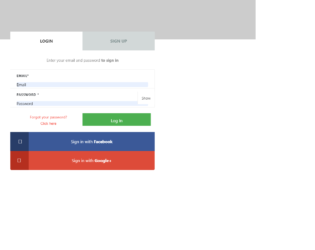
This is another example of a signup/sign-in form where the sign in and signup options have been given using toggle buttons, designed using HTML, CSS, and JavaScript. Bootstrap library and bootstrap style sheets have been imported to the code. JavaScript functions have been used to hide and show the password. Sign in using social media accounts function has been implemented with their respective links imported. Cursor style is set as pointer to display the cursor as a hand whereas text-transform style is set as uppercase for the headings to convert the text to uppercase automatically. The list has a style set of width: 50%, position: relative, float: left, text-align: center, background: #D2D8D8, line-height: 72px, height: 72px, font-weight: 700, font-size: 16px, and color: #809191 whereas the subtitle is given the styles of display: block, font-weight: 400, font-size: 15px, color: #888, and line-height: 48px. In a focused event, the login and signup tabs get an outline border of outline: dotted 1px.
Source: https://codepen.io/arunslite/pen/dojLOg
This is another example of a signup/sign-in form where the sign in and signup options have been given using toggle buttons, designed using HTML, CSS, and JavaScript. The Li element of lists has been used to display the details in a list. The form consists of placeholders, checkboxes, and a button. JavaScript click(function() have been used to implement the toggle feature. The body of the form has the styles of box-sizing: border-box, font-family: 'Open Sans', sans-serif, and a background color of linear-gradient (rgba(246,247,249,0.8), rgba(246,247,249,0.8)). The background of the container is imported with its URL. The text-transform style is set as uppercase to convert the text to uppercase automatically. The sign in and sign-up sections have the styles color: rgba(255,255,255,.3), and cursor: pointer to display the cursor as a hand which takes a transition of all .25s ease in a toggle event and takes the border style of solid 2px #1059FF and padding-bottom of 10px. The sign in and signup buttons are given the styles of float: left, font-weight: 700, text-transform: uppercase, font-size: 13px, text-align: center, color: #ffffff, padding-top: 8px, height: 35px, border-radius: 20px, margin-top: 23px, and background-color: #1059FF.
Source: https://codepen.io/joshsorosky/pen/gaaBoB
This is an example of a web signup/sign in form designed using HTML, CSS, and JavaScript. Signup and sign in options have been given using toggle buttons. JavaScript functions ready(function() and click(function() have been used to implement the toggle feature. The background of the body is set as #FAF3EC and the font family as 'Roboto'. The color of input placeholders is set as #748194 to work on different browsers. The background picture is added to the form with its URL imported and given the styles background-size:300px 400px, background-color:white, width:300px, height:400px, position:absolute, and border-radius:15px 15px 200px 200px. The signup and signup buttons are given a background color of white and cursor as pointer to display the cursor as a hand. The signup and get started buttons have the styles of font-weight: bold, width: 230px, height: 45px, padding: 6px 15px, border-radius: 5px, background: #EE9BA3, color: white, and font-size: 14px.
Source: https://codepen.io/chintuyadav/pen/mBaBqW
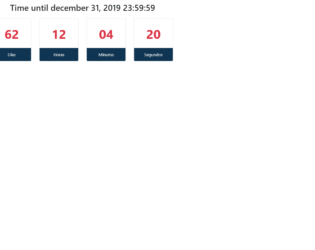
This is a template of a web form with a countdown feature, designed using HTML, CSS, and JavaScript. The countdown is displayed in all days, hours, minutes and seconds formats. The form is divided into three main sections as the header, counter box, and footer. The header displays the time when the countdown ends and the footer displays the time formats. The counter box is given the styles of width as 150px, margin as 0 15px, color as #dc3545, font-size as 3em, and font-weight as 700. The footer has the styles of background-color as #103552, and color as white. The JavaScript functions have been used to make the counter up and running. getTime() function had been used to set the ending time and get today's time whereas setInterval(function() had been used to update the counter every second. Math.floor had been used to calculate the time for days, hours, minutes and seconds.
Source: https://codepen.io/isacs33/pen/bGGevBy