JavaScript in Modern Web Design: What the Browser Now Does for You
Most of the interface patterns that once needed a JavaScript plugin are now plain HTML and CSS: modals, accordions, tooltips, smooth scrolling, carousels, form validation and theme switching. JavaScript still matters in modern web design, but its job has changed. You use it for state, data and the few interactions the platform does not cover, not to rebuild widgets the browser already ships.
This article revisits the classic checklist of jQuery and MooTools plugins that web designers once collected (lightboxes, sliders, tabs, tooltips, scroll effects, form styling) and shows what replaces each one today, with code you can paste into a project.
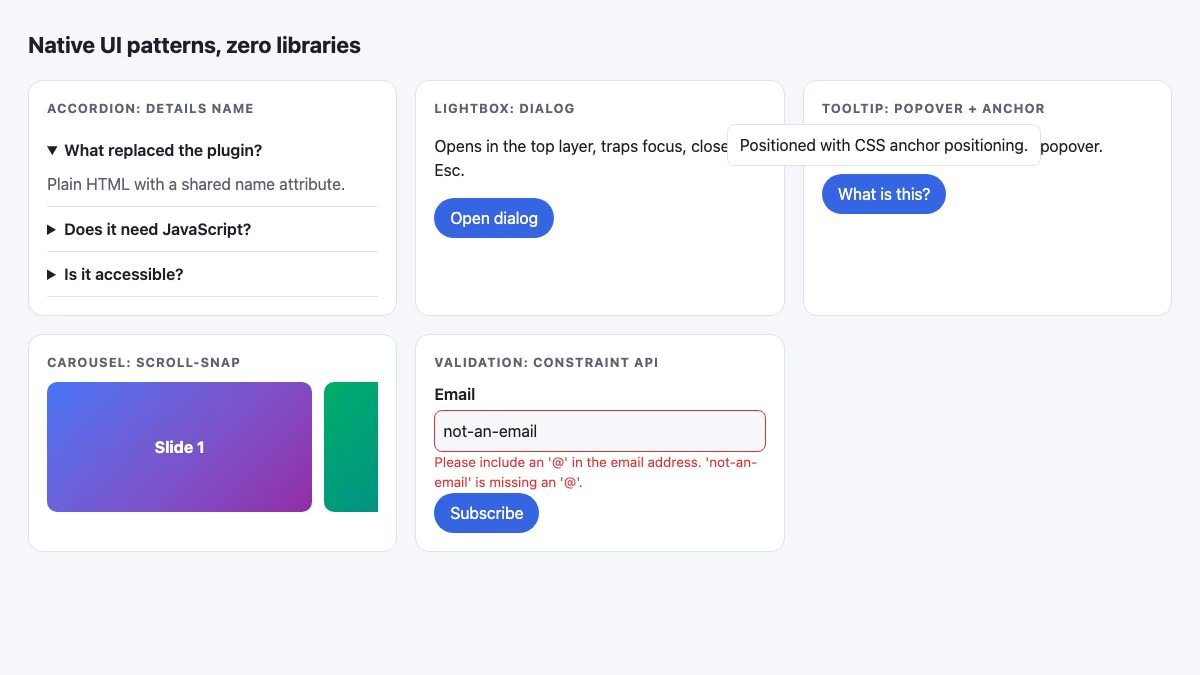
From plugins to platform: the quick map
The old approach was to download a script, load a framework, and call something like $('#gallery').lightbox(). The modern approach is to start with the right HTML element and add CSS. Reach for JavaScript only for the gap that remains.
| Old plugin category | Modern replacement | JavaScript needed? |
|---|---|---|
| Lightbox, Thickbox, FancyBox | <dialog> with showModal() |
One line to open |
| Accordion | <details name="…"> |
None |
| Tooltips and popups | Popover API plus CSS anchor positioning | None for basic cases |
| Scroll to anchor | scroll-behavior: smooth |
None |
| Carousels and sliders | scroll-snap-type |
Only for arrows or autoplay |
| Form validation and styling | Constraint Validation API, :user-invalid, accent-color |
Small, for custom messages |
| Stylesheet switcher | color-scheme and light-dark() |
Only to save a manual choice |
| sIFR and image text replacement | Web fonts with @font-face |
None |
Lightboxes and modals with the dialog element
Lightbox scripts existed to put content on top of the page, dim the background and capture clicks. The <dialog> element does all of that. According to MDN, calling showModal() renders the dialog in the top layer, shows a styleable ::backdrop, and makes the rest of the document inert. It is Baseline widely available.
<button id="open">Open dialog</button>
<dialog id="dlg" closedby="any">
  <h3>Hello from a dialog</h3>
  <button id="close">Close</button>
</dialog>
const dlg = document.getElementById('dlg');
document.getElementById('open').addEventListener('click', () => dlg.showModal());
document.getElementById('close').addEventListener('click', () => dlg.close());dialog { border: 0; border-radius: 14px; padding: 1.25rem; }
dialog::backdrop { background: rgb(0 0 0 / .55); }Escape closes a modal dialog by default, and focus returns to the trigger afterwards. The closedby attribute lets you also allow clicks outside, though browser support for it is newer than for the element itself, so treat it as an enhancement. If you want a full image gallery, see our walkthrough on creating a modern lightbox with CSS3 and JavaScript, then swap its overlay markup for a dialog.
Accordions and tabs without a plugin
The old accordion plugins toggled heights with script. Today <details> and <summary> give you a keyboard-accessible disclosure widget. Give several elements the same name and only one stays open at a time, which is the classic accordion behavior.
<details name="faq" open>
  <summary>What replaced the plugin?</summary>
  <p>Plain HTML with a shared name attribute.</p>
</details>
<details name="faq">
  <summary>Does it need JavaScript?</summary>
  <p>No.</p>
</details>
MDN documents the ::details-content pseudo-element for animating open and close. Combine it with block-size and transition-behavior: allow-discrete for a smooth slide, and check the compatibility table before relying on the animation, because the content still opens instantly in browsers that lack it. For ready-made styling, browse the accordion FAQ template.
Tabs are the one widget without a dedicated element. You still need a small script (or radio inputs and :has()) to manage role="tab", arrow-key navigation and aria-selected. Follow the ARIA Authoring Practices tabs pattern rather than inventing keyboard behavior. A working example is the login and sign-up form with tabs.
Tooltips with popover and anchor positioning
Tooltip plugins calculated pixel positions with JavaScript. Two platform features split that job. The Popover API handles showing, hiding, stacking and light dismiss. CSS anchor positioning handles placement next to the trigger.
<button class="tip-btn" popovertarget="tip">What is this?</button>
<div id="tip" popover>Positioned with CSS anchor positioning.</div>
.tip-btn { anchor-name: --tip; }
[popover] {
position-anchor: --tip;
position-area: top;
margin: 0 0 8px;
}MDN lists the Popover API as Baseline 2025 newly available, and position-area as Baseline 2026 newly available. That means both work in the latest versions of all major browsers, but you should keep a fallback if you must support older devices, such as a popover that simply appears below its button. A popover="auto" closes on Escape or an outside click. Note that a popover opened by click is not a hover tooltip; for hover and focus hints, the newer popover="hint" type and interest invokers are designed for that, so check support before using them.
Smooth scrolling in one line of CSS
jQuery ScrollTo and SmoothScroll animated the page position frame by frame. The browser now does it:
@media (prefers-reduced-motion: no-preference) {
  html { scroll-behavior: smooth; }
}
:target { scroll-margin-top: 5rem; }
The media query respects people who ask their system to reduce motion, and scroll-margin-top keeps the target clear of a sticky header. Our article on the animated scroll to top button applies the same idea to a floating control.
Carousels with scroll snap
A horizontal scroller that snaps to each item replaces most carousel plugins. MDN marks scroll-snap-type as Baseline widely available.
.carousel {
  display: flex;
  gap: 12px;
  overflow-x: auto;
  scroll-snap-type: x mandatory;
}
.slide { flex: 0 0 80%; scroll-snap-align: start; }
Touch, trackpad and keyboard scrolling all work out of the box, and the content stays real, selectable HTML. Add tabindex="0", a role="region" and an aria-label so keyboard users can focus and scroll it. If you need previous and next buttons, a few lines calling scrollBy({ left: width, behavior: 'smooth' }) are enough. Avoid autoplay unless users can pause it. For ready layouts, see the blog card carousel.
Form validation and styling
Libraries like jQuery Validate duplicated what browsers now do natively. Use the right type, add required, pattern or min, and let the Constraint Validation API report problems.
const form = document.querySelector('form');
const email = form.elements.email;
const error = document.getElementById('email-error');

form.addEventListener('submit', (e) => {
  if (!form.checkValidity()) {
    e.preventDefault();
    error.textContent = email.validationMessage;
    email.focus();
  }
});
input:user-invalid { border-color: #d33; }
input:user-valid { border-color: #2a9d5c; }
:root { accent-color: oklch(0.55 0.2 265); }The :user-invalid pseudo-class only matches after the person has interacted with the field, which avoids red borders on an untouched form. accent-color recolors native checkboxes, radios and sliders, replacing the old custom-checkbox scripts while keeping their accessibility. Server-side validation is still required, since client checks can be bypassed. See the registration form with validation for a styled example.
Theme switching without swapping stylesheets
The stylesheet switcher was a trick from 2001 that jQuery and MooTools later wrapped. Today, declare color-scheme and use light-dark() for color tokens, so the page follows the user’s system setting automatically.
:root {
  color-scheme: light dark;
  --bg: light-dark(#f6f7fb, #14161c);
  --ink: light-dark(#1b1f2a, #e8eaf0);
}
body { background: var(--bg); color: var(--ink); }
If you offer a manual toggle, set color-scheme: light or dark on the root element from a small script and save the choice in localStorage. That is a real case where JavaScript earns its place.
What JavaScript is still for
Dropping plugins does not mean dropping scripts. These jobs still need JavaScript:
- State that outlives the page, such as a saved theme, a cart or form drafts.
- Data: fetching, filtering and rendering content from an API.
- Complex widgets: tabs, comboboxes, date pickers, drag and drop.
- Observing the page with
IntersectionObserverto lazy-load or trigger effects when something scrolls into view. - Page transitions:
document.startViewTransition()animates between DOM states, and the CSS-only cross-document version covers multi-page sites in supporting browsers.
For motion that needs no script at all, see how CSS transitions and transforms work, and for inspiration on what is possible when CSS and JavaScript cooperate, browse 30 truly interactive websites built with CSS and JavaScript.
A practical rule for choosing
- Look for a native element or attribute first (
dialog,details,popover, input types). - If CSS can express it, use CSS (
scroll-snap,scroll-behavior,:has()). - Write a small vanilla function for what remains, keep it under a screen of code, and guard for missing elements.
- Only add a library when the problem is genuinely hard, and then pick a small, maintained, framework-free one.
Check each feature’s Baseline status on MDN before shipping, provide a sensible fallback for newly available features, and test with the keyboard. A page built this way loads faster, breaks less and needs far less maintenance than one stacked with plugins.
I must say that jQuery is my favorite, it feels easy and quick to work with. Nice post, keep up the good work.
I had to give it to jQuery as well. I’m a rookie when it comes to javascript, and that library was simply plug and play.
I really enjoy working with jQuery… tought at the start but becomes second nature after some stressfull times:) .. This site just gets better and better keep it up.
Not a single prototype.js plugin? It’s currently third in the above poll…
nice post, i am using jQuery and mootools a lot.
I’ve player with jQuery and MooTools, but had to give up because the one thing I found impossible with these frameworks is getting cross-browser compatability, especially with ie6. I know I could just ignore ie6, but most of my clients still use it. Is it just me?
Nice Collection.
jQuery sIFR link does not work.
Thanks for this list. I’m fan of jQuery FW.
JQuery and Mootools are different. I wouldn’t call JQuery a framework, it’s more of a shortcut to javascript with an extensive plug-in library. Mootools seems to be a proper framework. It’s just a shame that their documentation is so poor that most front enders can’t grasp the overall concept. If you’re new to javascript, I’d suggest using JQuery to avoid the steep learning curve that comes with “object-oriented” scripting in Mootools.
This is a great resource, while i’d heard of most of them there are a few really hot additions to my list now! The Image replacement will be very useful. However, I’m amazed that you missed Adobe’s superb Spry framework off of this list! And what about the Yahoo user interface which is also pretty good?
This is the greatest resource of Javascript Frameworks.
Thanks
Awesome list, love the javascript links, thanks, i didnt know about some of them frameworks and scripts, thanks!
Wow great list. I am looking for something like this right now!! Was wondering thought does anyone know of any other JavaScript plugins just for text?? I am looking for something to enhance one particular line of text on a site I am working on. I might use the image text replacement but… looking for something with a little pizazz
Thanks
R
I started using Mootools in early 2007, but by the middle of 2007, I switched to jQuery and haven’t looked back since ;)
There are a lot of talented people working on both frameworks, but for me, jQuery fits my needs better and besides…it just works. I’m still amazed with the things I can do in jQuery.
One popular category not covered was Modal dialogs. jQuery has a number of related plugins used for things other than just “Image Zoom and Popup”.
Full disclosure: I am the author of SimpleModal.
Excellent, thks a lot for this content. I’d hope this comparaison … I’ve a lot problem to decide what is the best of component…
Amazing Lists!! I didn’t know some of them.. thanks bookmarked!!
You’ve done a lot of work… Thank you for assembling such a great list of resources.
OMG! You are a saint!
I have 4 months working as a web designer (oficially) and I still have million of things to learn. Ive been looking for this a lot! honestly thank you very much.
I LOVE this site.
i accessed this page with javascript turned on stupidly (i nearly always have it turned off) and it made safari crash, losing all the pages i had open.
*that* is what javascript is all about to me.
These plug-ins and tutorials are great! As a designer, learning javascript is tough for me. jQuery has certainly been easier for me to learn, but I’m loving mootools and some of these look like a lot of fun!
Very nice collection. We use jQuery because we love their slogan “write less, do more”. And since the main lib file is loaded, why not go with jQuery’s plugins instead of loading an extra/another lib.
Interesting list. I myself am a front end developer and have been using prototype with the Scriptaculous extension for 2 years. I mean ive been using this framework intensely, creating a whole CMS with a drag and drop front-end. Movable site tree structures and fluid page content via Dragging & Dropping elements around the page. However It seems they haven’t put out any updates for it since January, which has me a little worried. Think i might down tools and look into jQuery, it seems to be by far the most popular choice and has a large community following, thus pushing the development of new plug-ins etc. What are other peoples views? Any recommendations. Hope i haven’t made the wrong framework choice :S
@Drewid: jQuery is definitely the most popular, and while I’m biased towards Mootools, I would especially recommend Mootools to you since you’re coming from Prototype. Mootools is essentially an updated, optimized, and better Prototype. It handles Classes in much the same way, along with everything else you’d expect from Prototype, and it has an active community.
STUMBLED!
Very nice post, I prefer jquery myself.
I was looking for these scripts… Helped a lot!
Thank you! ;)
ovvv very very thnx and very beatiful blog ;)
Wow! Stunning collection, I’ll have to have a look. Thanks for the amazing post! =)
Thank you so much for these! I’ve always been interested in putting Javascript effects with my works.
Great rundown of modern JS… it’s always been something that’s slightly intimidating (and a job in itself to keep up with the latest updates), so seeing a nice little list like this definitely demystifies the whole issue. Thanks a ton for this post – I’m sure I’ll be coming back to this one in the future.
Good to see some great advice and coverage on implementing javascript into sites.It’s exciting to be able to offer some animation and clever loading etc for clients.
Now that is some list. This will be bookmarked for sure. I am going to implement some of these scripts to existing sites, and any I work on in the future (if necessary). Great research Nick. Very much appreciated.
On my site I have my own special fx with mootools.
Don’t see it in any of the above ( link ).
Very good Techniques & Scripts. I love them because is a way to avoid working with Flash, to do effects and work with indexed elements by the robots. I also use some tricks on my Website.
Thanks for the great tools! Would it be possible to do a similar post, but featuring WordPress plugins instead? I’d love to easily spice up my blog with some of this stuff.
In poll you forgot one very progressive and popular framework: EXT JS ( extjs.com )
I think you made a mistake here Nick, on the Slideshow2 for MooTools.
I do appreciate you linking up my website Muse for sure, but I do NOT use MooTools. The Javascript used on Muse is custom stuff written by me, but it does also use the Prototype/Scriptaculous libraries. You can see the copyright notice in my JS file for reference.
Just thought I would let you know, in case it matters :) Otherwise no worries and keep up the great work!
Thanks again bro!
Peace,
Drew Wilson
thanks for posting this javascript article. good job!
A very nice round up web designer wall. A great list of easy to insert javascripts for us developers. Keep these kind of posts coming in other areas, we could use them.
Wow is pretty much what I first thought.
This is a great guide an reference for pretty much any javascript functionality without having to create something from scratch.
Cheers for this
Web Design Portfolio
I stared to use JavaScript Frameworks/Libraries at work especially in Online Applications. They indeed help with visual representation of informational and add useful features tot eh web site. We started to use MooTools, but switched to jQuery because we found it to have more different components and large support resources online. I enjoy using jQuery toggle, date picker, sliders, gallery, info tip and more more more. There a lot that can help with form, for example auto suggest. :-) JavaScript Frameworks allows us to do things that we would most likely use flash for before for animated galleries and such.
A lot of nice Javascript resources here, thanks for sharing them.
I really like your post!… Keep up the great work! ;)
Ovi Dogar
AbsoluteCovers.com
awesome collection this is a great list of javascript libraries but i prefer to use mootools as i it has an elegant look besides it’s very great and flexible to use.
Hi thanks for this collection!! I use some of these plugins, but some are new ;-)
The thumbnail of poolga.com shows Lightview but the script itself isn’t linked, I’m guessing this is because most of what’s listed is for jQuery.
Is there any example that combines accordion and smooth scrolling, something like that one: https://www.duarte.com/? My point is: if you type some address that contains a named anchor the relvant accordion panel is open; I tried to combine jQuery accordion with scrollTo, but it doesn’t work :(
Simply awesome links here. I’m glad that there are so many choices, and so many widgets! I’ve been working on, and finally finished a mooTools select box factory that can produce really cool custom dropdowns, select boxes and more. Check it out… Customizable Select Box Factory. You can also play with it below.
It has a sift tool which can allow you to trim the list for easy selections. It takes spreadsheet style selections (ctrl, shift), it has an eraser, an indicator for how many selected, and is browser compatible. This is just one variation, there are more…
Thanks for this resource. One of my favorite resources is Dreamweaver extensions from ProjectSeven.com. They can be used to quickly and easily create accordion and sliding panels, dropdown and flyout menus, and lots more. Customer support and browser compatibility is excellent.
Wow some effects are really shocking! JavaScript is the best for websites of graphic designers and photographers but if you want nice “moving web”, choose JavaScript, too.
Simply wondering, would I also use jQuery to toggle which menu item I am on, or does that have to be done on a page per page basis?
this is really very useful information about javascript frameworks. Jquery is easy to use & more effective.
Nice lists here, i’m studying now this jQuery thign :)
Nice list!
I’ve also created a jQuery Image Zoom plug-in that looks and works slightly different from the others.
Thanks for the excellent javascript tips and programming techniques. This sure was helpful in building a general resource guide for my programmer’s to use internally.
jQuery for the win Nick! – awesome post
Thank you so much for this list. You are an extremely helpful and amazing “administrator” of excellent web information out there. Keep up the great work, and thank you for what you do.
Nice resources… keep up the good work.. :)
Regards,
Cheap SEO Services
Thanks for the wonderful list. Javascript is a valuable tool for all web designers. Coming from a programming background I was initially wary of using javascript especially due to browser incompatibilities. However in recent years Javascript has evolved both in terms of the things it can do as well as its compatibility across browsers and platforms.
I like jQuery
And thanks for the good js design list
I’m really glad jQuery is prevailing in the poll!
Very nice, I now have plenty of fuel for experimentation and lofting on random design ish.
Thanks for sharing your hecka dope fresh sick design skills and theories with us all in the world of the anon. I am using the CSS Dock menu based on Jquery and Interface libs from the NDesign blog.
I look forward to all that you have to share in the future.
Cheers , mate.
Loftkilla
First of all I must say your blog theme is awesome!!
I use prototype and jQuery is also my fav.
I always thought that Flash will stop Javascript but the opposite happend. Especially because you can change things with some lines of code. For example with the lightbox effekt.
This is a great list of javascript techniques. Smashing magazine recently posted an article on 75 popular js techniques. I also had a list going on my blog.
Hi all, i was wondering if anyone was aware of a carousel scroller that would enable me to enlarge any of the contained images within a lightbox. I am currently using the stepcarousel.js script and am trying to use the lightbox.js script within it. There are conflicts occurring whereby only one or the other will work at once. Does anyone know how i can code it so that both can work in conjunction or alternatively offer a script that already combines both.
Any comments will be much appreciated, just to note i am very new to this.
This is a super good resource. Going to come back to this post for sure. Thanks for the JS roundup!
Considering large corporate websites, what is your opinion about these js libraries slowing down page rendering and overall request/rendering performance?
Good list Nick, though you didn’t mention our tools :-(
We offer 3 tools for enlarging images to show them in greater detail. The code is tight, the filesize is small and they don’t require libraries (so they can be used on any website).
View the demos of Magic Zoom, Magic Magnify and Magic Thumb here:
https://www.magictoolbox.com/
javascript is cool, but the most important sites avoid to use it. why?
Thanks for the resource. Is there anyone who knows how to make the drill down menu done at http://www.deviantart.com?
it would be better if the page wont be refreshed when i submit my comment.
Hey this might be a stupid question, but what is the copyright on these plug ins? I’m guessing they are open source and you can use them as you wish, I’m talking about if you were to charge a client and use some of these features.
I’m wondering, can someone give me an answer? [email protected]
Thank You!!
In one day I’ve gone though and learned a tremendous amount about Jquery and mootools core/plugins. Fantasitic collection.
Keep up the amazing work.
highslide js not work in ie
wy?
help me plz
It’s so great to see these tools, i guess one day the internet would be so perfect that computers will have only a system operative and the rest will be online made with IRA all the time. Thanks a lot for your list and great JS tools i’m using some of those right now.
regards
Paluh
http://www.deprowebs.com
Hi,I am a web developer. JavaScript increases the speed of designing.This improves the efficiency.
You never cease to amaze! Your listst are so thorough! Thanks to you my web designer toolbox has exponentially grown in leaps and bounds!
PLEASE keep up the awesome job you are doing!
Thank you sooo much for making this page! i have been wondering for ages how these are made, i found your site the other week and have been hooked on it! Really appreciate your work, and i am learning loads for re designing my site this month!
Full Free Scripts and Web Designer Programs
wwww.fireturk.com
nice repertoire. Thank you for compiling these plugins in one single page. Thanks again and keep up the good work.
Goodday!
Thanks indeed for your services.
Please kindly provide me the roles of Java Script technology in building web design and web servers.
Hope to read from you soon.
Best regards
Good list,! i especially like the Jquery ones, but some mootools are very effective.
Thanks for sharing
hello, my name is tedd and good web site i´m from peru very well. thankyou hellme much
Free Asp and Php Scripts at the same address : Fireturk.com : )
Thanks for this, been looking for a nice simple gallery i can use to display a few pics and this works a treat. Cheers
Great list of jQuery stuff.
I’ve always wondered what mootools was?
I’ve already used the accordian and I’ll definately try some of the others.
Thanks
Keith D
hah! I like the post, but Flash is the future of the internet friends. Believe it or not, actionscript is more powerful that GOD.
-makingcolor staff ;>
Thank you so much for these great resources. I have used a few of these in the past however, there where so many on this list that I did not even know about.
very good site as a reference for all developers
i just love your website. really. everything is so pretty, so helpful. thanks for sharing with us
=)
there where so many on this list that I did not even know about.
Hi
this is great post it’s help me alot but I have a issue working with mootols and jquery both are awesome and work well but when I use them togather some things are not working.
pls advice
thanks
kinza
The designs showed here show what simple and tasteful design is all about. Another one to consider
I have no concept of how to write a Java script, but I need one that shows an image of letters and numbers combination which should then be typed in to get to the next page, I have made a sketch but of course it does not work with drove + talk script. but it is within the script, it looks like. Exist such if not what will it cost to make for me. I preview my website at this address http://www.route66side.dk/ script2.htm Sincerely Johs Kjaer
Hi,
I hope someone can help me, Im trying to create a website similar to this one
I want to try and produce the same order form so a customer can either upload an image or choose from one of our gallery images, It then previews the image where you can then select the size and finish and put in your order details, Do you know what program has created this?
any Ideas would be a great help.
regards
Adam
You are definitely a skilled writer. You definitely know how to write to keep the audience engaged. Cheers
A customizable jQuery plugin that displays tooltip popup — with either static html text or Ajax content.
Some interesting uses of various code banks here… been looking for different ways to implement a new look to a current site I’m designing, thanks for cataloging some of main ones into an easy to read page! :)
I have design my website service with Adobe Flash Pro, but my pictures are not appearing on the page but there are on my C panel Account help?
It relies heavily on touch because the pages I have a user acting on, are usually a collection of child records. uggs outlet Caching is a big help in this respect.Thanks
If I got a chance, i will prefer buying the iphone 4 white but not the iphone 4 Black. Who can tell me where is the white iphone 4 available? I would really want to take one.
News about Apple’s much-delayed white iPhone 4 continues to fly fast and furious, with a new claim from Boy Genius Report suggesting that the model has been canceled entirely instead of merely delayed until next spring as the company announced yesterday.
The researchers, knowing the style of creativity, strengths and weaknesses of individuals with ADHD may help identify appropriate career, he says.
hi, if anyone know javascript designing then contact me .. i have some work for hem/her!
i will pay him !
contact me-09988971816
Exactly what I have been craving
Thanks so much for this all in one place!
I have viewed the videos and it is really great, It give me ideas on how to finish my graphic design courses.
Many Thanks.
Kayar Sekmeler bir çok zarif bir etki yaratır bir mootools 1.11 eklentidir. Bu da iTunes Music Store kullanılan bir widget çok benzer Panik Software’in Coda sitesi, görülen şeyin bir klon.
using these plugins will make your websites look like everyone elses….. and give you a real headache when your client asks for modifications. Invest your time in learning jQuery and do it yourself.
It is 100% true.No one can learn from copy and paste method.To all developers, take hints from this codes but use your open mind to develop.
Carousel Slideshow is a fabulous DHTML script for the showcasing of images on your site. It displays images in a 3D, carousel fashion.
It displays images in a 3D, carousel fashion.
of course like your web site but you need to test the spelling on several of your posts. Many of them are rife with spelling issues and I in finding it very bothersome to tell the reality on the other hand I will surely come back again.
Thanks so much for this all in one place!
I have viewed the videos and it is really great, It give me ideas on how to finish my graphic design courses.
Sorry, but jQuery, MooTools these are not frameworks, are merely Javascript libraries…