Parallax Gallery With CSS Scroll-Driven Animations

A parallax gallery moves its layers at different speeds as you scroll, so the background seems far away and the foreground close. In 2027 you build it with CSS scroll-driven animations: no Flash, no ActionScript and no scroll listener in JavaScript.
The original version of this tutorial made a Flash scene from a Photoshop mockup and moved two movie clips against the mouse position. The idea of depth through differing speeds has not changed. What has changed is that the browser can now tie an animation to scroll progress natively, run it off the main thread, and let users switch it off. This guide builds a layered hero plus a gallery that rises into view, and shows a pure-CSS 3D alternative.
How parallax creates depth
Distant objects shift less than near ones when your viewpoint moves. Parallax scrolling fakes this: when the page scrolls by 100px, the nearest layer moves with the page by the full 100px, and farther layers move by less. To get that effect you offset each layer against the scroll by a different amount, so the far layers appear to lag.
There are three ways to do this on the web today:
| Technique | Best for | Needs JavaScript |
|---|---|---|
Scroll-driven animations (animation-timeline) |
Layered heroes, reveal effects, galleries | No |
CSS 3D with perspective and translateZ() on a scroll container |
Real depth from one scroll container | No |
background-attachment: fixed |
One simple background image | No, but unreliable on mobile |
Scroll listeners that rewrite transform on every event are no longer needed. They run on the main thread, which is where jank comes from.
Build a layered parallax hero
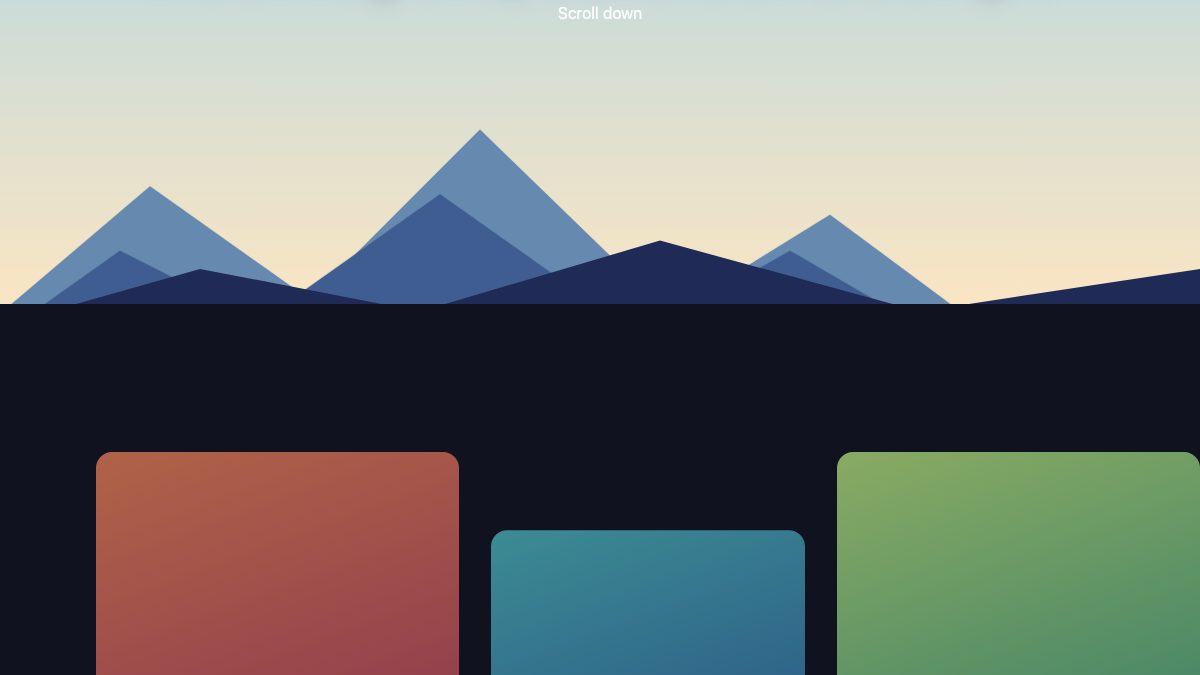
Each layer is an absolutely positioned element taller than the viewport, so it has room to travel. Stack them from back to front: sun, far mountains, mid mountains, near mountains.

<section class="scene">
  <div class="layer l-sun"><div class="sun"></div></div>
  <div class="layer l-far"><!-- svg mountains --></div>
  <div class="layer l-mid"><!-- svg mountains --></div>
  <div class="layer l-near"><!-- svg mountains --></div>
  <div class="title"><h2>Four layers, zero JavaScript</h2></div>
</section>
.scene {
position: relative;
height: 100vh;
overflow: clip;
}
.layer {
position: absolute;
inset: -20% 0;
pointer-events: none;
}
@keyframes drift {
to { transform: translateY(var(--dist)); }
}
@media (prefers-reduced-motion: no-preference) {
@supports (animation-timeline: scroll()) {
.layer {
animation: drift linear both;
animation-timeline: scroll(root);
animation-range: 0 100vh;
}
.l-sun { --dist: 45vh; }
.l-far { --dist: 35vh; }
.l-mid { --dist: 18vh; }
.l-near { --dist: 0vh; }
}
}What each line does
animation-timeline: scroll(root)replaces the clock with the scroll position of the page. At the top of the page the animation is at 0%; at the end of the range it is at 100%.animation-range: 0 100vhlimits the effect to the first screen of scrolling, so layers stop drifting once the hero is gone.- The custom property
--distlets one keyframe serve every layer. The far layers get a large downward offset, which cancels most of the page scroll, so they seem to barely move. The near layer gets none and scrolls at normal speed. - Declare
animation-timelineafter theanimationshorthand. The shorthand resets it toauto.
Reveal gallery items with view()
scroll() follows a scroller. view() follows an element as it crosses the scrollport, which is what you want for gallery items. This rule slides each card up and fades it in as it enters:
@keyframes rise {
  from { transform: translateY(8rem); opacity: 0.2; }
  to   { transform: none; opacity: 1; }
}

@supports (animation-timeline: view()) {
  .card {
    animation: rise linear both;
    animation-timeline: view();
    animation-range: entry 0% cover 40%;
  }
}
The range entry 0% cover 40% starts when the card’s leading edge touches the bottom of the viewport and finishes when the card has covered 40% of its travel. Give the middle card a different translateY start or a top margin, as in the demo, and the row looks staggered without any delay logic.
Because the cards sit in a normal grid, they work as an ordinary gallery. For click-to-enlarge behaviour, pair them with the lightbox approach in Creating a Modern Lightbox with CSS3 and JavaScript, or start from the photo gallery with a modal lightbox snippet.
The CSS 3D alternative
You can also get real depth with no animation at all. Put perspective on a scrolling container, and push layers back along the z axis. Because deeper layers are drawn smaller and shift less, they scroll slower automatically.
.parallax {
  height: 100vh;
  overflow-y: auto;
  perspective: 1px;
  perspective-origin: center top;
}
.parallax .layer {
  position: absolute;
  inset: 0;
  transform-origin: center top;
}
.parallax .back { transform: translateZ(-2px) scale(3); }
.parallax .mid  { transform: translateZ(-1px) scale(2); }
.parallax .front { transform: translateZ(0); }
The scale() value compensates for the shrinking: with perspective: 1px an element at translateZ(-1px) renders at half size, so scale it by 2 to restore it. This technique needs the scroll to happen inside the perspective element, not on the page itself. That makes it awkward for full-page layouts and can interfere with sticky positioning, so prefer scroll-driven animations for page-level effects and keep 3D for contained scenes.
Accessibility and fallbacks
Parallax can cause discomfort for people with vestibular disorders, so treat it as optional decoration.
- Respect reduced motion. Wrap all movement in
@media (prefers-reduced-motion: no-preference), as above. Users who have asked their system for less motion get a static, fully readable page. - Default to the finished state. The base styles show everything in its final place. The animation is added only inside
@supports, so a browser without support never sees hidden content. - Keep text out of moving layers. Headings and captions should sit in their own unmoving layer, as the title does here, so contrast and reading are stable.
- Keep the gallery keyboard-friendly. The effect changes only
transformandopacity, so focus order, links and buttons behave exactly as in a plain grid.
Browser support
Scroll-driven animations are not yet Baseline. Chrome and Edge have supported them since version 115, and Safari added support in version 26. Firefox keeps them behind a flag, so there the page shows the static layout. Because of the @supports guard, that fallback is a deliberate, complete design rather than a broken one. Test each function you use (scroll() and view()), and check MDN’s compatibility table before shipping to see if the status has moved.
Performance is the other reason to prefer this approach. Animating transform and opacity lets the browser run the effect off the main thread in most cases, which is far smoother than a scroll handler that reads layout on every event.
Take it further
- Swap the SVG shapes for cut-out photographs saved as AVIF or WebP with transparency. Keep each layer under a few hundred KB and set explicit
widthandheight. - Combine the hover tricks from the expanding image gallery with the reveal for a richer gallery.
- Add a scale effect to a hero image as you scroll with How to Zoom Hero Images on Scroll.
- If keyframes are new to you, start with Easy CSS Animation Using @keyframes.
- For styling the images themselves, see CSS3 Image Styles.
The whole effect is about 30 lines of CSS. The old Flash version needed a Photoshop scene, 24 steps and a plugin that no browser runs any more; this one works from a single stylesheet and degrades gracefully.


Looks nice! But the front_mc should move faster than the back_mc for the parallax-effect to work. Picture yourself in a moving car, looking out at the landscape through the side window. The road will move really fast, while the clouds almost seem to stand still. It’s the same thing, only not as extreme.
Great technique Nick, looks very good. I think I would like to try something similar in javascript if I get the time. One thing I would say though is the actionscript uses a few bad practices. It is best to assign a button with an instance name and call the onRelease action in the first frame of the main timeline, rather than embedded in the buttons. Embedding it in buttons only causes problems later when searching for pieces of code.
héhéhé
amazing.. no more words…
thanx
=]
I learn something from you with all occasions :-)
This first poster is correct – this isn’t parallax scrolling. Maybe something is wrong with the demo? The background should be scrolling slower than the foreground. All I see is a picture scrolling across.
@dude: Yes there is a parallax scrolling. Watch for the pillar moving in front of the pictures. It’s just not a very big difference between the speed of foreground and background.
Tough, there is a slight calculation error I think: The pillar is not in the same position when the picture moves to the right and when the picture moves to the left. But anyway: Nice!
Hey…
Is this not the exact same tutorial you did for web designer magazine ages ago… digging up old content eh ?
hey.. thanks dude..
you inspire me for my next project.. keep up a good work
i will come back.. hungry for more idea / knowledge.. :)
My answer is simple: this tutorial is amazing ;)
Ralph
@andy: Yes, there is sort of a parallax-effect, but it’s inverted. For a more realistic effect (as I wrote before), the front_mc should move faster, not slower than the back_mc.
great tutorial. What I would like to see if the explanation for the code, that would help people like me that want to learn actionscripting.
Thank you.
Love your site.. but wasn’t this the same tut in a web design magazine about a year ago?
your tutorials are very detail and awesome man.. thats help me a lot..keep up the good work nick..
@John – Yes, it was previously published in Web Designer magazine before. I re-publish here due to many requests.
Umm… this isn’t right. The background is moving faster than the foreground, this is reverse of how it should be.
Great tutorial, thank you for taking the time, looking forward to giving this a go tonight! ;)
Uh… where’s the parallax? I viewed the demo and I see the room move from left to right, but the foreground and the background seemed to move at exactly the same speed – no parallax.
I have the same issue as #36, same speed. I’m using Firefox 2.0.
Beautiful piece nonetheless.
thanks, because with your help we are getting a more friendly internet every day; really thanks for all you do for web master rookies.
Great demo! You’re giving designers some top quality training for nothing. And explaining everything step by step means that we can all give it a try.
quick question:
is there a way to blur the wholoe swf while scolling?
I think it might be a little easier on the eye.
This is mad cool. Thanks for all of your hard work. I can’t wait to give it a try after my final exams.
Great element and thanks for share your hard work. I challenge you to this… traducelo al español.
the work is just marvelous.. u r really great to share it ..n teaching each n every aspect of the work..hats off………
This gallery is very cool …But the link is corrupted…Could you put another archive ?
THX
Nice demo… but it took me a few moments to realise what wasn’t right about the perspective. When you move around in real life, objects closer to you appear to move faster than objects further away. In your demo, objects closer to you move SLOWER than objects further away.
hi! this is awsome, i was lookin for this 2 weeks ago, just a question: is so important to made 9 backgrounds?? i need to know this ’cause i have a background that is not a pattern, have diferent forms, etc, so this affect something??
Your demo parallax is backwards. The closer an object is too you, the quicker it should move buy. However, in your explanation you get it right. Oops…
hi! i love your blog and love this demo
but i have a problem with the file parallax-gallery.fla
can you help me?
thanks!
@pakolg – the demo FLA files were saved as Flash CS3 format (thus you need CS3 to open it). Please download the zip again, I have replaced the files with Flash 8 format.
Nice effect and all, but your parallax works opposite of real life :)
Things closer to you should be moving faster than things away.
it looks nice but i didn’t have found out how i can stop the scrolling once i’ve start it?!?
it looks nice but i didn’t have found out how i can stop the scrolling once i’ve start it?!?
(i tried out with the touch pad of my notebook instead of an mouse)
exelente posto, muchas gracias, me sirvio para comprender muchas cosas del flash que no sabia hacer tambien
Hola!! disculpen la ignorancia, pero el primer diseño es hecho en photoshop verdad??
Por otra parte los quiero felicitar porque me encanta el diseño de su pagina.
Atte. Esmeralda
PD. Si tienen una web en español envienmela por favor
Excellent tutorial! I never got flash … now I’m beginning to see that it’s not that big of a deal, if you know what you want and no how to obtain it :-). Thanks a lot. Keep up the good work.
This article has been ripped straight out of Web Designer Magazine? Shouldn’t you be worrying about publishing copyright issues unless you have permission to redistribute their material on your blog?. Sure copying out of publications is an easy way to get content and visitors but it’s also just as easy to get yourself sued, very disappointing behavior from what is otherwise a pretty good blog.
https://www.creativebloq.com/
Poor m8, pretty poor :(
What a lovely work!
I truly enjoyed exploring your work and I would like to thank you for sharing such an immense talent.
Keep the good work up!
Lawrence
Thanks a lot man for sharing this tutorial with us :) Although I find the scrolling a tad bit of a headache. Something I can keep in mind next time if i just wanted to make something look cool.
Steven: I don’t think it’s a rip off, especially if you were to look at the number of tuts on the web that almost look the same.
Truly impressive.
Would like to know a couple of things.
Is it possible to make your swf files open at a pre defined (x & y) position rather than at the center. Would xml driven swf files open up on the tint mc? The reason I asked was I have heard of ‘layer’ clash in flash.
Expecting your reply. Regards
to: Steven
Maybe is because NICK write for that magazine?, inform yourslef before posting a negative comment.
Cheerz from Uruguay!,
Hey Steven, it’s good idea to advertise your magazine here and it’s smart idea that you did here… But I will not click on your link. Nice trying. But not right.
hey , when i try to download this zip (for viewing on my computer) i get all the files and they open except for the actual flash .fla files – they say UNEXPECTED FILE FORMAT… tried downloading zip a couple of times…
I would really like to get it working – i did the tutorial (which is great by the way), but its doesn’t really work properly when i make it, so i need to see your source FLA files
any suggestions?
by the way- love this site’s design. Amazing!
hi, thx for great tutorial !!!
is it possible to scroll with right/left arrows ? i am not so experienced with flash/action script, but i would like to do it different way …
and, another problem, i have only flash mx/ flash 6, is that action sript works with my old version of flash ? could you post .fla file in this old format ?
thank you in advance, jan
awesome. But I think there is one problem when you wanna stop inside it vibrates but no stop.
Nice Gallery, I was using differnt way for our flash work. This is really helpful for my future flash work.
This crashed my browser (FF3) when I right clicked it. Generally it was quite slow and buggy, only scrolled if the mouse was in a very specific location.
Pity because it looks great.
i’m currently learning Flash at Tech in sydney Australia.
It would really help if you could send me Actionscript comments on what all the code is doing. I learn faster when i understand what the code is for.
Seeing other peoples script comments helps me alot.
Are you able to send me(if you have time) a text file with the actionscript for the above tutorial, but with script comments? it would me alot!!!
Thanks.
woops, i meant “it would help me alot” . . . . .
email: [email protected]
So many components to purchase for Flash MX – CS3, but a black hole of information on how to create you own simple component.
Have you seen or posted such a tutorial?
Thanks
One of best gallery, I have seen ever…:)
Hey I used my own version of Parallax scrolling, but this is an excellent tutorial, I’ll definitely let people know about it. My site is using parallax scrolling – http://www.skribbs.com – check it out let me know what you think!
The tutorial is very helpful, so thanks for that.
NOW… is there a way to make the scrolling effect go smoothly? Even in the demo, it looks rough.
I’ve seen other ones that have “no friction” =p
aside from that. Awesome site!
I have been scouring the internet for a UNIQUE flash gallery for a projeect of Kids art here at work. Fom the example I will be jazzing it up with a kids theme. Thanks alot.
Great!!! Very very impressive thank you for the script. Maybe I can tweak it to something relevant to my project.
Thanks!
Wow! I’ve been looking for help on creating a similar effect. I’ve got a new client who wants a layered look and I appreciate this in-depth tutorial. You rock, man!!
This site is good,for Iso 9001 Quality Management
Great work. But it would be more reallistic if you invert the values…
“speed 1” must be lower than “speed 2”, considering that speed 1 moves the farthest objects, and speed 2 moves the closest.
Try the optical illusion with your monitor and the farther wall on your room, move from one side to another. The monitor will “move” faster while the wall moves just a little.
I downloaded the files, and it seems to be much better with speed1=18; speed2=22; or something like that.
Congrats!
Wow really slick work.
This can come in very handy
what about if you have 3 different planes instead of two?
Should I change/add ActionScript if I’d like the Gallery to zoom in on certain pictures?
Otherwise gr8 job m8!
can anyone suggest how to add a 3rd layer, between the front_mc and back_mc
i’ve tried making new movie clips and adjustng the actionscript but im having alot of trouble getting it to work
any help?
hey,
this is great,
but i was wondering if maybe you could do a video version of it.
it always seems so much easier to see things being done live and copy them or adapt them.
thanks.
sam.
Oops – parralax is backwards in your demo. Nearer things should move faster than farther things…. think of a car trip – the fence at the side of the road zips by, but the distant mountans hardly move.
wow. is that how is it done? interesting.
awesome! can be the tutorial made on actionscrp 3? its grat thank for the work!
Great!
see my site with the gallery: http://www.lisdalcorte.com.br/galeria.html
Hi!
I am trying to create a prallax effect and I came across your tutorial at:
I can not figure out how does Flash understand where is a middle point to scroll left or right! In my case in is far at the right side and I have to move a mouse right at the border of my flash video to scroll it left! How can I make program to understand my middle point is in the middle?
Thanks in advance,
and have a nice day!
Janis
Is there an AS3 version aanywhere out there?
The gallery is awesome bu I’m working in as3.
Muchas gracias me encantó el tutorial, además q me encanta este tu blog muy lindo diseño, lo hiciste tu??
Un saludo
This is exactly the type of tutorial that should be on every inspirational web design web site. I love that you gone and explained how to use the Flash part. You are brilliant!
I will definitely give this a try on our new web site. :)
It is super, but I really need the ac3 one. Does anyone know how to do it!? Thank you!
i’m having trouble doing this using CS4 seeing as how the motion tween is different. can anyone help me?
can anyone help me do this with Flash CS4?
Willie…did you get help with that? I’m on step 20 and can’t figure out how to adjust the alpha in CS4. It keeps adjusting the alpha for each color of the gradient fill.
And…can anyone help me with step 16?
Was I only supposed to copy the column to the to the front MC? Why does the white rectangle look like two in the preview under 16?
Hey grace,
no one has helped me yet. :( I’ve tried this multiple times…i can’t get it to work…when i publish to html it shows only the 450X700 box with that much of my room and it flashes the grey gradient off and on. i can’t get it to scroll when i move the mouse to the right.
grace,
did you get the scroll function to work? i looked in the action script and thought everything looked like the tutorial…
argh! nope, no success yet. Yeah, it’s just showing the same box… I went step by step and made sure my document was as identical as possible to the demo file…
and, nothing.
Grace,
when you started your new file did you use Action Script 3.0 or 2.0? the original is 2.0, so that might be our problem…. i’m going to try haha
Willie! Sorry, I gave up. Actually, I used 2.0 because I looked at the provided file and it listed actionscript 2.0..but I still had the problems. Honestly, I gave up! I launched a plain old site and gave up hope of publishing my gallery. I hope you had more luck than I. Unless, you’ve found the answer…my files will just be archived into my ideas folder… ;o(
Actually, I’m still using AS.2 so i don’t think i could apply this. I love tutorial but for now, i dont have time to do self-study due to busy works..
But i like this this ;)
Nice!!!! but I can’t download the demo T.T
Saludos =)
hey man! in the file, the wall btns don`t load the external swf. In demo does but zip doesn`t. Can you tell me what`s up?
Never mentioned “tint symbol” is an mc and not a graphic symbol (step18)
Never mentioned which of the 4 instances of the “tint symbol” in tint is meant to be named tint_mc
Never mentioned you need to name something tint_mc
Shouldn’t the AS for the fake button be logically in frame 20 where tint stops?
Why the code still works beats me, Flash is weird :) and so is all Adobe suite even at CS4. At frame 20 shouldn’t the code in frame5 be no longer relevant?
In frame 20 the code IMHO should be:
tint_mc2.onRelease = function (){};
tint_mc2.enabled=false;
stop();
I named each of the instances in the tweens separately (tint_mc1..tint_mc4) to understand Flash behavior.
Note if I only name the first instance tint_mc (frame5 begin of tween) Flash assumes the remaining instances (unanmed) are the same and targeted by the code in frame5. Why? my understanding was at a new keyframe in action layer or tint layer I am dealing with totally unique items. Why would code in frame5 at frame20 still apply?
Thanks for any enlightening into the world of Adobe/Macromedia :)
I love tutorial but for now, i dont have time to do self-study due to busy works..
Hi.
I’m very anxious to find a way of doing this with AS3. I saw some other people here were also asking. Anyone get it it working yet? Thanks. Great tutorial!
Nice!!!! but I can’t download the demo T.T
oh my god what is this i have never seen like this
https://www.eastfilters.com/
Auto Filters, Replacement Elements For Fuel Filters, Turbine Fuel Filters, Replacement for Fuel Filters, Air Filters, Filter Water Separators, Fuel Purification Systems, Engine Fuel Filters, Gasoline Engine Fuel Filter, Diesel Engine Fuel Filter, Trailer Engine Fuel filter, Engine Fuel filter, Car Filter, auto fuel filters, Truck Fuel Filter and Motor Yacht parts.
The designs showed here show what simple and tasteful design is all about. Another one to consider
maybe this posting could be off topic but anyways, Having been surfing about your site I must comment on how it is well presented and professional. It is obvious that you know your topic and you are passionate about it. I am putting up a new website and I am trying to make it look fine, as well as pass on the best message. I have gained much from your site and also I look forward to your future posts. Please include the email that I have submitted into your mailing list and let us know when you make new posts. Thanks.
Driver Detective Download
The demo looks so great. Hope its not that difficult to create.
Thanks.
Explained details. Simplify up then I will try to do more.
1st Thks for this tutorial..
2nd it has a small probleme in the limit, the floating object jumps from thier final position, any idea to resolve that ? (u can see that if u make ur flash fullscreen)
what if I had a dynamic stageWidth/Height ? (full screen website)
What program do I need to make this ? Exept from a place where to host it. :)
im going to try it right now looks easy !
Was looking over web for this example. Now i can learn and apply it on my own projects.
Happened to find and log on, excellent and great to see this gallery. I’m trying to design an E-book for my friend who is a unique calligrapher in China. Thanks for the inspiration.
The Parallax Gallery is one of the most unique and innovative galleries!!!
I have a question for you and I cannot seem to find the answer anywhere on the internet. I’ve setup something similar to your example, except that I’d like to have 1 of my movieclips loop. I know how to make a MC loop on it’s own, but I’m not sure how to loop a MC that’s moving forward and backward depending on how the mouse moves. Can you give me some insight as to how to code that clip? I’m thinking I somehow need to duplicate the MC?
Hey very nice Tutorial!! Thank u a lot!!!
I was trying to change the size of the windows and i couldn´t make it.
must be 310 x 265px the size?? where i can make that change?
Thank u very much!!
This is an amazingly useful way to engage users! I’m targeting a small business and non-profit organization market, a group that responds very favorably to a one-on-one engagement with me. I’ve been looking for a way to lend that feeling in some way to my site. This will be a great big help!
Muito legal este tutorial, excelente oportunidade de aprendizado! Parabéns estou um pouco enferrujado com estas coisas…
I’ve pretty much customized this for my needs, it’s excellent and thank you for sharing it. I do have one problem, where can I tell the action script to look for the external files for the content box (1.swf,2.swf, etc….) or if it’s not in the action scrip please advise. Thank you in advance for any and all help
very detailed and clear as all tutorial here
I don’t see any parallax scrolling. Hmm, what’s wrong?
As you already know the difference between the cameras in these phones is quite big but it was interesting to find out just how big using white iphone 4 and iphone 3. Check out the shootout gallery inside.
Still wonder white iphone 4 avaiable or not? We tells you the answer is "yes". Now you can buy the hottest white iphone 4 Conversion Kit and make a change!
En güzel günler bizi bekliyor haydi baklım
I don’t see any parallax scrolling. Hmm, what’s wrong?
I don’t see any parallax scrolling. Hmm, what’s wrong?
Still wonder white iphone 4 avaiable or not? We tells you the answer is “yes”. Now you can buy the hottest white iphone 4 Conversion Kit and make a change!
My them e options page doesn’t display as it is here it only shows:
Koi Theme Options
Hide the header search form? Yes, I’d like to hide the header search form.
What could be the problem
All whitening formulation is applied by dentists with quality features, powerful, secure, and very reasonable prices, as well as the missing handbag is a unique product design, fashion styling you will not ..
The way web search form is hide is nice. I m a Web Designer in London & yes nice compilation and thanks for that hard work.
I don’t see any parallax scrolling. Hmm, what’s wrong?
Çok hoş ama bu kadarı beni aşar..
Beautiful!! Great work.
#Web Designer in South Africa.
I don’t see any parallax scrolling. Hmm, what’s wrong?
Hi – nice scene – how would you introduce some ‘easing’ into it, so the scrolling slows down as you get to each side?
cheers
J
I’m not good in drawing but I really want to make on my website
Paintingasder on the tablet is fun, but to do cool things need work.