This is an example of a linear carousel layout, designed using HTML, CSS, and JavaScript. The Li element of lists has been used to display the cards in a list view. JavaScript functions have been used to implement the carousel animation. Control buttons and indicators have also been used in implementing the carousel. The item card is given the style of box-sizing as content-box. The fuchsia-rose-text is given the color of #db0075, the aqua-sky-text is given #5cc6c3, mimosa-text is given #F0C05A, and chili-pepper-text the #9B1B30 whereas the button control are given the color #F8CDCD. The item cards are given the transformations as -webkit-transform: translateX(0), and -ms-transform: translateX(0). The indicators have the initial styles of height: .75rem, width: .75rem, max-width: .75rem, and background-color: #5cc6c3 where it changes to max-width: 1rem, and background-color: #5cc6c3 when they're active.
This is an example of a rotating carousel layout, designed using HTML, CSS, and JavaScript. Class custom-cursor has been used to customize the mouse cursor. The png images have been added to the form with their URLs imported. JavaScript functions have been used to implement the carousel animation. The background color of the form is set as #000. The photo container has the styles of position: absolute, float: left, padding: 0 50px, z-index:2, background-size: cover, and background-position as center. The cursor has the styles of position: absolute, z-index: 3, height and width: 35px, border-radius: 50% to make the cursor a circle, border: 1px solid rgba(255,255,255,.6), transform: translate(-50%, -50%), color: rgba(255,255,255,.6), and font-weight: 100 whereas the titl of the form has the styles of position: relative, z-index: 2, font-size: 48px, color: #fff, and font-weight: 999.
This is another template of a bootstrap web form with a logo and a navigation bar, designed using CSS and HTML, The logo is added to the form with its URL imported via a link. Links to social media pages are also added to the top right corner. Bootstrap styles are imported to the code. The navigational buttons are embedded with the links to the external content to externally redirect and the version button is given a dropdown list. The Li element of lists has been used to display the buttons and social media icons in a list. The navigational bar has been given a background color of #563d7c, min-height of 4rem, and box-shadow of 0 .5rem 1rem rgba(0,0,0,.05). The text color of the navigational bar is set to #7952b3.
Source: https://codepen.io/kravmaguy/pen/qgvGNZ
This is a template of a bootstrap web form with a logo and a navigation bar, designed using CSS and HTML. The logo is added to the form with its URL imported via a link. Links to social media pages are also added to the top right corner. The Li element of lists has been used to display the social media icons in a list. The background color of the form is set to #f5f5f5. The about section of the navigational bar is given a dropdown list. The default color of the background and text of the navigational bar is set to #00AAD4 whereas, in a hover event, it is changed to #5e5e5e. Text values of the bar are automatically converted to upper case with the use of the class ‘text-transform' with the value of uppercase in CSS styles and font size is set as 12px. The font family of the text is set to "ssi-icomoon".
Source: https://codepen.io/leonrainbow/pen/jWgjQp
This is an example of a simple bootstrap card image gallery, designed using HTML, and CSS. Bootstrap styles are imported to the code. The bootstrap class card is used to implement the cards, class card-columns to display the cards in a column view, and class card-img-top to display the cards on top of the text. The images have been added to the form with their URLs imported. A card is divided into three parts as Card Body, Card Title and Card Text. The background color for the background is set as orange. Default bootstrap styles have been used almost in the whole code and a text-muted helper class is also added to the cards.
Source: https://codepen.io/alex7andria/pen/PgdrZq
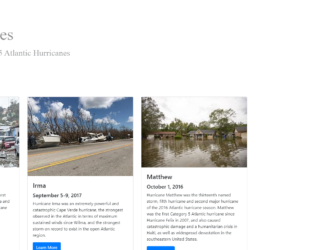
This is an example of a simple bootstrap card layout with links to its Wikipedia content, designed using HTML, and CSS. Bootstrap class card-deck has been added to display images in a deck. The images and the background image have been added to the form with their URLs imported. The background is given a background-size of 100%. The title has the styles of background-color: white, padding: 30px 40px 30px 20px, background: rgba(256, 256, 256, 0.5), display: inline-block, and font-family: Orbitron. The images are given a min-width of 576px, and the image title is given a font-size of 4rem and the subtitle a 2rem. Learn more buttons are embedded with the links to the Wikipedia content to externally redirect.
Source: https://codepen.io/mvthsmiller/pen/bxKxpM