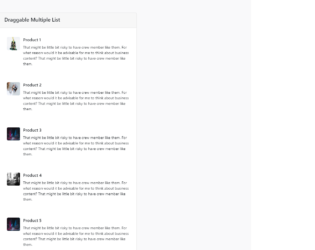
This is a template of a draggable product list with multiple product cards, designed using JavaScript, HTML, CSS, and Bootstrap framework 4. The product images are imported to the code with their URLs. The sortable JavaScript library is used to implement the draggable function of the cards. The body of the form is given a background color as #f9f9fa. The product cards are given a box shadow style of 0 0 1px 2px rgba(0, 0, 0, 0.05), 0 -2px 1px -2px rgba(0, 0, 0, 0.04), 0 0 0 -1px rgba(0, 0, 0, 0.05), whereas the cursor style for the cards is set as 'move', to be able to drag the cards. The card details are displayed using the styles of font-size as 14px, line-height as 1.55556em, padding-left as 5.11111em, and background color as #fff. The product image is given a height and a width as 50px, and border radius as 5px. Media quarries are also used to increase the responsiveness of the form.
Source:https://bbbootstrap.com/snippets/sort-list-drag-and-drop-list-items-jquery-ui-sortable-35214381
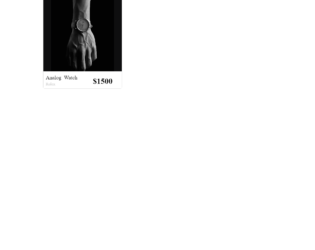
This is an example of an E-commerce single product card that open details on a hover event, designed using HTML, CSS, and Bootstrap framework 4. The images and font styles are imported to the code with their URLs. The concept of Lists has been used with UL and LI components. UL element has been used with the child elements of LI to display the list items, in an orderly manner. The body of the form is given the styles of font-family as 'Open Sans', serif, and background as #AB47BC. The product card is given the styles of transform as translate(-50%, -50%), width as 300px, height as 400px, box-shadow as 0 20px 40px rgba(0, 0, 0, .2), border-radius as 5px, and background as #0e0e0f. The product name is displayed with a font-size of 20px. The product prize is given a font-weight style as bold, font color as #000, and font-size as 30px. The five list items are given five colors in the boxes. The product details section is given a bottom value as 160px, which changes to 0, in a hover event to display the product specifications.
Source:https://bbbootstrap.com/snippets/ecommerce-single-product-card-open-detail-hover-49583085
This is another example of an E-commerce category filter sidebar, designed using CSS, HTML, and Bootstrap framework 4. The font styles are imported to the code with the URL. The concept of Lists has been used with UL and LI components. UL element has been used with the child elements of LI to display the list items of the categories, in an orderly manner. The body of the form is given the styles of background-color as #eeeeee, font-family as 'Open Sans', serif, and font-size as 14px. The filter group is given a border-bottom style as 1px solid #e4e4e4. The category card is given the styles of position as relative, display as flex to automatically rearrange the content according to the container, flex-direction as column, word-wrap as break-word to allow long words to be able to break and wrap onto the next line, background-color as #fff, background-clip as border-box, border as 1px solid rgba(0, 0, 0, 0.1), and border-radius as 0.37rem. The list items are displayed in a font color of #343a40. The checkboxes take a fill effect of #3167eb, in the active mode. The size buttons take the styles of background-color as #fff, and border-color as #989898, in a hover event.
Source: https://bbbootstrap.com/snippets/ecommerce-category-filter-sidebar-79153947
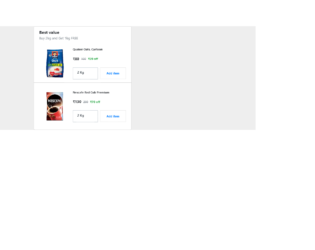
This is an example of an e-commerce multiple items add to cart sidebar, designed using HTML, CSS, and Bootstrap framework 4. The product images are imported to the code with their URLs. The form is given a background color as #eee. The Add to Cart button is created as a primary button with the styles of border as 1px solid RGB(231, 231, 231), font-size as 0.7rem, font-weight as bolder, and padding as 2px. In a hover event, the button changes its background color to #2196F3, and border color and font color to #fff. The product name is given a font-size as 0.7em, and font-weight as 700. The header title of the form is given a font-weight as bold to highlight the text, whereas the subtitle is defined as muted text in HTML. The weight selection menu is given the styles of height as calc(1.8em + 0.6rem + 14px), font-size as 12px, and padding-right as 2.8rem.
Source: https://bbbootstrap.com/snippets/ecommerce-best-value-product-sidebar-29637738
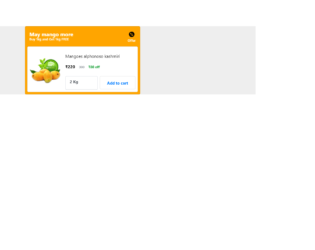
This is an example of e-commerce add to cart item sidebar, designed using HTML, CSS, and Bootstrap framework 4. The background images are imported to the code with the URL. The form is given a background color as #eee. The product image is given height and a width of 120. The header title of the card is given a font-weight as bold to highlight the text. The card is given a background color as orange, and a font color as white, whereas the background of the inner class is set as #fff and font color as black. The Add to Cart button is created as a primary button and changes the background color to #f4a540, in hover, and active events. The weight selection dropdown list has the styles of height as calc(2.1em + 0.5rem + 12px), font-size as 15px, and padding-right as 4rem.
Source: https://bbbootstrap.com/snippets/ecommerce-add-cart-item-sidebar-65791195
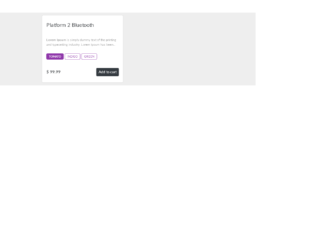
This is an example of a simple E-commerce product card sidebar, designed using HTML, CSS, and Bootstrap framework 4. The form consists of three tabs and one button. The three tabs are created as radio type tabs. The body of the form is given a background color as #eee, whereas the product card is given a style set of box-shadow as 0 0 5px rgba(0, 0, 0, 0.15), float as left, font-family as 'Lato', Arial, sans-serif, font-size as 16px, margin as 10px 1%, max-width as 310px, min-width as 250px, position as relative, text-align as left, and width as 100%. The description text of the card is displayed using a font-size of 12px, and a margin-top as 11px. The cursor style for the tabs is set as pointer to get the hand cursor effect in a hover event. The tabs are given the styles of border as 1px solid #8f37aa, display as inline-block, font color as #8f37aa, border-radius as 5px, font-size as 11px, and text-transform as uppercase to automatically convert the text to uppercase. The tabs change their background color to #8f37aa, in a hover event.
Source:https://bbbootstrap.com/snippets/bootstrap-ecommerce-product-card-sidebar-radio-button-78216618