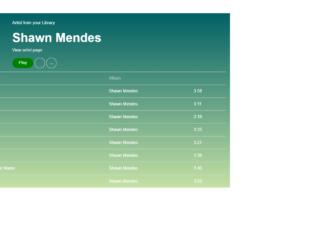
This is an example of a music library container with hover effects, designed using CSS, HTML, and Bootstrap framework 4. The artist's image is imported to the form with its URL, whereas media quarries have been used to increase the responsiveness of the form. The form is given a font-family style as 'Rubik', sans-serif. The background of the form is given a linear-gradient color as (#006064, #c5e1a5). The artist's name is displayed using a font size of 7vh, and the font color of white. The play button is given the styles of background-color as green, font color as white, width as 80px, and border-radius as 25px, which takes the background color of #a5d6a7, in a hover event. Each table row consists of a song number, song name, artist name, and song duration, which turns its background color to green, in a hover event.
Source: https://bbbootstrap.com/snippets/music-library-container-font-awesome-icons-75630261
This is an example of MCQ question and answers form with hover effects, designed using CSS, HTML, and Bootstrap framework 4. The background of the form is given as #616161. The form consists of four danger type buttons, which are used as MCQ answer blocks. The buttons are given the styles of padding as 18px 60px, white-space as normal. Transform as scale(1.0), and transition-duration as .3s. In a hover event, each button takes a text-shadow effect of 0 3px 2px rgba(0, 0, 0, 0.4), and a transform effect of scale(1.1). Each label is given a glyphicon to mark the correct answer by selecting the relevant radio button. Each button block is given its own animation time, to implement the transforming animations in a hover event. The answer blocks are set to increase their scale, to be expanded from the rest, in a hover event.
Source: https://bbbootstrap.com/snippets/mcq-question-and-answer-container-32470412
This is an example of a shopping cart with a card payment checkout form, designed using HTML, CSS, and Bootstrap framework 4. The images are imported to the code with their URLs. The card payment form is given the styles of background as blue, padding as 10px, border-radius as 6px, color as #fff, and font-weight as bold. The product details are displayed using a font-size of 12px. Each product raw is given a box-shadow style of 5px 5px 15px -2px rgba(0, 0, 0, 0.42). The card type section is given the styles of font-weight as 400, and font-size as 10px, whereas the card types are given in radio button forms. The cursor style for the card types is given as pointer to get the hand cursor effect in a hover event. The card types are set to take an outline effect of #fff, in a checked event. The input fields are given the styles of background as RGB(102, 102, 221), font color as #fff, and border color as RGB(102, 102, 221). The checkout button is set as a primary type button, in HTML.
Source:https://bbbootstrap.com/snippets/bootstrap-shopping-cart-credit-card-payment-form-28547121
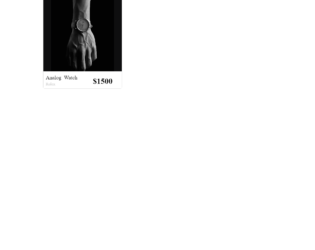
This is an example of an E-commerce single product card that open details on a hover event, designed using HTML, CSS, and Bootstrap framework 4. The images and font styles are imported to the code with their URLs. The concept of Lists has been used with UL and LI components. UL element has been used with the child elements of LI to display the list items, in an orderly manner. The body of the form is given the styles of font-family as 'Open Sans', serif, and background as #AB47BC. The product card is given the styles of transform as translate(-50%, -50%), width as 300px, height as 400px, box-shadow as 0 20px 40px rgba(0, 0, 0, .2), border-radius as 5px, and background as #0e0e0f. The product name is displayed with a font-size of 20px. The product prize is given a font-weight style as bold, font color as #000, and font-size as 30px. The five list items are given five colors in the boxes. The product details section is given a bottom value as 160px, which changes to 0, in a hover event to display the product specifications.
Source:https://bbbootstrap.com/snippets/ecommerce-single-product-card-open-detail-hover-49583085
This is another example of an E-commerce category filter sidebar, designed using CSS, HTML, and Bootstrap framework 4. The font styles are imported to the code with the URL. The concept of Lists has been used with UL and LI components. UL element has been used with the child elements of LI to display the list items of the categories, in an orderly manner. The body of the form is given the styles of background-color as #eeeeee, font-family as 'Open Sans', serif, and font-size as 14px. The filter group is given a border-bottom style as 1px solid #e4e4e4. The category card is given the styles of position as relative, display as flex to automatically rearrange the content according to the container, flex-direction as column, word-wrap as break-word to allow long words to be able to break and wrap onto the next line, background-color as #fff, background-clip as border-box, border as 1px solid rgba(0, 0, 0, 0.1), and border-radius as 0.37rem. The list items are displayed in a font color of #343a40. The checkboxes take a fill effect of #3167eb, in the active mode. The size buttons take the styles of background-color as #fff, and border-color as #989898, in a hover event.
Source: https://bbbootstrap.com/snippets/ecommerce-category-filter-sidebar-79153947
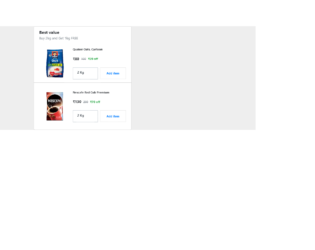
This is an example of an e-commerce multiple items add to cart sidebar, designed using HTML, CSS, and Bootstrap framework 4. The product images are imported to the code with their URLs. The form is given a background color as #eee. The Add to Cart button is created as a primary button with the styles of border as 1px solid RGB(231, 231, 231), font-size as 0.7rem, font-weight as bolder, and padding as 2px. In a hover event, the button changes its background color to #2196F3, and border color and font color to #fff. The product name is given a font-size as 0.7em, and font-weight as 700. The header title of the form is given a font-weight as bold to highlight the text, whereas the subtitle is defined as muted text in HTML. The weight selection menu is given the styles of height as calc(1.8em + 0.6rem + 14px), font-size as 12px, and padding-right as 2.8rem.
Source: https://bbbootstrap.com/snippets/ecommerce-best-value-product-sidebar-29637738