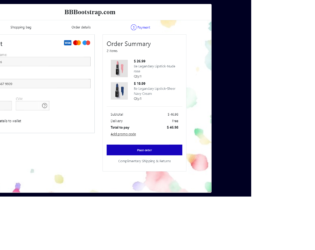
This is another example of a credit card payment form with order details, designed using HTML, CSS, and Bootstrap framework 4. The images are imported to the code using their URLs, whereas the media quarries are used to increase the responsiveness of the form. The body of the form is given the styles of display as flex, align-items as center, justify-content as center, background-color as RGB(0, 0, 34), and font-size as 0.8rem. The input fields are given the styles of border as 1px solid rgba(0, 0, 0, 0.137), padding as 1vh, margin-bottom as 4vh, width as 100%, and background-color as RGB(247, 247, 247). The input fields take a color style of transparent, during a checked event. The order summary is displayed with a font-size of 1.5rem. The place order button has the styles of background-color as RGB(23, 4, 189), border-color as RGB(23, 4, 189), color as white, width as 100%, font-size as 0.7rem, margin as 4vh 0 1.5vh 0, and padding as 1.5vh.
Source: https://bbbootstrap.com/snippets/bootstrap-step-credit-card-payment-form-order-details-78656903
This is an example of a credit card payment form with different card types to select from, designed using HTML, CSS, and Bootstrap framework 4. The images are imported to the code with their URLs. The payment information form is given the styles of background color as blue, padding as 10px, border-radius as 6px, font color as #fff, and font-weight as bold. The credit card types are displayed using radio type buttons. The cursor style for the radio buttons is set as pointer to get the hand cursor effect on hover. The radio buttons are given a border style as 2px solid #ada9a9, display as inline-block, color as #8f37aa, border-radius as 3px, text-transform as uppercase to automatically convert the text to uppercase, font-size as 11px, and font-weight as 300. The radio buttons change the border color to #fff, in a checked event. The input fields are given the styles of font size as 13px, and font color as #fff. In a focus event, the input fields change the background color to RGB(102, 102, 221), and take a border effect of RGB(102, 102, 221).
Source:https://bbbootstrap.com/snippets/bootstrap-credit-card-payment-form-different-card-type-90341294
This is an example of a simple single product card with add to cart button, designed using HTML, CSS, and Bootstrap framework 4. The product image is imported to the code using its URL. The body of the form is given a background color as #E0E0E0. The product card is given the styles of box-shadow as 0 20px 40px rgba(0, 0, 0, .2), border-radius as 5px, and padding-bottom as 10px. The card title is given a font-weight as bold to highlight the text. The View Details button is given a border style as 1.5px solid grey, font color as #212121, width as 100%, and box-shadow style as 0px 0px 10px #212121. The Add to Cart button is given a background color as #212121, font color as white, margin-top as 10px, font-size as 12px, font-weight as 900, width as 100%, height as 39px, padding-top as 9px, and box-shadow style as 0px 5px 10px #212121.
Source: https://bbbootstrap.com/snippets/ecommerce-single-product-add-cart-button-21268162
This is an example of an e-commerce product list that displays the product details on hover, designed using HTML, CSS, and Bootstrap framework 4. The concept of Lists has been used with UL and LI components. UL element has been used with the child elements of LI to display the icons in an orderly manner. The product images are imported to the code with their URLs. The container is given margin-top and bottom values as 50px, whereas the product cards are given a border style of 1px solid #673AB7. In a hover event, the row of icons takes an animation of 300ms ease-in-out 0s normal none 1 running fadeInRight, and an opacity value of 1. The product name is displayed using the styles of font color as #673ab6, font-family as Old Standard TT, font-size as 17px, font-weight as 600, text-transform as capitalize to turn the first letter of each word to capital, and transition as all 0.3s ease 0. The price is displayed using the styles of font color as #313131, font-family as Poppins, font-size as 16px, and font-weight as 500.
Source: https://bbbootstrap.com/snippets/ecommerce-furniture-product-list-onhover-83554976
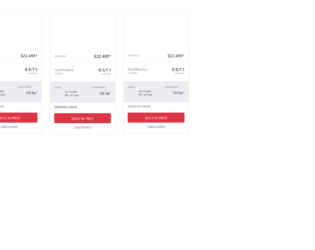
This is an example of a simple product comparison template, designed using HTML, CSS, and Bootstrap framework 4. The product images and fonts are imported to the code with their URLs. The form consists of three product cards. The body of the form is given the styles of background as #F5F1EE, font-family as 'Roboto', sans-serif. The product card is given a width of 250px and a border-radius of 10px. The product image is given width as 35px, and height as 25px. The price of the product is displayed using a font-size of 13px, whereas the fuel efficiency is displayed using a font size of 1rem. The engine and horsepower section is given a background color as #ECEDF1. The standard key features text is given the styles of text-decoration as underline, font-size as 9px, and cursor as pointer to get the hand cursor effect. Media quarries are used to increase the responsiveness of the form.
Source: https://bbbootstrap.com/snippets/bootstrap-product-comparison-template-99013072
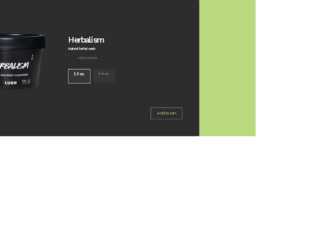
This is an example of an e-commerce product page with carousel and radio buttons, designed using CSS, HTML, and Bootstrap framework 4. The product images are imported to the code with their URLs, whereas the media quarries have been used to increase the responsiveness of the form. The body of the form is given the styles of align-items as center, justify-content to center, background-color as RGB(186, 216, 125), font-size as 0.8rem, and font-family as 'Work Sans'. The product card is given a width of 100%, padding of 4rem, background-color of RGB(46, 45, 45), font color as white, and box-shadow as 0 4px 8px 0 rgba(0, 0, 0, 0.2), 0 6px 20px 0 rgba(0, 0, 0, 0.19). The product is given two size options to pick from, which is displayed using two radio type buttons with the styles of background color as RGB(54, 54, 54), font color as grey, and display as inline-block. In a focus event, the buttons take the styles of the border as 1px solid white, background color as RGB(54, 54, 54), and font color as #ffffff. The Add to Cart button turns its font color to white, in a hover event.
Source:https://bbbootstrap.com/snippets/bootstrap-ecommerce-product-list-carousel-and-custom-radio-buttons-62651409