This is an example of a single E-commerce product with a carousel slider, designed using HTML, CSS, and Bootstrap framework 4. The font and images are imported to the code using their URLs. The concept of Lists has been used with UL and LI components. UL element has been used with the child elements of LI to display the child elements of the carousel, one after another. The carousel is given three items to be displayed as slides. The body of the form is given the styles of background as #fff, and font-family as 'Roboto Condensed', sans-serif. The price is displayed using a font-size of 18px. The memory type is displayed using three radio type buttons, which are given a cursor style as pointer to get the hand cursor effect in a hover event. The radio buttons are also given the styles of the border as 1px solid #8f37aa, display as inline-block, background color as #8f37aa, border-radius as 3px, and text-transform as uppercase to automatically convert the text to uppercase. The buttons take a border and a background color of #8f37aa, and font color of #fff, in a hover event.
Source:https://bbbootstrap.com/snippets/bootstrap-single-ecommerce-product-carousel-slider-60389242
This is an example of an accordion with hover effects, designed using HTML, CSS, JavaScript, and Bootstrap framework 4. The body of the form is given the styles of background-color as grey, and font-family as 'Titillium Web', sans-serif, whereas media quarries have been used to increase the responsiveness of the form. The JQuery slidetoggle method has been used to implement the collapsible and toggle features for the accordion items. The accordion item is given the styles of font-size as 1.5vw, width as 100%, background-color as orange, padding as 1.5vw, cursor as pointer to get the hand cursor effect in a hover event, margin-top as 0.5vw, background-color as #eeeeee, text-align as left, and font color as #9e9e9e. In a hover event, the accordion item blocks take an animation with the styles of animation-duration as 1s, animation-fill-mode as forwards, and animation-iteration-count as 1. The collapsible section is given a font-size as 1.2vw, font color as #757575, and background-color as white.
Source: https://bbbootstrap.com/snippets/accordion-hover-effect-26103860
This is an example of a form with the ability to share the items between two lists by drag and drop function, designed using HTML, CSS, JavaScript, and Bootstrap framework 4. The avatar images are imported to the code with their URLs. Sortable JavaScript library has been used to implement the drag and share function of the items, without cloning them in the next list. Media quarries are used to increase the responsiveness of the form. The body of the form is given a background color of #f9f9fa. The product card container is given the styles of word-wrap as break-word to break and wrap long words into the next line, background-color as #fff, background-clip as border-box, border as 1px solid rgba(19, 24, 44, .125), and border-radius as .25rem. The avatar image is given the styles of border-radius as 500px, and box-shadow as 0 5px 10px 0 rgba(50, 50, 50, .15). The text color is given as 5e676f, whereas the font size of the text is given as .825rem. Each product card is given a dropdown list to be viewed by clicking on a button.
Source: https://bbbootstrap.com/snippets/shared-list-sortable-library-35848440
This is an example of a form with the ability to copy or clone items from one list to another, designed using HTML, CSS, JavaScript, and Bootstrap framework 4. JavaScript functions have been used to implement the clone and draggable features of the form. Media quarries have been used to increase the responsiveness of the form. The body of the form is given a background color as #f9f9fa. The product card container is given the styles of word-wrap as break-word to break and wrap long words into the next line, background-color as #fff, background-clip as border-box, border as 1px solid rgba(19, 24, 44, .125), and border-radius as .25rem. The avatar image is given the styles of border-radius as 500px, and box-shadow as 0 5px 10px 0 rgba(50, 50, 50, .15). The text color is given as 5e676f, whereas the font size of the text is given as .825rem. Each product card is given a dropdown list to be viewed by clicking on a button.
Source:https://bbbootstrap.com/snippets/clone-or-copy-items-one-list-another-using-sortable-library-86403082
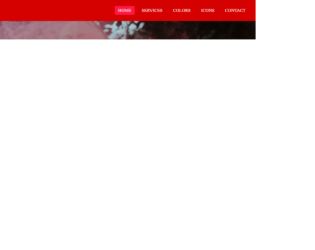
This is an example of a simple navigation menu bar with hover effects, designed using CSS, HTML, and Bootstrap framework 4. The background image is imported to the form with its URL. The concept of Lists has been used with UL and LI components. UL element has been used with the child elements of LI to display the child elements of the navigation bar, in an orderly manner. The form is given a font family style as Montserrat, whereas the navigation section is given the styles of background as #D50000, height, and width as 80px and 100%, respectively. The child elements of the navbar are given the styles of font color as white, font-size as 17px, padding as 7px 13px, border-radius as 3px, and text-transform as uppercase to automatically convert the text to uppercase. In the active mode and hover event, the nav bar items take the background color of #FF1744. Media quarries have been used to increase the responsiveness of the form.
Source:https://bbbootstrap.com/snippets/responsive-navigation-menu-bar-using-pure-html-css-57351723
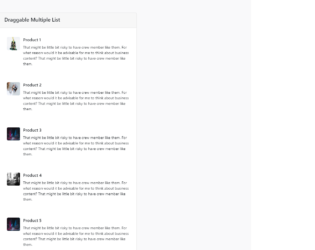
This is a template of a draggable product list with multiple product cards, designed using JavaScript, HTML, CSS, and Bootstrap framework 4. The product images are imported to the code with their URLs. The sortable JavaScript library is used to implement the draggable function of the cards. The body of the form is given a background color as #f9f9fa. The product cards are given a box shadow style of 0 0 1px 2px rgba(0, 0, 0, 0.05), 0 -2px 1px -2px rgba(0, 0, 0, 0.04), 0 0 0 -1px rgba(0, 0, 0, 0.05), whereas the cursor style for the cards is set as 'move', to be able to drag the cards. The card details are displayed using the styles of font-size as 14px, line-height as 1.55556em, padding-left as 5.11111em, and background color as #fff. The product image is given a height and a width as 50px, and border radius as 5px. Media quarries are also used to increase the responsiveness of the form.
Source:https://bbbootstrap.com/snippets/sort-list-drag-and-drop-list-items-jquery-ui-sortable-35214381