Simple Double Quotes with CSS
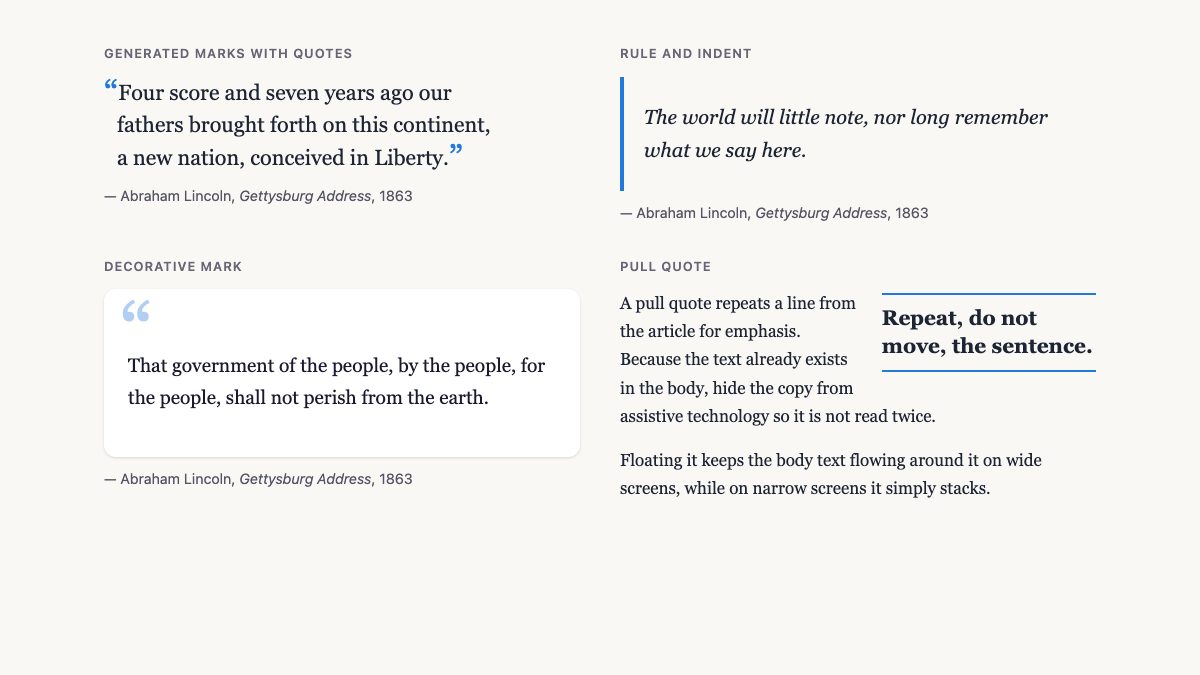
To style double quotes in CSS today, put your text in a blockquote, let the quotes property define the marks, and add them with ::before and ::after using content: open-quote and close-quote. No background images, no :first-letter tricks, and the marks are real typographic characters that scale and recolor with your design.
The original version of this tutorial pinned two GIF graphics to a blockquote. That approach broke when text was resized, when the theme changed color, and for every language that quotes differently. Here is the version that holds up.
1. Start with semantic HTML
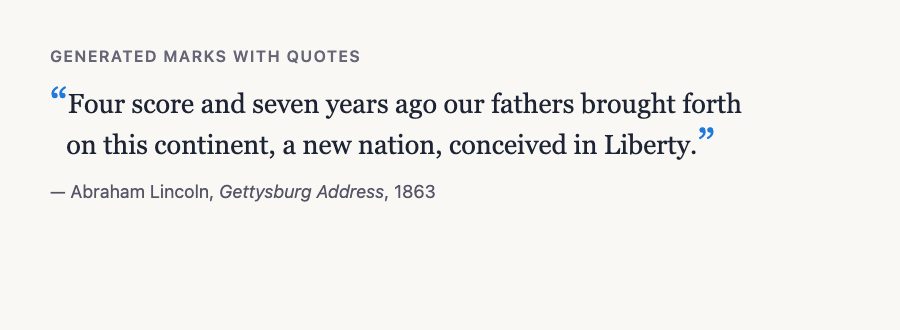
A quotation is a blockquote, and its source belongs in a figcaption inside a wrapping figure. Put the quoted words in a paragraph inside the blockquote. If the quote comes from a web page, add its address in the cite attribute; it is machine-readable only, so also show the attribution in the caption.
<figure>
  <blockquote cite="https://example.com/essay">
    <p>Four score and seven years ago our fathers brought forth on this continent, a new nation, conceived in Liberty.</p>
  </blockquote>
  <figcaption>Abraham Lincoln, <cite>Gettysburg Address</cite>, 1863</figcaption>
</figure>
For a short quote inside a sentence, use the inline q element. Browsers add language-appropriate quotation marks to it automatically, so never type the marks yourself.
2. Generate the marks with the quotes property
The quotes property lists pairs of opening and closing marks: the first pair for the outer level, the second for nested quotes. Use Unicode escapes so the file encoding never matters.
blockquote {
  quotes: "\201C" "\201D" "\2018" "\2019";
}

blockquote p::before { content: open-quote; }
blockquote p::after  { content: close-quote; }
Those escapes are the curly marks: \201C and \201D for double quotes, \2018 and \2019 for single. Curly marks are the right choice for English prose; straight " marks look like typewriter leftovers.
Why pseudo-elements instead of images? The mark is now text. It follows the font size, inherits currentColor unless you override it, and swapping to another language is a one-line change. If you leave quotes out, browsers choose marks from the element’s lang, and French, German or Japanese pages get the right style for free. Set it manually only when your design demands a specific style.
3. Style the marks and add a hanging indent
Give the marks an accent color and make them larger than the text, then pull the first line back so the letters align. The original tutorial did this with padding-left and a negative text-indent; the same idea works with em units so it scales.
:root {
  --accent: oklch(58% 0.17 255);
}

blockquote {
  quotes: "\201C" "\201D" "\2018" "\2019";
  font-size: 1.35rem;
  line-height: 1.5;
  text-wrap: balance;
  padding-inline-start: 0.6em;
  text-indent: -0.6em;
}

blockquote p { margin: 0; }

blockquote p::before,
blockquote p::after {
  color: var(--accent);
  font-size: 1.6em;
  line-height: 0;          /* big marks must not stretch the line */
  vertical-align: -0.15em;
}
blockquote p::before { content: open-quote; }
blockquote p::after  { content: close-quote; }
Two details matter here. line-height: 0 stops the enlarged marks from adding space above the first line. And text-wrap: balance evens out line lengths so a short quote does not end with one orphaned word.
There is also a purpose-built property, hanging-punctuation: first, which hangs an opening quote character outside the text block. It applies to punctuation typed in the text itself, and I did not verify that Safari treats a generated ::before mark the same way, so with generated marks the negative indent remains the real solution. Support is limited to Safari, so treat the property as progressive enhancement. You can check current support on MDN.
4. Three more blockquote looks
Rule and italic
The cleanest option needs no generated marks. Logical properties keep it correct in right-to-left languages.
blockquote {
  border-inline-start: 0.25rem solid var(--accent);
  padding: 0.25rem 0 0.25rem 1.25rem;
  font-style: italic;
}
Card with a decorative mark
A large faded mark in the corner is purely decoration. Generated content can be read by some screen readers, so keep decorative marks to a single glyph, and let the real blockquote semantics carry the meaning.
blockquote {
  position: relative;
  padding: 2.6rem 1.5rem 1.5rem;
  background: #fff;
  color: #1a1a2e;
  border-radius: 0.75rem;
  box-shadow: 0 1px 3px rgb(0 0 0 / 0.15);
}
blockquote::before {
  content: "\201C";
  position: absolute;
  top: 0.2rem;
  left: 1rem;
  font-size: 5rem;
  line-height: 1;
  color: var(--accent);
  opacity: 0.35;
}
This pattern suits testimonials. If you need ready-made markup, see our testimonial cards with profile photos and the hover-effect testimonial cards.
Pull quote
A pull quote repeats a sentence from the article in large type, floated beside the text. The old tutorial did this by floating the blockquote itself. Don’t: a pull quote is a repeat of the body copy, not a source citation. Use an aside and hide it from assistive technology so the sentence is not announced twice.
<aside class="pull" aria-hidden="true">Repeat, do not move, the sentence.</aside>.pull {
float: right;
inline-size: 45%;
margin: 0.2rem 0 0.5rem 1.25rem;
padding-block: 0.6rem;
border-block: 2px solid var(--accent);
font-size: 1.3rem;
line-height: 1.35;
font-weight: 700;
}
@media (max-width: 40rem) {
.pull { float: none; inline-size: auto; margin-inline: 0; }
}Handle nested quotes and long quotations
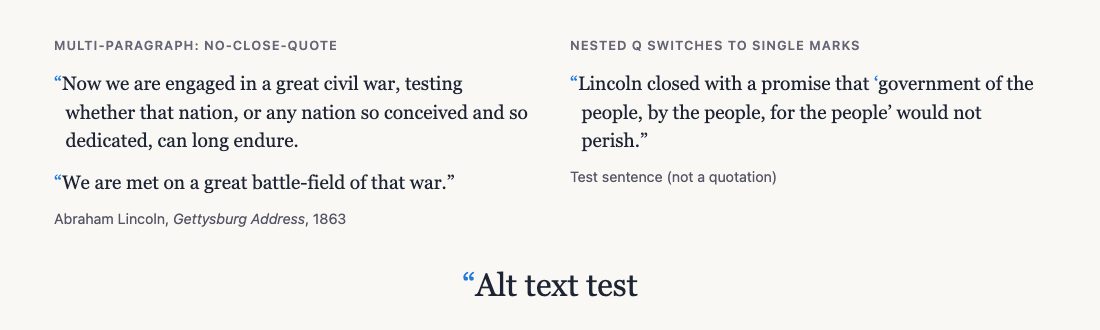
The second pair in the quotes list is used when a quotation sits inside another one. If a q element appears inside a blockquote that already shows generated marks, the browser switches to the inner pair automatically, so a quoted phrase inside a quotation gets single curly marks without any extra class. This is one of the strongest reasons to generate marks rather than type them: the nesting level is tracked for you.
Long quotations with several paragraphs need one extra rule. By convention, each paragraph of a multi-paragraph quote opens with a mark, but only the last one closes. CSS does exactly this when you use no-close-quote for the paragraphs that continue:
blockquote p::before { content: open-quote; }
blockquote p:not(:last-child)::after { content: no-close-quote; }
blockquote p:last-child::after { content: close-quote; }
no-close-quote inserts nothing but still decrements the nesting level, which keeps open and close marks balanced across paragraphs. For a single-paragraph quote, you will never notice the difference.
q switching to single marks.Test before you ship
Check three things in the browser. First, zoom the text to 200 percent and confirm the marks stay attached to the words and the hanging indent still lines up. Second, switch the lang attribute on the blockquote to fr or de and remove the explicit quotes declaration to see the language defaults. Third, turn on a screen reader or inspect the accessibility tree: a blockquote should be announced as a quotation, and decorative marks should not add noise. If a mark is announced when it should not be, move it to a pseudo-element with an empty alternative, written as content: "\201C" / "", which rendered correctly in my Chrome test and tells assistive technology to skip it.
Typographic rules worth keeping
- Use curly marks. Straight marks are for code; prose deserves
\201Cand\201D. - Do not double up. If the generated marks are on, the HTML must not contain typed marks too.
- Keep contrast. A pale decorative mark is fine because it carries no information, but the quote text itself still needs sufficient contrast.
- Respect the language. Set
langon the page or element; guillemets and low-9 marks are correct in many languages. - Limit line length. Quotes read best at roughly 45 to 75 characters per line; set a
max-inline-sizeinch.
For the typographic reasoning behind sizes, rules and contrast, read Typographic Contrast and Flow, and for background on how these marks evolved, A Brief History of Western Typography.
Browser support
The quotes property, open-quote and close-quote, logical properties and text-wrap: balance work across current browsers; check the Baseline badges on MDN. Only hanging-punctuation is limited, and it degrades gracefully because the negative indent already does the job.
btw. it’s not necessarily but you should use block elements inside your blockquote, like for example
That’s a great idea. I wanted to do this before, and when I saw this article I almost slapped myself. So obvious, yet so clever. Nice work.
I Quite agree with Ankur on this tutorial. Ingenious, and i can’t believe that I did not think of how to do this myself.
Ludwik is right (I can imagine what his examples would have looked like).
According to the w3c, under a strict doctype blockquote is for long quotations (block-level content). Unless you’re using a transitional doctype, text should not be placed directly inside a blockquote element without block-level tags surrounding it. Therefore, if the blockquote is marked up correctly, the method of using
:first-letterunfortunately won’t work.The only solution I can think of is perhaps applying the bottom-right background image to the blockquote itself and the top-left background image to
blockquote p. All you’d have to do then is cancel out the top-left background image for any subsequent paragraphs, using something likeblockquote p ~ p { background: none; }.The same technique could be used for the drop-cap:
blockquote p:first-letter { font: italic 1.4em Georgia; }blockquote p ~ p:first-letter { font: normal 1.2em Georgia; }.You might run into some trouble when quoting content other than straight-forward paragraphs though (such as a list). Hope that helps.
Good example, but this doesn’t work in IE 6, does it?
Good, but useless in production work since it doesn’t work in IE6.
Stavanger and Wolf:
Sure, it works in IE 6. I tested in IE6, IE7, Opera, Firefox, and Safari.
Steffen:
Thanks for your input. Unfortunately IE doesn’t support CSS selectors.
You can also use this css:
blockquote p:before {

	content: open-quote;

	}

blockquote p:after  {

	content: close-quote;

	}
This will only work in a modern Browser but it’s nice and quite simple. You can also use additional CSS to style the quotes. E.g. a bigger font size or an other color. take a look
@Nick: That wont matter when IE’s market share drops below 10%… I long await that day *sniff*
You’re welcome.
I know IE sucks in this (and many more other) matter. In this case you should use conditionals comments or (css)hacks.In fact the example above is a great way for a standard conform web browser. IMHO.
This is a nice technique, but unfortunately of no use to me if it doesn’t validate. On a related note, I put together a pull-quote design showcase that you might be interested in.
Hello Nick.
I see some bug.
The Close button ( X ) don’t transparent. Test on IE6 and MyIE.
And in Opera 8.5 im don’t see the title “Simple Double Quotes” and post “This CSS tutorial will show you how …” to first textarea.
first..congrat on the opening nick :)
been looking for the double quote css trick some times now..thanks
checking out your other post now ;)
Personally I use two images, because many browsers (first IE) not support yet this css features: first-letter, text-tranform, before, after, etc…
Meh, I’d gladly discriminate against IE since usage is falling behind anyways…
Excellent and del.icio.us article you got there, Nick. Yes I bookmarked this tutorial :D
I’ve been looking for an easy way to do this for a while now… thanks for the tutorial! The first-letter code didn’t work for me for some reason, so I used Sam’s suggestion of utilizing the P tag, but now I get 2 open quotes in front of each separate paragraph… the close quote seems to be working fine though… I’ll try again!
wow, I want to know how to make a div section right in the center of the screen.Just like the ‘preview’ your page show.
thx
@ Mo-Mo:
As I said, try sticking
blockquote p ~ p { background: none; }in the css. That should do the trick. :)Maybe you’re making things too complicated. For XHTML, a blockquote should include a block-level element, as seen here:
https://www.w3schools.com/tags/tag_blockquote.asp
So, you have two places for background images. If you put the opening quotes in the first paragraph, and put the closing quotes in the blockquote, you’ll be just fine in most cases.
@Sam: That technique does not work in IE6.
True Ed, but at least it’s valid. I’m sure you can target IE6 with some other fancy styling if you want. :)
I dont even remember how i reached your site but it doesnt matter, cause i’m so happy i found it, it really made me think, keep up the good work
It works in IE6.
The first-letter pseudo element is supported:
http://www.microsoft.com/technet/prodtechnol/ie/reskit/6/part3/c11ie6rk.mspx?mfr=true
Para ser feliz no se nesesita ser rico
Nice and simple even with 2 images. But I guess the first image isn’t that necesary … maybe a background color would be much easier to use and faster to load and also would fit your site better :D
I always thought there would be an easy way of doing that. Very simple and clean.
Hi there, well i tried to do this in blogsome but doesn’t worked.. can someone help me?
thanks!
Does anyone else have trouble getting the quote image to appear? i have copied the html and css exactly as well as put the images in the correct directory. And for some reason, it just wont work in either IE7 or Opera. All the formatting worked the images just don’t show up.
I am sure i made some stupid mistake but i wanted to double check first.
hmm.. How about you use <blockquote><p>Some text here</p></blockquote> ?
I thought that was the way you were supposed to do it in XHTML?
There is actually a problem implementing your method when the image is bigger then the font, although this can be fixed by giving a bigger font, i think it’s not recommended. The other bigger problem i see is when the last letter is not in the end of the line so the last ending quote wont be near it. The best solution i could come up and it works in FF2 and IE7 is just use:
blockquote {
margin: 15px 15px 0 15px;
padding-right: 30px;
background: url(images/blockquote_end.gif) no-repeat bottom right;
}
blockquote p {
background: url(images/blockquote_start.gif) no-repeat top left;
padding-left: 35px;
}
so 2 images are used. But it would cause problems if there are 2 paragraphs in a 1 blockquote…
hmm.. this method works. but what it doesnt work with
<blockquote><p> text here</p></blockquote>
any idea?
How about you use
?
I thought that was the way you were supposed to do it in XHTML?
with the element, specifying the language, you will obtain a more simplistic quote symbol. It is not as nice looking but it is coherent with accessibility principles and visual agents.
blockquote:first-letter {
background: url(images/open-quote.gif) no-repeat left top;
padding-left: 18px;
font: italic 1.4em Georgia, “Times New Roman”, Times, serif;
}
testing
blockquote:first-letter {
background: url(images/open-quote.gif) no-repeat left top;
padding-left: 18px;
font: italic 1.4em Georgia, “Times New Roman”, Times, serif;
}testing
kinda confuse here and im sort of novice with css.. where shoud i put my text on this code: blockquote:first-letter {
background: url(images/open-quote.gif) no-repeat left top;
padding-left: 18px;
font: italic 1.4em Georgia, “Times New Roman”, Times, serif;
}
Actually, I was looking for big double quote image at the end of para/quote.
Good sample, It’s require widely in community sites.
Is there a way to get the last comment to directly follow the lost word of the paragraph? I am trying to use this as a header on a page and I can’t get it to follow the last word. It goes to the end of the space and not the word?
Any thoughts?
I found it nessesary to change the text indent for IE7 – not sure if anyone else had this issue so thought I’d share… Great sample though, I think I’ll use it for my blog comments…
/*Start hack for IE */
* html blockquote
{
text-indent: -10px;
}
/*End hack for IE */
Great tutorial, but what happens when you want to use the following code:
text-align: justify;…to justify the contents of the blockquote? I’m noticing that the hanging indent changes are causing the first word to sometimes overlap the contents of the sentence (Google Chrome 1.0.154.36).
Any idea on how to prevent that from happening?
i am using a text box type of field in a details view, now when i’m typing “1” it changes to “&qoutes 1 &qoutes” now i want to fix that.
Hey, what happened to the content: open-quote; property?
Oh well.
Thanks for great code, just what I was looking for. But I must be doing something wrong as it works perfectly on Safari browser on Mac and PC and Google Chrome on a PC, but on FireFox and IE on both Mac and PCs the open-quote graphic and first-letter code don’t show.
Any ideas where I went wrong here
Thanks in advance.
Once again I am a little wiser…blockquote.
Nice simple CSS coding example, I’m sure I shall use it in the future.
thanks thanks thanks!!! :)
Nice blog layout by the way :)
well i think there is 1 problem, small but, i can’t select the first leter.. :/
Steve – get rid of the paragraph tags within the blockquote and it will work.
It doesn’t work in IE8 though as the closing blockquote background rules get overwritten by the first-letter rules – works fine in compatibility mode though.
It works but it’s not the solution when you have to quote a dynamically generated text. The problem is the closed quote that can overlap the ending letters of your text.
Try to quote this text in your example page:
Hello, I’m a gggg gggg ggg beautiful pullquote, hfghssf hgd dgdgd sdsds sdsdsds sdsdsds sdsds
(I use FF 3.6)
What do you mean by getting of the paragraph tags within the blockquotes? Could you give examples? Thanks! (:
It works fine.
Thank you.
Included it in my frontend framework.
The same problem like Hugo has: I cannot style the first:letter. There is no other blockquote definition in my styles.
Ummm, if this works – then why is your example an image dump!
Nice trick with first-letter css. But if you change your text content (just one more single character at the end of your example text) you’ll see it is over the closing quotation symbol. I think a padding-right will be good.
I’m not sure is it possible to use something like last-letter? I’m looking for something like that which will place the ending quotation right after the end of last letter and not at the right-bottom of the blockquote box.
Thanks
Adnan
hi WDW i’m newbie at css and i used read from w3 dot org trying to learn fine but this is before i read your tutorials people you are very professional and you gave it very easy and clear thank you i become one of your biggest fan
Don’t know if anybody else told you that already but according to the specs a blockquote element HAS to contain a block level element, it can’t just contain plain text or inline elements as direct children. And this kinda complicates the quote thing because they would be displayed on their own line then.
Want to buy the hottest white iphone 4 conversion kit? Highest quality white iphone 4 conversion kit is waiting for your choice! Come and take it home!
White iphone 4 avaiable! It’s a great news to tell you the latest white iphone 4 Conversion Kit is on sale. Get the chance to make your iphone more charming!
Your blog has provided a great tutorial for learning web designing. It is nice to help others and you did a great job that you have started such a nice blog.
Los Angeles Web Design
Don’t know if anybody else told you that already but according to the specs a blockquote element HAS to contain a block level element, it can’t just contain plain text or inline elements as direct children. And this kinda complicates the quote thing because they would be displayed on their own line then.
Why do you add the “text-indent:-18px;” at first? At the 3rd step, you add a “padding-left:18px;” for the first-letter.
Another questionnaire, the participants’ problem identification and structuring, idea generation, problem elaboration and clarification, such as creativity, problem solving insertion sezkin idea which one’s preferred styles are evaluated. While participants preferred the style of non-disclosure and intellectual development of ADHD, with ADHD, participants chose to produce ideas.
The last example adds demonstrates a couple more features that make
This doesn’t work in IE8. When you add the background to the first-letter, it “overwrites” the background to the entire blockquote, so you only get the opening quote image showing.
JPatti is right. This method does not work with IE8. It looks great in Firefox though. Any ideas?
Another thing is that when searching for a good on the web electronics store, look for online stores that are regularly updated, trying to keep up-to-date with the most current products, the most effective deals, and also helpful information on goods and services. This will ensure that you are doing business with a shop that really stays atop the competition and offers you what you ought to make knowledgeable, well-informed electronics expenditures. Thanks for the essential tips I have really learned through your blog.
These are really stunning, there are even some sites that are new to me. All the colour schemes complex 41are definatly brave but I really think they work to make the sites eye catching and engaging.
Nice article!
What also worked for me was:
#id a {
padding-left: 18px;
text-indent: -18px;
line-height: normal;
display: block;
}
#id a:before {
content: open-quote;
}
#featured a:after {
content: close-quote;
}
This doesn’t require images.
“#featured a:after” ofcourse has to be “#id a:after” in this example.
only shows the bottom quotation mark tho.. this is the third tutorial i’ve seen but i see the samples working fine on each website except when i place it on mine. im using IE8 at this pc and tried compatibility mode and still the other image doesnt show..
how do you make the command on “blockquote:first-letter { ” work? other sites suggested
blockquote span {
-OR-
blockquote div {
but still only the ones inside the code “blockquote {” shows..
any help would be appreciated. thanks!
Nice blog here! Also your web site loads up very fast! What host are you using? Can I am getting your affiliate hyperlink on your host? I desire my website loaded up as fast as yours lol
hey
i really like your code
i needed it badly
thanks for sharing