In the last post I talked about the design aspect of using CSS3 @font-face, today I would like to extend this topic to the technical side on implementing custom web fonts. So what are the options for implementing web fonts? I’m going to review the three main methods of incorporating @font-face and explain the pros and cons of each method.
1) CSS3 @font-face
Standard @font-face
First, let’s talk about the native way of implementing custom web fonts — @font-face. The CSS syntax for declaring a custom @font-face is very simple. Basically you just need to specify the font name and font file source. Once the font is specified, you can apply it to any element.
@font-face {
	font-family: "Custom Font Name";
	src: url('font.ttf');
}

body {
	font-family: "Custom Font Name";
}
Bulletproof @font-face Syntax
Because every browser supports different font formats (IE supports EOT only, Firefox supports EOT & TTF, and Safari supports OTF, TTF, and SVG), additional font formats are required to be cross-browse. Below is the bulletproof way of implementing @font-face from Font Spring.
@font-face {
	font-family: 'MyWebFont';
	src: url('webfont.eot'); /* IE9 Compat Modes */
	src: url('webfont.eot?#iefix') format('embedded-opentype'), /* IE6-IE8 */
	     url('webfont.woff') format('woff'), /* Modern Browsers */
	     url('webfont.ttf')  format('truetype'), /* Safari, Android, iOS */
	     url('webfont.svg#svgFontName') format('svg'); /* Legacy iOS */
	}
@font-Face Generator
If you need to export the fonts in different formats, there is a generator which allows you to generate various font formats from an existing font. Note: most fonts are not allowed to embed or distribute on the web. Check the licensing information before implementing any fonts.
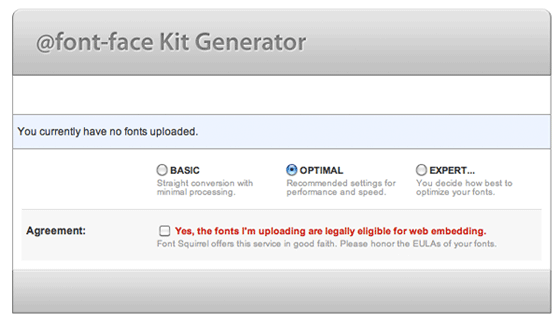
Premium @font-Faces
Because most fonts do not allow publishing on the internet, Font Spring offers professional fonts with @font-face support. You can buy licensed fonts individually and use freely on your sites.
Pros & Cons
- PROS: Full control because the fonts are hosted on your server.
- CONS: The process is a bit complicated because it requires various font formats.
2) Font Service Providers
Another way of using fonts without worrying about licensing issues is by using the fonts from service providers such as Typekit and Fontdeck. With font service providers, the fonts are hosted on their servers and you have to pay a subscription/licensing fee to use the fonts. The process of implementing host fonts is a lot simpler compared to the native way of implementing web fonts because they handle all the font formats and browser compatibility.
Installing Typekit
To install Typekit, it requires two lines of Javascript.
<script type="text/javascript" src="http://use.typekit.com/are7wnq.js"></script>
<script type="text/javascript">try{Typekit.load();}catch(e){}</script>
Pros & Cons
- PROS: Easier to implement because you don’t have to generate the different font formats.
- CONS: It requires subscriptions. Since the fonts are hosted on the service providers, if their servers go down, the fonts will not be available.
3) Google Web Fonts
Google Web Fonts is also consider host font providers, but Google Web Fonts are free. Google fonts are light weight (they load very fast) and they are easy to use.
Implementing Google Web Fonts
To implement Google Web Fonts, just add the line of code below.
<link href='http://fonts.googleapis.com/css?family=Arvo' rel='stylesheet' type='text/css'>
Pros & Cons
- PROS: Free, lightweight, and loads fast.
- CONS: Not enough selections and most fonts don’t come with different weights and styles.
Conclusion
@font-face is good if you need to use your own custom fonts. Typekit & Fontdeck offer professional fonts in complete sets (styles & weights), but require subscriptions. Personally, I like Google Web Fonts because it is simple to implement and it loads very fast.
100 Comments
Comments are closed.
Kasper Christensen
Have been using fontsquirrel for ages with little to no awareness for the license implications, but was not aware of the alternatives such as fontspring.com. Great article!
Chris
Thank you very much for that article! You braught me light in the dark :)
Erik
I was using @font-face, but I switched to Google Fonts. Since version 2 it has much more fonts to choose from and the performance is much better.
Also with @font-face, I had some browser issues that were not solved at the moment I needed to use the font. I think Google Fonts is safer regarding browser compatibility, am I right?
paul
I also think Google fonts is the way to go, they do have a nice selection of typefaces right now. Very few fonts have more than 2-3 weights but that’s basically the norm with free fonts. It’s also a nice ice-breaker for type designers that want to submit their first fonts somewhere.
As long as you don’t necessarily need some very specific commercial typefaces, Google fonts kicks ass.
Gerelt Od
I’m also Google Web font user. But as poster said it has limited offer of fonts library. Especially my country uses Russian like Cyrillic. I found only one font named “PT Sans Narrow”, that has all our language characters.
internetbureau
Don’t forget Cufon!
A great alternative.
Stijn
Cufon used to be great, but let’s face it, it’s not a match for real browser-rendered fonts with @fontface. Besides, the loading time of a page containing Cufon is dramatically slower than it is with @fontface. Time to step forward and be grateful for what delight it used to be, but fall in love with new and better technology :)
Chris
Until we have better anti-aliasing on Windows, Cufon is the only way for me. It’s hard to justify using a non-standard font because it looks better when in fact it looks terrible.
Cufon actually looks good regardless of your browser and OS, because it doesn’t rely on browser anti-aliasing to smooth out the pixels.
Ryan
Spot on Chris. Exactly what I have found. I will give up a little performance for something that looks fantastic in all browsers. The goal is to have a happy medium, but the designer in me cannot let the windows fonts pass.
Colin Lafferty
I would agree with your statemen however you can use the text-shadow property to good effect. By utilising this proerty as the same coour code as your font it can smooth it out providing its 1px.
Thats the method i have adopted and used for quiet some time. The only downside was the lack of support it once had which now is pretty much widely supported.
Internetbureau P
Another interesting read. Keep up the good work.
Ambro
I agree with what several people have already said, Google Web Fonts seems to be the way to go for free, reliable font service. Their selection has been growing and while you only get a few weights for each font, it is free.
Johnathan Zsittnik
Give Fonts.com Web Fonts ( webfonts.fonts.com ) a look for more than 12,000 Web fonts including the big name typefaces such as Helvetica, Frutiger, Univers and many others. @Gerelt there are 410 Cyrillic fonts currently available in the service. Free option as well.
Internetbureau GP
Cheers for the article. We use Google Web Fonts as well.
Bill Davis
I thought you should be aware that there are a few other web font services out there, including Webtype, WebInk and our service Fonts.com.
We are proud of the fact that we now have over 12,000 commercial fonts available for use on the web. These include name-brand fonts such as Helvetica®, Frutiger®, Gill Sans®, Univers® and many more. One benefit of the service not mentioned is that when we enhance a font and make improvements to how it displays on-screen, it is then automatically made available to subscribers. Additionally, something not mentioned is that there is a self-host option available for those larger sites who prefer to control all their site assets.
Heather
I use google web fonts for all of my custom blog themes and I love it. I’m also excited to see them adding new fonts pretty regularly, and I’m very impressed with the revamped website.
Ian
I think it’s important to point out that @font-face was in the CSS2 spec also, but was removed from CSS2.1. It’s also supported by IE6, although you need another font format, but at least it’s supported.
Ben Peck
Fully support @font-face
If you work on a site that has 10’s of thousands of page views a day Typekit is NOT the way to go. For them to track font usage they don’t cache the font so it has to pull the font on every page load.
TypeKit is great for smaller sites that don’t generate tons of traffic.
Chandan
Thanks a ton! I was just wandering around for the very information. Your article just fed me with the sufficient knowledge about custom @font-face fonts. Thanks again :)
Adam
In fact, you can choose different font weights and styles in Google web fonts.
Like this: http://bit.ly/qoJxgs
geoff
Doesn’t anyone else get horrible aliasing under Windows based browsers (yes, even on Chrome and Firefox)? Even more-so when using Google’s hosted fonts?
Min
Does @font-face works on IE7 and IE8??
ferrie
we miss your judgement on Cufon – – –
Nick La
Cufon is font/image replacement. It doesn’t consider @font-face solution.
Theo
I use Typekit, they provide a great service however, i think that @font-face would be the better choice if you do not want to subscribe.
Psychics
really nice article and brilliant work and this will help us .
SEO from Creare
Heard of the other methods except for google fonts, this method sounds good as its light weight, im going to try this to test.
Another great post thanks!
Saravanan
What do you have for the newbies?
Jon P
Use Cufon. You just need a font file. It’s pretty straight forward.
Steven
Ok, but the cufón is heavy, one font 1 or 2 MB. This service is easier then cufón.
Michel
I think cufon isn’t a great solution, if you want to get your website future-proof. The future of web standards (embedding fonts) really lies in @font-face, instead of finding a way to hack around it…
Antoine
After several trials with @font-face I still rely on cufon because it is backward compatible, and it is graphically much more beautiful than @font-face. The only problem is cufon forward compatibility… They update oftenly but you should followup carefully…
ssusana
Thanks. I want use all time especific fonts in my websites.
Mike
I have found that sometimes the cufon alternative is better
Jon P
At our company we use Cufon. The only downside about using it is that the end user can’t mark the text because it’s pictures. Anyway I think that you no matter what should be carfull using speciel fonts for text. I recemend to use it in headers and so and not for reading text that people might want to mark. :-)
Jay Rajput
Check Out nice nemo slider Freebie
http://www.jayrajput.deviantart.com/
Jay Rajput
Check out this nice freebie slider psd
http://www.jayrajput.deviantart.com/
yogesh mahale
PLS.HELP IN DESIGNING WEBSITES.
yogesh mahale
HELP ME IN WEB CODING
Epsilon
First and foremost, I think you need a help of a psychiatrist
Patrick
The stability is key point; I will not consider Font Service Providers
Siraceddin El
Thanks. A useful tutorial.
Ryan
I have found that using cufon is the only bullet proof solution to having fonts render identical no matter the browser or OS. But it is very heavy.
@font-face or any of the options above are great if you can get past the crappy rendering that PC’s give you. Historically, depending on the font itself, I have not been happy with how my custom font choices look on a windows machine. But I am biased.
Antoine
totally agree
Icondice
I will use especific fonts in my website design
Thank You
Andrew Berrel
I personally have some problems with embedded fonts while they undergo a CSS Animation. Seems that CSS still needs more refinement, so that their different parts can work together, not just separately.
Damian
I’ve had trouble using the @font-face method. However, it is less code heavy from Cufon. These browsers are going to have to get some consistency in rendering the CSS3 @font-face properties. Anyway, thanks a lot for sharing.
Nobita
Thank You for good tutorial
slideshow wordpress plugin
I am a beginner in web designing. And I am not well in it. I can not design font face in wordpress. Here I have got a great solution.
Justin Nguyen
It’s available and auto on Blogger. Just for WP.
Nicky
i love using font-face, not fan of cuFon and so on…
David
Nice post! I’ve mostly been using font squirrel, although I think I’ll give Google Web Fonts a try now.
inTOWN
Is there a way to deliver to a specific browser?
I have problems with font-face in FF4 on PC, all the other browsers are fine…
So, is there a way to serve FF4 with for example Cufon, or a general font?
Gary Davison
Hi,
I recently embedded a font using @font-face and the Mac rendered the font differently to a PC. It displayed it thicker and bolder.
Has anyone else had this issue, whilst using @font-face? In the end I had to resort to using Cufon instead.
Chuck
CUFON is great for large scale headline fonts, but its just not feasible for smaller font sizes, since it changes the text to PNG on the fly. I like @font best, but tend to use online font services more so I dont have to worry about breaking EULA on the fonts we use here.
naran_ho
Thanks, Intersting, Nice post.
Adam
With Google Webfonts, there are many more options than there used to be. Google just updated the Google Webfont interface, and added many, many new fonts. Many don’t have multiple weights, but most body copy fonts have regular, bold, and italic.
I still use Google Webfonts as my first stop for selecting fonts. If I can’t find any there, I will use FontSquirrel fonts. I hate all those paid webfont subscriptions, and try to avoid them. There are enough decent free webfonts. Why pay a subscription when clients don’t like extra charges?
siva
Not working in mac
website design westchester
CUFON give me trouble in explorer 9
Dan
Just get latest Cufon JS files, should fix this in IE9
Milwaukee Web Design
Google sounds like the best option…to have to install the fonts on your own server for every website seems like it could be time consuming. I’m sure, as CSS continues to evolve, we’ll see more solutions to this web design challenge.
priyanka
Hi there!
This solved a big issue on my site.
I was using cufon and transform (skew) effect, but its not working in IE8 and IE9. I searched a lot for another solution, and this helped me!!!!!! :)
BTW, is there any solution to using cufon and transform effect together [e.g. I am using: skew(0deg, -10deg)] ??
Please reply back if any solution is there.
Thanks a ton!!!!!!!!
M Francis
FONTS are cool for web design, but more so for print… I will wait until a more accepted, universal solution to web fonts is available.
ff-webdesigner.de
I’ve always been weiting for something like google web fonts. Your single con is obselete: Google got already 238 fonts online, and it’s growing fast and constantly.
Free Sick Wallpapers
http://www.freesickwallpapers.com/
Check this out everyone Featured Wallpapers
Especially to suit your Mobile Phone!!
Web Design - Jared
We used font squirrel quite a bit until we realized we had some inconsistencies with the way IE fonts were created, example they would have padding on the top of them.
Web Design Hull
Cufon is great for main headlines, but it’s really nice seeing body text in a decent google webfont, I tend to use different methods for different websites.
JB Web Design
Interesting summary. I’ve never used Google fonts, I’ll have to check it out
Dharmendra
Thanks for it :)
Neha.S
Is the following code wrong..??
@font-face {
font-family: “myfont”;
src: url(“../myfont.ttf”);
*src: url(“../myfont.eot”);
src: url(“../myfont.eot”)\9;
}
where “*” is the working for IE7 and “/9” for IE8. I haven’t worked for IE9 but the above code is working on all browser in my case.
Alen Carl
Thanks for your suggestions
Nand Kishor Singh
Thanks for this cool post. It is very useful when we have to use own styling fonts.
Seattle Real Estate Guy
I guess it’s time for me to try css3. Thanks.
Sharif Hamdy
Autson is an outstanding name in the field of web design, web development, and experts in Internet marketing. We are providing innovative and creative web development and designing solutions which ensure your strong online business presence as well as gave you a way to expand your business.
Vince
Thanks for your suggestions
SEO FROM Revax
Cufon was good at one point, now I just keep it simple :)
Dinesh
Google Font API is same as Font-Face … !
mybookmart
i love this site i learn a lot from this site
NewEmage
A nice tip to use fonts with every browser for webdesigners (diseñadores web en méxico), thanx to the team of wdw…
Mike
Thanks for this very comprehensive post. I’ve used cufon in the past to install fonts, which was javascript based, but I was aware of @font-face and also Google Web Fonts, which are both great tools.
Dan
What about Kernest?
j_hatfield
Great article, I’ve been looking for something for information on font face kits and typography. I found this one about general typogaphy, but its more gear towards standard web safe fonts: http://www.back40design.com/news/m.blog/22/communicate-trust-through-typography
Trevor Saint
Thanks for this useful article. Well written, and very helpful.
sanChy
hey mate, thanks for sharing that Bulletproof way.
long live html5/css3!
ssanChy.com
Internetbureau Webtraders
Cufon is indeed a great alternative! Thnx for the tip!
adumpaul
Nice tutorial.Thank you for sharing.
Thomas
Font Squirrel is amazing for font-face. A great selections of copyright free fonts. You can download kits with all fonts formats (svg, otf, etc) and a css file. It’s dead easy. You can even create your own kit if you know of to create fonts.
http://www.fontsquirrel.com/
I love it
Dhawal Choksi
Good article!! Something what I was about to look for. Saved me a search and a lot of time.
searsmastercardonline
I ‘ve just studied CSS3.I like your tips.thank for font face css guide.
Solution architect job description
The major papers reported today about exploding obesity rates. Especially for children in Australia and the US. There was no suggestion anywhere of a solution to the problem, except for surgery. Is there a solution?
SEO Exeter
We quite like the Cufon font, but are looking more towards the “Apple” font as it’s clearer and easier to read for our visitors! Thanks for the article though!
web design 123
Nice article. I have to have a better look in to which fonts I want to use on my web designs in the future and this article gave me some good ideas. Thanks
Facebook chat codes
I just started learning css. Nice article
magazin
This does look like a great theme.hloer
Shamier Coffie
Really nice article You braught me light in the dark
Thiet ke logo
simple effect, this is their need!
Logo Design
I will be trying this on my next project.
Ibiza yates
I’ve been looking for something for information on font face kits and typography. I found this one about general typogaphy, but its more gear towards standard web safe fonts
Afzal
Hey !
Great steps indeed. Really liked the whole post.
Sagar
Just wanna say ‘Thanks’ . . . !