This is an example of an animated signup/login form with a rotate animation, designed using CSS, HTML, and Bootstrap framework 4. The background image is imported to the code with its URL. The body of the form is given the styles of color as #6a6f8c, background as #c8c8c8, and font as 600 16px/18px 'Open Sans', sans-serif. The users can switch between the login and signup forms by clicking on the tabs and the section appears with a rotate animation. To hide one section from another while on active mode, the value of backface-visibility is set as hidden. The two sections are given a transform value as rotateY(180deg) to implement the animation. The section titles are given a text-transform style as uppercase to automatically convert the text to uppercase. The input fields text is given the styles of font color as #aaa, and font-size as 12px. In a focus event, the background of the input fields gets changed to #fff.
Source: https://bbbootstrap.com/snippets/animated-login-and-sign-up-form-59406852
This is an example of a Bootstrap Signup form, designed using HTML, CSS, and Bootstrap framework 4. The signup card has the styles of margin-bottom as 30px, box-shadow as 0 2px 3px rgba(0, 0, 0, 0.03), and transition as .5, whereas the body is given a background color of #f9f9fa. The card title is given a font-size as 15px, font-family as Roboto, sans-serif, font-weight as 300, line-height as 1.5, padding as 15px 20px, and border-bottom as 1px solid rgba(77, 82, 89, 0.07). The input fields are given a border color of #ebebeb, font-size as 14px, and a font color as #8b95a5. The signup button is given a background color of #33cabb, whereas the button font is given the styles of font-size as 12px, and a text-transform style as uppercase to automatically convert the text to uppercase. It is also given a cursor style as pointer to get the hand cursor effect on a hover event. The button changes its background color to #52d3c7, in a hover event.
Source: https://bbbootstrap.com/snippets/signup-form-32039614
This is an example of a login page with Google, and Facebook logins, designed using HTML, CSS, and Bootstrap framework 4. The form consists of buttons and checkboxes. The form wrapper is given the styles of border-bottom as 1px solid #e4e4e4, background as #fff, and padding as 50px. The login buttons are given the styles of color as #fff, width as 100%, height as 50px, padding as 6px 25px, line-height as 36px, margin-bottom as 20px, text-align as left, border-radius as 5px, background as #4385f5, font-size as 16px, and border as 1px solid #4385f5. The Login with Google button is given a background color as #db4c3e, and a border of 1px solid #db4c3e. The input fields have the styles of font-size as 14px, line-height as 24px, border as 1px solid #fafafa, border-radius as 3px, and font-family as 'Roboto'. The input fields take a border style of 1px solid #4285f4 in a focus event. The login button takes a background color of #2c6ad4, and the Google button takes the color of #bd4033, in a hover event.
Source: https://bbbootstrap.com/snippets/login-using-facebook-and-google-plus-40154529#
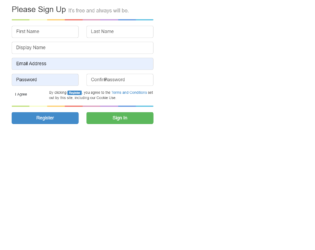
This is an example of a simple web signup form, designed using HTML, CSS, and Bootstrap framework 4. The CSS and Bootstrap styles are imported to the code with their URLs. The color graph section is given a background color of #c4e17f, and a border radius of 5px. It is given a linear gradient background image of linear-gradient(to right, #c4e17f, #c4e17f 12.5%, #f7fdca 12.5%, #f7fdca 25%, #fecf71 25%, #fecf71 37.5%, #f0776c 37.5%, #f0776c 50%, #db9dbe 50%, #db9dbe 62.5%, #c49cde 62.5%, #c49cde 75%, #669ae1 75%, #669ae1 87.5%, #62c2e4 87.5%, #62c2e4). The form is given two primary type buttons to Register and Sign in. The text areas of the input fields are given the value True to hide the default text, when in active mode.
Source: https://codepen.io/Stanssongs/pen/pJxAG
This is another example of a Bootstrap login form, designed using CSS, HTML, and Bootstrap framework 4. The images are imported to the code with their URLs. The styles for the background image is set as position as center, height as 100vh, and background-size as cover. The concept of Lists has been used with UL and LI components. UL element has been used with the child elements of LI to display the social media icons, in an orderly manner. The input fields are given the styles of background as #fff, border as none, margin as 10px 0px, padding as 20px, and height as 50px. The social media icons are given the styles of display as block, width as 35px, height as 35px, margin as 5px, color as #fff, font-size as 21px, and line-height as 35px. They are also given different background colors as Facebook- #3B5998, Google- #dd4b39, and Twitter- #00aced.
Source: https://www.tolmatol.com/bootstrap-login-form-using-html-css/
This is an example of a web Signup form, designed using HTML, CSS, and Bootstrap framework 4. The background image is imported to the code with its URL. The background of the form is set as linear-gradient(to bottom, rgba(43,57,144,.8), rgba(39,170,225,1) 65%), and the font color as #fff, whereas the logo has the styles of font-family as 'Agency FB', sans-serif, font-size as 2.5em, and font-weight as 700. The font color for the logo is also set as #fff. The registration form wrapper is given the styles of padding as 20px 20px 0, border as 1px solid rgba(255, 255, 255, .2), and margin-bottom as30px. The content section of the registration wrapper is is given a font-size of 15px. The Register Now Danger type button is given the styles of position as relative, top as 20px, and border-radius as 17px, whereas the line divider of the registration wrapper is given the styles of height as 1px, border-top as 1px solid rgba(255, 255, 255, .20), width as 180px, margin as auto, and margin-bottom as 10px.
Source: https://www.tolmatol.com/website-header-design-with-sign-up/