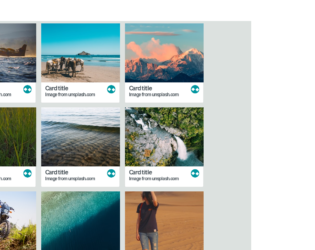
This is an example of a web form with a 3D fold-out reveal card preview, designed using HTML, CSS, and JavaScript. The background images of the cards are imported to the code with their URLs. JavaScript functions have been used to create 3D animations in a focused event. The font family of the form is set as Sans+Pro and imported into the code with its URL. The colors are predefined as variables and set as white: #ffffff, lightBG: #dce1df, salmon: #ff6666, teal: #0096a0, tealMid: #0ebac7, tealContrast: #33ffff, darkGrey: #4f585e, and tealShade: #007c85. The body of the form is given the styles of background: @lightBG, color: @darkGrey, font-family: 'Source Sans Pro', sans-serif, and text-rendering: optimizeLegibility. The cards are given an initial set of styles such as background: @white, display: inline-block, margin: 8px, max-width: 300px, perspective: 1000, position: relative, text-align: left, and transition: all 0.3s 0s ease-in. The cursor is set as pointer to display the cursor as a hand, in a focus event on cards.
Source: https://codepen.io/candroo/pen/wKEwRL
This is an example of a website header with a bootstrap carousel, designed using HTML, CSS< JavaScript and Bootstrap framework 4. The images and bootstrap styles are imported to the code with their URLs, whereas JavaScript had been used to implement carousel features. The concept of Lists has been used with UL and LI components. UL element has been used with the child elements of LI to display the details in an orderly manner. Media queries have been used to increase the responsiveness of the form. The nav-bar is given the styles of font-family as Verdana, color as #ffffff, and font-size as 20px. The background color for the nav-bar is set as transparent to make the menu transparent. The carousel image is given a linear gradient background color of linear-gradient ( rgba(0, 0, 0, 0.5), rgba(0, 0, 0, 0.5)), and a transform effect of translate3d(0, 0, 0). The title is given a font-weight of 600, and a font-size of 60px, whereas the subtitle is given a font-size of 23px. The explore button is given the background color #FF4000.
Source: https://codepen.io/arian-atapour/pen/xxbYxGW
This is an example of a bootstrap web form with an image carousel with swipe functionality, designed using JavaScript, CSS, bootstrap framework 4 and HTML. The images and bootstrap styles are imported to the code with their URLs, whereas the carousel swipe feature had been implemented in JavaScript. The concept of Lists has been used with the LI component to display the items in an orderly manner. The body of the form is given a height of 100%. The carousel indicators are given a background color of #E9E9E9, transition of (all 0.3s ease), and transform of scale(1), which changes its background color to #FFFFFF and take a transform effect of scale(1.3), in a hover event. Carousel item is given a height of 800px, whereas the image is given the styles of width and height as 100%.
Source: https://codepen.io/cliero/pen/oNgEjKK
This is an example of a bootstrap web form with a looping Instagram feed carousel, designed using JavaScript, CSS, bootstrap framework 4 and HTML. The images, fonts and bootstrap styles are imported to the code with their URLs, whereas the carousel feature had been implemented using JavaScript. Media queries have been used to increase the responsiveness of the form. The body of the form is given a style set of width as 100vw, height as 100vh, overflow as hidden, font-family as 'Dosis', sans-serif, background-color as black, and color as white. The autoplay mode, arrows, and center mode values are set as true in JavaScript with the autoplay speed set as 3000ms, and the slides to show value set as 5. A text-transform style for the indicator buttons is set as uppercase to automatically convert to uppercase with the cursor style set as pointer to get the hand cursor effect. The image item is given the styles of width as 100%, filter as blur(6px), transform effect as rotate(0) translate3d(0, 0, 0), and transition effect of filter 0.8s *2.
Source: https://codepen.io/martampoule/pen/oNgEzVz
This is an example of a bootstrap web form with image carousel feature with indicator buttons, designed using JavaScript, CSS, bootstrap framework 4 and HTML. The images and bootstrap styles are imported to the code with their URLs, whereas the carousel feature had been implemented using JavaScript. The body of the form is given a height and a width value of 100%, whereas the carousel is given a height as 400px, top as 50%, and a transform effect of translateY(-50%). The indicator buttons are given a style set of position as fixed, left as 50%, transform as translateX (-50%), and bottom as 10px. The carousel items have been named separately and given styles accordingly. The hideLeft item is given a transform as translateY(50%) translateX(-50%), opacity as 0, and image width as 200px, prevLeftSecond is given transform as translateY(50%) translateX(-50%), opacity as .7, and image width as 200px, prev is given transform as translateY(50px) translateX(-50%), image width as 300px, selected is given transform as translateY(0px) translateX(-50%), next is given transform as translateY(50px) translateX(-50%), and image width as 300px, nextRightSecond is given transform as translateY(50%) translateX(-50%), opacity as .7, image width as 200px, and hideRight is given transform as translateY(50%) translateX(-50%), and image width as 200px.
Source: https://codepen.io/aminos92/pen/YzPeRLM