This is an example of a colorful contact us form, designed using CSS, HTML, and Bootstrap framework 4. The font and Bootstrap styles are imported to the code with the URLs. The body of the form is given the styles of font color as #000, background color as #fcda2e, and font-family as "Roboto", sans-serif. The title of the form is displayed using the styles of font-size as 42px, font-family as 'Pacifico', sans-serif, and text-align as center. The input text fields are given a border color as #e2c705, whereas the text field labels are given an opacity value of 0.9. The input fields are validated by making them required in the HTML. In a focus event, the text fields take the styles of border-color as #d8b012, and box-shadow as 0 0 8px #dcae10. The 'Send' button is given the styles of font color as #fcda2e, and background color as #000. In a hover event, the font color of the button gets changed to #fff.
Source: https://www.tutorialrepublic.com/snippets/preview.php?topic=bootstrap&file=contact-form-with-yellow-background
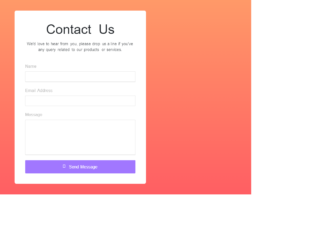
This is an example of a contact us form with a gradient background, designed using CSS, HTML, and Bootstrap framework 4. The font and Bootstrap style is imported to the code with its URL. The body of the form is given the styles of font-family style as "Varela Round", sans-serif, and background color as linear-gradient(#ff9968, #ff5e63). The form consists of the input text fields, and the 'Send Message' button. The contact form is given a background color of #fff and a width of 500px. Input text fields are validated by making them required in HTML. In a focus event, the fields take the styles of border-color as #a177ff, and box-shadow as 0 0 8px #c2a8ff. The title of the form is displayed with a font-size of 50px. The 'Send Message' button is created as a primary type button and given the styles of background as #a177ff, and font-size as 16px. The button changes its background color to #8048ff, on hover.
Source: https://www.tutorialrepublic.com/snippets/preview.php?topic=bootstrap&file=beautiful-contact-form-with-gradient-background
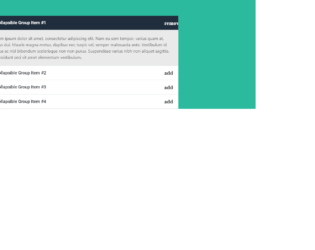
This is another example of an accordion widget with plus and minus icon, designed using CSS, HTML, Bootstrap framework 4, and JavaScript. The font and Bootstrap styles are imported to the code with their URLs. The form consists of four accordion items. Each accordion item is given a collapsible effect to hide the non-active sections. The background color of the form is set as #2bba9e. The accordion card header is given the styles of background color as #fff, and font-family style as "Roboto", sans-serif. The card header changes its background color to #f8f8f8, in a hover event. The header title is displayed using a font-size of 1.3rem, and a font-weight as bold. The body of the accordion item is given a background color of #eaeaea, and font color of #595959. The header of the selected accordion card takes the color #202d3c, when active. JavaScript methods are used to create the minus icon on the accordion header, its functionality and highlight the header of the selected accordion card.
Source: https://www.tutorialrepublic.com/snippets/preview.php?topic=bootstrap&file=accordion-menu-with-plus-minus-icon
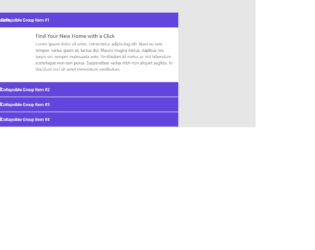
This is an example of an accordion widget, designed using HTML, CSS, JavaScript, and Bootstrap framework 4. The form consists of four accordion items. Each accordion item is given a collapsible effect to hide the non-active sections. The images, font, and Bootstrap styles are imported to the code with their URLs. The body of the form is given a background color of #e6e6e6, whereas the accordion card is given a box-shadow effect of 0 0 6px rgba(0,0,0,0.2). The accordion card header has a background color of #6245dd. The title of each accordion card header is displayed with the styles of font color as #fff, font-size as 1rem, font-weight as 500, and font-family as "Roboto", sans-serif. The accordion image is given a width of 150px. JavaScript methods are used to create the minus icon on the accordion header and its functionality.
Source: https://www.tutorialrepublic.com/snippets/preview.php?topic=bootstrap&file=elegant-accordion-widget
This is an example of an accordion feature on a sidebar menu, designed using HTML, CSS, JavaScript, and Bootstrap framework 4. The font, icons, and Bootstrap styles are imported to the code with their URLs. The concept of Lists has been used with UL and LI components, whereas the UL element has been used with the child elements of LI to display the child elements of the accordion, in an orderly manner. JavaScript methods have been used to implement the collapse feature of the accordion menu. The header of the accordion is given a background color of linear-gradient(#fff, #f1f1f1), which gets changed to linear-gradient(#f1f1f1, #e8e8e8), in a hover event. The cursor style for the accordion items is set as pointer to get the hand cursor effect on hover. The accordion item is given an opacity of 0.7 which gets changed to 1, in a hover event. The child elements of the accordion items are given a background color of #d6dbe0, which gets changed to #007bff, on hover.
Source:https://www.tutorialrepublic.com/snippets/preview.php?topic=bootstrap&file=accordion-menu-for-all-purpose
This is an example of a stylish newsletter subscription form, designed using HTML, CSS, JavaScript, and Bootstrap framework 4. The font and Bootstrap styles are imported to the code with their URLs. JavaScript methods have been used to display the subscription form when the page is refreshed. The body of the form is given a font family style of 'Open Sans', sans-serif. The title of the subscription card is displayed using the styles of font color as #000, text-align as center, font-family as 'Lato', sans-serif, font-weight as 900, font-size as 30px, and text-transform as uppercase to automatically convert the text to uppercase. The close button is given a background color of #c0c3c8, an opacity of 0.5, which gets changed to 0.8 on hover. The input text field is given a border color of #dbdbdb. The text field takes the styles of border-color as #49c5c1, and box-shadow as 0 0 8px rgba(73, 197, 193, 0.5), in a focus event. The 'Subscribe' button is given the styles of font-size as 14px, font-weight as bold, text-transform as uppercase, and background color as #49c5c1, which gets changed to #39b3af, on hover.
Source: https://www.tutorialrepublic.com/snippets/preview.php?topic=bootstrap&file=elegant-subscribe-newsletter-modal-form