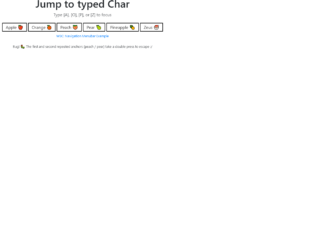
This is a keypress event where a certain element gets focused when the key that starts that element is pressed down. This is written in JavaScript. To handle the keypress event, the “key-down” function has been used in and to validate it to work only for alpha characters, a list has been declared with all the alphabetical characters with its Hexa value. There are three functions used here; handleAlphaKeyPresses, matchElemToKey and cycle focus and the use of them are respectively, to apply the keypress event, to find all the matching elements and return them and to make the “li > an” element. CSS styles have been used to apply mouse hover styles with the “hover” class and to apply the styles for the selected div with the “focus” class.
Source: https://codepen.io/miclgael/pen/LJJvyP?&page=1
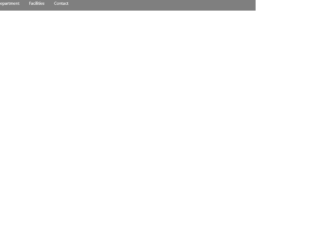
This code is used to design a responsive navigation bar where it dynamically changes according to the screen size. If the screen width is greater than 700px, the “nav-bar” class will be displayed and “small-navbar” will be hidden and vice versa. The style “display” is used with the value “none” to hide the visibility and the value “block” to make it visible. To identify the screen size, the media screen attribute has been used by specifying a min-width. The input element has been used with its type checkbox to display the clickable div; its clicked events have been handled by applying the styles when checked and remove the styles when unchecked.
Source: https://codepen.io/jewel998/pen/exVpQK?&page=1
This snippet displays the pagination with gooey animation using SVG. To display the goory animation we will use SVG. SVG plays with the shapes and allows to easily connecting the divs. Using SVG, we will create a filter and apply to the HTML element (DIV). For this, the concept used is CSS transition, CSS animation, SVG filters, and JQuery. Over your mouse and check out the animation used. Here the filter is defined under SVG in an HTML page and using CSS we apply this SVG filter to DOM element. Filter element contains one or more filter primitives, which defines the operation done by filters in this example its “blur”. To make the sticky part, we are using filter to change colors based on the transformation matrix. This gives users the power to manipulate the image with special effects. To use this snippet you need to take a look at SVG and its filters and design it accordingly.
This is an example of pagination styled with CSS. It does not include any scripts. This uses Bootstrap 4 .pagination element. The trick to having such type of pagination displayed is the CSS styling. Element to define the previous page of the pagination-item is styled color and text whereas the shape for previous is styled with display and margin-bottom to give the specific shape. The .pagination items which are not current or previous or next are styled with same settings with the transforms to display the shape for their boxes. The item to be active has a specific color to be displayed as the current page. You can use this to create the pages dynamically using JavaScript.
It is a Bootstrap 4 Pagination used to navigate across multiple pages by using the next or previous option or by a specific page number. To create pagination you need to include a .pagination class to your element. As well as you need to add .page-item to each element and .page-link to each element. You can include icons instead of next and previous content to improve the look of pagination. Include the “.active” class to your element that highlights the current page that the user is on. and “.disabled” class to your element to disable previous or next option to highlight the user reached the first or last page in the pagination options. Pagination size can be set, here it includes the large size ` .pagination-lg`. Use this snippet for pagination if you are going with bootstrap 4.
This is a simple yet elegant example for pagination. The look used for the matches the font and highlighted numbers. Bootstrap 4 .1 is used to create the pagination is used and is justified to center. The page-items are listed in pagination element along with the active and inactive state. To make the pagination work you will have to write javascript. Previous and next items are in an inactive state. The CSS file is designed to display the difference between the active state, inactive state, and disabled state. You can see the previous button is disabled where are 2nd button is active. You can use this pagination to match your webpage.