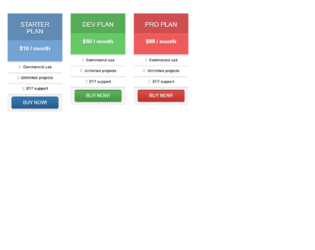
This is an example of a responsive price card table, designed using HTML, CSS, and Bootstrap framework 4. . The font style and the Bootstrap styles package has been imported to the code with its URL. The form consists of four price cards. The concept of Lists has been used with UL and LI components. UL element has been used with the child elements of LI to display the price card details, in an orderly manner. The panel header title is given the styles of font color as white, text-shadow as 0 3px 0 rgba(50,50,50, .6), and box-shadow as 0 5px 0 rgba(50,50,50, .2) inset. The price cards take a box-shadow effect of 0 0 30px rgba(0,0,0, .2), in a hover event. The panel footer is given a box-shadow effect as 0 3px 0 rgba(0,0,0, .3). The grey color card is given a background color as #808080, and panel heading color as #6d6d6d. The blue color one is given the background color as #73a3d4 and panel heading color as #608bb4. The background color of the green one is set as #65c965 whereas the panel heading is given the color of #57ac57. The red color card has the color #ef5a5c as background and #d04e50, as the panel heading color.
Source: https://bootsnipp.com/snippets/Pabj7
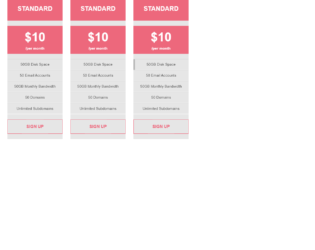
This is another example of a pricing table layout with hover effects, designed using CSS, HTML, and Bootstrap framework 4. The Bootstrap styles package has been imported to the code with its URL. The form consists of four price cards. The concept of Lists has been used with UL and LI components. UL element has been used with the child elements of LI to display the price card details, in an orderly manner. The price cards are given the styles of text-align as center and background as #e6e6e6. In a hover event, the cards take a margin-top effect of 10px to create the sinking effect. The header section of the card is given a background color as #ed687c. The title of the header is displayed with the styles of text-transform as uppercase to automatically convert the text to uppercase, font-size as 70px, and font-weight as bold. The price value is displayed with a font-size of 47px. The content rows take the background color of #b6b6b6, in a hover event.
Source: https://bootsnipp.com/snippets/Xarn2
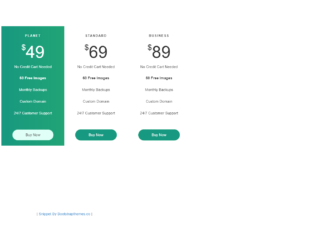
This is another example of a pricing table layout with hover effects, designed using CSS, HTML, and Bootstrap framework 4. The Bootstrap styles package has been imported to the code with its URL. The form consists of four price cards. The concept of Lists has been used with UL and LI components. UL element has been used with the child elements of LI to display the price card details, in an orderly manner. The title of each card is given a text-transform style as uppercase to automatically convert to uppercase. The price value is displayed with the styles of font-size as 64px, font-weight as 100, and line-height as 72px. The background color of the active card is set as #179880. In a hover event, the other three cards take the background color of #179880 with a transition effect of all 0.4s. The 'Buy Now' button is created as a success type button and given a background color as all 0.4s, which gets changed to #E0FFF6 in a hover event.
Source: https://bootsnipp.com/snippets/m02Nz
This is an example of another pricing table with hover effects, designed using CSS, HTML, and Bootstrap framework 4. The Bootstrap styles package has been imported to the code with its URL. The form consists of two price cards. The concept of Lists has been used with UL and LI components. UL element has been used with the child elements of LI to display the price card details, in an orderly manner. The price card header section is given a background color of #4d4d4d, which gets changed to #09b2c6 in a hover event. The title of each card is displayed with a font-size of 20px, and given a text-transform style as uppercase to automatically convert the text to uppercase. The price value is displayed with a font-size of 55px, and font color of #09b1c5. In a hover event, the font color of the price value gets changed to #fff. The 'Signup' button is given a background color as #d9d9d8 and gets changed to #09b1c5 on hover. Media quarries have been used to increase the responsiveness of the form.
Source: https://bootsnipp.com/snippets/B2KdQ
This is another example of a pricing table with hover effects, designed using HTML, CSS, and Bootstrap framework 4. The Bootstrap styles package has been imported to the code with its URL. The form consists of four price cards. The concept of Lists has been used with UL and LI components. UL element has been used with the child elements of LI to display the price card details, in an orderly manner. The header section of the cards is given the styles of font-weight as 300, font color as #fafafa, font-size as 27px, background as #36d7ac, and border-bottom as solid 1px #41b91c. The price section is given the styles of font color as #bac39f, font-size as 54px, font-weight as 300, background color as #fbfef2, and border-bottom as solid 1px #f5f9e7. In the active and hover modes, the font color of the pricing section turns to #36d7ac. In a hover event, the cards take the border style of 3px solid #36d7ac. The 'Signup' button is given a background color of #f3c200, which gets changed to #cfa500, on hover.
Source: https://bootsnipp.com/snippets/90QO4
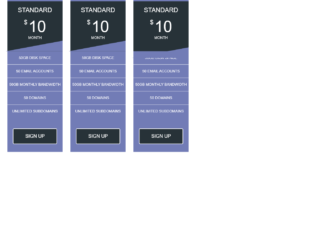
This is another example of a pricing card layout, designed using CSS, HTML, and Bootstrap framework 4. The Bootstrap styles package has been imported to the code with its URL. The form consists of four price cards. The concept of Lists has been used with UL and LI components. UL element has been used with the child elements of LI to display the price card details, in an orderly manner. The body of the price card is given a background color of #727cb6, whereas the header is given #273238. The text-transform style for the card header is set as uppercase to automatically convert the text to uppercase. The price value is displayed with a font-size of 60px. In a hover event, the height of the header section gets changed to 230px from 190px, to create the hover effect. The 'Signup' button is created as a default type button in HTML. Media quarries have been used to increase the responsiveness of the form.
Source: https://bootsnipp.com/snippets/klr1j