This is an example of a Signup Form with a blue background, designed using CSS, Html, and Bootstrap framework 4. The font, CSS, and Bootstrap styles are imported to the code with the URL. The form consists of input text fields, a checkbox, and a "Signup' button. The body of the form is given the styles of font color as #fff, background color as #3598dc, and font-family as 'Roboto', sans-serif. The Signup container is given a background color of #fff, and a box-shadow style of 0px 2px 2px rgba(0, 0, 0, 0.3). The input text fields are given a height of 41px and a background color of #f2f2f2. The input fields change their background color to #e2e2e2, in a focus event. The user name and password fields are validated by making them required fields. The 'Signup' button is created as a primary type button and given the styles of font-size as 16px, font-weight as bold, and background color as #3598dc. The button changes its color to #2389cd, in hover, and focus events. The 'Terms' and 'Privacy Policy' links also take an underline effect in a hover event.
Source: https://www.tutorialrepublic.com/codelab.php?topic=bootstrap&file=simple-sign-up-form-with-blue-background
This is an example of another signup form, with a background image, designed using CSS, HTML, and Bootstrap framework 4. The background image is imported to the code with its URL whereas the media quarries have been used to increase the user-friendliness of the form. The image container is given a box-shadow of 1px 1px 5px rgba(0, 0, 0, 0.1). The form is given a background color of #ffffff. The title of the form is displayed using the styles of font-size as 24px, line-height as 1.5, and margin-bottom as 30px. The input text fields are given a height of 40px, and a border-bottom of 1px solid #dfe7f1. The 'Sign-up' button is created as a primary type button and given a style set of background as green, border-radius as 4px, and padding as 11px. The button takes a transform effect of translateY(1px), in a hover event.
Source: https://bbbootstrap.com/snippets/bootstrap-signup-form-image-left-side-40740957
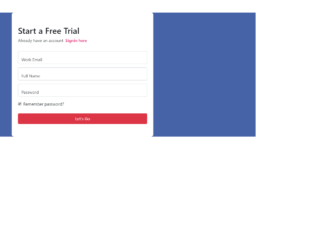
This is an example of a simple free trial signup form, designed using HTML, CSS, and Bootstrap framework 4. The form is given a background color of #4763a7. The card consists of a sign-in link, input text fields, 'Forgot password' checkbox, and a 'Signup; button. The information card is given a border-radius of 8px. The sign-in link is displayed using the styles of font color as #db0a5b, font-weight as 600, and takes a font-color of #b90b4f, on hover. The input text fields are given the styles of margin-top as 13px, and height as 49px. The text input fields take a border style of 1px solid #db0a5b, in a focus event. The 'Sign up' button is created as a danger type button and given the styles of height as 40px, and border-radius as 4px.
Source: https://bbbootstrap.com/snippets/bootstrap-start-free-trial-signup-form-84637784
This is an example of another signup form with sidebar image, designed using Bootstrap framework 4, CSS, and HTML. The sidebar image is imported to the code with its URL and media quarries have been used to increase the responsiveness of the form. The background color of the form is set as #8E24AA. The form container is given a box-shadow style of 1px 1px 5px rgba(0, 0, 0, 0.1), whereas the information form is given a style set of display as table-cell, width as 400px, background-color as #ffffff, padding as 40px 60px, and color as #505e6c. The title of the form is displayed using the styles of font-size as 24px, and line-height as 1.5. The input text fields are given a border-bottom style of 1px solid #dfe7f1 and a text-indentation value of 6px. The agreement text is displayed using the styles of font-size as 13px, and line-height as 20px. The 'Signup' button takes a transform effect of translateY(1px), in the active mode.
Source: https://bbbootstrap.com/snippets/bootstrap-create-account-sidebar-image-15398911
This is an example of a signup/ login form, designed using CSS, HTML, and Bootstrap framework 4. The image logo is imported to the code with its URL and the buttons are created as primary type buttons. The body of the form is given a background color of #EBEAEF and the information card is given the styles of border-radius as 10px, background-color as #4270C8, and width as 350p. The first line of text in the form is displayed using a font-size of 25px, and font color of #9FB7FD. The font-size of the login button is defined as 13px. The input text fields are given a border-bottom style of 1.5px solid #E6EBEE, which changes to 2px solid #8A97A8, in a focus event. The input field text is displayed with a font-size of 80%, a transform style of translate3d(0, -90%, 0), opacity of 1, and a font-color of #8B92AC. The font-size of the 'Get Started' button is defined as 15px.
Source: https://bbbootstrap.com/snippets/bootstrap-signup-login-form-56423928
This is an example of a multi-step form with a vertical progress-bar and floating label, designed using CSS, HTML, JavaScript, and Bootstrap framework 4. The icons and background images are imported to the code with their URLs. JavaScript methods have been used to implement the functionality of the Go back button and progress bar. The body of the form is given a font color as #000, and background color as #F44336. The registration card is given a background color as #F5F5F5, and a border-radius as 8px. The input text fields are given the styles of padding as 2px, box-sizing as border-box, color as #9E9E9E, border as 1px solid #BDBDBD, font-size as 16px, letter-spacing as 1px, and height as 50px. The input fields take a border style of 1px solid #E53935. The checkbox is given a background color of #E53935. The 'next' button has the styles of width as 18%, height as 50px, background-color as #BDBDBD, color as #fff, border-radius as 6px, and cursor as pointer to get the hand cursor effect in hover. The button takes a background color of #E53935, and font color of #fff, in a hover event.
Source:https://bbbootstrap.com/snippets/multi-step-form-vertical-progressbar-and-floating-label-41789662