This is an example of a LinkedIn login page template, designed using CSS, HTML, and Bootstrap framework 4. The background image is imported to the code with its URL. The body of the form is given a color of #eee. The Welcome text is displayed using a font-size of 23px. The input text fields are given the styles of background color as #E3F2FD, margin-top as 10px, font-size as 9px, font-weight as bold, font color as #fff, padding-top and bottom as 15px, and caret-color as red to set the color of the insertion caret. The 'Forgot Password' text is given a font color of #42A5F5. The "login; button is given the styles of background color as #0277BD, font-size as 11px, and font-weight as bold. The 'Sign up' button is given the styles of background-color as #fff, font color as #0277BD, and font-size as 11px. The buttons are created as primary type buttons. The media quarries have also been used to increase the responsiveness of the form.
Source: https://bbbootstrap.com/snippets/bootstrap-linkedin-login-page-72193613
This is an example of another payment form with card details, designed using CSS, HTML, and Bootstrap framework 4. The card images are imported to the code with their URLs. The body of the form is given a background color of #BA68C8. The form consists of two containers. The left one is given a background color of #263238 and a font color of white. Both containers are given a height of 600px. The headings in both containers are given a font-weight of 900. The subheading is given a font-size of 14px, whereas the subheading on the left side card is given a border of 1px solid white, while the subheading on the right-hand side is given a background-color as white, and font color as #263238. The input text fields are given a border-bottom style of 1px solid lightgray, whereas the input field text is displayed using the styles of font color as peachpuff, and font-size as 25px.
Source: https://bbbootstrap.com/snippets/payment-form-icon-55737250
This is a template of a card payment form, designed using CSS, HTML, and Bootstrap framework 4. The card image and font styles are imported to the code using their URLs. The body of the form is given a background color of linear-gradient(to right, rgba(235, 224, 232, 1) 52%, rgba(254, 191, 1, 1) 53%, rgba(254, 191, 1, 1) 100%), and a font-family style of 'Roboto', sans-serif. The payment card has the styles of max-width as 450px, border-radius as 15px, margin as 150px 0 150px, padding as 35px, and padding-bottom as 20px. The card heading is displayed using a font color of #C1C1C1, font-size of 14px, and a font-weigh of 500. The cursor style for the card image is set as pointer to get the hand cursor effect on hover. The input text fields are given a border-bottom of 1.5px solid #E8E5D2, and a font-weight style as bold. The input text field labels are displayed using the styles of font-size as 12px, font-weight as 500, and font color as #edb537. The button is given a background color of #F3A002.
Source: https://bbbootstrap.com/snippets/bootstrap-credit-card-payment-form-66489199
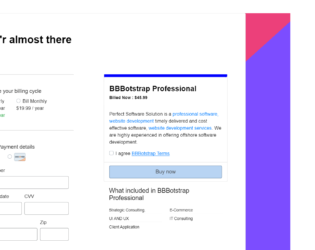
This is an example of a service or product billing/checkout page, designed using HTML, CSS, and Bootstrap framework 4. The form consists of radio buttons, input text fields, and a primary type button. The card images are imported to the code with their URLs. The body of the form is given the styles of font as 300 18px/1.5 'Muli', sans-serif, font color as RGB(0, 0, 0), background as linear-gradient(138deg, #EC407A 60%, #7C4DFF 60%), and height as 100%. Media quarries have been used to increase the responsiveness of the form. The information card is given a background color as white. The information card is split into two cards, left and right, and given a border-top style pf 1px solid #ccc. Some elements of the form have been given a cursor style as pointer to get the hand cursor effect in a hover event.
Source: https://bbbootstrap.com/snippets/service-or-product-billing-checkout-page-29315671
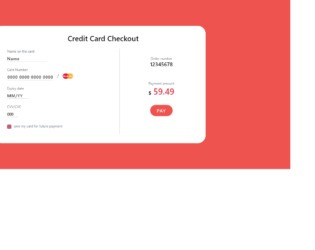
This is an example of a credit card checkout with formatted input, designed using HTML, CSS, JavaScript, and Bootstrap framework 4. The card image is imported to the code with its URL while the media quarries have been used to increase the responsiveness of the form. JavaScript methods have been used to validate the number format of the card number text field. The body of the form is given the styles of font color as #000, and background-color as #EF5350, whereas the payment card is given the styles of padding as 30px 25px 35px 50px, border-radius as 30px, box-shadow as 0px 4px 8px 0px #B71C1C,and margin-top and bottom as 50px. The input text fields are given a border-bottom style of 1px solid lightgrey, font color of #000, font-size of 16px, letter-spacing of 1px, and a font-weight of 500. In a focus event, they take a border-bottom style of 1px solid #EF5350. The 'Pay' button is given a border-radius of 50px, font-size of 18px, and a background color of #EF5350, and takes a box-shadow effect of 0 0 0 2px #EF5350, in hover and focus events.
Source: https://bbbootstrap.com/snippets/credit-card-checkout-formatted-input-51353295
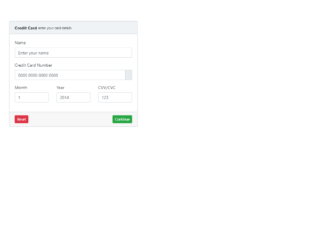
This is an example of a simple payment credit card form, designed using CSS, HTML, and Bootstrap framework 4. The payment card is given the styles of position as relative, display as flex, flex-direction as column, word-wrap style as break-word to allow long words to be able to break and wrap onto the next line, background-color as #fff, border as 1px solid #c8ced3, and border-radius as .25rem. The card consists of the card header, input text fields, and two buttons.The card header is given the styles of padding as .75rem 1.25rem, background-color as #f0f3f5, and border-bottom as 1px solid #c8ced3. In a focus event, the input text fields take the styles of font color as #5c6873, background-color as #fff, border-color as #c8ced3, and box-shadow as 0 0 0 #F44336. The 'Continue' button is created as a success type button while the 'Reset' button is created as a danger type button.
Source: https://bbbootstrap.com/snippets/simple-payment-credit-card-form-41641728