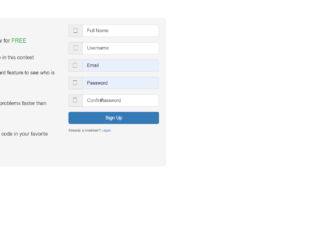
This is an example of another Bootstrap styled registration form, designed using CSS, JavaScript, and HTML. The form consists of the signup details, input text fields, and the ‘Signup’ button. The font and the Bootstrap style sheet has been imported to the code with their URLs. The concept of Lists has been used with UL and LI components. UL element has been used with the child elements of LI to display the signup content, in an orderly manner. The JavaScript methods have been used to implement the required validation on the input fields. The user name and email fields have been given a maximum length of 100 characters whereas the password filed is given a length of 60. The ‘Signup’ button has been created as a primary type button. The media quarries are used to enhance the responsiveness of the form to different browser frames.
Source: https://www.bootdey.com/snippets/view/colored-inbox-mail-list-and-compose#css
This is another example of a responsive registration form layout, designed using CSS, HTML, JavaScript, and Bootstrap framework 4. The JavaScript methods have been used to implement the validation on the input text fields. The body of the form is given the styles of font-family style as Verdana, Geneva, sans-serif, font-size as 14px, and background as #f2f2f2. The form container is given a width as 400px, border-top style as 5px solid #f5ba1a, a box-shadow style of 0 0 3px rgba(0, 0, 0, 0.1), and an animation style as expand 0.8s 0.6s ease-out forwards. The title of the form is displayed with a font-size of 1.5em. The input text fields are given an opening animation as bounce 0.6s ease-out and a border style as 1px solid #cccccc. The text fields take the border style pf 1px solid #f5ba1a, in a focus event. The ‘Submit’ button is given a background color as #f5ba1a, which gets changed to #e1a70a in focus and hover events.
Source: https://www.bootdey.com/snippets/view/Clear-inbox-view-message#css
This is an example of a registration form with an animated background, designed using CSS, HTML, JavaScript, and Bootstrap framework 4. The font style has been imported to the code with its URL. The JavaScript methods have been used to implement the required validation on the input fields. The body of the form is given the styles of font-family as 'PT Sans', sans-serif, font-size as 16px, line-height as 1.428571429, and font-weight as 400, and font color as #fff. The wave section is given a background color as #252E45, and given the styles of animation as shift 20s infinite linear, and transform as rotate(360deg), to create the wave animation. The input text fields are given a border-bottom style as 1px solid #75759The ‘Submit’ button is given a border style as 2px solid #75759E, and takes the background color of #EDA261, and a border style of 2px solid #EDA261 in a hover event.
Source: https://www.bootdey.com/snippets/view/Inbox-mail#css
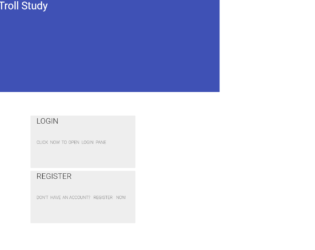
This is an example of a login and registration form layout with tabs, designed using CSS, JavaScript, HTML, and Bootstrap framework 4. The users are given the ability to switch between the login and register forms, using the tabs. The JavaScript methods have been used to implement the validation on the input fields. The body of the form is given a background color as rgba(255, 84, 151, 0.40). The tabs are given the styles of background color as rgba(11, 177, 224, 0.82), text-align as center, border as 2px solid #ffffff, font-size as 1.3em, and font color as #ffffff. The cursor style for the tabs is set as pointer to get the hand cursor effect on the hover. The information container is given a background color as rgba(11, 177, 224, 0.82), and a height as 330px. The title of the container is displayed with a font-size of 1.5em. The input text fields are given an outline style as 2px solid #ffffff.
Source: https://www.bootdey.com/snippets/view/Email-list-page#css
This is another example of a chat room layout, designed using HTML, CSS, JavaScript, and Bootstrap framework 4. The font style and user avatar images have been imported to the code with their URLs. The concept of Lists has been used with UL and LI components. UL element has been used with the child elements of LI to display the information in an orderly manner. JavaScript methods have been used to implement the scrolling feature in the chat list. The chat list section is given a border style as 1px solid #ddd, and height as 510px. The cursor style for the chat list rows is set as pointer to get the hand cursor effect on hover, and a border-bottom style is given as 1px solid #ddd. The rows change their background color to #f4f4f4 on hover mode and #eee on the active mode. The buttons are given a background color of #2ecc71, and a border color of #27ae60.
Source: https://www.bootdey.com/snippets/view/Green-chat-room#js
This is an example of a chat room layout with a chat list and messages, designed using CSS, HTML, and Bootstrap framework 4. The font style and user avatar images are imported to the code with their URLs. The form consists of a chat room panel, an input text field to type a new message, and a list of users available for chat. Media quarries have been used to increase the responsiveness of the form. The message avatar is given height and width of 48px, and a border of 1px solid #e7eaec. The message panel is given a background-color of #fff, border style of 1px solid #e7eaec, and text-align style as left. The message date is displayed with the styles of font-size as 10px, and font color as #888888. The input text field is given the styles of background-color as #FFFFFF, border style as 1px solid #e5e6e7, and transition as border-color 0.15s ease-in-out 0s, box-shadow 0.15s ease-in-out 0s, and font size as 14px.
Source: https://www.bootdey.com/snippets/view/Chat-room-with-right-list#css