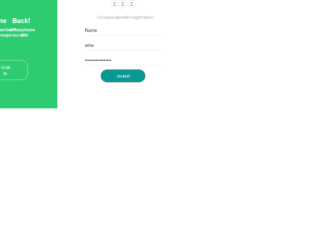
This is an example of a slide form for login and registration, designed using CSS, HTML, JavaScript, and Bootstrap framework 4. The users are given the ability to slide between panels. The sliding feature has been implemented using JavaScript methods. The font style and CSS styles have been imported to the code with their URLs. The body of the form is given a background color as #4d4d4d. The normal text has been displayed with the styles of font-family as 'Darker Grotesque', sans-serif, font-weight as 500, and font-size as 17px, whereas the bold text has been displayed with font-family as 'Montserrat', sans-serif, font-weight as 700, and font-size as 25px. The Welcome panel is given a background color as #2ecc71. The panel is given an animation style as .4s linear forwards, to create the sliding animation. The input text fields are given a border-bottom style as 1px solid lightgray.
Source: https://www.bootdey.com/snippets/view/Bootstrap-accordion-Start-Templates#css
This is an example of a sign in and a signup form, designed using CSS, HTML, JavaScript, and Bootstrap framework 4. The JavaScript methods have been used to implement the validation on the input text fields. The font style, CSS styles, and background image have been imported to the code with their URLs. The users are given the ability to switch between the sign in and sign up panels using the header links. The login container is given a filter style as blur(5px). The input text fields are given a border-bottom style as 1px solid rgba(255, 255, 255, 0.5). The font size of the input text field label gets changed to 0.75rem with a transition style as 0.3s, in a hover event. The ‘Submit’ button is given a background color as #ff1552. The media quarries have been used to enhance the responsiveness of the form. The error message gets displayed with the styles of font-size as 1.125rem, and font-color as #ff1552.
Source: https://www.bootdey.com/snippets/view/User-wall-with-sidebar-show-hide#js
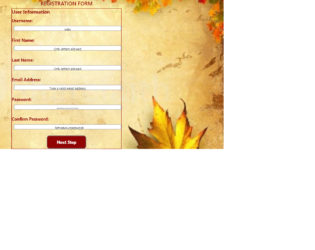
This is an example of a responsive and functional registration form, designed using HTML, JavaScript, CSS, and Bootstrap framework 4. The JavaScript methods have been used to implement the validation on the input fields. The background image has been imported to the code with its URL. The form is given a font-family style of Segoe UI', Tahoma, Geneva, Verdana, sans-serif. The title of the form is displayed with the styles of text-align as center, font-size as 30px, and font color as RGB(145, 5, 5). The information container is given a border style as 1px solid RGB(145, 5, 5). The input text labels are displayed with the styles of font color as RGB(145, 5, 5), height as 30%, font-weight as bold, and font-size as 20px. The input text fields are given a background color as white, and a border style as 1px solid grey. The ‘Next Step’ button is given a background color as RGB(145, 5, 5), font color as white, and font-size as 18px. The cursor style for the button is set as pointer to get the hand cursor effect on hover whereas the media quarries have been used to enhance the responsiveness of the form.
Source: https://www.bootdey.com/snippets/view/bs4-profile-card#css
This is another example of a registration form layout, designed using CSS, HTML, and Bootstrap framework 4. The font style has been imported to the code with its URL. The body of the form is given a font-family style as 'Montserrat', sans-serif, and background color as #fec107. The registration container is given a background color as #fff, and a box-shadow style as 2px 2px 4px rgba(0,0,0,0.125). The title of the form is displayed with the styles of font-size as 24px, font-weight as 700, font color as #fec107, text-transform style as uppercase to automatically convert the text to uppercase, and text-align as center. The input text field labels are displayed with a font color of #757575, and a font-size of 14px. The input text fields are given the styles of font-size as 15px, and border style as 1px solid #d5dbd9. The fields take a border style of 1px solid #fec107, in a focus event. The ‘Register’ button is given a background color as #fec107, which turns to #ffd658 in a hover event.
Source: https://www.bootdey.com/snippets/view/Social-network-profile-with-panels#css
This is an example of login, registration, and a recover password form swap with a ripple effect and floating labels, designed using CSS, HTML, JavaScript, and Bootstrap framework 4. The form consists of three separate panels for login, registration, and recover password features. The body of the form is given a background color as #e0e0e0, and a font-family style as 'Roboto', Arial, sans-serif. The JavaScript methods have been used to implement the ripple swapping animation on the form. The sign-in form is given a background color as #00bcd4, whereas the register and recover password forms are given the colors #ffea00, and #757575 respectively. The title of the card is displayed with a font-size of 24px. The input text field labels are given a font-size as 16px, which gets changes to 12px, in a hover event to create the floating label effect. The input fields also take an underline effect with the color of #00bcd4, in a focus event. The buttons are given a text-transform style as uppercase to automatically convert the text to uppercase and a box-shadow style of 0 2px 2px 0 rgba(0, 0, 0, 0.12), to be activated on hover.
Source:https://www.bootdey.com/snippets/view/user-profile-bio-graph-and-total-sales#css
This is an example of a registration form layout, designed using CSS, HTML, and Bootstrap framework 4. The background image, font style and bootstrap styles have been imported to the code with their URLs. The information container is given an opacity value as 0.9. The title of the form is displayed with the styles of text-align as center, font-weight as 300, font-size as 1.8em, line-height as 15px, letter-spacing as 1px and text-transform style as uppercase to automatically convert the text to uppercase. The two social media buttons are given a box-shadow style as 0 1px 5px 0 rgba(0, 0, 0, 0.35), which gets changed to 0 5px 20px 0 rgba(0, 0, 0, 0.45) in a hover event and 0 3px 10px 0 rgba(0, 0, 0, 0.4) in a focus event. The Facebook button is given a background color as #3b5998 whereas the Google Plus is given a background color of #d34836. The button take a span with a color of #212121, in a hover event.
Source: https://www.bootdey.com/snippets/view/View-mail#css