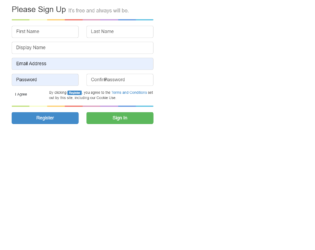
This is an example of a simple web signup form, designed using HTML, CSS, and Bootstrap framework 4. The CSS and Bootstrap styles are imported to the code with their URLs. The color graph section is given a background color of #c4e17f, and a border radius of 5px. It is given a linear gradient background image of linear-gradient(to right, #c4e17f, #c4e17f 12.5%, #f7fdca 12.5%, #f7fdca 25%, #fecf71 25%, #fecf71 37.5%, #f0776c 37.5%, #f0776c 50%, #db9dbe 50%, #db9dbe 62.5%, #c49cde 62.5%, #c49cde 75%, #669ae1 75%, #669ae1 87.5%, #62c2e4 87.5%, #62c2e4). The form is given two primary type buttons to Register and Sign in. The text areas of the input fields are given the value True to hide the default text, when in active mode.
Source: https://codepen.io/Stanssongs/pen/pJxAG
This is an example of a responsive mailbox layout, designed using CSS, HTML, and Bootstrap framework 4. The images and fonts are imported to the code with their URLs. Media quarries are used to increase the responsiveness of the form. The body of the form is given the styles of font-family as 'Roboto', sans-serif, font-size as .9em, font-weight as 400, and color as #797979. The panelist on the left side is given the styles of line-height as 40px, margin as 5px 0px, padding as 0px 8px, border-radius as 4px, and cursor as pointer to get the hand cursor effect. The panel items take the background color of #fff, in a hover event. The concept of Lists has been used with UL and LI components. UL element has been used with the child elements of LI to display the panel items in an orderly manner. Each mail section is given a different border-left color for identification purposes.
Source: https://www.tolmatol.com/bootstrap-snippets-responsive-mail-inbox/
This is another example of a simple Contact Us form, designed using HTML, CSS, and Bootstrap framework 4. The concept of Lists has been used with UL and LI components. UL element has been used with the child elements of LI to display the news items in an orderly manner. The news panel is given a background color of #f9f3e1, and a padding-bottom of 50px. The news sections are given the styles of border-bottom as solid 1px #8b61e0, and padding-bottom as 20px. The title of the news cards is given the styles of margin as 10px 0px 10px 0px, whereas the author's name is given a font-weight of 400. The right panel header is given the styles of margin as 50px 0px, and color and #eee. The input fields of the right-side panel has the styles of margin as 8px 0px, padding as 20px, line-height as 30px, and border as solid 2px #ffffff5c.
Source: https://www.tolmatol.com/contact-form-with-news/
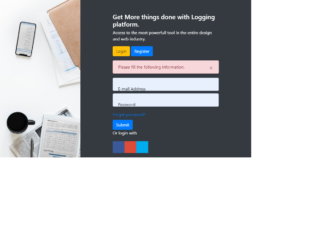
This is another example of a Bootstrap login form, designed using CSS, HTML, and Bootstrap framework 4. The images are imported to the code with their URLs. The styles for the background image is set as position as center, height as 100vh, and background-size as cover. The concept of Lists has been used with UL and LI components. UL element has been used with the child elements of LI to display the social media icons, in an orderly manner. The input fields are given the styles of background as #fff, border as none, margin as 10px 0px, padding as 20px, and height as 50px. The social media icons are given the styles of display as block, width as 35px, height as 35px, margin as 5px, color as #fff, font-size as 21px, and line-height as 35px. They are also given different background colors as Facebook- #3B5998, Google- #dd4b39, and Twitter- #00aced.
Source: https://www.tolmatol.com/bootstrap-login-form-using-html-css/