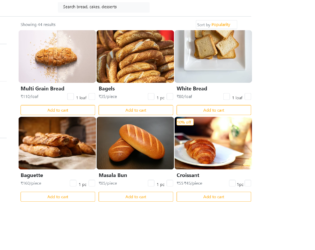
This is an example of an e-commerce product category page with navbar and filters, designed using HTML, CSS, and Bootstrap framework 4. The form consists of a search bar, six product cards with product image, details, and 'Add to Cart' button, and a set of filters created as checkboxes. The product images are imported to the code with their URLs. The concept of Lists has been used with UL and LI components. UL element has been used with the child elements of LI to display the login and shopping cart icons in an orderly manner. The font color RGB(153, 40, 59) has been used to get the burgundy color in text lines. The font-size of the search bar is set as 20px. The product card is given a height of 330px, and a width of 300px, whereas the product image, is given a height of 200px and a width of 250px. The 'Add to cart button is given a border style of 1px solid orange, and background color of #fff. The button takes the background color of orange and font color of #fff, in a hover event.
Source:https://bbbootstrap.com/snippets/bootstrap-ecommerce-product-category-page-navbar-and-filters-66782703
This is an example of a login form layout, designed using CSS, HTML, and Bootstrap framework 4. The font style has been imported to the code with its URL. The media quarries have been used to increase the responsiveness of the form. The form consists of the social media buttons, input text fields, and the 'Login' button. The title of the form is given a text-align style as center, and a line-height of 300%. The social media buttons are given an opacity value of 0.9, which turns to 1, on a hover event. The background color of the Facebook, Twitter, and Google+ buttons are set as #3b5998, #00aced, and #c32f10, respectively. The 'Submit' button is created as a primary type button in HTML. The 'Or' clause in between the social media buttons and the input fields is displayed with a font-size of 1.5em, and font color of #aaa.
Source: https://www.bootdey.com/snippets/view/Responsive-login-with-social-buttons#css
This is an example of a registration form with an animated background, designed using CSS, HTML, JavaScript, and Bootstrap framework 4. The form consists of an animated background and a registration section with input text fields and a 'Submit' button. Particles.js JavaScript library has been imported to the code and JavaScript methods have been used to implement the animations in the background form. The body of the form is given the styles of height and width as 100%, font-family as 'Roboto', sans-serif, and font color as #fff. The background of the form is given a linear gradient color of linear-gradient(to right, #6819e8 0%,#7437d0 35%,#615fde 68%,#6980f2 100%). The title of the form is displayed with a font-size of 59px. The input text fields have been validated by making them required. The 'Submit' button is created as a primary type button in HTML.
Source: https://www.bootdey.com/snippets/view/Register-form-with-particles-js#js
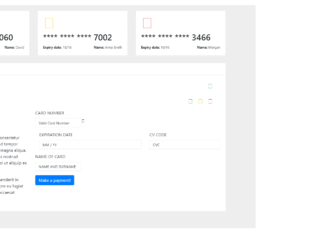
This is an example of a credit card payment form, designed using CSS, HTML, and Bootstrap framework 4. The card images and font styles are imported to the code with their URLs. The body of the form is given a background color of 0 3px 2px 0 #516cd9. Media quarries have been used to increase the responsiveness of the form. The payment card is given the styles of background color as #ffffff, padding as 20px, margin-bottom as 25px, and border as 1px solid #e7eaec. The payment method section is given two panels as PayPal, and Credit Card. The title of each payment method accordion is displayed with the styles of background-color as #ffffff, border-color as #e7eaec, border-style as solid solid none, border-width as 3px 0 0, and color as inherit. The PayPal section is given a success type button. The Credit Card Payment section is given input text fields with the styles of background-color as #FFFFFF, border as 1px solid #e5e6e7, and display as block, transition as border-color 0.15s ease-in-out 0s, box-shadow 0.15s ease-in-out 0s, and font-size as 14px.
Source: https://www.bootdey.com/snippets/view/payment-credit-card-form#css
This is an example of a login form with a blue color background, designed using CSS, HTML, and Bootstrap framework 4. The body of the form is given a background color as linear-gradient(to right, #4e63d7 0%, #76bfe9 100%). The icons and font style is imported to the code with their URLs. The form consists of three sections; login signup, and sign in. Media quarries have been used to increase the responsiveness of the forms. The login section is given a box-shadow style of box-shadow: 0 10px 20px 0 rgba(0, 0, 0, 0.1). It is also given the input text fields and the 'Sign in' button which is created as a dark button. The input text fields are given the styles of border as 1px solid #e1e1e1, background color as #fff, and font-color as #858585. The social media button are given a height and a width of 35px, background color of #6893e1, box-shadow style of 0 3px 2px 0 #516cd9, and a font-size of 16px.
Source: https://www.bootdey.com/snippets/view/blue-login#css
This is another example of a detailed pricing table, designed using CSS, HTML, and Bootstrap framework 4. The body of the form is given the styles of font-size as 1rem, font-weight as 400, line-height as 1.5, color as #1a202c, text-align as left, and background-color as #e2e8f0. The concept of Lists has been used with UL and LI components. UL element has been used with the child elements of LI to display the pricing details in an orderly manner. The price card is given a border style of 0 solid rgba(0,0,0,.125), and a word-wrap style as break-word to break the long lines and wrap onto the next line. The card header is given the styles of background-color as #fff, and border-bottom as 0 solid rgba(0,0,0,.125), whereas the card footer is given the styles of background-color as #fff, and border-top as 0 solid rgba(0,0,0,.125). The four cards are also given four types of 'Subscribe' buttons which are secondary, success, primary, and danger.
Source: https://www.bootdey.com/snippets/view/Pricing-table-with-detail#css