This is an example of a login/ sign-in page attached to a navbar, designed using CSS, HTML, and Bootstrap framework 4. The font style, background image, Bootstrap, and JavaScript styles are imported to the code with their URLs. The form consists of a navbar, login form, search bar, and dropdown items. The Login form is attached to the navbar where it can be opened by clicking on the Login navbar item. The Login form consists of social media login buttons, input text fields, and the 'Sign in' button. The Facebook button is given a background color of #3b5998, which turns to #496ebc on hover, whereas the Twitter button is given the color of #55acee, which turns to #59b5fa on hover. The input text fields are validated by making them required in HTML. The media quarries have been used to increase the responsiveness of the form.
Source: https://bootsnipp.com/snippets/DV3m4
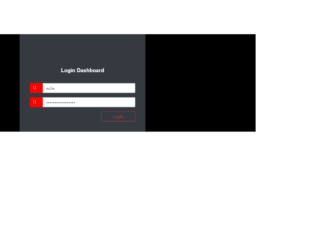
This is an example of another login form, designed using CSS, HTML, and Bootstrap framework 4. The font style, Bootstrap, and JavaScript styles are imported to the code with their URLs. The body of the form is given a background color of #000. The login card is given a border style of 1px solid #28a745. The card header is given the styles of font color as #fff, font-family as sans-serif, font-size as 20px, and font-weight as 600. The login and password icons are given a background color of #ff0000, and a font color of #fff. The input text fields are given the styles of font-size as 1.5rem, font-weight as 700, line-height as 1.6, font color as #495057, background color as #e9ecef, and border style as 1px solid #ced4da. The 'Login' button is created as a danger type button and changes the background color to #ff0000, in a hover event.
Source: https://bootsnipp.com/snippets/E1gVl
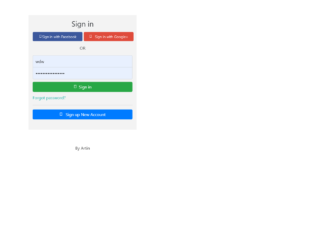
This is another example of a login+ registration form, designed using CSS, HTML, JavaScript, and Bootstrap framework 4. The font style, Bootstrap, and JavaScript styles are imported to the code with their URLs. The form consists of buttons, toggle buttons, and input text fields. The functionality of the toggle buttons has been implemented using JavaScript methods. The input text fields have been validated by making them required in HTML. The Register and Sign-in forms are given the styles of background color as #f3f3f3, box-shadow style as 0 1px 3px rgba(0,0,0,0.12), 0 1px 2px, and width as 412px. The input text fields are given a font-size of 16px. The social media buttons are given the styles of font-weight as 100, font color as white, width as 190px, and font-size as 0.9rem. The two social media buttons are given two different background colors as #3C589C and #DF4B3B. The media quarries have been used to increase the responsiveness of the form.
Source: https://bootsnipp.com/snippets/GavAo
This is an example of an animated login page, designed using CSS, HTML, JavaScript, and Bootstrap framework 4. The font style, CSS, and Bootstrap packages have been imported with their URLs. The form is set to switch between the login page and the register page. JavaScript methods have been used to implement the switching animation of the login and register forms. The body of the form is given a font family style as 'Mukta', sans-serif. The white panel is given the styles of background-color as rgba(255,255, 255, 1), height as 500px, transition as .3s ease-in-out, and box-shadow as 0 0 15px 9px #00000096. The registration and login panels are given a height as 400px, and background-color as rgba(236, 48, 20, 0.9). The 'Register' and 'Login' buttons in the white panel are displayed with the styles of background color as #444444, font color as #f9f9f9, text-transform as uppercase to automatically convert the text to uppercase, and cursor style as pointer to get the hand cursor effect on hover.
Source: https://bootsnipp.com/snippets/92gmX
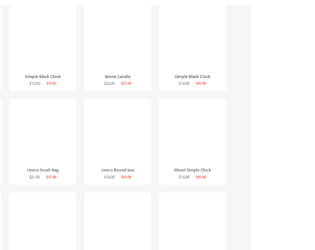
This is an example of an E-commerce product list, designed using CSS, HTML, and Bootstrap framework 4. The font style and product images have been imported to the code with their URLs. The concept of Lists has been used with UL and LI components. UL element has been used with the child elements of LI to display the prices, in an orderly manner. The body of the form is given a background color of #f4f7f6. The product image is given a transform style as translate(-50%), and a transition style of all 0.2s ease-in-out. The product image moves -40px to the top and takes a box-shadow style of 0 19px 38px rgba(0, 0, 0, 0.3), 0 15px 12px rgba(0, 0, 0, 0.22), in a hover event. The new price of the product is displayed with a font color of #ff4136. The product name is displayed with a size of 15px. The media quarries have been used to increase the responsiveness of the form.
Source: https://www.bootdey.com/snippets/view/bs4-ecommerce-products#css
This is an example of an accordion feature with collapsible buttons, designed using CSS, HTML, and Bootstrap framework 4. The font style has been imported to the code with its URL. The JavaScript methods have been used to implement the functionality of the collapsible buttons. The form consists of four accordion panels. The panel title is displayed with the styles of display as block, font-weight as 400, font-size as 18px, line-height as 1.6, and font color as #6d7194. Each panel is given a plus icon to expand the panel, which is displayed with the styles of font-size as 45px, and background color as #03C6FE. The panel body is given a border style of 1px solid #d9d7d7. When expanded, the panel takes the background color of #03C6FE. The font color of the panel heading also changes to #fff, in the expanded mode.
Source: https://www.bootdey.com/snippets/view/accordion-collapse-buttons#html