After years of quarantine, the Scalable Vector Graphics is finally raising fame as a feature of HTML5 with full native browser support. Vlog.it, by Marco Rosella, is an experimental site launched last month to explore two aspects of SVG with interesting potential for the design of original interfaces: clipping paths and scalable 2D motion graphics. Marco is going to share a quick tutorial on how it is done.
Overview
The interface of vlog.it is composed by three rotating circle created by 48 thumbnails (chosen randomly) that let play over 300 Vimeos and over 1000 YouTube videos from my favorite ones. At the onload and before the opening of every video several black & white animations, with primitive shapes, are played in full screen like shown here:
About the idea behind this work, if it was a commercial project I probably hold the client’s hand and whisper: “close your eyes and think about the centrality of The Man, surrounded by The Movement in The Digital Universe …”, but in fact the technique comes before the concept: I was testing After Effects’ masks with several shapes trying to reply some contemporary paper collage in this way, and straight after I wondered if something similar could be replyed in HTML. An old friend, lost in memories, comes to my mind…
Welcome back SVG
Many of you probably worked with SVG (first W3C draft in 1999) before – I have experimented with a PowerPoint-like web application introduced at the SVG Open 2005 and some SMIL animations – and you have maybe read the announcement of native support in Internet Explorer 9 as an unexpected green light for large scale development.
In the last months several experts studied its cross-browsing application in different topics: for example Shelley Powers wrote about scalable backgrounds, Brian Suda talks about the use in infographics and Jsdo drawn a cartoon movie; different Javascript libraries like SVGWeb or Raphaël use scripting for a rapid development providing the support for old browser (with Flash engine for the first, and VML for the second).
The next challenge is to look to SVG not only for animated scalable images, but also to use it as a core part of the interface of your site for the final knockout in the match with Flash, obviously not falling in useless skip intro animation and find a good compromise solution between usability and a never underestimated value: coolness.
An SVG interface example: the wheelayout (view demo)
To explain in a few steps how vlog.it is build, I extracted the inner circle from the core engine and created a carousel that could be used in ‘real life’ context using jQuery (only for events and selectors, so you can use your favourite library) and Raphaël working in all modern browsers.
I’ve imagined a culture web magazine that want to dedicate a focus of 5 articles about the nominations of a new discussed Oscar’s category:

Every slice of the wheel is made by the crop of images thought an important SVG feature, the clipping paths. Some simple shapes, and his related paths, could be easily created with a couple of JS functions, but for complex ones is easier to delegate to vector drawing tools like Illustrator or Inkscape that can export in SVG format. This is the first case (look at this pie chart), but we’ll use Illustrator anyway to meet the SVG tag.
-
Select the Pie Graph Tool, click on the artboard and enter 400×400px.
-
Enter five 10 values (for equal slices dimension) and click on the check to apply changes; close the data table.
-
Rotate the group created of 180° with Object->Transform->Rotate
-
With the graph selected, go to Object -> Ungroup to separate the graph into individual parts.
5) Cancel all the slices other the one on the top and position it at the horizontal center of the artboard. -
Export the file as SVG with Save as a copy.
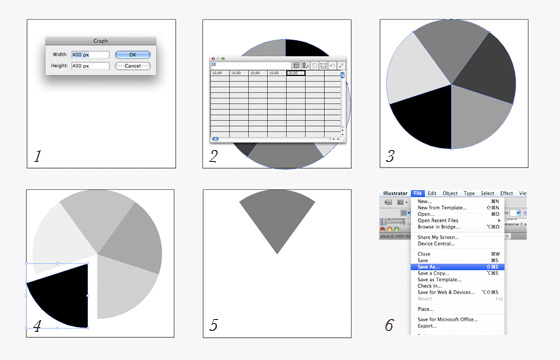
Open the SVG file with and editor and keep in mind this tag, with ‘d’ attribute only:
<path d="M200,175.223L97.395,34c62.396-45.334,142.814-45.334,205.211,0L200,175.223z"/>we will use it later.
HTML
In the HTML code we have a div “wheel” where Raphaël will draw the SVG canvas, some header tags for the carousel title and an unordered list of 5 items where are inserted the title of ‘actor’, a little description and the link to the article.
<div id="wheel"></div>
<header>
  ...
</header>
...
<ul>
  <li>
    <div class="descr" id="pigeon">
      <h3>Rick Pigeon</h3>
      <p>Lorem ipsum dolor sit amet, consectetur adipisicing elit.
      <a href="#">Read the story →</a></p>
    </div>
    <img src="https://webdesignerwall.com/wp-content/uploads/2011/10/rickpigeon.jpg" alt="First Image"/>
  </li>
  <li>
  ...
  </li>
  ...
</ul>
Javascript
With the function called at the domReady we create a Raphaël main object and call a “vlogitWheel()” (just the original name I used in my site) method to generate the wheel and draw a black circle as background of the titles.
$(document).ready(function() {
    var paper = Raphael(document.getElementById('wheel'),400,350);
    var wheelayout = paper.vlogitWheel();
    var headerback = paper.circle(202, 175, 90).attr({fill: '#111', "stroke": "none"}).toFront();
});
In the “vlogitWheel” method function we create the clipping path using the coordinates of the Illustrator’s path tag above. The clipPath element is not generated using Raphaël because it isn’t supported by the library yet, so it can’t be displayed in Internet Explorer versions before 9 (until the release of a new Raphaël version I think is maybe possible create a patch with the related VML class).
Raphael.fn.vlogitWheel = function () {
      var paper = this;
      wheel = this.set();
      var angle = 0;
      var first = true;
      var slices = [];
      svgcanv = $('svg')[0];
      svg = "http://www.w3.org/2000/svg";
      var clippath = document.createElementNS(svg,"clipPath");
      svgcanv.appendChild(clippath);
      clippath.setAttribute("id","clipw");
      p = paper.path("M200,175.223L97.395,34c62.396-45.334,142.814-45.334,205.211,0L200,175.223z");
      clippath.appendChild(p.node);
Using a loop we create five SVG images (maskedImg) with the path of the HTML img tags and we attach to them the attribute “clip-path” with as value the id of the clipPath element created. Every clipped images is drawn rotated with an increasing angle, so the fifth item complete the wheel.
for (var j = 0; j < 5; j++) {
	angleplus = 360 / 5;
	var indimg = $('img').get(j).src;
	var titleimg = $('img').get(j);
	var bong = titleimg.getAttribute('alt');
	var maskedImg = paper.image(indimg, 65,0, 240,150);
        maskedImg.node.setAttribute("clip-path","url(#clipw)");
        var deg = angleplus*j;
	maskedImg.rotate(deg, 202, 175);
	maskedImg.attr({"opacity": "0.7"});
	maskedImg.node.style.cursor = 'pointer';
	maskedImg.index = j;
Thanks to its DOM element nature (the main advantage over the other graphics HTML5 feature, <canvas>) we can attach to every clipped images the hover - simple opacity switch - and the click - opening of motion graphics and fade in of description text - events.
maskedImg.hover(
	    function(event){
	      slices[this.index].animate({"opacity": "1"}, 200, "<>");
	    },
	    function(event){
 	      slices[this.index].animate({"opacity": "0.6"}, 200, "<>");
 	    }
	).click(
	    function() {
		openDescr(this.index);
		stopAll();
 	    }
	);
The motion graphics animation I chose to be displayed before the fadeIn is extremely simple: a scaled rotating pentagon.
function openDescr(el) {
	$(".descr").fadeOut();
	el = $(".descr").get(el).id;
	if(first) {
	  $("header").fadeOut();
	  var pentagon = paper.path("M 148.721,249.6 115.991,148.868 201.679,86.612 287.368,148.868 254.638,249.6 z").attr({fill: '#eee', "transform": "s0.01r180,202,175","stroke": "none"});
	  pentagon.animate({"transform":"s1.3r0,202,175"}, "1500", "<>", function(){$('#'+el).css("top",120).fadeIn(1000)});
	  first = false;
	} else {
	  $('#'+el).css("top",120).fadeIn(1000);
	}
       };
Let's SVGo!
As you may though reading the lines above, there are infinite creative possibilities to explore, with infinite paths for clip and infinite shapes to animate. (or think about an hypothetical use with a revelation of this year, the parallax scrolling).
But there also some important related topics that will conduct to some questions about the correct use:
- CSS3 - when is better to use the CSS3 transition selectors and when use the SMIL animations?
- responsive site - how can use the view box and preserveAspectRatio in correct way for small screen?
- canvas - forgetting the big handicap of DOM tree, canvas could have better performance than SVG in some cases?
- animal actors - will Whip Peggy won the deserved Oscar? (I'm with you Peg, your melodic barks really touched me.)
Guest Author Info
Marco Rosella is an italian interactive designer. After the degree in Computer Engineering, he worked in multiple disciplines of digital world, from semantic web to motion graphics to electronic music.
He won a SXSW Award for the project "The Horizontal Way".
45 Comments
Comments are closed.
Sara
Great post !!
joão
Yeap!
Kristina
Thats pretty neat!
Beben Koben
amazing…
heres one about SVG too SVG Girl
hihi :D
cheers m/
Mike
wohoo, didn’t know that svg is native to html5 – thats gonna be awesome …
PS: thanks for the tutorial!
Chris
Great article. I’m very glad to see SVG a native part of HTML5.
Simon clavey
I love working with svg but it cannot be used at standard yet because not all web browsers support this yet
kangtanto
wow…. I love this article. The vlog.it website is pretty cool
Antonio
Thanks for tutorial!!!!
The demo works perfectly also on Ipad.
Sagar Ranpise
Awesome Experiment!
Ed
Sweet, I can’t wait to try this.
Max
SVG is cool. Thanks for making easy to follow.
Wiz
…this Guy is also known as “The Css World Champ”…!
adumpaul
Great article.Thank!
Tim
I still don’t think it’s going to catch on after all these years.
yakta
Thanks for sharing this article.
Nice post, I found from google.
I like it.
Translation Services
I have a few creative ideas where I can use this, lets see how it works out.
Patrick
My mind is dry with creative idea. SVG is a cool design, it give me new idea for future project.
Translation Services
The Vlog.it website lags on my PC quite a bit, it is very processor intensive.
SVG designs might not be most suitable at this stage and I am yet to see a practical use of it.
Jeremiah
Wow, this is interesting seein the power of HTML5, how many of you out there are design with the new standard?
Cheers,
Alfonso Fanjul
Two aspects of SVG i.e clipping paths and scalable 2D motion graphics sounds interesting.
Web Design Auckland
These are some great HTML5 designs! Thanks for posting!
办公文秘
喜欢你这 不错 转啦
Tomáš Zemanovič
Amazing, thanks!
noa
thank you☆
Gaston Cantens
Scalable Vector Graphics represents a collaborative effort by some of the biggest players in the computer world to find a workable cross-platform solution to Web imaging. The blog is quite informative.
Dane Troup
I like SVG a lot and think there is potential there. The big drawback is that it won’t run on Android. Thoughts?
Medway classifieds
When using IE9 everything looks perfect, but it gets stuck on option “read the story”
Starter Website Design
Choice, hope it does run android?
şişme bebek
The blog is quite informative. ;)
Anonymous
Asking questions are truly good thing if you are not understanding anything totally, except this piece of writing offers fastidious understanding even.
buy season 11 gladiator
code is saving the time & good
Swami Prakashanand Saraswati
I actually don’t know what’s this SVG design all about.
isak
Great. But I’m not a fan of SVG :)
M.H.Awan
nice article..blog is cool
jcubic
If you want free svg graphics check out Open Clipart Library http://openclipart.org (Largest collection of Public Domain SVG graphics)
magazin
This does look like a great theme.s
Ibiza yates
Scalable Vector Graphics represents a collaborative effort by some of the biggest players in the computer world to find a workable cross-platform solution to Web imaging.
Website Design Lover
SVG design is really very nicely created with HTML 5 by someone very creative person. It is totally unique design that I have first seen in this post.
ACS
Buy diablo 3 powerlveling, buy arena rating, buy arena carry
uk james
awesome SVG rocks ….. am search SVG and my next will be done in SVG :)
Afzal
Thanks for sharing such wonderful article with us,its really very helpful for everyone. Keep on posting.
Cleaning Equipment
Hello Marco !
These this awesome post. I really liked the wheelayout. really I am impressed by its demo. This would definitely make our site different from others.
Thanks for sharing about SVG design with all the explanations.
Cleaning Equipment
zoyoyayep
WOW, It’s totally a new experience for me about playing with svg design. Truely love this. Keep share, following you mate. Just awesome.
Angela Sledge
Previously I tried SVG in a different way, but you did a very easy and simple way. Thank you so much