Due to a number of requests, I’m writing a detail tutorial on how to create an animated scroll to top as seen on Web Designer Wall. It is very simple to do with jQuery (just a few lines of code). It checks if the scrollbar top position is greater than certain value, then fade in the scroll to top button. Upon the link is clicked, it scrolls the page to the top. View the demo to see it in action.
Design & CSS
Declare the #back-top elment with position:fixed so it stays fixed on the page. The span tag is optional. I added the span tag to display the arrow graphic. I also added transition:1s (1s = 1 second) to create the fading effect on mouse over.
Take a look at this step demo (note: the jQuery part is not implemented yet).
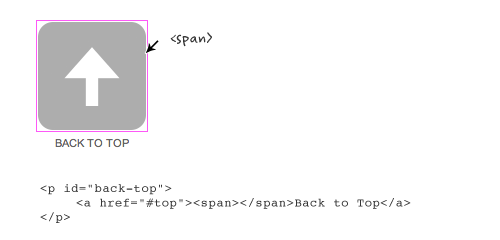
#back-top {
	position: fixed;
	bottom: 30px;
	margin-left: -150px;
}

#back-top a {
	width: 108px;
	display: block;
	text-align: center;
	font: 11px/100% Arial, Helvetica, sans-serif;
	text-transform: uppercase;
	text-decoration: none;
	color: #bbb;

	/* transition */
	-webkit-transition: 1s;
	-moz-transition: 1s;
	transition: 1s;
}
#back-top a:hover {
	color: #000;
}

/* arrow icon (span tag) */
#back-top span {
	width: 108px;
	height: 108px;
	display: block;
	margin-bottom: 7px;
	background: #ddd url(up-arrow.png) no-repeat center center;

	/* rounded corners */
	-webkit-border-radius: 15px;
	-moz-border-radius: 15px;
	border-radius: 15px;

	/* transition */
	-webkit-transition: 1s;
	-moz-transition: 1s;
	transition: 1s;
}
#back-top a:hover span {
	background-color: #777;
}
jQuery Part (Demo)
Below is the Javascript code (you can paste it any where on the page). Basically, it hides the #back-top element (it is the <p id="back-top"> tag in my demo) initially . Then it checks if the window scrollbar top position (scrollTop) is greater 100, then fade in the #back-top element, else fade out. The next set of code is the click function. If the #back-top link is clicked, it will animate the body scrollTop to 0.
If you want to learn some basic jQuery coding, read my jQuery for Designers tutorial.
<script type="text/javascript" src="http://ajax.googleapis.com/ajax/libs/jquery/1.4.3/jquery.min.js"></script>

<script>
$(document).ready(function(){

	// hide #back-top first
	$("#back-top").hide();

	// fade in #back-top
	$(function () {
		$(window).scroll(function () {
			if ($(this).scrollTop() > 100) {
				$('#back-top').fadeIn();
			} else {
				$('#back-top').fadeOut();
			}
		});

		// scroll body to 0px on click
		$('#back-top a').click(function () {
			$('body,html').animate({
				scrollTop: 0
			}, 800);
			return false;
		});
	});

});
</script>
No Javascript Fallback
Note the back to top button is linking to anchor #top which is the ID of the <body> tag. Technically speaking you don’t need to assign any anchor link because jQuery can scroll the page to any position. However, it is nice to include it because it provides a fallback if Javascript is not supported.
245 Comments
Comments are closed.
binary
when pressed on “demo ” near “Take a look at this step” i got 404 error
good, simple and in some cases useful tutorial
Nick La
Just fixed the demo link.
PauliusR
It’s a great tutorial and it does scroll back to top on Chrome browser, thanks a lot. Unfortunately, it doesn’t scroll on my Firefox 4 and in the “Design & CSS” part, the demo link is broken. A quick fix would be highly appreciated.
adrian
demo seems broken in ff 4/os x, works on this page
Anders
Same here, on Win 7.
david
same in ff4 on xp
Nick La
It should be working with Firefox now. I added the ‘html’ element in the animate function.
Joe Bloggs
Works fine for me.
Joe Bloggs
Blah
Raksaka Indra
in Design & CSS from tutorial above, demo link: https://webdesignerwall.mystagingwebsite.com/tutorials/demo-scroll-top/scrolltotop-step1.html, not found. Thanks…
nico
Same here, demo broken in FF4 / Linux, but works on this page
akasuna
your demo doesn’t work in firefox 4
Matias
Just what I was looking for, thanks a bunch!
David Garbacz
I see that it uses Webkit transition but this doesn’t work in Firefox 4 or IE9
isotrope
It works using if I use $(window) instead of $(‘body’), but it doesn’t animate. It just jumps to the top.
http://jsfiddle.net/J5vwm/
Ender
Too bad this one don’t support more browsers, Fixefox is a must for me.
Nick La
It is fixed now. Should be working with Firefox.
RaduM
Nice article :)
I also made an implementation of this that works on every browser: http://radumicu.info/blog/2010/02/20/animated-top-link-that-works-on-every-browser/
alex
I’ve used similar code except I animate on both the html and body elements. Seems to have better cross-browser compatibility.
[code]
$(‘span.tothetop’).click(function() {
if($(window).scrollTop() > 0) {
$(“html, body”).animate({scrollTop:”0px”},1000);
}
});
[/code]
Ben
Hi,
It must be working… if you put a #top anchor on the top of the page.
akasuna
That’s not animated scroll
mcpDESIGNS
Love the scrolltop / animate functions in jQuery, weird it never works well in Opera, but at least not many people use that thankfully.
I’ve also always done $(‘html,body’).animate(….
Not sure if the added html makes any difference though
skip405
Hey, why thankfully?! The fact it doesn’t render these particular jQuery functions on this particular site doesn’t mean the whole browser is bad.
P.s. By the way, before the redesign the scroll worked perfectly well in Operas 9-10. If the code remained unchanged only then it’s a browser related bug imho.
Kawsar Ali
Yap some here not working FF4. Perhaps some mistakes on the function.
Christian Rodero
Hello guys, I wrote a similar article, in Italian, on my blog recently :)
Christian Rodero
I forgot the url: http://www.christianrodero.it/blog/2010/jquery-tips-torna-su-che-appare-quando-scrolli-la-pagina/
Bilbo Baggins
Bit Sh1te. doesn’t work for me in FF4
Funtime Ben
When I saw your scroll to top button, I furiously tried to figure out how to do it. After many attempts I did, but so glad to finally have all the info in one place! Thanks!
Sawyer
Nice tutorial Nick, however it’s recommended that you use setInterval so that you aren’t firing the function every time a user scrolls (Twitter learnt this the hardway). Check out this quick article written by John Resig on this topic: http://ejohn.org/blog/learning-from-twitter
rado
sweet, thanks
coltcha
Thanks , it is perfect… any idea how to add some easing effects ??
bob marteal
Great post. Would the issue @Sawyer brings up only come into play on really long pages? The example Resig uses is Twitter’s infinitely scrolling pages.
Bilal Cinarli
I’ve a rather reverse implemention of this scroll. In our company website, web you open a portfolio page, browser automatically scrolls the content for making visitors feel that, they are in a microsite. Here is the sample
$(window).load(function(){
if($(“body#portfolio”).length == 1)
{
$(‘html, body’).animate({ scrollTop: 75 }, 500);
}
});
http://www.iconpm.com/tr/portfolyo/hatko-sport-cdz
And as a bonus scroll :)
Here is a sample implementation for scroll to top & scroll to bottom
$(“.up a”).click(function(){
$(‘html, body’).animate({ scrollTop: 0 }, 500);
});
var pageHeight = $(document).height() + 250;
$(“.down a”).click(function(){
$(‘html, body’).animate({ scrollTop: pageHeight }, 500);
});
http://www.aydinozon.com/en/about-me
cris
chek it out! http://elcasotudela.pe/ :) with the tutorials of web designer wall :) i still work in the autoresize with jquery for mobiles and tablets B)
El garch
you copy it hahahaha bad boy ^^
Shelby
Beautiful job but I would remove the empty span tag and instead give the link some extra top padding and a background-image. Less mark-up. Yay!
Alex Hall
Nice article. One point I’d make is that you’re technically calling the document ready function twice.
$(document).ready(function(){});
is exactly the same as
$(function () {});
the second of which you call in the middle of your first document ready function.
Marvin Hagemeister
That was the first thing that caught my eye as well. But apart from that nice article!
maco
Unfortunately not working well in Opera, which I use. Do you plan update? :)
Ramaraju Ramakanth
Nice job! Is this cross browser compatible?
Raju
Nice job man, I searching this script for a week….
Richard Nash
Doesn’t seem to work with JQuery 1.5.2 though… I had it working just fine with 1.4.3, which you included in the url…
hmmmm….
RN
jonathan
I use jquery autoscroll script, that way it can animate to many places on my page.
The demo doesn’t work on my HTC Hero.
Steve
Nice. Any chance of a “scroll to anchor” writeup? There are certainly some poor articles about that specific topic out there on the internets.
akber kabir
many many thanks!
ios hacks
You have an amzing website Thank you so much
Nuar
Simple and useful. Thank you.
Mike
In my opinion a better option is using an anchor link to the header element, sans-JavaScript. Just like in the 1990s.
I think a lot of this sort of animation satisfies the developer or site owner more than the users. They just want to be at the top of the document. Doubly so if their browser happens to render the animation slowly. My phone also does these little animations on menus and it just means I have to wait for no reason before taking my next action.
Alex
Interesting point there. Maybe we should disable any animated ‘frills’ on mobile devices. I would love to know what the ‘average’ user would vote about this. Unfortunately it is hard to get a ‘mass’ oppinion because average users will not be looking at sites where you can vote for your preference on a piece of web site functionality. BOO!
IOM Design
I’ve been thinking of adding this function in a site rebuild. Found this article outlining 7 different techniques:
http://www.net-kit.com/7-scroll-to-top-jquery-solutions/
Not sure what’s the best solution really, but I like the look of this :o)
El garch
thx for the URL, i liked the way of cratin’ the plugin’ ^^
savvinovan
Thank you, really useful if you have very long site, especially for tutorials site :)
HTML Codes Dude
Working on a personal site with a friend. This will be perfect thankyou.
Mill
Hi
It doesn’t slide in Opera!
vale
Absolutely fantastic! Thanks a lot for sharing this.
It’s very cool the effect. It’s also very clever that you are doing the fade-in fade-out also in JQuery and not only via CSS3 transition.
Liam Kenneth
Thanks for this I did something similar on an old site but made the page go to the right when you clicked on a link it was quite cool but took ages to load because the hole site was on one page
JayNL
Hmmm, since implementing this some weird things happen with my YouTube embedded video’s.
If I scroll down, the arrow appears, all good. But if I scroll to top, my youtube video stops? That’s odd! I’m really sorry, I cannot share a link due to the site still being in development, but if you feel like ‘wtf?! I wanna help’, you can email me on [email protected] :)
Błażej Klisz
Thank for a nice script. I’ve already put it on my page:). I’ve tested it under Opera 11.10 and it works fine.
Michael Hulleman
Glad you likey. I didn’t write it, it was written by Matthew Ruten. Look for us both on Linked In!
Michael Hulleman
Oooops. Wrong post :P
The Typical Whiner
looks good. pretty simple..
although it’s similar to what I did a couple of months ago.
http://typicalwhiner.com/tutorials-and-downloads/effortless-jquery-floating-back-to-top-script-v2/
Ruslan
thanks for you. translated your post to russian on my blog ;)
Web Design for Doctors
The code is nice and works properly. We are a website design company that specializes in Web Design for Doctors Only. Come check out our site when you get a chance. Thanks
Katarina
Thank’s a lot! I’ll add it on my blog.
web designer wall is a great page!
Jay
This is great … but on a similar topic does anyone know a good demo for a smooth scroll using java going down the page with links at the top … Something that I can just copy paste, my code hand is weak? I did a google search and the examples were as easy as I thought.
Many thanks,
Jay
towry
I’m using it .
Dorothy
I really needed some help with my “Animated scroll to top” site I’m building so this tutorial couldn’t have come sooner! Thanks!
dexx
Recent surveys, children of depressed mothers’ negative patterns of activity occurring in different brain reveals. This is for children of mothers who take more risks in the future is going to have depression.
ru87
fuu bar
Justin
This certainly does the trick, but the only problem I find with this method is that it takes 800 milliseconds to animate the scroll, so if you’re close to the top, the animation is leisurely, and if you’re at the footer of a very long page, the animation is completely indistinguishable. I’m sure there has to be a way to calculate the page length and use a derivative number as the scroll speed, right?
Gustavo Rocha
Dont work in Opera. :(
AbsAlgorithm
didn’t work for me also, but only 2 days, and then… voila! (may it be an update? 11.10)
Gabriela - Punta del Este
Felicitaciones por el tutorial. No lo conocía y además de vistoso (como lo es todo lo de Jquery) es sumamente útil.
Muchísimas gracias por el aporte
Raju
Wow… amazing, I have searching this kind of script…
Simon
looks great and works great apart from on an ipad :(
dan
http://crab-tree.com is now a worldwide web design services website
Demovik
It will be more useful if you put this arrow button on the right side at bottom. Because when you scroll down your mouse is already on the right hand side.
Matthew D.
I understand what you’re saying. That does seem to make more since. That’s where I’d put it on my site. But I don’t think I’ve ever used the actual scroll button; always the mouse wheel! :)
Jared - Stealth Web Designs
Nice demo!
Saskatoon Web Design
Good ol’ jquery
7 Hills Travel
This is a nice demo and useful.
yashwanth
This is really cool…i used in my website. Thanks Lot
Spaksu
Thanks. I’m using now in my blog :)
zalila
great code…
thank you
may i try it later in my blog
thedevelopertuts
Wow, this effect is really cool. This is great for usability and makes your website modern.
Thanks for the tutorial!
Sam Ng
very helpful and inspiring. thanks
Soccer Jerseys
Thanks in advance for your help
designsky
I’v been looking for this solution for a long time. Thank you so much.Sunny day today in Vancouver, guess Toronto the same. Have a nice weekend.
Maziar Ahmadi
Great post!
Autonoleggio aeroporto Cagliari
Good script. I’ll be using it on my websites, thanks!
Web Designing Mumbai
I was looking for such kind of script. It will be using it.
Thanks for the posting.
Web Design Sheffield
I just love JQuery. Very good script and very useful.
kombi
thanks you for this very good share
peetausmeinemkopf
Wonderfull !! I want to https://flattr.com it ;)
jhon
Complaintagainst is a online Complaint Department. You can Submit your complaints Totally Free and get your voice heard!
Website Designers
You are right Jhon totally free.
Damian
All going to the memory banks, cheers
Jonathan
Thank you very much for the great tip!
– Jonathan
El garch
nice and very useful technique, thx a lot!!
Manuel
I got a similar script but to scroll to both sides (top and bottom), but that was for my previous site, I’m going to implement this in my current site, thanks for sharing! :)
Josh Miller
This is exactly what I was looking for just as I was ready to use it. Great stuff as always.
Promotional Products
Very good, we have seen a new thing here
Zech
Hi, does this conflict with mootools? i have tried it on a site, but it’s not srolling smoothly on pages that are linked with mootools, it also doesn’t hide the image on these pages, any idea how i can fix this?
Kalen
Nice Stuff, had to move the click function id to “#back-top” rather than “#back-top_a” after inserting this into my site to get it to scroll. Before this edit, the button would hide and reappear but the page just snapped to the top with no animation. Looks great.
Dalton
Nice tip. But may I just add something I noticed. In your code:
if ($(this).scrollTop() > 100) {
$(‘#back-top’).fadeIn();
}
You’re calling “$(‘#back-top’).fadeIn();” almost on every scroll event. I know this isn’t such a performance hit. But some browsers seem to fire a lot of scroll events. I would rather cache the jQuery object and set a flag so that it doesn’t fadeIn() every time.
pawel [PL]
i wrote similiar code a few days ago, it is really simple:
$.extend( {
scrollTo: function(param, duration, event){ // @param – scrollTop value or id of the element you want to scroll the page
if(event) event.preventDefault();
if(typeof param === “number” && isFinite(param))
$(“html,body”).animate({scrollTop: param}, duration);
else
$(“html,body”).animate({scrollTop: $(param).offset().top}, duration);
}
});
You can use it in this way:
Scroll to photos
Shuttertower
I’m have a problem with the screen flickering when I click on the link to scroll back to the top. Any chances what might be cousing this. I do have the anchor points set in case of no js as a fall back so you can see the flick of the top then it scrolls…
joomla website design
Cool. Wondering how do we make this work in Joomla. Thanks for the code download. we will try to experiment in a joomla article.
Ehab Shaker
I was looking for such tutorial for along time . Thanks for sharing .
Web Design Greece
Thank you very much. This is a really helpful tutorial
Sarang
Hello and my regards…
What a wonder to meet such great person on the Net just by typing search term “CSS tips”. I always go through your sites… They inspired me to try my hand on pages with such design, such spirit.
The wall is as sublime as the portfolio. You are a wonderful programmer and sharing your knowledge with us is a noble deed.
Umer
Awesome tricks by jquery.. I really like this tutorial and very helpful for me…
Thanks for post this add
Terry Reilly
Thanks for another very useful tutorial.
Click 71
Thanks for sharing this code. Nice feature which is sure to find it’s way onto a site in the very near future.
Mark
very useful tutorial and helpful
thanks
iPhone Development Tutorials
Absolutely awesome, just created a new blog so going to implement this pronto… cheers dude/ess :)
Anthony Hind
Nice little trick, thanks for sharing.
alex
This scroll plugin is amazing and works well! Thank for the cool effect.
Web Promosi
Greatt !! already implemented on my new wp themes.
PixelPinch
Awesome! Thanks for the tip. Just replaced it with my old static back to top button! :)
wolf3d
thank Your for this peace of code :)
i was curious and tested this demo in IE 6.0,
when I scrolled down it say “Stack overflow at line: 46” :D
Flo
This is great, will replace with the text-only back to top!
Ryan
mmm… adding this page to my bookmarks! Thanks!
PS… nice new theme (I haven’t been here in a while :)
Jamie
Just what i was looking for. Thanks for the tutorial
Joey Wargachuk
Love this! Thank you
Fred
Thats great, thank.
But how can i get this to work on IE 8 and 9?
V
I’m completely new to jQuery- for the scrolling, can I scroll to anchor points rather than pixels? If so, how? Also, is I want to be able to scroll down, is there anything I need to change?
complex41
And then he handed you the thirty-five 45
orhanbt
This is verry good.
Stephanelam
I’m gonna use it, may be useful in my next project.
Thank you, and keep the good work on !
飞鱼的声纳
very useful. I use this method creat my own back to top links. But I can’t understand why there’s a return false sentence in the jQuery? What’s the function?
carrie
Cool and amazing jquery effect. Though done it many times, this effect will be impressive. Thanks a lot.
Werner
I added a this.blur() to the click. This de-select the link after it was clicked, which means if you scroll down again you won’t see a box around the link when it appears.
$(‘#back-top a’).click(function () {
$(‘body,html’).animate({
scrollTop: 0
}, 800);
this.blur();
return false;
Leelu
Great!! Just what been lookin’ for!
Believe
Thank you alot!!!!
Jim
I am trying to get this implemented on my wordpress theme, but I think I am having issues since I am using jquery 1.6.1. All of my other plugins are working fine with the newer jquery – do you know what I need to change to make this work?
complex 41
And then he handed you the thirty-five 55
Warford Designs
Great code snippet for the arsenal, thanks for solving the mystery. :)
Brisbane Osteo
Very very cool!! Thank you!…
kcfilip
Very nice tutorial, thx :)
Aaron I
Instead of using .hide() you could just set the element’s display property to none. Also aren’t $(function () {}); and $(document).ready(function(){}) the same thing? You can take one out.
Tony
This is useful! Thank you!
mybookmart
thanks i like this
jsadfasd
asdfasdfsdf
kevin
Nice article. I’d use preventDefault rather than returning false though.
Tre
I just need this for my web site. It’s another tool for a professional web site designer and it can be expended for a fancy whole new menu appearing after the main disappear under windows scrolling.
OLDSKULL
Great code! Very useful!
askold
Help please, set it on a site with Joomla, looks great! But when the page is at the top for some reason the button is not faded out… =( What could be the problem?
GNtemplates
Download free quality of web templates – GNtemplates.com
Harm Jan
Isnt it neater to hide the link with CSS? I can still see the image flicker when I load the page..
brandon
Thank you so much this really helped me! ._.
zinmarlwin
Thanks you so much…
Peter Schreiner
Works like a charm here: http://mightyspecial.com and it’s so COOL.
THANKS!
Andri
Thanks a lot!! Worked fine
Peter Schreiner
And, here: http://crowdogs.com. Nick, you da man!
Dheeraj Bansal
I was looking for it. Finally my search ends at your blog. Thanks for sharing animated scroll to top. I developed it using simple HTML. But animated effect really makes it awesome
Freelance Artist
Another awesome tutorial. I was wondering how that BACK TO TOP link of yours was made! Now I know. :)
asdadasd
adsadsadad
kalidasan
Its great tutorial. i love you so much.
JA
Too bad it doesn’t work in IE :(
Kristina
Thank you so so so much for this!! <3 c:
James Weaver
Love the script! It was really easy to use and falls back nicely to quirks mode in IE. It’s not beautiful in IE, but what is???
I added a little opacity to soften it a bit and added display:none; to #back-top css. Why you ask? It was showing for a split second when the page loaded. I guess that is because my script was below the markup???
Also, I wonder how this renders in IE6 since we have position: fixed…
Thanks again, love this site!
James Weaver
Luca
Very cool, and very easy to use.
Thank you so much!
I want use it in many of my project!
;)
Jitu
Nice, very simple logic & cool logic.. :-)
Bastian Wittig
Vielen vielen Dank für dieses Tutorial. Nach solch einer simplen Lösung habe ich gesucht!
Thank you so much for this tutorial. After such a simple solution I was looking for!
mike
Worked perfect, thanks!
Cata
Cool, but where do i put it ? before/after what code ? please answer me on my blog or e-mail.
geraldine
hi, i tried using the code above but the #back-top shows.
can you pls .figure out whats wrong with this code?
#back-top {
position: fixed;
bottom: 30px;
margin-left: -150px;
}
#back-top a {
width:100px;
display: block;
img-align: center;
/*transition*/
-webkit-transition: 1s;
-moz-transition: 1s;
transition: 1s;
}
#back-top a:hover {
color: #000;
}
/*arrow icon(span tag)*/
#back-top span {
width: 100px;
height: 100px;
dispaly: block;
margin-bottom: 6px;
background: #ddd url (arrow.jpg) no-repeat left left;
/*rounded corners*/
-webkit-border-radius: 15px;
-moz-border-radius: 15px;
border-radius: 15px;
/*transition*/
-webkit-transition: 1s;
-moz-transition: 1s;
transition: 1s;
}
#back-top a:hover span{
background-color: #777;
}
$(document).ready(function(){
// hide #back-top first
$(“#back-top”).hide();
// fade in #back-top
$(function () {
$(window).scroll(function () {
if ($(this).scrollTop() > 100) {
$(‘#back-top’).fadeIn();
} else {
$(‘#back-top’).fadeOut();
}
});
// scroll body to 0px on click
$(‘#back-top a’).click(function () {
$(‘body,html’).animate({
scrollTop: 0
}, 800);
return false;
});
});
});
im really confused … O.o
peter
Has this been tested on responsive sites and tablets/phones?
Neri
the script works fine in ff, thanks
Liam
Thanks for share it
Shahid
Thanks dear, this is very useful and easy to use way for scroll to top button.
Anthony
I was looking for a hidden menu tutorial that would show my menu on scroll. I could not find one that I liked.
I made some very minor modifations to your script, a little CSS tweaking to the navigation element ID on my site and it gave me just what I wanted for my hidden menu to show on scroll.
I made a tutorial that is gives you credit for this awesome code and how to make it work as a hidden menu. You should be seeing traffic from that tutorial.
Thanks for all the hard work and sharing with us all.
Daniel
thank you so much!!!
spa warszawa
thank you so much for sharing this information. it is very useful for us.
Leo
Thank you sir! You saved my days! I love your tutorials!!!!
Darryl Young
Does anyone have a solution to make this work in IE6? I know how much that browser hates position:fixed… :)
Any help would be much appreciated.
bobby
Nice tutorial.. Thank you very much…
Gabriel Dubois
Hi,
You are a wiz with scripting, and the more I am reading your site the more I feel my own scripting skills are growing. Now, I know you offer all these files for free and I am very grateful for all you are giving back to the community, but could you possibly provide a couple of free templates I could test this script in? No, offense the headings/subheadings HTML file is not what I would call advanced.
I am asking this, because I want to see how it fares in a full design template with CSS, images and the rest.
Also do you think this could work on handheld devices?
Peter Schreiner
“Also do you think this could work on handheld devices?”
I use this on a lot of websites. I’ve found that it doesn’t work well on my particular Android phone (1st generation Droid). Once the ‘top’ image appears it stays put there and not at the bottom of the screen.
Also, it seems that the latest versions of FF and Opera don’t hide it on load, as the javascript would imply.
xris
“Also, it seems that the latest versions of FF and Opera don’t hide it on load, as the javascript would imply.”
Instead of hiding #back-top with jQuery, you can “hide” it, with css:
#back-top{
display: none;
}
And now you can remove $(“#back-top”).hide(); from the js.
Thanks for your tutorial btw!
keke
Is it possible to implement this on joomla 2.5 site. Any help is welcome. I write to Peter but I understand he is busy!! THX in advance
Brandon Conway
I just wanted to say thank you and let you know that I will be using your solution on http://www.closedfortheholiday.com Thanks again!
Julie
This is awesome. I was playing around with another tutorial and there was additional javascript and seemed more code than needed. Love that you explained it & I can use my own image with or without text. Thanks!
kathir
This is awesome.Thanks for the great work.
Waqar
Great work.. Thanks
Sebastian
Nice tutorial! Thanks for sharing this.
I think the button should appear next to the scrollbar because this is where the mouse of the user is often, when she is scrolling on the page. Therfore I think the right bottom corner of the page is a good position for this link to the top pf the page.
Sebastian
Actually it depends on the design of the page. I just saw your link here on this page and it makes sense – where it is. ;)
A Roy
Nice tutorial dude…
Afregi
nice tutorial
Waqar
Very Good Script. Thanks you very much for sharing it.
Jesper
Awesome tutorial! Very easy to use :)
Thanks for sharing!
Byron
Nice, great code, this is absolutely what I’m looking for:)
thanks!
johanso
Thanks for the tutorial, just what I wanted
I-Design
Excellent!
design
why its not visible on ie7
Julianna @ The Reviews News
That was amazing–thanks so much! :) Mine doesn’t wait until the scroll value is >100 to show up, though. It’s just there once you load the site. I mean, it’s not a big deal or anything, and I’m super grateful you put this up! But I was just wondering if it’s ’cause of something I did wrong?
pierro
“Also, it seems that the latest versions of FF and Opera don’t hide it on load, as the javascript would imply.”
“Instead of hiding #back-top with jQuery, you can “hide” it, with css:
#back-top{
display: none;
}
And now you can remove $(“#back-top”).hide(); from the js.”
If I try to hide it with css (by “display: none;”) , button never appears even at the bottom of the page. In the tutorial version, on the contrary, it always appears as soon as the page is loaded.
Any help would be appreciated
farrukh Baig
This is sizzling concepts and i appreciate your help by mentioning the programming code…cheers…
Nic Cohen
Coolio! Nice tutorial!! Thanks!
KHAN BHAI
yes dud you are right..? this tutorial so helpfull to me and you? :)
lol
you’re a weirdo
sdsfds
BITCHHHHHHHH
Carlos Narvaez
Excellent tutorial!!! Thanks
Parra
Great and useful tutorial. Thanks! :)
Michael
Hi Nick, thank you for this. You have a nice website to :-)
4decor
Wow! Great tutorial, thank you for it
Kirill
Thanx! Just what I needed
Roger
Great post! Thanks for the detailed instructions. Another way is by using http://www.scrolltotop.com , which would suit beginners. I however like the way you have described as it gives you more flexibility with the button position etc. for advanced users.
yates Ibiza
I however like the way you have described as it gives you more flexibility with the button position etc. for advanced users.
firdos
this code works well when i am using it in static website,but when i am working in asp.net environment the back to top scroll doesn’t works in ie7 .even it is not showing up,i am using jquery version 1.7.2
Bram Vanroy
Wouldn’t it be better to call a preventDefault instead of a return false? Also see this article: http://fuelyourcoding.com/jquery-events-stop-misusing-return-false/
Daniel
Brilliant!!! Thanks for sharing this info!
Ahmed Faris
Thank you very much, this tutorial helped me well :)
Eugene
Nice tutorial, ain’t working on Opera 12.00.
Wing Marketing
Works great.
Good tutorial.
Thanks
dev rudhin
thanks i was searching 4 such kind of script . . . easy 2 use . . . thank u once again :)
s
sasasas
Alquiler yates Ibiza
this tutorial so helpfull to me and you? :)
Ajinkya
Great Tutorial… Thanks a lot…
engin
i cant make this code to work!
pasted the first part to my html and the second part to my css…
no luck whatsoever…
for now, im settling with the backtotop.com preset buttons…
can anyone tell me what the hell im doing wrong?
Bernd
Great tutorial!
This works in IE,FF an Chrome until last week, but from now it’s stop working in Chrome. Am I the only one with this problem?
Keisa
I tried it out and it doesn’t work on my site either. Using Chrome as well.
Roland
@keisa- how does it work in other browsers?
Bernd
@Keisa: Any fix or workaround for this ? Don’t know what’s changed in chrome. Maybe selfhealing in the next update..?
Dharmendra
Nyc work Friend…!
Sharon
I got it to work but the span back to top png image is blank and it shows “SPAN<BACK TO TOP" text under it. I put the js code in the html. Any suggestions?
Sharon
Actually, I just had the id= code wrong. It’s working fine except there’s no arrow in the box. Which makes me think it’s not linking correctly to the png file. The link only goes in the css correct? I’ll figure it out.
impostor
maybe u didn’t copy the arrow image, i downloaded the demo then copied the arrow image then paste…
impostor
the download demo works without internet but for the program that i created it only works with internet, the download demo used but still working without internet, anyone? pls!
impostor
***used src=”http://ajax.googleapis.com/ajax/libs/jquery/1.4.3/jquery.min.js”
impostor
if it doesn’t work, maybe u should take note of the margin-left: -150px; in the #back-top, maybe…
Nazmul
so nice and useful
Rob
I love this so much!! I was out searching for something similar to this back to the top button and everything here is EXACTLY what I needed to finish my project!! Thank you so much!
Jibin
Can any one convert this piece of code to Vanilla js (Pure js)? Just so i can understand how this all works?
Dhanushka
Very nice. well done.. Really helpful to us..
Ulli
is this script working on xp?
I use OSX and Windows 7 and it is working, but it dosn’t work with Windows xp?
krishna
thanks dear, this is very helpful to me…
thanks
kinnngg
Not Working!
:(
Sagar
Thank man . . . Dat’s what i need . . . Clean and Simple
Kenny Vo
This is useful tutorials, thank so much!
Paul
Thanks I really like this solution and have implemented this in my website. However I have noticed that if you click the ”Back to Top” button multiple times and then you try to scroll down it causes the window to keep scrolling back to the top. Any idea how to stop this happening anyone?
7themes
It was great, thank you, I’ve used it in my site
Madhivarman
acutally for animation part moving top to the webpage we need only this code
$(‘button’).click(function(){
$(‘body,html’).animate({
scrollTop : 0
},800);
});
and all other are css for button work…Thanks a lot for this great work admin… :)
Madhivarman
i think the button works the way the number of times you click…to avoid this use preventDefault option in jquery
$(‘button’).on(‘click’ , function(e){
e.preventDefault();
//do your stuff here
});