I’ve been using Photoshop CS6 for a while and I have to say that the interface and user experience is a big improvement. Instead of releasing more new tools, Photoshop CS6 put a lot of focus on the basics — the essential tools that we use very often such as crop tool, type, layer group, and save. For example, now you can apply effects on layer group, keep cropped pixels, type styles, and save in background. These simple enhancements result in increase productivity.
Better Layer Right-click Menu
Now the layer color can be set via the layer right-click menu. In the previous versions, it requires 5 clicks to set a layer color (right-click on the layer > click Layer Properties > click on the color dropdown > click to select a color > click Ok). Now it can be done with just 2 clicks (right-click on the layer > click to select a color). That is 3 clicks less!

I think the layer color can be further minimized by placing the color icon horizontally without the color labels. The color label is not quite necessary in this case. So it would be like the Mac file right-click menu.

Crop Tool
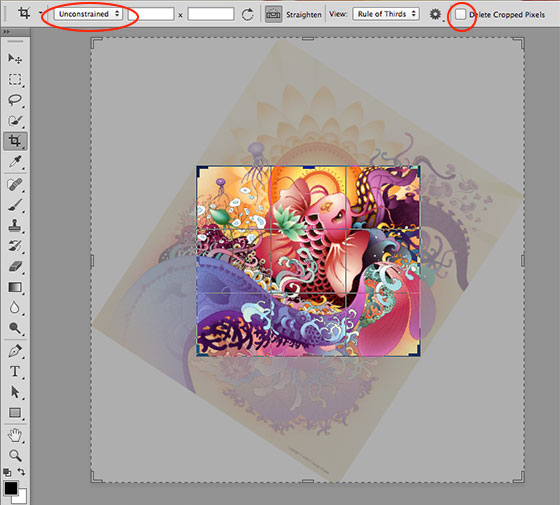
In CS6, the crop grid automatically activated as soon as the Crop tool is selected (this reduces one mouse drag). The new Crop tool allows you to rotate the image instead of the crop handles. It also introduced some nice crop options such as constrain ratios (16×9, 5×7, 2×3, etc.) which are great for cropping photos for print.

My favorite new crop option is the "Delete Cropped Pixels" checkbox. To crop an image and keep the cropped pixels in the previous versions, you would need to manually edit the canvas size and re-position all layers.
Transformation Values
CS6 added transformation values which is very handy. When transforming an object, it tells you the dimension of the object. This is useful when sizing an image on the mockup. The transformation value can be turned off at Perference > Interface.

Searchable Layers Panel
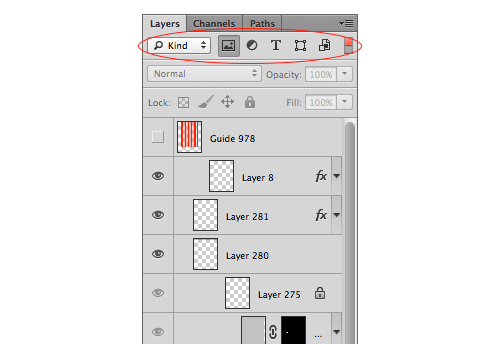
For an average design mockup PSD, it can easily contain more than a hundred layers. Sometimes it is quite difficult to look through the layers. The new Layers palette allows you to filter the layers by kind, effect, mode, color, etc. or search for specific layer name.
Character & Paragraph Styles
For web designers who use Photoshop to design mockups, the new Paragraph and Character Styles is a big thing. Think of it like CSS styles. You can create styles for body text, headings, titles, links, captions, etc. and apply to the text layers. When you edit the styles, it will automatically update the text layers. Not only will this save time, but it also makes your mockup text more consistent.

Layer Group = Layer
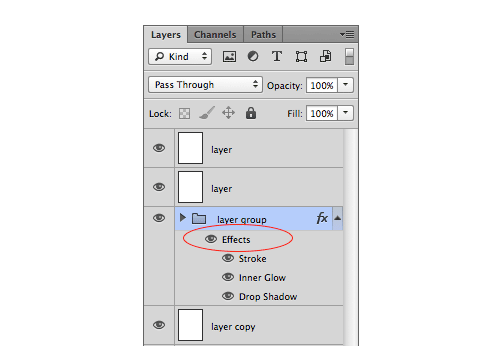
Now the layer group is treated like a single layer. This means you can apply layer effects directly on the layer group. Before CS6, you need to either flatten the layer group or convert it to Smart Object in order to do this.
Multiple Layers
Photoshop CS6 now allows you change blending mode, lock, layer color on multiple layers. You couldn’t do this in the previous versions. Also, in case you are not aware, now you can use Cmd+J to duplicate multiple layers.

Auto Save & Background Save
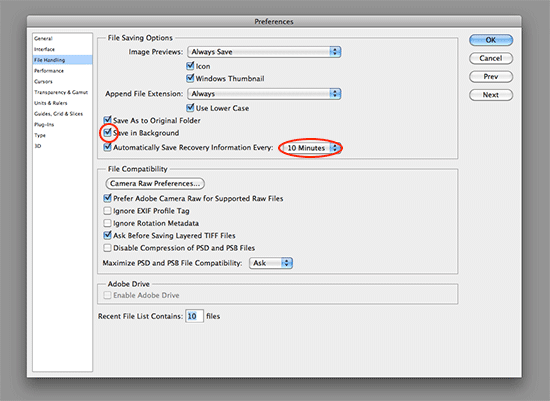
Finally, auto save in Photoshop! No need to worry about software crashes any more. Beside auto save, there is a new background save. This means you can still use Photoshop to work on file while another file is saving. This is particularly useful for editing large files such as large size illustration or print design. The auto save and save in background option is available under Perference > File Handling.
More…
There are new features in Photoshop CS6, here is a good video that summarizes everything.
62 Comments
Comments are closed.
John
Photoshop CS6 has indeed undergone some minor but Adobe still needs to step up its game. I was recently working on something in Illustrator and before I realised it an hour had passed without saving. Suddenly it crashed, but I didn’t panic too much since I was sure I’d get an automagically saved version loaded up when I opened Illustrator again. Only to realise that Illustrator doesn’t have the ability to autosave your files.
I can’t wait for CS7, when they’ll be boasting with the new Illustrator Autosave feature that requires you to pay another 600$ dollars or so upgrade fee.
John
I accidentally a couple of words.. I meant to say ‘minor but very useful changes’.
giuseppe
there is some tutorial on the web about making actions to autosave the file by itself. Actually there are already plenty of ways to get it further.
cheers,
Merit
to hard to hit cmd + s uh?
Design Panoply
I REALLY wish the right click colors were side by side without the names. They make the menu too tall :-/
– John
Miguel
You can already access the layer color properties with two clicks. Just right-click on the layer’s eyeball and the color menu pops up! :D
Ronne Vinkx
I agree, Adobe did a great job improving existing tools. As a photographer I’m glad they finally sort of copied their Lightroom crop tool to Photoshop. As a web designer, character & paragraph styles make it an absolute must-have.
Dexter Adams
I miss the ability to go up to the upper toolbar and select arrangement for tab layout. I used it quite a bit and it was just easier the old way (at least for me)…but overall the changes in workflow have been a big improvement. I can’t say how much I love being able to take projects to and from Photoshop to Indesign, and Illustrator!
Tim
The only thing good about PS CS6 is the crop tool. The interface is awful – particularly the dark version. For the Mac version…
Keyboard shortcuts do not jive with other Adobe apps. Command-D for example does something different in every app.
There are serious bugs in CS6, mostly involving fonts. The character panel is a constant headache for me. Font versions (regular, italic, bold) are being duplicated in the menu. In Futura I literally have 13 fonts of each style showing in my character panel popup menu. In addition, the new character and paragraph styles panels are so slow that they are unusable. I get a spinning wheel (not beachball) every time I try to make a parameter change in one of those panels. Even turning off the preview checkbox takes 8 seconds.
The layers panel is ridiculous. It actually decreases my productivity. Having thumbnails turned on when trying to nudge a layer with the keyboard arrows causes Photoshop to give me the spinning wheel again while it constantly redraws the thumbnail of every layer in the layers panel.
The shape and paths context bar at the top is a horror now. Instead of having easy one-click buttons to select the type of path I’m drawing or the union features, they are now in dropdown menus for some insane reason. This adds two extra clicks every time I want to change to a different path operation. Throughout the day this adds up – a lot.
Adobe knows about all these bugs and has done nothing to fix them yet even though Photoshop CS6 has been out for months now. I have canceled my Creative Cloud subscription and gone back to CS5, which actually works.
Adobe clearly did not let any graphic designers or illustrators beta test Photoshop CS6. They really need to.
On the upside, I used to dislike Illustrator, but not I like it better than Photoshop.
Sean Rall
Try reinstalling your suit, I have had none of these problems, and you can also default back to CS5 shortcuts. and if you were using only the Creative Cloud there are cretin features and bugs that Adobe is working out since it is a brand new product.
Josipa
I’m having the exact same issue with the character styles in PS6 for mac. It’s a 2-month-old MacBook Pro!
I hope Adobe fixes this speed issue with the character styles, and adds even streamlining features. I know we shouldn’t be using PS for layout, but as long as developers request mocks in PS, web designers will be forced to use it for layouts instead of AI.
Sean Rall
I dont have these problems but i am running on a win 7 pc. there are major differences in how the programs are coded for each style of OS. So that could be the problem, try looking at the Adobe support forums to see if there is a ticket in for your specific problems.
Tim
I have posted the paragraph styles issue in the Adobe forums and there are a LOT of people having this problem. It is only on the Mac — not an issue in Windows (so far). Adobe employees in the forum say it’s a corrupt font issue. I don’t believe that at all because I have no issues in any other program I’m using.
Misael
Did you ever find a solution for this? I’m having the same problem!!
Misael
I had the same problem, and I was able to fix it by removing some of the third party plug-ins that i was not using, hope this helps you
Lenny Terenzi
CS6 is the best Photoshop I have used in years. Blows CS5 out of the water in every way.
Tim
No, it doesn’t
Thiet ke logo
this is what you need, thanks for sharing!
Loibinky
thiet ke logo
color is very impressive, I want to learn. thanks
Matt
Very nice summary of some key features. I just downloaded a trial copy a few days ago. I am finding the new UX to be well thought out and user friendly. I would definitely agree that it was developed to support faster productivity as well. I’m going to buy my copy before the trial expires.
Nathaniel Dodson
Killer write up! Love this stuff! CS6 has been an amazing upgrade!
John Bash
I tried my hands on PS6 and noticed some new features and enhancements. Its too speed to handle and finally PS6 is simply awesome.
Chris Devlin
I didnt used yet. As for as I know about Photoshop CS6, the features are awesome like crop tool. Hope I use this one… :)
Dubai Web
The first thing I noticed was the black background! I did not like this but after a few days thought it was great as it did not put much strain on your eyes by getting snow blind.
When I used the 64 bit version it took up a lot of CPU resources for running on the laptop but the normal Photoshop CS6 still worked a treat.
alvaro
Great tool, a little expensive but amazing
Andre Augusto
hey guys, the fastest/productive interface is the Fireworks cs6, FOR SUREE. Adobe should extend the easy of Fireworks to their other softwares. I want to share with you my facebook page http://goo.gl/g9vcq Please like it! If you take a look you will find very interesting content, give it a shot! ;)
Alquiler yates Ibiza
just downloaded a trial copy a few days ago. I am finding the new UX to be well thought out and user friendly. I would definitely agree that it was developed to support faster productivity as well. I’m going to buy my copy before the trial expires.
johanso
Photoshop is best, CS6 very very good, and use
saha
Very informative post on best features of CS6. I did not tried CS6 yet but these new and improved features looks amazing. Thanks for sharing.
مالتی مدیا
CD MultiMedia
سی دی مالتی مدیا
.k
Louie
On a brand new high end pc running win7 i’ve found the creative cloud programs, photoshop and illustrator cs6 to be fundamentally slower to respond than cs5.5, it pains me. I’ve tried tweaking the performance settings but to no avail, using a Wacom in illustrator and trying to select a simple shape lags so much its like pulling teeth. I’m about ready to go back to 5.5. It’s horrible, why can’t they just make speedier versions of their last programs rather than adding bulk?
marlon gantalao
You are right louie,,because you can move faster which the last programs perform the certain task where you force to get a high speed.I’m so inspiring to share this.
bluzed
One things that really keeps bugging me is that ‘ stroke ‘ options have been moved up in CS6 and every time i open the properties…. i am always looking for it at the bottom… may be its because i still using.. CS6 at home and CS5 at workplace.
rickymartin
Your post really helped me to understand the photoshop. It has great details and yet it is easy to understand.
gabe
you know I was pretty skeptical when another designer at work switched over to cs6 but reading this short article convinced me to give it a go. Two features in particular – character and paragraph styles will save me tons of time and give flexibility to my site mock-ups, and treating layer groups as layers will allow me to stay more organized while non-destructively editing. thanks for the write up.
Ruud Voost
I highly agree on layer label colors. The right-click menu is just way too long even on a high resolution screen. Kind of annoying. But the feature is welcomed and the stated solution would be superb!
Oh man that crop tool. Took a little time to get used to but in the end it works a lot better. Rule of thirds guidelines were there in CS5 as well (don’t know about earlier versions).
I do think the searchable layers is a bit overdone. You should just manage your layers the right way giving them descriptive names and put them in folders. That way you’ll still know how to handle that PSD when you open it up later!
All in all I think Adobe did a great job on creating the CS6 version of Photoshop.
Kind regards,
Ruud Voost
http://www.creativitea.org, your daily cup of inspiration
IndustryIdea
That look like wonderful, I hope to use CS6 as early as possible.
Alquiler yates Ibiza
I’ve tried tweaking the performance settings but to no avail, using a Wacom in illustrator and trying to select a simple shape lags so much its like pulling teeth.
jared
I can’t wait to try out the new photoshop.
projetos corporativos
his program is fantastic. I loved the design of the photo.
Venture
I was using PS 5 but when I see the futures of PS6 I try it and I must say this is better then old.
seo
color is very impressive, I want to learn. thanks
Theo
Thanks for this review, you convinced me to upgrade.
Alquiler yates Ibiza
I do think the searchable layers is a bit overdone. You should just manage your layers the right way giving them descriptive names and put them in folders. That way you’ll still know how to handle that PSD when you open it up later!
Alejandro
Wow!!! this current version seems to be really washed and make up!! i mean, those news behaviour are on the right way. I was some kind of dissapointed with the last css5 version… :D
Debbs Hosting
Finally! An Auto-save feature. I had many frustrating moments when my PC or laptop just crashed and I forgot to save the thing! And I was almost finished, too. LOL. I still have the CS5 version and I would like to explore this one. Are there any additional features for the content-aware option?
Yiannis
I like its new lens blur . It has three types of effects, which work live if the graphic card supports the new Adobe Mercury Graphics Engine.
Mark Wrangham
I have to say I’m extremely disappointed with CS6 for Photoshop, Illustrator and InDesign. The user interface, if you’re on a Mac, seems to have a look and feel more akin to a PC program, and I have to say there is now less clarity when using it. This is just a personal gripe though. The fundamental problems however are many – a couple to note are: When using Photoshop the program now creates file sizes that are 4 or 5 times larger than my previous versions, not so bad when you’re working on web graphics but when it comes to promotional display graphics it’s a killer, where once I was working on 300 to 400MB files now they’re exceeding 2GB and this is with no more than 20 to thirty layer items, once above 2GB Photoshop will not save the documents.
Screen render in Photoshop isn’t great but is woeful in Illustrator particularly when scrolling. I am running an iMac i7 Quadcore with 8GB of RAM, this however does not seem adequate for running CS6 which sends my hard drive into overtime when in use writing to virtual memory. Both Illustrator and Photoshop cause my system to dramatically slow and saving documents is like stepping back into the 90’s watching the timer spin around and around and around… My productivity levels have dropped significantly since using this version, which, as I work for myself, is lost money. All in all it’s a very poor release.
Wordpress Development
Little long but happy to read it. It helped me so much.
Dwight Zahringer
I’m a big fan of the layer colors and the autosave feature. Once I learned about that I now know I am never more than 5 minutes without a save.
Wordpress installations
Wow, I think its time to upgrade! I am still using CS4…
Affiliate Revenue - A Web testing human figure
Perhaps love dreaming processing of your personal website, whether for personal use or for the game. If this is true of you, then you could perfect affiliate programs for the division to make the revenue as a way to mend uncomfortable is his artistic skills website gives you the opportunity to offset the total income of the money or the regularization of more information about members step finishing recipes.
Figure complete enterprise software website can learn a relatively simple and inexpensive web-skills plan.
Aaron
Photoshop CS6 has a lot of bugs too. It crashes randomly and you can’t even copy and paste a file name when you’re perform a “save as.”
James @ Make Money Online
I personally love Adobe Photoshop CS 6 for its better user interface and better crop tools and layers. I could see better graphics output when working on Photoshop CS 6
Gloria
Thanx! I will try CS6.
adeel
really helpful post!
sajid
Wow.. Great advancements in PS CS 6. Will like this.. soon i am going to Download and install PS CS6 .
Thanks for sharing
Azunga
I really like when the brush tool is being used that the user can right click to change brushes. Great feature and thanks for pointing out some other features I didn’t notice.
tuananh
the improvements with Layers are awesome! The auto-save is a big life-saver too, no more corrupted files after crash, hallelujah!!!
Afzal
Cs6 is such a remarkable photoshop.. Its all contents and features are just amazing and its geting better and better day by day.
Cleaning supplies 4 everyone
Hello !
This is a remarkable post. Cs6 Photoshop is awesome. I really liked “Mac file right-click menu”. It’s easy comparatively.
Thanks for sharing this post.
Cleaning supplies 4 everyone