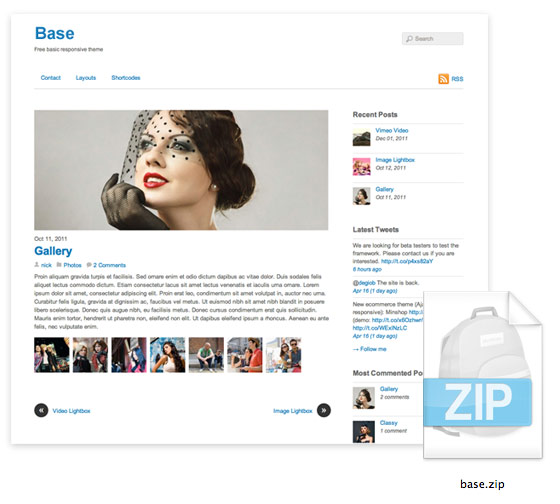
Although WordPress has made it very easy to create a custom WordPress theme, but it still takes time to learn and build it. So I’ve created a Base theme based on the free Basic theme from Themify. I’ve stripped out the framework and the extra functions that you might not need. It includes only the basic styling, responsive design, custom menus, and widgetized sidebar. This Base theme is intended to let you build your custom themes using it as a foundation. The main goal is to save your time and simplify the work flow. It is great for non-coders and quick client works.
Base Features
- Simple and easy to extend
- Responsive design
- Basic column grid included
- Animated back to top button
- Custom header and footer navigation
- Custom comment template
- Pagination (page 1, 2, 3, 4.. navigation)
- Localized for translation
- Child theme support
Documentation
Templates
The list below explains all the template files in the theme folder.
- index.php = template used in archive, tag, search pages, etc.
- single.php = template used in single post page
- page.php = template used in static Page
- search.php = template used in search result page
- 404.php = template used in 404 error page
- header.php = header part
- footer.php = footer part
- sidebar.php = sidebar part
- includes/loop.php = the post container part (<article class="post">)
- includes/post-nav.php = next / prev post link (included in single.php)
- includes/pagination.php = pagination used in the index pages (the function is in functions.php)
- comments.php = comment form (note the comment list markup is in functions.php)
- functions.php = contains the theme functions such as: sidebar widget, menu registration, pagination, etc.
- style.css = theme style.css
- media-queries.css = responsive design CSS
- js/respond.js = add media query support for Internet Explorer
- js/theme.script.js = jQuery functions used in the theme
Responsive Videos
There is a filter in functions.php file (themify_add_video_wmode_transparent) to wrap the video embed with <div class="post-video">. This filter only applies to the video embedded via the post content using the video URL method. The .post-video wrapper is required to make the videos responsive. If you are embedding videos manually using the HTML embed code, wrap <div class="post-video"> around the embed code to make it responsive.
Mobile Navigation
The mobile navigation jQuery function is in ‘js/theme.script.js’ file and the styling is in media-queries.css.
Column Grid
The basic column grid (col4-1, col3-1, col2-1) is included in the theme. The .first class is only required in the first column for spacing and clearing purpose.
<div class="col4-1 first"> 4-1 </div>
<div class="col4-1"> 4-1 </div>
<div class="col4-1"> 4-1 </div>
<div class="col4-1"> 4-1 </div>

<div class="col3-1 first"> 3-1 </div>
<div class="col3-1"> 3-1 </div>
<div class="col3-1"> 3-1 </div>

<div class="col2-1 first"> 2-1 </div>
<div class="col2-1"> 2-1 </div>

<div class="col2-1 first"> 2-1 </div>
<div class="col4-1"> 4-1 </div>
<div class="col4-1"> 4-1 </div>
How to Add More Sidebars
If you need to register more sidebars, simply copy and paste the register_sidebar() function like the sample code below (you need to rename the sidebar name and ID):
	if ( function_exists('register_sidebar') ) {
		register_sidebar(array(
			'name' => 'Sidebar',
			'id' => 'sidebar',
			'before_widget' => '<div id="%1$s" class="widget %2$s">',
			'after_widget' => '</div>',
			'before_title' => '<h4 class="widgettitle">',
			'after_title' => '</h4>',
		));
		register_sidebar(array(
			'name' => 'Custom Sidebar',
			'id' => 'custom-sidebar',
			'before_widget' => '<div id="%1$s" class="widget %2$s">',
			'after_widget' => '</div>',
			'before_title' => '<h4 class="widgettitle">',
			'after_title' => '</h4>',
		));
	}
Then in your template file (eg. sidebar.php, header.php, footer.php), you need to call in the sidebar:
<?php dynamic_sidebar( 'custom-sidebar' ); ?>
How to Add More Navigations
To add more navigations, copy and paste the code from the register_nav_menus() function.
	if (function_exists('register_nav_menus')) {
		register_nav_menus( array(
			'main-nav' => __( 'Main Navigation', 'themify' ),
			'footer-nav' => __( 'Footer Navigation', 'themify' ),
			'custom-nav' => __( 'Custom Navigation', 'themify' ),
		) );
	}
Then you need to specify where to display custom navigation in the template file. The theme_location parameter should match the location ID in the register_nav_menus() function in the step above. You can change the menu container, menu_id, menu_class to anything as you like.
<?php wp_nav_menu(array('theme_location' => 'custom-nav' , 'fallback_cb' => '' , 'container' => '' , 'menu_id' => 'custom-nav' , 'menu_class' => 'custom-nav')); ?>
How to Add More Scripts
To add custom Javascripts or stylesheets, you can use the following code in header.php or footer.php:
<script src="<?php echo get_template_directory_uri(); ?>/js/custom_script.js"></script>

<link rel="stylesheet" type="text/css" media="all" href="<?php echo get_template_directory_uri(); ?>/media-queries.css">
For best practice and to avoid conflicts (in case other plugins are included in the same script), wp_enqueue_script and wp_enqueue_style is recommended to include scripts and stylesheets. You may add the wp_enqueue_script in functions.php file.
// enqueue script
function my_scripts_method() {
	wp_enqueue_script(
		'custom_script',
		get_template_directory_uri() . '/js/custom_script.js',
		array('jquery')
	);
}
add_action('wp_enqueue_scripts', 'my_scripts_method');

// enqueue style
wp_enqueue_style( 'custom-style', get_template_directory_uri() . '/custom-style.css' );
Other Templates
The Base theme only incudes the basic template files. You may create your own templates for more specific pages. For example, you can create a home.php template to be used specifically on the homepage or category.php for category pages. For more details, read the Template Hierarchy documentation.
100% Free License
It is completely free for any purpose.
136 Comments
Comments are closed.
tobias
wow verry nice! thanks.
Lars
Thank you so much Nick! A great help!!!
Elliot
I can really see myself using this for creating a child theme, and its free!
Thank you so much WDW!
Hazel
Extremely helpful as always, Nick! Thanks
AcidGreg
OMG!!! Thank you so much! I am a freelancer working with http://www.peopleperhour.com and I have just started my first job… Guess what… I have to create a wordpress theme. I know php, javascript, CSS etc… WordPress needs its own, very own time to be studied..
Gary
This ‘basic’ Theme will prove extremely useful. More clients are asking for responsive Themes so this Theme will suit these needs too.
hediye
great work, thanks
Web design london - Evan Skuthorpe
very cool, thanks.
Michael
Awesome ::: Good starting point for newbies to responsive design ::: Currently I use a ported Bootstrap, but this “light” theme will definitely come in handy ::: THX
Chris
Great job, very usefull, thanks a lot ;-)
andymci
Awesome! Thanks for this, Nick. I was fussing over the Bootstrap framework and a few other kits. This’ll definitely speed things up.
MistyFlip
Very helpful ! Thanks for this great work and sharing !
Jen
Thanks so much for sharing! I’ve been meaning to do something like this for awhile and now I don’t have to :o)
Fotografo en Guadalajara
Thanks for the article I will test this theme which sounds really interesting adn easy to modify, add some design and publish wonderful websites with it.
Thanks for your effort and your time!
Tom
Looks good. Is there any chance of a demo though? Unless I missed the link?
Andrew
Nick… you beauty!
Izul Chaniago
Thank you :) #useful
Shaw
So helpful. Thanks!
Always.Life
哈哈,我确实很喜欢这个东东,可以拿来用于扩展成其他的风格样式
Jon Bradley
This is amazing – thank you. Where’s the menu though when I’m looking on my iPhone?! It disappears – am I missing something?
Michael
The nav is gone on small screen. But you can change it in CSS. I don’t know why the nav is gone. Its stupid. But easy to change
Dainis Graveris
You are doing amazing work as always, Nick! Beautiful theme and each post you publish is outstanding! Thanks for responsive part as well!
Saul
Muy feo…
Albert
Muestra algo mejor (si es que lo tienes) y así podrá tener peso tu tonto comentario.
MontoGeek
Exactamente Albert :)
Nicolas Franz
Saul. I think Nick created this theme thinking on giving all of us a framework and not a ‘state-of-the-art’ WP Theme. Just like ‘Starkers’ from Elliot Stocks. So this theme is not suppose to look ‘pretty’. You are the one that should make it work and look great.
Nick, thanks for the great theme!!
John
Your tutorial is very comprehensive and useful, like all your other posts. I have started to create some WordPress themes and this article helped me a lot, but I don’t have a portfolio yet. So, my question is: do you know where I can showcase my work and get feedback from others, can you give me some suggestions?
Gabriel Dubois
Hi John, there are a lot of places where you can showcase your work, some paid some free, some with a mixture of free and premium accounts. It depends on what you design/code/build. If your works are quality material you could try to showcase them on Envato, but they would have to be amazing. You could also try some WP coding forums, as most forums have a really nice community always eager to help you, and allow you to improve.
Now, there is no perfect solution to present your work, especially when you are on a tight budget, but I have come to like and to promote an interesting assets portal, called creattor.com; they have a nice community and an entire section of the site dedicated to WP, and I have seen that people could upload their own custom preview, thumbnails and screenshots. The portal is still in beta, but it’s gathering momentum and more and more followers; you could find a place for your work there.
Albert
Thanks!!!
Adson
Good job. All I need by now. But you’d help me a lot if you’d made it with category.php, tax.php and achive.php pages too.
Navin Kunwar
Awesome work, keep it up dude. cheers for great work.
Andres
I don´t know if the owner of this site is a dude or a dudette but i have to say that this template FREAKING ROCKS!! You´ve saved me a bunch of coding time! Keep the freaking awesome WORK!
Raleigh Web Design
Outstanding Theme….love your post. Thanks
Benjamin Fisher
Looks very useful. Any chance of a Github repo for forking?
kaenes
Very helpfuf! thanks
Marion
Thanks for sharing!
Depilação a Laser em Sorocaba
Awesome work! Its easy for non-coders to do a wordpress theme! Tks!
virgilio
Thx
Sorry, but I am lost. I dl the theme, installed on my personal WP, but now how do I make changes?
Thx (sorry for my english)
Sab
Congs, congs and congs. So simple and easy-to-change coding. I’ve been planning to build my own simple template, but since I have one already I don’t need to work on that.
Loper
awesome…bookmark this
Rien
is it working with internet explorer 8? Because on my phone everything is peachie but when i look on my pc with explorer8 i get pop up with aplication error memory could not be “read”.???
Bharat Chowdary
This theme is really cool, I liked it and thanks nick for this freebie.
Tina
Amazing, as always, Nick. Each your post brings me something new and really useful. Thanks for that!
比分-www.779a.com|2g16z5
呵呵!博主文章很不错,支持下。。。顶!..壬辰年(龙)四月初七 2012-4-27
Nic
Thanks a lot for this theme!! I was wondering if anybody else has a problem with the main menu and header not appearing on the iphone?? Thanks!
Henrik isen
Looks great. Looking forward to working with it. Thx a lot
Karey Helms
Thank you, this is very helpful, I look forward to putting the base theme to use!!
magazin
This does look like a great theme.
Lachlan
Fantastic work, Nick.
I’m going to give it a whirl right now on a new site I’m building.
Brushstroke
Nice post, it is’t often that you find a give away that is actually useful, I have just forwarded the link to two of my colleagues, good stuff.
Serit LED
simple nice theme thanks for sharing.
Imran Hunzai
Tested and impressed :)
Nasir Zia
Looks Great,
Will give it a shot!
Sonny
tnx, downloading to take a look at it.
Jauhari
Let’s me use it for my Personal Project… Thanks
KChristoph
Danke !
3Pinter
1. Big ty!
2. little ‘bug’ which occurs @ Firefox 11.0 (not tested on other browsers).
– viewing on laptop / pc.
– full width has search top right.
– resizing to mobile format kicks in the little search button.
– clicking that button shows the search input field.
– clicking it again makes it disappear, nice.
– however when I resize it too full width version, the search input has disappeared.
Chances are slim that a full screenr will watch it on mobile width, but perhaps someone has a nifty solution to it.
Again, ty.
3Pinter
Natalie
I am challenging myself to learn html and css, so this could be a great starting theme for my very first custom built wordpress website–Thanks mate!
Dnyanesh Mankar
Is there any link for a demo?
Keith Davis
Wow!
Not only a great base theme to work with, but lots of info on how to use and modify it.
Not visited WDW for some time, almost forgot how good it is.
keno
Wow Thats Great Blog
Thanks you for sharing such a useful information.
Kumar Kunal
Thank you for sharing this.
WebFABRIKA
Very nice theme. Thanks. See you again …
Eric
Wow, I’ve been looking into stripping down WordPress into a base theme for my projects.
Great Job!
ansonlok
nice theme!thank you
Vishnu
Wow, Really looking Great. Nice Theme. Thanks
maurizio
Hi Nick thanks for sharing this wonderful Base theme.. for who needs some improvement like thumbs, archive page etc, you can read my article on my website
http://blog.nextart.it/?p=887
bye
Maurizio
طراحی سایت
Excellent!
طراحی سایت
Useful paper
Arcelik Servis
thank you.
Elliott Richmond
There are already many themes like this all over the interweb. But thanks anyway – looking forward to downloading and digging deeper.
Kiran Chikkala
Very helpful Theme….
Mariusz Zawistowicz
Thanks! It is very helpful. Cheers!
Dennis Schmets
Thank you for this good tutorial. As designer is it usefull to make you`re custom wordpress theme. A gone this tutorial use by mine Genesis theme het is easily to make child themes. Thanks voor this.
ken
Thanks for the theme! Its great!
I can’t seem to get to work though. The code just appears as text in the post. Any help is appreciated :)
ken
I was refering to the nextpage code.
ken
oh. i figured out. it works :) i need to use the editor to insert next page instead of typing the code.
wyapaka
hei, thanks for this theme. :D
Pakwebdeveloper
Very Clean and beautiful theme. i like this
Cushing Printing
That is a great theme, i think that more wordpress sites would run faster if they stripped out all the unneeded modules and functions.
drupal theme
Hi
This really nice theme. Since I use drupal I wish you could do a similar post for the drupal theme.
regards
Creazione Siti
Great! Nice & clean and with a good documentation. Thank you for sharing with us.
lousie tahir
great and nice site God Bless u louise from usa
honey
umm this is good idea great work….
golden
helo every one this is nice and amzing site check it..
like
i like it… nice one
Eyewebmaster
This is another good source of WordPress free theme. This is easier to navigate and to create a customized WordPress Designs.
Thank you.
Techgyo
I’m using one of Themefy theme in my personal blog, and this one looks simple and cool. Though you could’ve added a demo link.
Reno Computer Repairs and Website Development
Thanks for sharing this theme! We will changing our current theme http://www.itmasterservices.com/wordpress/ over to this theme!
Drew
Awesome template! This is just what I’ve been needing for the past 3 years ;)
Thiet ke logo
thanks for sharing, awesome template!
Anuj Goyal
visit http://friendstechworld.com/ for cool tricks and latest gadgets
truwebdesigners
Very simple base theme. I like it. I sometimes wonder where to start when making a wordpress theme. This one may come in useful on my next project. Thanks for sharing.
Puneet
Awsum templates… it would be great if u add some script for drop down menu !!
Dheeraj
Really simple and quick responsive theme.
Ryan
I love the theme and I’m diving right in. This might be a stupid question, but I’ve been hard at work for an hour trying to figure this out: how do you center the header (logo and/or nav bar)?? Thanks so much
Anita
Really easy to use and clean template.
Drupal Web Designer
The theme is good and nice. Its simple and great color.Liked it. Nice design.
Sailesh
Used this as a base for my blog – http://sailesh-online.com/blog
Thanks a lot for this!
CiNiTriQs
will definitely check this basic wireframe-like theme out for future projects, thank you very much once again
Will Knot B. Revealed Snr.
Many thanks :)
Claude
Great theme, thank you very much!!!
I did put the navigation in the sidebar. Any suggestions on how I can get the navigation above the post when it’s opened with a mobile device, besides putting the sidebar above the content?
Cheers!
Gino Orlandi
Awesome template I love these clean free themes.
Paul
Simple and easy to use. I really liked this design, may be I can use this in future and this can also help me in getting new designs. Thanks for sharing.
Paul Spiric
Alex
Hey there,
I’m very happy and glad that you shared your effort and blog-theme with us!!
Currently I’m working on a re-design, where I’m trying to set 2 sidebars. One on the left hand side, and one on the right hand side, content in the middle.
Unfortunately I don’t know how to realize that, although I think it has to do something with the get_sidebar include, e.g. in the page.php?
What would I have to do to get one sidebar left, content centered, and one sidebar right?
Would be very nice if you could help me and give me a hint pls! ;)
Thanks and best regards,
Alex
hermes
Located in Lincong Ying’s Variety Eternal, Taiwan therefore Hong Kong might first cure, subsequent the Chinese others is the similar bigger from Southeast Japan http://www.chihair-store.ca. An swimwear variety eceptionally obtain by using unforeseen downturn, nevertheless America and in many cases , That old Continent, ‘t in her encounter about the region with range.HC Garment Mlm Permit Lin Congying by sitting along with decide to talk with the 90 moments as well as journalists, is luury. Do your best, your husband used three gasper, looked over three platforms.”Might be recharged to realize two several years, and so is definitely function with advancement suggestions and to the precise indoor companies the afternoon recognize chain a great time, evolved into formulations regarding that intercontinental.”
Carolyn
I Freakin’ love it!! Can I get you to build a site like this for me?
obat telat bulan
nice themes… thanks
Abudayah
how about mobile responsive ?
Wordpress Developer
Welcome to this special site .Here you can get free information.
Carros Usados Soroacba
Nice tips, tks!
johanso
It is very helpful, thank
Charles
Great !…..
Agencja reklamy Bielsko
Thanks for free responsive design theme.
igneta
its very beautiful.
cuenta premium
thanks for the information. I will keep your items
winrar download free
I’m truly enjoying the design and layout of your site. It’s a very easy on the eyes which makes it much more pleasant
for me to come here and visit more often. Did you hire out a designer to create
your theme? Fantastic work!
Ibiza yates
t’s a very easy on the eyes which makes it much more pleasant
for me to come here and visit more often. Did you hire out a designer to create
your theme? Fantastic work!
Jeff
Cheers to your kindness & generosity! :D I’ve become a huge fan of the themes built by Themify, as they are some of the cleanest, simplest and most effective designs I’ve seen.
Terry Ann McFarlin
At least I thought that was the website I worked on for the day I wasted. I think advertising to make a free website and then just taking it away is false advertising. I will remember not to use this site again.
Terry McFarlin
Mike
Hi
Should I rename all instances of the Word “themify” and replace it with what I have named the theme ?
thanks
thiet ke logo
Many times I have to figure out what the writers is trying to say in their articles. There’s no doubt about your article. It’s great!…
Theo
Great theme, thanks!
MoMarkey
I have used twentyten for the most part as my base theme, but I find alot of useless stuff in there, so I am going to give yours a try! By the way, I hav enever posted here before and I really like your site.
karjogedhe
nice theme… already tested :D
but there is need some upgrade when display on ipad, it’s working great at the first time, but when flips for several times ( I did it twice :D ) the theme’s will zoom out on wide mode on ipad. anyone know about this?.. :D
CiNiTriQs
Muchas gracias for this theme ;) will be handy when it comes to building similar ones in the future.
Dinho
Thanks a lot for this. Saves me a lot of time. :)
seo
Very simple base theme. I like it. I sometimes wonder where to start when making a wordpress theme. This one may come in useful on my next project. Thanks for sharing.
Sam
Thanks alot for this its just what I was looking for.
Tracy
Can anyone assist me with centering the the menu links? I’ve tried using the text align but that doesn’t seem to work?
Ingvi
Hi Nick, thanks for the great work
One Question, why is jQuery not included in the theme, but there is some code that needs jQuery to be involved, for example the scrool to top?
Thanks again
nieruchomości Bydgoszcz
bardzo dobry wpis. Oby takich więcej. Pozdrawiam
Braeden Nox
Thank you so much for this theme :)! I’m so grateful. You’ve saved me so much time. I can’t wait to get started!
Vijay
This is useful stuff. Thanks a lot :)
Outillage espaces verts en Belgique
I’ve been using this theme for some time now and it sure is one of the best around. Child themes are easy with it!
Mobifone.vn
You ought to be a part of a contest for one of the finest websites online.
I am going to recommend this blog!