Surprisingly enough, based on the findings from my recent survey there are quite a bit of Fireworks users. Personally, I never used Fireworks. Photoshop is alway my first choice for designing—from image editing to designing mock-ups. But, did you know that Fireworks is way better than Photoshop in term of image compression? I’m not a software engineer, I can’t explain why Fireworks can compress better. But I can prove it to you by showing a series of experiments I did.
[poll=17]
PNG Compression
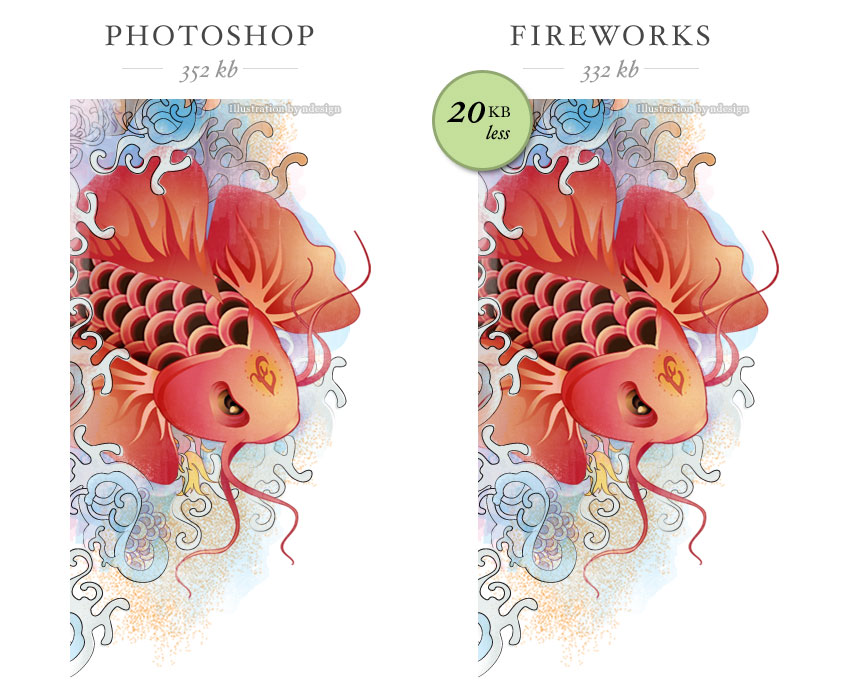
For testing purpose, I used an un-compressed image with transparency. I used Photoshop to export the image to PNG-24 with transparency and the resulting file size is about 352 kb. Then I used the same image and exported it to PNG-32 with Fireworks. The file size is about 332 kb. Visually, they both look the same (at least to me). In term of file size, the image exported with Fireworks is about 20 kb less.
GIF Compression
Next I exported the image to GIF 256 colors, adaptive, with no dither. The results are: Fireworks = 88kb, Photoshop = 92kb. That is 4 kb less. Also, they don’t look the same. I prefer the image exported with Fireworks because it has more image details.

JPG Compression
Now, I’m going to try the JPG compression with a different image. I exported the image with Photoshop to 60% quality JPG and the file size is 80 kb. Then I exported the same image with Fireworks to 80% quality JPG and the result is 72 kb. Both exported images look pretty much the same, but Fireworks beats Photoshop by 8 kb in this case.

Please note: Fireworks and Photoshop have different compression technology. 80% compression rate in Fireworks is relevant to Photoshop 60% compression rate.
What Is The Big Deal?
You’re probably thinking: what is the big deal? It is only a few kilobytes… Well, don’t under estimate the little difference in kilobytes, it can make a big difference on your bandwidth and load time. Lets use the background image on WebDesignerWall as an example. If I export the background with Fireworks, I can reduce its file size by 20 kb. I get about 16,000 visits per day on average. 20 kb x 16, 000 = 320, 000 kb. Yes, that is 320 megabytes per day! I’m only talking about the background image here. Could you imagine how much bandwidth I can save if I compress all the graphics on the site with Fireworks? Most importantly, I can make my site load faster and that is a big deal!

Conclusion
If you have Photoshop and Fireworks installed on your computer, try it yourself. You will be surpised with the results. From now on, I’m going to use Fireworks to export my web graphics, particularly the template graphics.
316 Comments
Comments are closed.
Jasmin Halkic
I used Fireworks for almost 2 years, but since I learned to work in PS, don’t use Fireworks anymore… Thanks for post!
Selvam
An Eye opening article……
Tom Davies
Hey, great post, but even as a fireworks fan I’ve got to call you up on your bandwidth savings maths. Your calculation would only be correct if none of your user’s don’t already have a cached version of the bg image – obviously I don’t know what your visitor loyalty/caching set up is like but I bet you get quite a bit of repeat traffic…
PS If your getting that kind of level of traffic you could probably reduce both your bandwidth & server load (by reducing http requests) by compressing/combining your css/js with something like minify (http://code.google.com/p/minify/)
YSlow (http://developer.yahoo.com/yslow/) for firebug can make finding optimisation routes really easy too.
Fireworks does rock though – also kicks Photoshops ass for vector stuff
hope this helps anyone trying to optimise their site out there….
Origin Ideas
now i know, that’s pretty helpful, thanks Nick!
Cyprian Gwóźdź
Lorem ipsum dolor sit amet enim. Etiam ullamcorper. Suspendisse a pellentesque dui, non felis. Maecenas malesuada elit lectus felis, malesuada ultricies. Curabitur et ligula. Ut molestie a, ultricies porta urna.
Haha :-) more or less the same as everybody :-)
Milos Milikic
Really didn’t know… Nice article! Thanks!
mattia
Firewors was born to create site layouts. Photoshop for photo editing. That’s it. If you don’t need extraordinary effect on website layout ( and just 1% of designers need it ) you can create an efficient layout saving time. A lot of time.
I’m the only one in my company using fireworks and it’s quick, versatile and efficient.
Kyle
@mattia: not really, Fireworks was born for creating web images of all kinds. It’s the only application I use for creating web graphics simply because it (well, used to before Adobe took over) loads quickly, has a much easier UI, and overall better at completing tasks when it comes to web design.
Thomas
When you’re saving the files in Photoshop, are you using the Save for Web option? Photoshop generally puts a lot of meta-data in its images if you don’t – which may explain some of the image sizes.
James
You’ve highlighted one of the problems with Photoshop in your first example. There’s no such thing as 24 bit PNG with transparency. I don’t understand why the dropdown couldn’t just contain 24 bit or 32 bit as it does in Fireworks.
Antony
I’ve always suspected this but it’s nice to have it backed up by someone reputable.
Fireworks, while not as powerful, does have other tenets, it’ss also far quicker and easier IMO to mock up and change elements quickly in addition to dealing with slices in a far better way, pre sprites of course;-)
Thomas
@James
In Photoshop, Save for Web will do this and also reduce the file size by removing all unneeded meta-data.
Todd
I’ve used Fireworks for optimising for a while now… I started using it to overcome transparent png not working in IE6 then realized the other optimisation was better than PS as well.
Side note you may or may not know;
If you export from FW as a PNG-8 with alpha transparency you’ll get the nice fade you expect from PNG-24 but it degrades to completely transparent in IE6, albeit a little chunky… (bah, it’s only IE6… update your browser, its free!) it means not having to replace png’s with gifs for IE6.
Also, thanks for the great resource.
Vins
I love Fireworks!
Dan
I’ve used fireworks since it was Macromedia. Compression and optimisation are just better. One area where it falls down, though is custom brushes. If I could readily get all my photoshop brushes into fireworks without a big headache then I’d probably not use PS for web work again.
Bartek
well I can’t agree with your theory in this article. I also made this kind of test and in my opinion photoshop’s save-for-web option is much better. At least when it comes to JPEG. The images are noticeably sharper, and the file sizes are very similar to the ones saved in fireworks.. but once again… the image simply looks better.
You didn’t mention if you use just File/Save as.. option or save for web, so I can’t be 100% sure. But that’s just how I see this… Cheers
Jim Neath
You could also use smush.it or PunyPNG to decrease the file sizes of your images without losing quality.
I ran a quick test with the background image using shush.it and managed to shave off ~7kb. That’s about 109mb saving per day.
Marten
Photoshop is made for editing photos not to design websites..
So use the right program for the right result!
Anyway… I love both of the programs ;)
depi
Probably Fireworks optimize better than PS (it was so some year ago, may be now it’s the same)! But test and text about your background is a little questionable:
1. if you save for web with PS, generally jpg quality 50 may be a good quality for web image (now I’m out of my office and your bg is ok with PS6, file size 136 Kb; with PS CS3 may be better)
2. Many of your daily visitor are your affectionate estimators (me too) so they download your background only the first time…
Many thanks for your good job!!
Ron
well, for web FW is better except for one very disturbing issue: brushes.
the brush engine in photoshop is amazing, with the ability to create your own. FW sucks in that department. another great item of FW is the path palete and the pages ability. but overall PS is much more powerfull on almost every level.
in short, for web work (mostly) FW. since cs4 there is better integration between the 2 so this is the best workfllow for me.
Kev Adamson
Always been a fan of FW. I could go into it more here, but I wrote an article a while back describing my experience, and why the two should not be directly compared: http://www.kevadamson.com/talking-of-design/article/stop-comparing-fireworks-with-photoshop
JonBollinger
I read somewhere recently that when you save a file in Photoshop on a mac it puts some extra meta data in the file, but when you upload it to the web the extra data gets taken out. That could explain the difference in file size? Maybe fireworks doesnt put in any extra meta data in?
Peter M
Your findings might be correct, but I doubt you will save 320MB in traffic. That might be true the first day after launching a new website, but like depi mentioned, I suppose most of your visitors have your images cached so it won’t make so much difference.
In fact, if you have changed your images now, after finding out FW does better compression, all your regular visitors will have to download them again, which will cause a peak in traffic that could take a long time to compensate by the couple of kB you have saved with the compression.
But still, when a new project with heavy graphics comes up, I will definitely check if FW does a better job than PS. Tnx for the tip. ;-)
Adson
I knew there was something fireworks make better… rsrsrsrs
Great topic…
Pete
Interesting…must be why I prefer using Fireworks. Besides the compression I think Fireworks is a much simpler interface to use.
Charles-Henry Vespierre
As a web designer, I always work with FW since the first release.
During a webmeeting with an Adobe Engineer, he said to me that FW was built for compression, compression and compression (and today quick mockup).
Remember for the oldest ones! when we used 56K modem… and built 30Ko pages.
And keep in mind, FW must keep some assets against king PS.
Ben
Cool! Adobe is pretty good at that software stuff.
Daniel George
Haha, i like Marten’s point.
Some people i speak to assume that everyone also uses Photoshop to design all websites. It’s great for grungy and arty websites that use lots of layering and texture to get the final look, but just doesn’t compare to Fireworks when pixel perfect work is required.
I wish Fireworks was championed by more designers like in this post as i would like to see more articles and tutorials written for it.
lan
Did you save for web use or save as…
carl
I don’t use fireworks, however, along the lines of compression technology: Those looking to squeeze filesize for Flash projects—Save all your images as uncompressed PNG’s (whether it’s from Photoshop or Fireworks) and let Flash handle the “jpg compression” for optimizing. You will see some better results, visually and with file size.
jeff
Fireworks Rulz & Photoshop Droolz!
I love them both, but Fireworks is simply amazing when it comes to website design. You can quickly go to from wireframing ( using master pages and symbols), to interactive PDFs (client presentations) then using the same file start design over it! You can’t beat it.
Fabrício
Hi there! Well, great article this! I could never guess this but as a designer i always used both but for web layout and logos prefer Fireworks. Its funny, i always had this discussion with designers about Photoshop and Fireworks and its really impressive how people loves Photoshop! In some cases they even never had started Fireworks! Adobe off course have an easter eggs in their package! Well done!
Craig
ImageOptim for OS X will save you even more KB as it losslessly compresses PNG, GIF, and JPG. I always run my Fw exported images though other compressors since they can always be optimized more.
Fw is a fantastic app though, I’d be lost without it.
Simon White
I think that you’re probably not comparing the same thing. Fireworks likely has better image compression defaults since there are lots of parameters you can use in JPG and PNG optimisation; in GIF too, the choice of the 256 colour palette can be optimised based on “perception” algorithms.
Plugins or separate packages to do JPG/PNG/GIF optimisation exist that can outdo both Fireworks and Photoshop no doubt… but there are so many options in the “save to web” of both packages that you cannot be sure that one or the other of the packages makes a real difference.
Photoshop “save to web” has one option which I have really noticed makes a difference: quality=50 is vastly different to quality=51 when you save. Above 50, the subsampling options change and you get a better result (with corresponding larger filesize).
Why not try this : save to JPG with Fireworks. Now save the same image from Photoshop, specifying to optimise for the same file size. Do the images look different? If so, the algorithm for optimisation is different…
PH
IMO the best to compress PNGs efficiently is Yahoo’s Smushit : http://developer.yahoo.com/yslow/smushit/
Rodrigo
Good article! I have followed your posts for quite a while and I really admire the quality of your work and content. I am surprised as well by how much people don’t use Fireworks, because, in my humble opinion, sometimes Photoshop is an overkill.
Don’t get me wrong, I still love them both!
Having said that optimization does make a difference, specially if a site gets a lot of traffic.
brad_strickland
I’ve know for years that fireworks produces better quality files at lower file sizes. Fireworks faces two problems.
It duplicates so many photoshop features and doesn’t distinguish itself enough from Photoshop it is very hard to sell the cost of a extra program in business.
Boss:
Well. What does Fireworks do?
Me:
Edit image files and reduces website graphic file sizes better than Photoshop.
Boss:
Photoshop does that and we’ve already paid for it.
End of discussion.
The other problem is that it’s the devil you don’t know. With quick turn around times in the workplace and the fact there is no time to deal with any learning curve at all. You go with the one you know which is Photoshop.
Fireworks is an awesome program that has not gone away as I thought it would when Adobe bought Macromedia and for that I thank Adobe.
IhateDesign
Yeah its real, also try jpg compression to 80% and you have 20 or 30 kbs of gain.
the module of photoshop (export fro web..) is very bad, i use it for my drawings and the file always exceed 100kb of grabage.
dont use the module
Cheers!!
Daniel Haus
Good point, I’ve been wondering for so long why they didn’t improve Photoshop’s image compression routines for years. I’ve been using jpegoptim and optipng for years, but finally I found ImageOptim which provides a comfortable GUI for these tools.
Mark
I’ve been using fireworks for 6 months and I luv it!
Michael E
Hello “brad_strickland,” I will admit that being in a Web based company, I have suggested the use of Fireworks over PhotoShop not only for its cheaper price but for its simplicity and easy usability. Fireworks also has way more advanced tools for editing vector based raster images and type. Applying effects and filters to these objects are way more editable and the pen tool is more like illustrator. Not sure where Adobe is heading with this application but I will continue to recommend Fireworks over PhotoShop for any Web based environment. Obviously the same does not hold true for print, in that case I would def. recommend PhotoShop.
Mil
I’ve used FW a lot and was very satisfied with the web-workflow, but i noticed that PS make better antialiasing rendering typos. Now i make the most web design in PS but i am missing the simple and streight workflow of FW … did someone else noticed the difference in rendering antialiasing between PS and FW ???
Peto
I wonder about the explanation from the programmers from both products, being fromthe same company why don’t they share the bits needed to maximaze both programs.
Marc
With Adobe’s acquisition of Macromedia a few years ago, I am hoping they will eventually incorporate FW into FS as they had done with ImageReady.
FW has its pros, but they’re not enough for me to give up PS, the standard in our industry, altogether.
Marc
Oops! I meant incorporating FW in PS. :)
brian
Does it really affect your load time noticeably? I get it, on your end, a little savings for every access is a big deal, but a page load only accesses each resource once, so that 20kB savings might be like 200ms faster for me, probably less. Am I missing something?
Andrew Vieau
I’ve found Fireworks to be much easier for making websites. Creating vectors, managing colors, and slicing up an image is just really simple in Fireworks, and I can get it all done much faster than in Photoshop.
brad_strickland
Hi, Michael E
I also work in a web development environment and I am a fan of fireworks for all the reasons you posted. It in many ways is superior to photoshop for web development.
cheers
Brauny
I have been using FW for a long time and very much prefer it to PS for Web related work. IMO…FW is much more intuitive and quicker to get web related items done. That being said…PS is a much more robust program with many more options for manipulating photos. I definitely need both.
kre8iv1
I never knew how to use PhotoShop very well. I could do basic things but not more advanced functions. I started a Web Design (re)certification program at a local technical school. The teacher taught us FireWorks. As I became more comfortable with FW, I saw the benefits of the program. I feel grateful now that I don’t have to use PhotoShop for my web work, as it is too overwhelming for me.
Andy
To be fair, it’s not compression, it’s optimization. Also, why don’t you use a proper PNG optimizer such as PNGOUT, optiPNG, PNGrewrite etc ?
It’ll save you more space.
Andy
oh, and for JPEG, use JPEGtran.
There’s also no point in using GIF anymore. PNG-8 easily does everything GIF does (except for animation.. it’s coming, though!) and more.
mauricio
I have always used fireworks to make web designs. I am trying to go to photoshop but I find the use too complicated. Photoshop is more for graphic designers than for web designers
BebopDesigner
What a brilliant post! I guess for Adobe, FW was an itch the had to own but couldn’t solve.
Thanks for posting
ElAlecs
Fireworks is for Web, Photoshop is for everything, I think you can do ALL the hardwork with Photoshop BUT all the web work, slices, compression, etc with Fireworks, In my work all the graphic designers use Illustrator and Photoshop and the web guys use Fireworks
The Frosty
Wow, who knew?
Sophia
Wow, thanks for the tip. I have both and have mostly used Photoshop for the majority of my web design work while reserving Fireworks for creating UI and quick slice slice and dice jobs. I will be changing that routine.
Rodolfo
I have been using Fireworks for a long time. Photoshop is a better design software than Fireworks, but this is the main goal of Photoshop, and the main goal for Fireworks, is to be the best “WEB” design software. Just take a few steps back in time: at the beginning, Photoshop did not have options for web and then Adobe make a partner application where Photoshop export the arts and then export in order to use them for a website (I don’t even remember the name of that software); and in the latest versions of Photoshop, this functionality have been integrated. BUT… Fireworks was born with this and FOR this functionality. I think that this is why Firework handle compression better than Photoshop! Because it was created with that goal in mind.
Ottun L.O
Fireworks was designed for the web and very easy to use. While photoshop was designed for photo editing (superb).The web capabilities of photoshop started getting better after the acquisition of Macromedia by Adobe but presently no matter how good photoshop is in web, fireworks still rules.
Website Design Sydney
Surprisingly enough, based on the findings from my recent survey there are quite a bit of Fireworks users.
Pablo
Wow! I knew something!
I usually use PhotoShop for all my designing but always save from PS and open and export from Fireworks, only for the optimization!
Good article and nice examples :0)
eRIZ
Unfortunately, Photoshop has broken web image optimization a bit.
Within PNG I’m always using pngOptimizer. My pictures gain ~10% less size. I don’t know, what do the guys from Adobe screw but many people complain on PNG support in Photoshop.
~58: too much of time and one license more to buy. :P
Carl114
I used Photoshop for anything. Very interesting findings. I start to use Fireworks to store images for my blog. Thanks for the article!
Noel Wiggins
Thanks for posting these findings I use fireworks for their new css feature, but never thought that the image optimization would have been such a great benefit, But I am convinced that this is now the best way to go.
—
Thanks and Regards
Noel for Nopun.com
a graphic design studio
Maciek
Use PNG Optimizer. In some cases it reduces your png weight even 50% less. To reduce jpeg weight use JPEG cleaner. Photoshop add a lot unnecessary information into image.
Ric
If you are a professional, you use both. Fireworks is much better than Photoshop for web.
Eric
“If you are a professional, you use both.”
Unless you use one or the other. If you’re a professional, you know how to use whatever tool(s) you’ve chosen to use.
Adrian
If you are really that worried about it then use lazy load:
http://www.appelsiini.net/projects/lazyload
Also I really don’t see the big deal here. Use lazy load, and after the first load people will have every cached anyways.
dev
really dont know about this, but firework does has some advantages if compare to photoshop but not in image editing but on designing, and it true
Srdjan
I use Fireworks and form day one and I like it simplicity in making small graphic elements like buttons, headers and even logo design. It’s more simple then Photoshop and no with Photoshop integrated effects it can do almost everything you can imagine.
Fireworks made for simple web graphic. That’s why it has better compression then Photoshop.
UK Hosting
I am really a Fireworks user and Like it’s simplicity and effectiveness on Web projects. I am not so sure about Photoshop but it looks complicated to me. I fireworks one can have different pages in one file and one can have rapid prototyping to show the work to client before the coding begins.
Doug S.
I keep trying to like Fireworks but the app UI is just so counter-intuitive. What’s worse is that it’s lacking basic abilities you can find in any browser. Small caps? You need to do that yourself.
I guess it comes down to what Fireworks is. If it’s an app prototyping tool for turning things into AIR apps and so forth it’s great. If it’s for designing web pages I’d much rather stick with Photoshop.
Oh, and as for image compression, I don’t use Photoshop. I use ImageOptim which compresses to a degree that is equal or superior to Fireworks. Oh, and it’s free.
debugr
fireworks is way better for website prototyping than any other software.
it’s a mess working with photoshop and vector elements. designing ui’s is fluid and easy. changing elements is even easier.
John Skinner
Completely agree with debugr, read my blog post on the subject if you have a few minutes spare.
ComfortablyNumb
Always used to use Fireworks for image otimisation but went over to PS CS4 cos I assumed it was better! Never assume anything!
I’ve just tried JPG Cleaner and found at least a 50% reduction in image size with no disernable degridation in image quality and it’s quick. So that’s one for the toolbox – (thanks Maciek)
And thanks for the post; very helpful…
Glen
I started using Photoshop at around version 5 and really only started to take notice of Fireworks around CS3. I’m glad I did take notice. It’s a brilliant tool for very rapidly prototyping UI designs / widgets for a range of applications. It’s support of vector based editing plus the ability to easy fine tune an underlying grid to snap things to (typographical grid / baseline structures are incredibly easy to setup and accurate) and the greatly reduced footprint are highlights for me.
What I don’t like so much are its text tools. I don’t know if its just my copy on the mac or a bug (guessing its the latter as it was a known problem in CS3) but text selection and manipulation feels really clumsy to me. In addition the work-flow for adding image export profiles is again unnecessarily awkward and convoluted.
I think for me its the combination of PS and FW that makes for a killer combo. I couldn’t live without either and so I regularly encourage web designers and people new to web design to at least take a look at Fireworks and to give it a chance to melt its way into their web design work-flows. :D
mr.antough
I’m using Fireworks for many years doing my all web-design work. I started from Macromedia FW MX2004, v.8 to Adobe CS3, CS4. It’s the great tool for fast and pro web-design. For me the 8 (macromedia) version is the best. You can easy create any type of web site in FW. Export to PSD or easy create compressed animated gif. The best ever. I use photoshop (CS4x64) only for editing/export PSD projects. PS, as for me, is better for cool photo editing and digital painters. This is only my thoughts. =)
Ricardo
Fireworks is best not just for compression, but for it’s vector editing capabilities, effects and easy/quick interface. For png optimization http://www.gracepointafterfive.com/punypng seems to work wonders, and there are many other tools (supporting other formats too).
Sam
Yeah, what he said. I was just going to add a comment about punypng, when I saw Ricardo had beaten me to it. I’m a speed junky, so I optimize most of my graphics (which tend to be created in Fireworks) with it. It’ll compress the current background on this site by an additional 5% (about 7kb).
akhter Rasool
yeh this is right PNG is nice format for web it works great and light, specially Adobe Fireworks software is concern
Indrek
Great review. Hadn’t even thought about using anything but Photoshop. Thanks a lot!
Ari
This is really strange. When CS3 first came out – I attended an Adobe Roadshow and I am pretty sure they said that the new Photoshop CS3 was going to use the same compression engine as Fireworks. So I assumed the performance would be the same.
That’s disappointing.
Carl - Web Courses Bangkok
Really useful article, I found both Photoshop and Fireworks easy to use but our students mostly want to learn Photoshop, hence we go with PS.
Andi
Actually image compression is the only reason why i use fireworks. I dont like the interface at all, but the compression rates and quality are quite impressing. Additionaly i use ImageOptim (http://pornel.net/imageoptim/en), a small piece of OsX Software which gets rid of some extra info in image files, to get even smaller png files.
RCKY
I already remarked that some years ago using the Macromedia Studio 8 (!) and i retested it when i installed my CS3 in comparison to the older Fireworks. Since then i always prefer Fireworks for slicing and final preparations for web.
Bernd Artmüller
I also recognized the difference between the two tools and now I also slice my design with fireworks. After that I try to compress the image again with yslow and SmushIT…That’s a really great tool
Ashutosh
Fireworks designers darling …where as…Photoshop photographers babe :)…so choose ur role!
Rob
Photoshop is what I learnt to use first and I loved it. When I started work experience early this year in a web design office I was made use Fireworks as that was all the boss knew in the office and he was always against change.
I hated it at first because I was so use to PS but after a while I got to know it well enough but it still held me back in terms of the finished design as I was limited to what I could do.
Now what i do is create the whole design in Photoshop and once the final draft is approved I import the PSD in Fireworks and save it as a PNG and slice that file. I prefer Fireworks for slicing as it is much quicker and simpler in my opinion. I never tested the files sizes compared to PS though, some good savings in this example.
Enatom
I have been using Fireworks for 5 years, … its recieved heaps amount of snobbery, by people who cannot value its “Half Vector half Bitmap Approach” …. snobby people need to wake up to Fireworks.
NeonBlueWS
Nice article. Although, I think the size difference of web ready output is important, it is just icing on the cake. Fireworks is under appreciated and is SO much better than Photoshop for web design work. I think the only reason people still use Photoshop is because they haven’t tried Fireworks.
Rob Wage
As a Web-Designer/Graphic Designer, I started out using JASC Paint Shop Pro and eventually migrated to Photoshop. FireWorks came Highly-Recommended by other web-designers and when I switched, I was hooked and never-looked-back! The interface is very intuitive and the exporting tool is a God-Send!
Glen
Yeah I was at the Adobe Roadshow conference. The speaker made this a major point of discussion. Telling everyone to stop using Photoshop to export web graphics and start using Fireworks. You’ll really notice a much more substantial saving when you’re working with photos over illustrations too.
When asked why the exporter wasn’t in Photoshop – his response was a standard “it’s harder than you think – we’re working on it”
David Trang
Funny, I just started to try and force myself to use Fireworks instead of Photoshop last week for other reasons, but this might be enough to do it permanently.
Wai Vuong
Yeah, I just started using FW myself. I love it!
Chepi
I think the morale of the story is: Buying Macromedia was the best decision Adobe could ever make.
FW ruled webdesign long before “Web 2.0”, the “blogosphere” and “user generated” were even part of the project. Got to respect that!
Christyl
I always knew that many people utilized FW for effective web layouts, but I didn’t know that the program was capable of better compression. I know that you have posted tutorials on PS and AI..maybe you should include FW in that list now?
I always love your tutorials. You have a wonderful eye for design.
leTurco
excuse my english … Not only is the compression, I use FW from early vrs. It is much faster and intuitive and the PNG files as base format are much lighter than PS files, even being able to match many of the effects and attributes of the PS, of course all this applied to the design, PS is an excellent tool for retouching images and photos, but not so good for design, for my experience, moreover, FW can handle pages, managing the design of a site in one master file, inclusive, a file more lighter than a PS full of layers and groups that you need to hide and show to see the “pages”… ;)
Seeker
You can also reduce the size by using smushit or punypng, on this very page smushit says you can reduce the size by another 25kB, including 7kB in the main-bg image… so much for fireworks compression.
wien
nice post, very helpful, thanks
Daemon
Photoshop adds all sorts of META data when exporting, and many more unnecessary data not required in web production.
You can uncheck those options and have the same files in both PS and FW.
hans
@ daemon: how????
i take photoshop, i work with photoshop since 12 years and i love it. and since CS it’s well optimized for web-produktion.
Jeroen
It is very simple. Photoshop was built for image editing and retouching. Later on, they bolted on all kinds of web functions. But in essence, it is still a photo editor.
Fireworks is set up as a design tool though, and is much better at that. It is a pity that Adobe doesn’t seem to care too much about their FW userbase, because important bugfixes and/or new features take a lot of time before they implement them.
Fireworks needs a more solid font management (still not up to par in CS4) and less crashing, and then, well, it’s kind of perfect.
Jeroen
Oh and one more thing.
Fireworks is so much better with vector objects and editing, which is a laugh in Photoshop. Everyone who also likes to use Illustrator will probably agree.
Alexander boy
I tried using Fireworks, but so far i haven’t found that magic setting. I use “Save for web and devices” in Photoshop, with following results as example: normal “Save As…” png 24 : 212 KB, , with “Save for web and devices”, 76 KB. I opened up Fireworks but it gives me about the same size, 76 KB… With transparency, of course. Did you know about “save for web” Photoshop feature or can Fireworks further reduce this?
dean
wow! this is awesome! i do realized that FW load faster than PS, but I’d never thought it ‘d be much difference between those software..
btw, thanx for the info! nice!
Danny B
I’m a long time Fireworks user and I’ve always appreciated its compression. However, if I’m really looking to save kilobytes these days I use an online service. Try running your Fireworks images through PunyPNG – http://www.gracepointafterfive.com/punypng
They can get a lot smaller without any loss of quality.
Xaby Web Design
actually i agree with you, i am quite surprised there are still many people using fireworks, guessed it just taste and preference of designers
hans
hmmm, took a look at fireworks, but, how do you make things like this? http://www.flickr.com/photos/77579546@N00/4067992463/sizes/o/
TonyV125
Fireworks was designed for efficiency and when you use it for what it is intended for (creating new designs, images, & prototypes for the web), you run circles around anyone attempting to do the same in Photoshop.
I’ve used Photoshop & Illustrator since the mid 90’s and Fireworks since its launch (around ’99). Each one is a tool for a specific purpose (don’t attempt to edit bitmapped images or create complicated vector designs in Fireworks).
I still use all three (CS3 but hoping to upgrade soon) and love each one, but I’ve demonstrated to a countless number of colleagues how much more efficiently I can complete many design-related tasks with Fireworks. All but one purchased it after seeing what could be done.
It’s extremely accessible and if you can afford to buy another application, the investment will pay off shortly with the time you save and speed you gain.
TonyV125
@hans: I believe the flickr file you asked about used a feature in Fireworks that allows you to leverage Photoshop layer effects. The feature is called Photoshop Live Effects. If you have both apps installed, select an object in Fireworks, then in the properties window click the plus sign next to Filters. You should see the “Photoshop Live Effects” in the drop-down menu. Selecting it will give you a list of effects you can use in any combination, just like the layer effects in Photoshop. I used inner shadow & inner glow to acheive the effect shown in the image.
Google “fireworks photoshop live effects” for more info.
Stephen Bates
I’ve been using Fireworks since before I had Photoshop. Personally I find wireframing and doing mockups to be far easier and faster than with Photoshop. It really is a shame, as someone said, that it doesn’t get more attention.
Rick
I love Fireworks and find it much easier to use than Photoshop, having come from a vector-based background. I also appreciate Fireworks unique ability to make PNG-8 files with alpha transparency – something that Photoshop cannot do at all (at least the version I have, CS3 cannot do it).
xun
seconded your motion. firework beats photoshop in compression. huhu.
arthurius
Fireworks RULES!! Been using it since 1999.
Melody
Definitely going to have to check this out…the more you can optimize for your site the better..
Nick - Freelance Graphic Designer
I have only recently gone back to fireworks as I had ben happily using imageready for all animated gifs that I needed to generate. Now with imageready totally gone after my latest jump to CS4 from CS1, I am learning the new fireworks and I honestly would of preferred to have the imageready program built into photoshop. I do almost all my work in photoshop, and I am much more comfortable with it, (and faster with it) and prefer the filter, script and plugin options I have with photoshop.
I am normally very fussy about my filesizes and push the software as much as I can to get the best result.
Don’t forget you can save kb by refining your code as well.
Jeff
Ok, aside from image compression, can you tell me why as a web designer you would want to use an application with a smaller limited set of features? IMHO, Fireworks does less, and therefore can (potentially) limit your creative options during an explorative design process. I am not saying you should be running every PS filter under the sun (ugh) but I have just always felt FW isn’t as robust an application as PS from a design potential point of view.
As it stands now, design in PS, and if you are working on a site where an extra 4kb in size on your images will affect overall bandwidth, optimize with FW. :-)
Batterycentury
So I will use Fireworks, space is limited.
Viljami
If you want to compress PNG:s without Fireworks, use PNGout.
Just drag and drop your image (jpg, gif, png..) files to PNGout and it will output a compressed PNG.
Omer
Major problem with PS ( till PS CS3 as i still use it), there is no way you can find the Objects height and width as you can easily do it in FW.
I love FW.
Tom
I’m a website designer, and have only used fireworks a couple of times, just so used to photoshop, How many of you have made the switch completely?
Is it suppose to be better for designing websites specifically?
Cheers.
Tom
Ian
@Tom – Yes it’s better for web design, that’s what it’s made for.
The biggest reason people don’t want to switch from PS is because FW has a different workflow, but once you master it web design will become much faster in FW than PS. Fireworks is for rapid development of websites.
You can set up Pages in FW that basically act as grouped layers so you can design your entire site in one PNG. Exporting and slicing is also much easier and quicker.
Also, don’t think your FW graphics won’t be as good as PS. If I was as talented as Nick I could make his fish examples above and they’d look just as good.
The only thing FW is missing are the custom brushes.
I started with FW so for me PS seemed horrible to switch to (it’s the other way around for most people) but once you get used to how they both work, they both have their advantages.
Lee
I use both. Photoshop is a better image manipulation package, Fireworks is a better web development package (talking about graphically, i’d never use it to create html)
Slicing, exporting states (frames) etc is much easier in fireworks.
niko
I think at least with png/gif there’s some gained reduction from smaller image header size compared to what Photoshop outputs.
Web Dizajn
The articles in your website are really cool!
Selidbe Beograd
Its a nice blog having a huge source of important information.
kok aan huis
This is an interesting experiment… I’m using fireworks from now on to compress images for the web :-)
Elizabeth K. Barone
I used to use Fireworks but haven’t in a long time. I had no idea that FW compressed better than Photoshop! Thanks for the side-by-side comparisons; they were great!
Stephen Bates
@Jeff
The idea isn’t to use one over the other. The idea is to set up the layout in Fireworks, and the put in the finishing touches in Photoshop. It’ll save you a lot of time.
Tom Karels
It brings up a good point, what is the best image compressor out there?
Photoshop is far superior interms of laying out graphics and editing. Yet Fireworks has the better compression and Alpha Channels.
One would think Photoshop would absorb Fireworks since they are both Adobe now, RIP Macromedia
Savageman
Really interesting test! I was wondering if it wwas possible to get the original files used for the comparison, so we can run more tests on our own (I was thinking using Paint Shop Pro as well).
tj
Have you compared with optimization in Illustrator? Illustrator is also nice for web graphics. You can actually use the crop tool to optimize as well in Illustrator.
Zach
Please, please Adobe, will you just put the gradient transform tool, styles, and the web image compression engine into Photoshop. Because those are the only cool things Fireworks has. Why all the different software..
website design
Hey that was a really nice post… I work in a website designing company and appreciate it a lot…
John Philip
Was completely amazed at first until I start looking closer. All the side by side comparisons above reveal that the fireworks images are blurred. Photoshop quality being better in terms of sharpness in every comparison. Both programs offer “smoothing” or “blur” functionality.
I simply believe you cannot compare the “quality” slider options to relate on an equal scale. The percentage measurements are definitely different on “save for web” vs “save as” vs the Fireworks methods. I’m really not convinced that “50%” in Photoshop is supposed to equate to “50%” in Fireworks.
…besides, Illustrator is still the superior web design tool in my opinion anyhow!
x.10
Did you checked the metadata (EXIF, IPTC…) and color profiles that may be incorporated (or not) into files. It has an impact on file size.
naran_ho
Another new and interesting article, Thanks.
Jayanthi
Hey Thanks,
I love this article because I am a loyal fireworks user ever since I started my career as a web designer. Fireworks surely does not have as much exposure as photoshop does (not that I am biased, I love photoshop too).
Anybody interested in learning fireworks, You can visit my fireworks tutorial section at – http://www.imajine.in/fireworks_tutorials.aspx.
I am sure you will like both fireworks and tutorials ;).
Bryan Moore
Excellent post and excellent blog. Good information and looks really good. As far as Fireworks and Photoshop compression I think I am convinced. Thanks!
Warwick
I had been told the reason of why at an adobe seminar once… but I have forgotten now, which sort of makes this comment useless, but I do use fireworks, even for my designs, as I find it quicker to mock up layouts, apply gradients, partterns etc…
If i need a highly custom graphic I normally take that into photoshop, play around with it there and then bring it back into fireworks…
Kean Onn
Of course when come to photo editing Photo shop win the race.
However when come to standard web design, I do prefer Fireworks, as it is tons easier to use and don’t have too much functionality to cloud the designing process.
Darcy Clarke
Awesome as usual. I’ll be using Fireworks a bit more now. I know that every kilobyte counts for your sites so this is a great thing to find out.
Cheers!
P.S. lets go for beers soon with Verne.
Keith
If both fireworks and photoshop are made by adobe, why don’t they just use the fireworks compression engine in photoshop. I am like you, much prefer to do my layouts in PS and can’t be bothered to learn fireworks just for better compression.
Ian
@Keith – it has many more benefits than just the mentioned compression improvement.
I like how everyone is jumping on FW now a well know designer mentions something good about it, maybe you should explore further Nick and report your findings to the rest of the PS die-hards.
FW is a fantastic program, as I said before, web graphics can be made just as well in FW and your work flow will be improved.
FW for web design, PS for print design IMO.
Thiago Pereira
ok, I always used firework, ilove this program.
I use photoshop too, of course!
Sarthak Singhal
This is a nice article and highlights the strength of Adobe Fireworks. It is such kind of information people are looking for as it affects their daily working style and end results!
Drop in a line if you would like to discuss more on Adobe Fireworks.
Hello Len*
hi! i normally use fireworks to export web graphic, I think it’s better in quality and compression.
But it “distort” colors.
If u try to cut a layout and export pieces in ps and others in fw, u’ll notice colors differences..
fw make images darker.
João Aliano
This comes as a no-surprise. I’ve been using Fireworks since 2002, working on animated gifs for a webcard company. Back in the day of dial connections every single bit counted. We had to work with a 20kb limit for animated GIFs (300 pixels width or height and usually 3 frames)!
Fireworks is my software of choice for web graphics and prototyping. Macromedia did a great job with Fireworks and I’m pleased Adobe has kept up. Besides its superb image compression, FW has a great set of features, it’s easy, powerful and intuitive. Take frame masking, hotspots, slicing and image mapping, for example.
Damian
Yeah, I always use Fireworks for my Mock-Ups, I think it’s way more handy than PS for that. I think that’s what makes the difference, FW is for optimizing for web while PS has its focus on quality (e.g. for printing).
Oliver
I use Fireworks for my web page mock ups but never really thought about using it for slicing up my PSD layout for a full website. I’m used to using Photoshop for creating the web graphics for my website but maybe I will try Fireworks instead.
Shawn
Wow! You made a believer out of me. I’ve had FW for years but always used Photoshop. I figured why spend time learning another tool when I don’t even use the one’s I have effectively (originally photopaint and now PS for the past 5 years or so.) I guess I’ll have to start playing with FW. Thanks once again for your wonderful info.
Dotty
I certainly love fireworks. Use it everyday at work.
HeidyG2
Photoshop is the best for image retouch, you can see it in the name “photo”…
Fireworks is the best for web design. It is faster for create mock-ups. It’s very easy and it helps you a lot to save time with faster and creative results.
Nina
i just found this webpage today, searching for “great web designs” or something similar since I’d really like to update my own homepage. Just love this! It’s absolutely gorgeous and, to top it of, really informative! Me like a lot :-)
rai
my use of FW is confined with editing thumbnails running in macro. i actually use it to quickly resize images and quick retouch of images for web. it makes sense to know the crucial difference between the usage of PS and FW for graphics specially over bandwidth concerns which tells which is more efficient in the long run. thanks for lighting it up.
mgsmus
I’m using FW for all of my vector and image works. I use PS and AI very well too but i don’t know, just habituation i guess
ammarali
Hy
Feed
There is no way to compare FW an PS when you focus on Webdesign. FW is just so much better, handful and quicker than PS in that matter. Try slicing a website in PS and FW and you’ll see the difference, FW is so much quicker.
Seyfi Aslangecinen
I started designing my page with Fireworks 6 years ago. That’s why i got used to it. Photoshop has a complex user interface for me, plus hard to use it, plus uses much more systems resources then Fireworks.
If you are a web designer -not a illustrator- fireworks is enough for you…
Jagd
Tru. I`m always using fireworks to spare few KBytes.. On large pics – even more that “few” (in VGA pics, it often even almost 1/2 of PS result).
Nice comparsion!
WordPress Themes @CMSTheme.NET
Yep, Fireworks is surely better when it comes to image compression.
Lee
Went to an Adobe convention a few years back and the speaker explained this at the time. FW was designed from the ground up to export for the Web.
Alice
My super slim image tip is:
1) Export into PNG-8 in photoshop (reduce the number of colours in the save for web option, but use your judgement to still keep it looking good).
2) Run the image through Puny PNG ( http://www.gracepointafterfive.com/punypng/ ) to shave off a few more kb. You can do batch uploading and save it back as a zip – yay!
3) Run Google’s Page Speed Firefox Addon to see how well you did! (This add on will also offer to let you save out compressed images, but I think you can only do one at a time… bit slow.)
BONUS… IE6 supports transparency in PNG-8 too, (but the edges may not look perfect, though when I used it for 16px icons it looked great).
Vishnu
Actually from the scratch, (Macromedia) Fireworks was made to design/export for the web. And, (Adobe) Photoshop was made to design for Print/Film industry. But Now both are used in print/film/web, and it’s upto the designer’s choice to use which one.
Phil Ricketts
Or .. use smush.it!
John Burchi
Started using Fireworks way back and have never ditched it for Photoshop or other tools since I can do all web-related (even print sometimes) jobs so much better than with PS. The thing is a lot of graphic designers moved to web design in the past few years so Photoshop became the de-facto tool for designing everything from simple websites to WP themes etc (because it’s what everybody knew and used on a daily basis). PS was not meant for web, while Fireworks was definitely built from the beginning for the web by the defunct (read “swallowed by Adobe”) Macromedia. Using PS for designing web layouts is like using a monster truck to plough a field , you CAN do it but why not use a tractor (Fireworks) designed specifically for that. Not the smartest allegory out there, but you get the point.
Am I biased in my review? Definitely, being a long-time Fireworks user, but it doesn’t mean that what I said is not true in any way.
Thore
I’ve been using Fireworks since ever. I love it. :D
Robbie
I’m going to give a fireworks a try. But, sometimes (not always) I get much better compression with 24-bit pngs using Preview. Obviously, this is a mac only solution. For those who work on macs, I’d highly suggesting saving a file in preview and comparing file sizes.
Froi
Fireworks indeed is good in compressing images for the web.
I’ve been using Fireworks since 2001. I like using it for One major reason. I love the fireworks preview in browser feature. I like to see how my web design mock up will look like on the browser without saving it then exporting it to dreamweaver just to see how it looks like.
In Fireworks just hit F12 and Fireworks will open up a browser with your design on it, the best part when you are working with Fireworks is you don’t even have to keep saving your work before previewing it.
As a web designer it saves me a lot of time and it gives me a lot of freedom to experiment with my designs and see how it looks without going back and forth with two programs (photoshop and dreamweaver).
I have both Photoshop and Fireworks and I use them both, but I use Fireworks more for web design mock ups and Photoshop for print designs.
If you are a web designer and haven’t try Fireworks yet give it a try, not only can it help you with better image compression it will also save you some time, and as a designer myself I know we want all the extra time we can get when we are designing to finish our projects ahead of time.
Kyleigh
I HEART Fireworks and we’ve used it here in our web design studio since 1998 (I think, man I’m old…). It’s always my first choice when it comes to web design. I love the way it handles vectors, gradients and text (to name but 3) it’s far superior for web graphics than Photoshop. Photoshop is an INCREDIBLE programme, I use it primarily for image manipulation and retouching (as it was designed to be used) and Fireworks for web graphics (as it was designed to be used). I really really hope Adobe doesn’t sideline it – I think I’d cry…
Lovely comparison thanks!
curdaneta
This is an old history, I always use the Batch process to compress the client’s files. I always use Fireworks for web projects, nobody can beat it!
adam
Fireworks can reduce the physical size of an image much better than Photoshop aswell. particularly when you are working with an image that has already been optimised.
For example – if you want to resize an image to 150px X 100px down from 300px X 200px Photoshop will show jagged edges and severe image degradation long before Fireworks does.
Eric
At work we’re obsessed with the smallest, fastest, lightest because so much of our costs are associated with large files needing to be downloaded. Eventhough only 1% of our customers are on 56k and would have a heck of a time downloading the site (lots of big graphics), the smaller the image size, the cheaper our bandwidth costs.
Also spriting images together gives your customers a better experience as well — and on top of that, if you sprite JPGs together, you get even better compression.
As @alice has said above, punyPNG is a good tool, but there’s also PNGSlim (works only on PNGs) and it seems to get better results than punyPNG (eventhough that’s a great tool as well!)
Just some thoughts. :c)
Sonicatu
Interesting fact, but Photoshop is way more popular then Fireworks and I don’t think in the near future this will turn around.
As Vishnu said, Fireworks was designed for web related images, this can be an explication for the smaller size.
dany permana
Fireworks is the best, i make this tool for slice..
Web Shop Murah dan Jasa Web
Parvez
Yes, That’s why Fireworks is my fav! I’ve checked that whn i first use fireworks
now ur site loading faster then before :)
Thanks
Elcodigodebarras
Usually considered like a minor application than photoshop; fireworks would surprise many psd users.
It´s a shame adobe eliminate it from dreamweaver image editing for web instead photoshop.
Ryan S.
I’ve always loved Fireworks for this and other reasons. While Fireworks CS4 got rid of it, earlier versions had a ‘System’ anti-aliasing option for text. When making comps, it exactly mimicked how copy would look in the browser (far better than any of Photoshop’s anti-aliasing options).
Roy Ho
And here is a tip…Save out your 24bit PNGs in Photoshop and open it up in Fireworks, then change the PNG to 8 bit with alpha-transparency and use export to save the image. You will see that the file size will reduce by 60% on average simply because it is going from 24bit to 8bit. You may now be wondering how come you can have alpha-tranaparency in 8bit PNG. Well you CAN, in Fireworks…However do play around with dither settings because sometimes you need to set that to 100% so it doesn’t look jagged…
Cheers!
s_mangia
My only issue with Fireworks is that I cannot embed an sRGB color profile. Great compression, definitely… but the colour shift is unacceptable. All my photos lose a fair bit of colour saturation.
Vafa
First thing that is necessary for your compare is equal output(image) in each test.
i thing the FW image content a less detail than PS.
the result is :
Exported image from Fireworks have a lowest quality than Photoshop Images.
Greg Stout
I’m happy to see an article like this. For years I have used fireworks for professional website and have found to consistently produce better results for web work than Photoshop. Sadly I feel both Macromedia and Adobe are letting fireworks languish without the care and attention to detail that a program of this caliber deserves. The basic pencil and eraser tools still do not work intelligently at the pixel level. The program also seems to have some serious speed issues.
I hope that as time goes on Adobe will wake up and devote some real resources to the fireworks program.
Greg
acai
All my photos lose a fair bit of colour saturation.
Min Thu
For me, I have been using Fireworks for creating some web graphics but I did not notice about the file size in compression. Thanks for this post. It is really worth reading!
mumbojumbo
hi
my test result:
image type: JPEG
orginal image size: 27.3 kb
PS Compress: 23.3 kb
Fireworks compress: 15.3 kb
quality:same (fireworks is lower)
Cyber-Ottoman.com
Cyber-Ottoman.com
Cyber-Ottoman.com
Cyber-Ottoman.com
Gimeti
I’ve always used Fireworks. I was introduced to it when it was owned by Macromedia. I am not a designer, mainly i develop sites and I find Fireworks to be a lot better and easier than Photoshop when it comes to cropping, resizing and simple stuff. My former boss had bought CS3 for me and he was like what is that, why don’t you use photoshop? I always thought fireworks was developed to make graphics optimized for web. That is why i never open photoshop
MexiChriS
Thanks for this amazing post & “data/results” between both programs. I prefer Photoshop CS4 hands down! Being a user since ’04 using older verions than that year. But, i do love the fact how you can manage multiple pages and so forth on Fireworks & have been giving it a try more.
Seeing these results here on photo compression is making me consider using it a lot more! Plus using Fireworks CS4 feels more like home for a web designer, once you’ve grasped its program!
Highly recommend other “Photoshop only users!” to give Fireworks a try, along with tutorials, to get a hands on of what it can do, it’ll do wonder’s! ;)
Thanks for the article!
– MexiChriS
p.s. to those wanting to grasp Fireworks, check & try this out!
“The Ultimate Round-Up of Fireworks Tutorials and Resources”
http://www.smashingmagazine.com/2009/07/27/tutorials-and-resources-for-adobe-fireworks/
francesco
I use Fireworks to create both wireframes and projects visual design storyboard.
I hate creating multiple files for each page in Photoshop. If i make a change on an element in a page, I’ve to do the same on all pages manually.
Fireworks instead has nice feature of Pages, States and Levels, which you cand share elements in multiple pages.
I hope Adobe push next Fireworks CS5 as main web design software tool, making it more powerful (it has bad color manage) and reliable.
Keith Davis
I love Fireworks.
I have tried Photoshop but it is so complicated… I managed to learn Fireworks from a few internet tutorials. It is much more intuitive than Photoshop.
Only problem is… most tutorials on the web are about Photoshop!
Long live Fireworks I say.
Vitezslav Valka
It comes from the idea that Photoshop was “offline” software and Fireworx “online” from the times at Macromedia. I’m using Fireworx + Pixelmator.
Btw, a mistake is in first paragraph of your article: “…is alway my first…”
sikis
Photoshop and fireworks both indispensable. Especially a web design is using those two programs. Whether the design with Photoshop, fireworks and we put into practice. Size is more appropriate ..
ramon thackwell
The pre-compressed file-size gap is even wider: I’d not used Fireworks for years until I recently received a design as a 700kb .png (which I couldn’t open). The file, redelivered as a .psd was 5Mb in size. Fireworks made it back into the arsenal soon after.
This said… Fireworks feels ‘broken’ to me and full of bugs. Which is a shame because the workflow makes way more sense for web. I still use Potatoshop & smart-objects (vs. FWx & symbols) for the majority of the design process. Considering committing more once I’ve seen CS5.
luis angel
I’ve used Fireworks since the beta version, and I have to say that it’s very useful to make quick mockups, wireframes, demos, and also all the graphics for a website. I use Photoshop only for advanced photo editing tasks. I hope that Adobe continues supporting the development of this great tool.
Timothy Jones
Wow, that’s awesome! I’ve started using Fireworks just because I find everything web related just one-step simpler (like the fact that the dimensions of whatever object you are looking at are almost right there in the bottom panel)
Michael
Interesting review, though perhaps not surprising with FX a supposedly dedicated web based application. Theoretically FX rocks. The properties box gives you pixel point perfection that is hard to achieve in PS. It’s gradient tool is superior to PS. It’s slice capability is much more intuitive than PS. The pages function is excellent for a multi-page site. But. But. I get an application crash on average at least once per session. It’s export capability is seriously flawed. The inability to draw a gradient on a blank canvas defeats me and, if you take the time to learn, PS is a much more capable slicer than I first imagined, thought not intuitive I would admit. FX is also buggy. Adobe did not pay enough attention to detail. What gets me most is that FX has capabilities sorely needed in PS, and vice versa, another Adobe con to get you to buy both. The funniest element of FX is the export to html and export to css. Export to html gives you tables. To be fair, it works but good luck trying to understand the code. Export to CSS results in nightmares too awful to contemplate. I am not interested in those capabilities, so no big deal, but it does seem like Adobe are sticking two fingers up at us, telling us to spend the money and, by the way, you will get shi*!!!
Donstudio
Very nice article, I think Photoshop is best for Photos, actually this was the initial purpose of this software and it’s major specialization.
Instead of that, Macromedia Firworks (Now Adobe) was made to do website graphics from the start. You can have all graphics in vector format, you can even do minor photo work as well on FW. At the end of the day FW is best for web designing. I have been using FW since version 4. And photoshop from version 5. So i have been around long time to be able to compare in my own experience.
Don
Website Design
I recently made the switch to Fireworks, and I can tell you one thing…I’m never going back to photoshop again, when it comes to web design. I’ve been working with photoshop since CS2, but Fireworks has become by first choice, I don’t think it’s going to change any time soon.
Tom
I was lucky enough to get in on a day of lectures about multiplatform deployment by Adobe.
Someone actually asked if fireworks was better at web compression than ps.
The guys from Adobe said that it was more efficient and would consistently produce small file sizes. When asked why not use the same behind the scenes compression in PS. They simple said that there were legal issues left over from acquiring fireworks and they couldn’t use the code in PS.
Looks like their going to position Fireworks as software for Web dev and PS for photos in future
Will Paccione
Glad you posted this. I thought I was going crazy with the end result file sizes. I’ve always loved Fireworks and thought maybe I should use Photoshop more… not anymore. THANKS for a great post.
Jose Viscasillas
Fireworks is a great program for web designing. But Photoshop is better for details. Usually I design graphics in Photoshop and save them as .psd. Fireworks can read psd files just file and still keeps the layers at their appropriate location. Then slice up my graphic and export it into HTML. DONE.
Ales Bulva
As a big Photoshop fan I don’t use FW at all. But I was forced to use it in my former job. I’m sorry but have to say it was just pain. I’m not saying it’s bad software but for experienced PS user I was missing lots of features.
First thing I remember is FW’s accuracy. I mean , try to rotate a thing with pixel accuracy. Correct me If I did something wrong but I just wasn’t able to do it.
For me it is program which mixing vector and bitmap graphic at fracture of price you’ll pay for PS+AI and that’s just speak for itself.
About compression. Some comments here say FW actually has less quality with the same compression. If this is true than whats the point.
Don’t take me wrong. Fireworks is software which definitely has a place in designer’s work flow till you reach the point when you want create something more than button, button, bar, menu, footer website with corporate colors.
My opinion though.
Lyons Solutions Web Design
I don’t think fireworks is capable of doing what photoshop can. Although not a graphics designer myself, I have had problems with fireworks and photoshop compatibility and since then stopped using fireworks
dafodil
Great post, Thanks!
Another reason to switch from PS to FW :)
photoshop CS5
Great article
According to the latest info photoshop CS5 will be a massive advancement in this area of compression
See the CS5 features on a video on the main web site
http://www.photoshopcs5.co.uk/technology.htm
crossyou
very good, I like FW ,more
a boy from china
Neil
Interesting stuff… Seams Fireworks may be the eventual winner for web dev. Makes sense to me! :)
SeanM
Have known this for years, thanks for the testing. People often look at me sideways when I mention it. Prefer Photoshop for design then Fireworks to compress.
kylan
I have been using fireworks since it was macromedia-still using their pro version and love it for design, layout and compression…however…photoshop seems to port to printer better and is faster working with larger files. I use both depending on content and end product
Jacky from Germany
Ever heard about “PNG-Optimizer” ? For free and the same results ;)
Professional Website Design Company
I am surprised by that actually. I would have though Photoshop would have done a better job.
I might have to try this myself to actually believe it.
Li
Well, it’s a big deal when you really can save a few KB but on the other hand, I’m not a fan of FW. It doesn’t work the way it is like PS though. I think it’s depends on the designer. Maybe I just need to get use to the FW. *shrug*
Kevin
I’ve been using Fireworks for 8 years now, I wouldn’t use any other program for web design or any digital design jobs for that matter (PS for print only). I don’t know where to start; the vector tools? Cut and paste any object(s), anywhere? Paste attributes? Frames output to images? Real boolean tools? Simple, easy to use toolbar? Slicing that blows Photoshop away? Better compression? More dynamic effects (including filters) that are changeable at any time? No massive “mask” layers that make my layers palette 3 ft long (you can do anything Photoshop can do with masks)?
Basically you can’t beat it for speed and layout. Photoshop has a few more “painterly” tools but that’s it. BTW I was an 8 year Photoshop user before I started using Fireworks – give it a try, you won’t be sorry.
Kevin
…additionally, try to put aside your love for any program when you experiment, I loved PS, and I was skeptical at first, but I got over my Photoshop, Illustrator, Quark complex pretty quickly. Photoshop and Illustrator have real issues with user tools – they’re based on print-based code that is now decades old and you can see how they retrofit their tools with every “upgrade”.
yaoming
我一直在使用FW,我个人感觉PNG的话FW会方便很多
SmsVar, Sms Gönder, Toplu Sms
hmss
nice :)
Jeff Imperial
I’ve always suspected this but never thought to do an experiment like what you did. Thank you for saving me the trouble of confirming this! I’ll try studying Fireworks more from now on.
Great article!
Daniel
I’d say more experienced designers tend to lean towards photoshop.
It simply does alot more…
Yazılım TV, Php, MySQL, db..
oo thanks :)
Pontus
Started of and learned FW before PS, it´s great if you need to do things fast, for more complex graphics I find that PS is better even if it takes a bit more time to work with…
burak
first of all, I can clearly say that compression results are not true as it seems. We had made a little research about that with our team and yes FW’s results “seem” less than PS but image quality is not same.
secondly, I CAN NOT USE FW. FW is definitely a stepchild of Adobe. The CS4 version has incredibly bugs that makes me crazy especially on text objects.
I can not say anything more about FW I srtongly need like that software but I just can’t believe its stuation today.
Designer Aaron | wisnet.com
Make sure… before you pass off a design to the CSS/HTML Jedi master… that they know the difference. This is a great article. Just send them the link. If they don’t read it then reveal your lightsaber hidden behind your belt.
james Mifsud
i’m a huge fan of fireworks and was dead scared it would be dropped from the roster when adobe took over. Its combination of bitmap and vector tools are unparalleled in the other cs sw. It is buggy – heck i can never quit it without it crashing, but which cs4 isn’t buggy? My biggest complaint is that its been slow to better integrate css previewing and it stumbles on high res images. We work in in print and web so we tend to have artworks in various formats – we use fireworks as a staging ground for most of our web related work even just to get assets into flash for example.
Kien
I never use FW. Over this past year, I’ve opened FW twice and that was by mistake. I’ll have to take another glace at it after reading this article.
cc
Orrrrrr you could just use SuperPNG (free plugin), which compresses png a hell of a lot better than Photoshop could ever dream to, and doesn’t screw up the dimensions either. Ever try to load a Photoshop-saved png into Flash? Barf.
posicionamiento web
i don’t like Fireworks. Photoshop and Gimp are my best companions.
Antoine Guédès
I only use Fireworks when I do webdesign. It’s truely useful. I think Fireworks is a kind of photoshop/illustrator program, I mean both at the same time but with 50% uses of each ones.
Gerii
One advantage of Fireworks could be the use of ‘Pages/Frames’ for Slice comp groups (for multi-page templates of a website design), hence outputting from within a single psd/png master file. A feature that photoshop currently lacks.
Haven’t used fireworks enough to confirm this, but suspect it may be capable, can anyone confirm?
irshad gurmani
firework is best even for vector graphics and best for logo creation.
i’m a huge fan of fireworks,
I only use Fireworks when I do webdesign.
Justin Ryan
What citation(s) do you have for this statement?
Pramod
Nice article
Edhar
About the traffic calculations caused by the wallpaper, i think real world results would be not that dramatic because of the browser’s caching. (or is it really 16000 unique impression per day? :) But of course for high traffic sites, compression should be taken seriously with a proper quality/size/tools research.
JMC Website Design Blackpool
I went through a fireworks phase when i first started out in web design. Its very good for web graphics, kind of similar to imageready (which for some reason wasnt as fun to get into). I think the drawing tools are slightly better in fireworks. And its a small app which takes up a lot less space than photoshop!
Nick Baudean
Yes – I’ve known this fact for years – It’s the compression algorithm to be more precise. It was designed to export web graphics from it’s creation. Photoshop was not. In fact, Photoshop’s compression algorithm used to be worse, a lot worse, then what your test results have shown.
Nice article.
Mike
Interesting article. Now that I’m used to Photoshop I don’t have much patience trying to use other software. Thanks for the information!
509 Media
I do not open Fireworks as often as I should. I have been trying to remind myself more and more to use the software. It has some very handy features.
Juan Carlos
Everyone thinks that Fireworks is a tool for editing photos and export them to the web. I’ve been working professionally for many years with both programs, I never think about starting a web project with Photoshop. Fireworks exports HTML, JavaScript and CSS. If you stop to read your manual you will see that is a much more complex and useful tool. It is a hybrid between Photoshop, FreeHand or Illustrator and Rapid CSS. In fact compared to other program should be with Adobe Image Ready, and is unparalleled.
Sorry for my mistakes writing in English
murat
Thanks so much. Good sharing :)
Ex-Buddy
Simone
Thank you so much!
Paul
neat, i will try with some of my images, see if I can save a bit of diskspace and bandwidth on my website
Sean
I have to say, I have used both Photoshop and Fireworks for 10 + years, actually since FW was released, and starting at about PS 3.
Slicing in FW is way quicker, and the user interface is much more user friendly. When it comes to Web mock-ups and interface design, I choose FW hands down, when it comes to photo manipulation, or batch processing, obviously PS is the best. FW also has a quick export function that lets you export your sliced mock-up as an index, at the same time it counts how many Button-objects you have and then creates respective pages for each,including a down-state nav image. So- once you can let go of the PS interface, you’ll be able to accomplish a lot more in less time with FW.
Q2Keeper
I find the 20kb difference reduction on your png example quite surprising, to my experience the filesize difference is much greater, I do not understand it myself but Fireworks is definitely the way to go, at least for me
Dave
I totally disagree. I find photoshop to export a smaller file size. I hate Fireworks.
hvntrung
I thinks , we have to use both PS an FW for design and slide image, actualy PS for design first and FW for slide images to css
Matthew Aebersold
I’ve never really used Fireworks, but have heard great things. Thank you for this post. I’ll give it a try.
Graham
Very nice article Nick!
I think that working in Photoshop and saving images for the web is just easier and more convenient, so we tend to only use this method. (Yes, I am guilty of that)
I do agree that if we actually take that little bit of extra time to optimise all of the images, it will have really measurable results.
Thanks again for the awakening to this.
Ravi Kumar jangra
Nice Explanation presentation.
i do use FW. its is realy a very portable tool for image work i hve ever used.
and all these things a realy true the the artical writer has written.
Can i link this page to my website
————————————————–
[email protected]
+91(0)9811669942.
vincentdresses
喜欢你们的设计与技术,常来看看
Chris B
As a web designer for close to a decade, in my opinion Photoshop doesn’t even come close to Fireworks for web comping and exporting. I can do the same work in Fireworks three times faster than Photoshop. When you are billing by the hour, you can charge more for the same work, and get lots more work done. Seems an obvious choice to me.
Dima
i dont know about it before, it’s a nice thing
Luana
Thanks again, I work with kb a lot on my website, I have to make files less than 40k everyday and the PNG stuff piss me off..
You help me a lot i’ll try to compress them on fireworks
IM Mo
FW is a great tool and i wish more designers would test it …
the mixture of vector and image handling is superb and most of the people that like clean design would really enjoy to arrange the things more faster than in PS ..
Give it a try … :)
Aqua
I’m Fw user from Fw3 to now Fw Cs4 and trust in Fw
Faheem
I am user of Fireworks. if you are web designer then its better then photoshop and easier. If you are graphic designer then go with photoshop. personally i preffer designing prototype in FW and some effective graphics in photoshop.
rekoyunasril
very useful info for my beginners
Laurence
I’ve actually never used PS for web design, always used FW simply because I can do things FASTER with it. This is because it works with vector and bitmap at the same time, which is very useful.
Gopinath
Thoughts Hosting:- Domain Name Rs.92/-only, 10Gb space, 100 Email id’s, Rs.2600/-only. And for every domain get FREE extras over 7900/-. *Start Your Own Web Hosting Company Only for Rs.4000/-. visit: http://www.thoughtshosting.com, Contact:9059747833
tim
what do 20kb help if people still uns pics with 5mb and just scale it down in the browser? i see it all the time…
Roppa
I mainly use Photoshop but I have always been disappointed and frustrated with the PNG export. Really good information here; I will definitely have to start using Fireworks.
diseño web
Everything depends on the type of work that we are going to carry out. If it is a project Web because I advise to use fireworks by its multiple tools and the close relation with dreamweaver. But, if it is a project for impression would be due to use photoshop
Marcos
Another great tool which can serve as a “file size reducer” is IrfanView (http://www.irfanview.com/). You have many options and it is really easy to use and the fastest program for images I’ve ever used. For ppl who work with web it is a pain to open up PS just to scale something down or crop it.
Simon
I use Fireworks as my primary tool. I am Front-End Developer, so 90% of my work is coding XHTML, CSS and JS, from time to time PHP. I use Photoshop only to hide/show layers, move elements, check font size and color, etc., and then export PSD to PNG (and edit in Fireworks) I can’t even draw a square in Photoshop ;).
I find Fireworks bilion times more _simpler_, faster and useful. It’s a brilliant tool for anyone working betweend PSD designs and code. However it’s understandable that web designers won’t use it – why they should learn two tools, when they can use one. That said, I don’t like bashing Fireworks like it’s some kind of “loosers choice” tool. People doing this are just ignorants.
And what is more, it supports 8bit PNG alpha transparency (search google for more info on that topic).
capsiplex
I mainly use Photoshop but I have always been disappointed and frustrated with the PNG export.
Laurence comment
to Laurence: photoshop can work with both. is called import you can place both type of files in vector or in pixel format it gives you the options to do that.
CB
Is this with the Photoshop “save for web and devices”, or just by clicking ‘save’?
andy
Very interesting. I tested this myself with PS CS3 (save for web) and FW CS3 (optimize). A photo saved with the same JPEG compression settings resulted in: PS JPEG = 291k, FW JPEG = 142k. Doing the same for GIF was the opposite (although this image isn’t a good gif candidate, few flat colors): PS GIF = 288k, FW GIF = 306k.
sbobet
Work is not different. Based on competency of users.
Bhausaheb
I use fireworks because it’s easy to use, and useful for PNG outputs.
Quoc Anh
I used FW some moths and I love it very much, I hope have more FW tutorial in design web. It’s useful for beginner.
Oscar
What if you Export your images for web on Photoshop??, Im pretty sure they’ll be smaller than Fireworks images but I dont know about image quality hmmm….
GCLUB
Work is not different. Based on competency of users.
demon child
I was a Photoshop user until I find Fireworks. Now I use Fireworks for all my website graphics purpose. I use Photoshop for photo editing only :)
HotCustard
Gotta agree, Fireworks is number 1 for export.
The 8bit png export is great for reducing file-size, i got my main nav sprite from 54k to 17k with no loss in quality.
MuMcuk
I don’t use photoshop
Hassonya
Yes this is true. Im using Photoshop and Fireworks.
Hassonya
Yes This is true I Agree. I use Photoshop and Fireworks
Design for Photoshop, Optimize for Fireworks
Best Option for Designers:)
Web Design
love both…
Website Design
Wow is this new in CS2? I remember trying the different compression methods a few years ago and picked PS… now I’ll have to go back and give Fireworks another look.
Thanks for the heads up!
Douglas Bonneville
I’ve been a FW user since v1.0, and Photoshop since 2.0. Fireworks has always been the better web layout and slice maker, handily beating ImageReady. And the better image compression has been a secret feature for some reason since v1.0 going back to about 98. Now I use FW for iPhone apps. Pixel level precision, reusable symbols, and pages – nuff said right there!
Ross
Yeah, I’ve always used both. Especially for web design. I usually export a PNG-24 from photoshop, then open it in fireworks and (in most cases) save it as a PNG-8 in Fireworks with Adaptive Transparency, and the final filesize is reduced massively.
This works really well for items with drop shadows with a low/medium opacity
Ross
Sorry, I meant save as adaptive PNG-8 – with index transparency!
Elliot Lings
I don’t know a way of editing GIFs when indexed in Photoshop, so I use Fireworks for this…
Richard Lee
I did this test with a simple black to white gradient in cs4 for both. Some red text in the middle and a reflection and a few effects on the text at 300×250. The file sizes were definitely less in Fireworks but it was clear that the detail was less in fireworks too with banding in the gradient in the gif but not in photoshop. though you think you are getting the same quality because it says 90% in FW I’m not sure you are. Maybe it just works better with more detailed imagery you know?
Results were as follows:
{P-jpg:16kb / F-jpg:12kb | P-gif:16kb / F-gif:12kb | P-png:28kb / F-png:31kb} .
LIke I said lower file sizes but also lower quality in fireworks except for the 24-bit png which photoshop had a lower file size but similar quality. I’m not so sure optimization is all that better in FW but I’m confident there are exceptions as above in this article. I will continue to test but this is my first test and I was shocked.
Bedava
Thanks teşekkürler güzel bir site thanks
Shahid Saifi
Nice info! I will try when i get the Fireworks on my system.
Melvins
Yes I agree with you. I use Fireworks and Photoshop both and I saw this different between them as you explained. Anyway Thanks for sharing information.
Los Angeles Web Design
Juno Mindoes
The modern and delicate makes iphone 4 white so charming that even me, want to own one. But what i can do now, is to wait the price to decline.
gucci8
Hoy I am a designer from Egypt If I win I will give to a friend in US.
Henry Peise
People die for iphone 4 white is understandable, isn’t it? The reason is quite simple, We all want to be differnt!
Andre Reinegger
And here are 50 more reasons to prefer Fireworks http://www.reinegger.net/50_reasons_not_to_use_photoshop_for_webdesign.html
Ben
That’s Great! Thanks for the post!
altın çilek
That’s Great! Thanks for the post!
hcg damla
I don’t know a way of editing GIFs when indexed in Photoshop, so I use Fireworks for this…
CuPliz
Hi Richard Lee,
Remember, Nick use Mac OS X to work with this tutorial, and (maybe) you use Windows. I’ve tried this trick on CS4 within Windows and I got a same thing: Fireworks gave me a larger image. This evening I retry the trick with CS5 and JPEG images and it works! It’s really a big deal!
Anyway, thanks for the trick, Nick!
yukee
Thanks you for your info…
i will be use plugin
Eliezer
i give you a reason; cause fireworks was made for create websites, and in them we (web designers) need good looking with less kb.
regards!
Mark Hamilton
Good info shared in here. Will show it to our team of Web Designer in London & yes nice compilation and thanks for that hard work.
Pal A-F
You can try a free tool named RIOT (Radical Image Optimization Tool), I get a very good quality with around 50% (or more) off the original size.
panax clavis
I always follow your site thank you
Micha
Fireworks is THE tool for web and screen prototyping and designing. There is simply no reason to use Photoshop which was and always will be a photo manipulation software hence the name Photoshop. For Adobe to remain in business they keep on adding and removing features from Photoshop (and AI etc) but essentially PS has been the same for years.
Fireworks on the other hand as evolved together with the online industry and was always a great companion to Dreamweaver.
No wonder Fireworks still exists and becoming better and relevant by the version, it’s simply a dedicated tool for a specific task and hopefully won’t become a bloated software such as Photoshop and Illustrator.
ORJİNAL PEMBE MASKE
Unutmayın, Nick kullanmak Mac OS Bu eğitimde çalışmak için X ve (belki), Windows kullanın. Windows içinde CS4 bu hile denedim ve ben aynı şey var: Fireworks bana daha büyük bir görüntü verdi. Bu akşam CS5 ve JPEG resimleri hile yeniden deneme ve işe yarar! Gerçekten önemli değil!
Her neyse, eli için teşekkürler, Nick!!!!
Pozycjonowanie
I must try! Thanks
Evan Skuthorpe
I like the bit where you say 20kb less = 320mb less a day – very good point!
stronywww
Fireworks is cool
Nargile
Good job,thank you
RyHoo
Its 320Mb per day assuming that every day You have 16.000 unique visitors. I think, that more than 50% of them are returning visits and they already have the gfx cached. Well – have a look at Your Webalizer logs and see how many times You served this gfx vs how many visits You have.
But, yes, You are right that we have to fight for every byte…
Alexis
Nice examples (nice design as well). I’ve just been comparing fireworks exports to Google’s webp format. WebP pwns but its only suported in Chrome and Opera at the mo, Firefox support is bugy and should be released soon. Lets hope IE follows suit. There is also transparency support in development for webp. But I imagine gradients and logos will still be more efficient as png. Webp is built for compressing photos, using the VP8 codec.
complex41
And then he handed you the thirty-five 45
Creative Basement
Great article and some useful examples. I’ve been using Photoshops ‘save for web’ for years and wondering why I wasn’t getting the quality to file size as good as some websites.
Dan
Fireworks is also the only program i know, which can export 8bit PNGs with alpha transparency. Photoshop has the benefit of a much better dithering algo, which really comes into play if you store gradients in 8bit images.
JJ Spelman
I have never been a fan of FireWorks since I first got it back with macromedia products. I have always used PhotoShop, and still do. This has made me think a bit more about it though…
Dinle indir
I will try it now! Thanks!
Steven
The reason it’s better is likely because Fireworks was originally a Macromedia product – Photoshop obviously Adobe, therefor it seems likely that the Macromedia programmers were just better at their jobs than the software engineers at Adobe.
overbyte
I think unless the optimization / animation process is as streamlined as it is in photoshop, nobody will care if they can save 5% in the compression by moving to fireworks.
John Kurrl
I have compressed Photoshop jpg image sizes by loading them into another program like MS Paint, then simply saving the file. The question is, how much image degradation does it really cause?
Ibiza
I think, that more than 50% of them are returning visits and they already have the gfx cached. Well – have a look at Your Webalizer logs and see how many times You served this gfx vs how many visits You have.