Web designers are a highly creative bunch. Whilst most will probably have a natural eye for what looks good and what doesn’t, experience is everything in the world of web design, and learning is a key part of the process en-route to the top. One of the fundamentals of any design – be it web or print – is that it’s the audience that counts, not you. With that in mind, the one golden rule of thumb web designers should remember when carefully crafting their sites is that the second they’re launched into cyberspace, they’re global.
Anyone from Bangladesh to Birmingham can access your pages, which means you need to design with the world in mind.
Of course, you can’t please everyone. But you can make your site so it’s easy to adapt for other languages/cultures and by thinking global from the start, the act of localizing your website later on becomes a whole lot easier.
Content, content, content…
Visitors won’t keep coming back to you website for a nice layout and appealing color scheme alone. The old adage that ‘content is king’ shouldn’t be forgotten amongst all the bells and whistles of an aesthetically pleasing design.
Having a website in English means that around a quarter of the Earth’s population can read your website (and the vast majority of them will have English only as a second language). So if you’re serious about making international inroads online, the time will probably come when you need to start thinking about converting your content for the global masses.
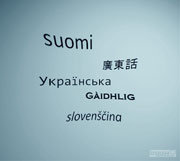
The world has many different writing systems and scripts, with the likes of Arabic, Greek and Chinese having quite distinct characters in their respective alphabets. Even closer to home, the likes of German uses the ‘Eszett’ symbol (ß) in place of ‘ss’, whilst three German vowels use the Umlaut (ä, ö and ü). These are all classed as separate characters to a, o and u from the English alphabet.
With that mind, the need to use Unicode is imperative if you’re planning to develop your website for other markets. Unicode is a standard numeric representation of characters that can currently be used for over 90 scripts, and has a repertoire of over 100,000 characters.
More specifically, UTF-8 is a variable-length character encoding for Unicode that most programmers will be familiar with. It is the best option when creating websites for international markets, as it allows you to use characters from countless writing systems.
All the standard web design applications facilitate Unicode documents, allowing you to choose the language of your pages and insert appropriate HTML tags within the code.
Color considerations
The color scheme is a key consideration on any website – in fact it may be one of the first things many web designers think about.

But whilst color preference is subjective and you can’t please everyone, colors also have cultural significance and it’s perhaps worth thinking about this before settling on a scheme.
For example, black denotes ‘death’ in many western cultures, but not so in eastern cultures, where white is the signifying color for this.
Similarly, red represents ‘danger’ or ‘passion’ in North America and Western Europe, but it can mean ‘purity’ in India. Furthermore, Orange is often used to represent autumn (fall) or Halloween in many regions around the world, but in Northern Ireland, it holds religious connotations for Protestants.
This doesn’t mean you should build a different website for each of your target markets, it just means it pays to be wary of culture and color.
Graphics and imagery
Okay, this depends on how PC you want to be. A liberally-clothed lady on a website isn’t all that offensive to western audiences, but it may be a major faux-pas if you’re targeting more conservative cultures. So you may want to reconsider having such imagery on your website. The same applies to any potentially divisive graphics, whether it relates to gender, religion, age…anything.
But there is a more practical consideration to be made when thinking about your graphics. Believe it or not, there are still many countries across the world without high-speed internet access, which means fancy Flash animations or other bandwidth-sapping graphics may preclude millions of potential visitors from accessing your pages.
To circumvent this, one option is to have a simple HTML version for those on slower connections, and another version for those lucky enough to have superfast Web access on tap.
Design & layout

You are currently reading this article in a ‘left-to-right’ motion. And if you’re not, you probably aren’t taking in many of the key points.
But not all languages read from left-to-right. Arabic, for example, reads in the opposite direction, which will have repercussions for your website’s navigation if you plan to convert your site for Arabic audiences.
It’s not the end of the world if you have to develop separate templates to cater for other languages, but it will save you a little hassle if your navigation bar is in the same place across all your sites. A horizontal navigation bar will go some way towards aiding this consistency process.
Finally…
This is just the very basics of creating a cross-cultural website. The key point to remember when designing a website is that it is for international audiences and adopting a global mindset from the outset will stand you in good stead. Good luck!
About the author
Christian Arno is founder of global translation services provider Lingo24, specialists in website localization. With offices on three continents and clients in over sixty countries, Lingo24 achieved a turnover of $6m USD in 2009.
91 Comments
Comments are closed.
Adeel Ejaz
Great article! We launched our websites in 12 countries and were suffering for huge bounce rates. The way we tackled this issue was by using a minimalistic design. Something that is enough to get the brand across but not so much to affect the look of the website. Much like facebook or YouTube pull it off. The only branding the website is the top logo and the nav bar. Everything else is pretty standard.
Jen
Very helpful. One thing to add: please avoid using flags to represent language. Using the Spanish flag to represent the Spanish language can be confusing or insulting. I know there are dialect differences, but the implications of offending someone with the flag are far greater. Just make a note on the page or in the document regarding the dialect or region.
Sascha Postner
Intersting thoughts and information. I once wrote a paper on cultural conciderations in web design during my studies in Sweden.
Although no many people were thinking about this stuff at that time we found some pretty strong relations between user experience and cultural heritage/nationality. Cultural optimization seems to be one of the key-areas of improvment for international web sites.
yosh
I’ve been working on multi-lingual websites for the past couple of years, (One of those supporting more then 30 languages) and found very little information on this issue when I started, so this article is a very good starting point.
If I may, I’d like to share a couple more tips, from my experience:
1. Content:
Never assume that content will have the same dimensions in different languages. In fact, the sizes/lengths can vary dramatically. This might create a huge problem when the design involves horizontal elements (like a horizontal menu) or horizontal alignment of elements.
2. Fonts:
When dealing with fonts, encoding to UTF-8 is not enough. Surprisingly (or not) not all commonly-used fonts support characters that are not Latin. It is very important, then, to specify different font-families, and of course to have the option to degrade to the browser’s default font type (serif/sans-serif).
Another issue with fonts is the fact that Non-Latin fonts may not have the same height as their Latin counterparts (or numbers).
3. Right-to-Left (RTL) Interface
It might be good craftsmanship to keep a unified design all over the site, but keep in mind that RTL languages have the same reading conventions as Left to Right languages (just opposite…) and the users of these languages want the website to respect their reading conventions. So the site might need to have it’s design “mirrored” to RTL.
A good way of doing this, it giving RTL different CSS files. Using a web service like “CSS Janus” might help you convert the styles. Still some manual labor will be needed, especially on non-symmetrical graphics.
4. Browsers
Different countries have their own browsing habits. Do not rely only on North American/Western European statistics: Asia and Africa use more of Internet Explorer (and the earlier versions!) then we want to consider. The same goes for Eastern European countries. This combined with slower internet services, means that multi-lingual sites cannot always work with the latest complexities (like CSS3 for example). You might decide to degrade your site’s user experience (gracefully!) for “The challenged”, but make sure that they are not the majority of your users…
Last but not least: Browser Bugs
We found that ALL browsers have bugs when dealing with RTL content. Naturally, IE’s have more bugs (and remember IE6’s market-share in Asia…), but the others have some as well. You WILL work hard to make your website look good on all browsers and in all languages – but the outcome is gratifying.
Good luck.
milan
great info thx
Tanya
Great article. and thanx yosh you add some really useful info to the article.
Anita
I agree about the problems with using flags to represent languages – even English. Your choice of flag says more about you (did you use the UK or US flag?) than about me (I’m Australian).
Perhaps a designer’s best option for deaing with other cultures is consultation with representatives of those cultures/countries/languages that will be important to them.
Finally, you used the phrase “liberally-clothed” in the main text. To me “liberally” in this context means “generously” – i.e. with lots of clothing – rather than what I think you meant: with little clothing or scantily-clad.
Ahmed
Nice Article – An article on the same topic was posted on Web Designer Online – http://www.webdesigneronline.co.uk/web-design-across-cultures-9-advices
Jordan Walker
Nice write up, and very thought provoking.
Ted Thompson
Interesting article, some interesting points. Thanks for sharing!
colormist
Seconding Anita’s comment. Liberally-clothed in this context means “lots of clothing on”. Maybe minimally, skimpily, or partially clothed is a better turn of phrase.
Rebecca
Good article. Over the years companies and individuals have made a lot of mistakes in marketing because they did not consider different cultures. Even between British and American English there are words that have different meanings which can lead to some unfortunate mistakes.
Eric
Great article.
web design philippines
wow! i never expected that! i’ve been a web designer for almost all my life, and the thing that i always do is keep in mind the market that i’m aiming for, like if it is for the kids or for adults.. but not the cultural thing like you said… and yes, every culture of every country has their own preference, such as the use of colors in our website and, well, the language of course… thx for this very informative article! i’ll be coming back for more if you have more tips on these kinds of things! thx again! ^_^
Jeremiah
Awesome post!! Keep it coming.
Pablo
@Anita and @Colormist – I think liberally-clothed is about right here, though I do see your point. Conservatively-clothed would mean someone who’s not showing a great deal of flesh or who is otherwise uncontroversially clothed, liberal therefore would be the opposite of that – basically free, open and not bound by convention. So that could mean not a lot on, or going by your interpretation it could also mean a generous helping of garments.
PsdDude
Interesting article! You have a really good point!
louis vuitton
Seconding Anita’s comment. Liberally-clothed in this context means “lots of clothing on”. Maybe minimally, skimpily, or partially clothed is a better turn of phrase.
louis vuitton
Seconding Anita’s comment. Liberally-clothed in this context means “lots of clothing on”. Maybe minimally, skimpily, Louis Vuittonor partially clothed is a better turn of phrase.
Download Video Bokep
Great post! Your article have really good point! Keep share. thanks.
Popcorn WebDesign
Keep sharing, thank you. Great post.
ikilobo
nice post..
good article…
Lampros
very good article
DSM Design
Really great post, great read! Keep up the good work! :)
Bhargavi
I agree this is good stuff to keep in mind. Thanks.
As to the “liberally-clothed” debate:-) – #16, #18 and @anita, liberal style of dressing would probably convey the author’s meaning more!
Saskatoon Web Design - Jared
Very nice read, thanks. Most of our clients are local, but soon we have a few international potentials, I’ll pass this on to our designers for sure.
ndrew
yeps, we have to take user attention with the interface first but don’t forget to enrich the content. Give what user need..
Ozon Yagi
good post for web desing
Web Design Dispatch
I think this is a great post its about time websites start becoming much more accessible to other languages.
Paul Alexander
This is so interesting, excellent blog! Paul Alexander Web Design
Yannian
发达地方 的发生的 地方阿道夫阿道夫阿德
Back Up Management
This article is definitely a good reference for those wanting to create a site for someone who’s from a different culture.:)
code pixelz media
very good. I like the way you present your content.
ridwan
really a good reference to create a web
WordPress themes collection
Good read. I would be interested to know what is your CMS of choice when working or building a multilingual site? Would you go for a custom platform or do you think WP, Drupal and others have what it takes?
Freddy
A thoroughly good read, I especially liked the thoughts on design. Too many designers today try to push their own limited design skills and discard the views of their customers who very often have a different perspective or direction that they would like to pursue. Once again – great article.
amit
Though we would all like to be able to do website designing for own website, we all aren’t able to, whether we just don’t understand the various elements or we just don’t have the time or don’t have the required expertise; the use of a top website design company is a must have. Just any website design company will not do; there are various things that can make a web design company a best web design company who will provide the exact services you need to meet the exact specifications you provide and request.
Robbi
I loved this post! A cheeky wee comment… I loved seeing Gáidhlig in that picture! A Gaeilge speaker (Irish Gaelic’s Scottish Gaelic’s sister!). Ádh mór oraibh! [=
Ps, orange doesn’t hold religious connotations in northern Ireland, but cultural ones (The Orange Order for example). On the Irish tricolour, green is for Nationalists, orange for Unionists and the white in between for ‘peace’. [=
eka
nice article !
wangqian.net.cn
very good. a good reference to create a web.
hstar
very good!
hstar
This article is definitely a good reference for those wanting to create a site for someone
fajar
nice post..
ilham
very clear reference to create a website
buzz
nice post..
Kojeje
Nice… thanks for this article :)
popular-websites
Most popular education websites
The most popular reasons include religious beliefs, dissatisfaction with the school system, and personal family values. Regardless of the reason a family chooses to homeschool, it is important for these individuals to have a host of educational resources available to them.
Here you will find the best education links and original content the Net has to offer.
visit: popular-websites.com
wij
great article…
balance is important thing, thanks for remind…
kai
i wanna share it… thanks…
ndrew
what a great post..
way to go..
thumbs up..
tedted
great info
Nitesh Kumar
very nice post
filesforflash
indeed. great tips
Business Catalyst Dev
very informative…thanks for this :)
Roy
trims.. i will try this concept..
flip
“A liberally-clothed lady on a website isn’t all that offensive to western audiences…” I guess you didn’t have in mind the good-old-ready-to-sue-USA when you wrote that, right?
ball mill
Web designers are a highly creative bunch. !!!!very good!
iMediaSolutions
Really great article. It is really easier to begin right away implement there tips. Our clients seldom haven’t need a website in multiple languages.
khaled
I really enjoyed your article,It has been extremely helpful,The information provided by you is very good,is very excellent.For that I need to say that I am very grateful to the information you share through your blog. good luck with you.
Freelance Portal
http://www.freelanceportal.8rf.org
Work From home: Homebased website design jobs, web developers,graphic animation, SEO, CMS templates, blogger themes, article writers, Joomla, wordpress, API programmers, ASP, XML, PHP programming projects. XXX video blogging, ebay sellers and online IT support.
Cheatsheets and online tutorial.
http://www.freelanceportal.vze.com
web_cultural considerations
^^
andrei
thank you very much your site has provided lots of useful info,,,,
andrei
thank you very much your site has provided lots of useful info I wish I could have skills like you, because I was very impressed with the idea of you who are always fresh ideas
Jerky Oats
Great post, there are some very valid point made.
ospop
thank for this post,love your site
ospop shoes shop
It is really easier to begin right away implement there tips.
Thiago
gooof…very very goood
http://www.tkp.com.br -> Web Brazil
mary
Hi, where did you get this information can you please support this with some proof or you may say some good reference as I and others will really appreciate. This information is really good and I will say will always be helpful if we try it risk free. So if you can back it up. That will really help us all. And this might bring some good repute to you.
Melvins
Nice article shared by you. Thanks a lot for upgrade my knowledge. From this I can learn lots of things.
Los Angeles Web Design
اليمن
the choice of colors is very important , so I have take advantage of reading such article
Erin
Nice article. Being bicultural, I also noticed the differences of cultural influence on web design. e.g., East Asia vs. North America.
mikwillson
Your article’s resource box should help to persuade your readers. No matter how amazing your article is if it’s not succeeding in driving traffic to your website cheap uggs
Russian translation
Very good post! There are a lot of useful tips which have to be used for improving website worth.
Henry Peise
Want to buy the hotest white iphone 4 Conversion Kit? http://www.whiteiphone4.com will be your best online store. Don’t hesitate to buy the charming iphone 4 Conversion Kit!
Juno Mindoes
Is white iphone 4 available right now? Cuz my friend told me he just got the white iphone 4 panel. But i haven’s seen it sold in my area. What’s wrong?
Ben
When you are in not good state and have got no cash to get out from that point, you will need to receive the mortgage loans.
tablet laptops
Hi, just thank you so much! This article is so helpful to me!!
Jacques
This is the worst cultural help I ever read. Linkbait here.
dexx
Associate researchers. Dr. Shah, people with ADHD “different thinking” they know better than laboratory measurements, but this situation in real life it could do with this work a success and said they did not know çevirmediklerini turn.
Michael
I teach writing at the college level, and one of the things I discuss with my students is the importance of traditional color associations in their descriptive writing. I bring up the aspect of different cultural associations of color. For instance, the color white in traditional Korean culture is similar to western culture’s associations when it comes to the color a bride’s dress should be, but a white chrysanthemum represents death. This post brings to light an often overlooked issue in web design. Very enlightening.
Web Design Tampa
This horizontal navigation bar will go some way towards aiding this consistency process.
Moto Flash CMS
You’ve made very good post. Ad if you don’t mind we’d lile to tell you about
Moto CMS. It is one of the first full-fledged systems translated into more than 15 languages, among which are: Russian, Japanese, Turkish, German, French, Portuguese, Italian, Spanish, Bulgarian, Indonesian and others.
And the list of the available languages is becoming longer and longer
Evan Skuthorpe
certainly in the western world, when talking web sites, red predominately means sale.
Translation Services
I think in general, this post is insightful and interesting. However, I think it fails to consider a couple of things.
Firstly, different countries prefer different ways to access the Internet. A desktop or laptop certainly isn’t the only way to access the Internet and in some countries, smartphone browsing may be more common.
Secondly, some cultures have different design aesthetics. This is not the same as cultural connotations or associations. You can often seen this in different movie posters for international releases. Similarly, the many different writing scripts can result in unique design choices.
orhanbt
This is verry good
complex41
And then he handed you the thirty-five 45
Translation Services
A multilingual website should have distinct differences across all language portals however the core elements should remain constant in order to retain brand recognition.
cybermales
I Love for all posts is this site..
BestTemplatesStock
You stressed some great points in article, nice post. Check some great template designs on Best Templates Stock
yates en Ibiza
Ad if you don’t mind we’d lile to tell you about
Moto CMS. It is one of the first full-fledged systems translated into more than 15 languages, among which are: Russian, Japanese, Turkish, German, French, Portuguese, Italian, Spanish, Bulgarian, Indonesian and others.
Afzal
Nice information, I have learned a lots of good things from this post.
Thanks for sharing.